When it comes to email marketing, getting your message into your subscribers’ inbox is everything. You might have the best content, but if your emails don’t reach your audience, all your effort goes to waste.
That’s why deliverability matters more than ever. If you’re stuck choosing between GetResponse and AWeber, you’re probably wondering which one will actually get your emails seen. You’ll discover how these two popular platforms stack up on deliverability and what that means for your campaigns.
Keep reading to find out which service can help you connect with your audience better and boost your email success.

Credit: getresponsereview.com
Email Deliverability Basics
Email deliverabilityis the chance your message reaches the inbox. It is key for successful email marketing. If emails land in spam, readers might never see them. This lowers open ratesand response.
Deliverability mattersbecause it affects your trust with readers. Good deliverability means emails appear in the right place. This helps build a strong connection.
| Metric | What It Means |
|---|---|
| Delivery Rate | Percent of emails sent without bouncing |
| Open Rate | Percent of emails opened by recipients |
| Bounce Rate | Percent of emails not delivered |
| Spam Complaint Rate | Percent of recipients marking emails as spam |
Credit: www.emaildeliverabilityreport.com
Getresponse Deliverability Features
GetResponsehelps emails avoid spam filters with smart tools. It uses spam filter checksto keep messages safe and trusted. This means more emails land in the inbox, not the junk folder.
Email authentication toolslike SPF, DKIM, and DMARC are built-in. They prove your emails are real and not fake. This builds trust with email services and stops blocks.
| List Management Options | Description |
|---|---|
| Segmentation | Groups contacts by behavior or info for targeted emails. |
| Cleaning | Removes inactive or bouncing emails automatically. |
| Subscription Forms | Easy setup for new subscribers with double opt-in option. |
Aweber Deliverability Features
AWeberuses strict spam compliance measuresto keep emails out of junk folders. They check each message to meet rules and avoid spam traps. This helps emails reach the inbox safely.
Authentication and securityare key for AWeber. It uses SPF, DKIM, and DMARCto prove emails are real. This stops hackers from sending fake emails from your address.
Subscriber engagement toolsinclude easy ways to send personalized emails. AWeber tracks who opens and clicks emails. This helps senders send better content to interested readers.

Credit: en.softonic.com
Performance Comparison
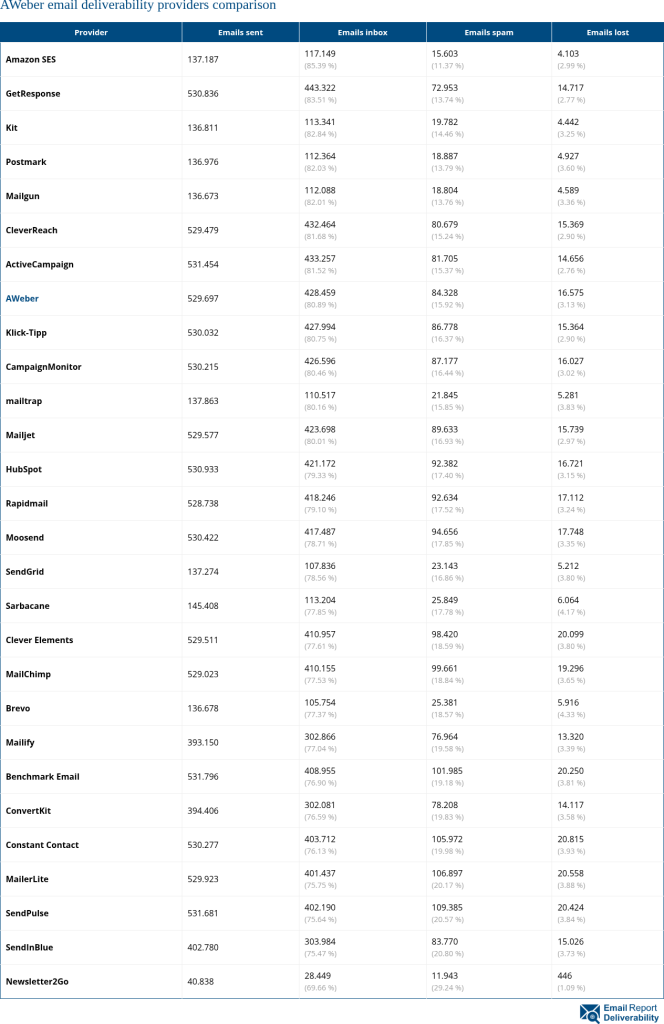
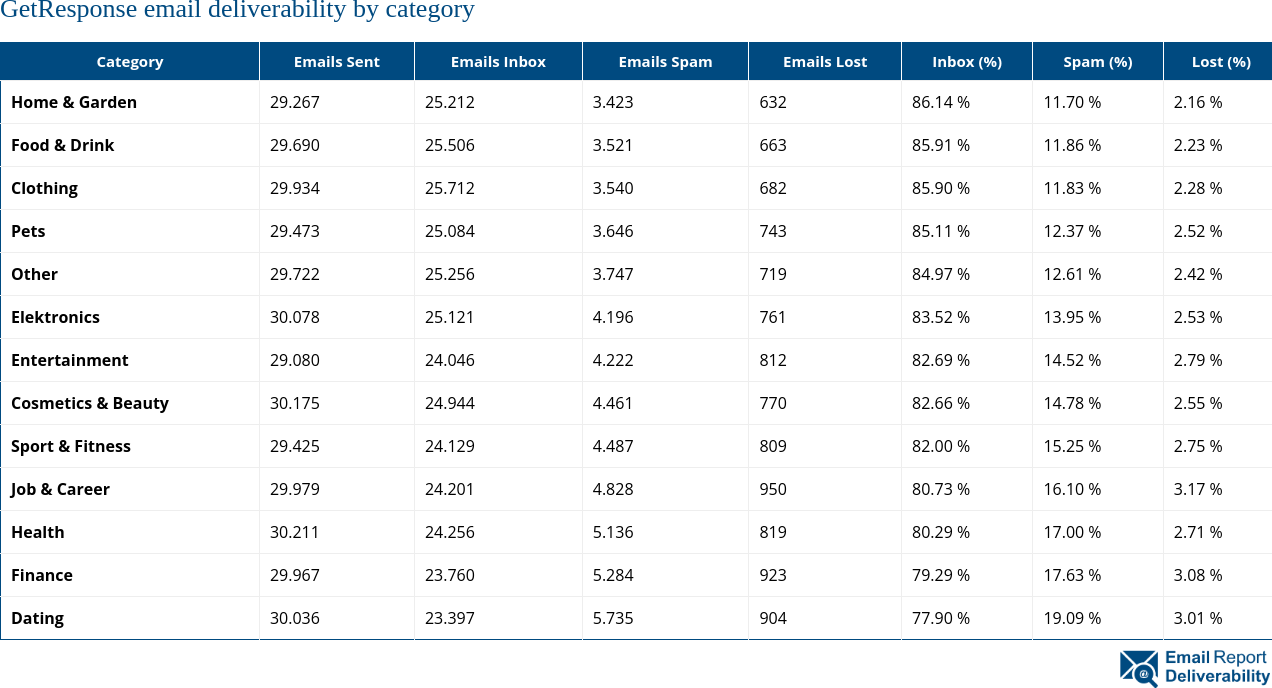
Inbox placement ratesshow how many emails reach the main inbox instead of spam. GetResponse often scores around 85-90%, while AWeber usually hits 80-85%. Both are strong, but GetResponse has a slight edge.
Bounce rates tell how many emails fail to deliver. Both platforms keep bounce rates low, usually under 2%. Complaint rates, or how often recipients mark emails as spam, stay below 0.1%for both. This means they respect user preferences well.
Sender reputation affects how email providers view the sender’s trust. Both GetResponse and AWeber maintain a good reputation by using clean lists and proper authentication. A strong sender reputation helps emails land in inboxes more often, boosting overall performance.
User Experience And Support
GetResponseand AWeberboth offer helpful deliverability support services. Their teams assist users to improve email delivery rates. Support is available via live chat, email, and phone for quick help. Users often find GetResponse’s support more responsive during peak times.
Both platforms provide clear guides to adjust deliverability settings. Ease of usediffers slightly. GetResponse has a more visual setup, making it easier to find options. AWeber’s settings are straightforward but may take longer to navigate for beginners.
Managing authentication tools like SPF, DKIM, and DMARC is essential. Both tools guide users to set these up properly. This helps emails avoid spam folders and reach inboxes more often.
| Feature | GetResponse | AWeber |
|---|---|---|
| Support Channels | Live chat, email, phone | Email, phone, live chat |
| Responsiveness | Fast during busy hours | Good but slower sometimes |
| Deliverability Settings | Visual and easy to use | Simple but less visual |
Pricing And Deliverability Value
GetResponseand AWeberoffer several pricing plans with different limits. GetResponse starts with a basic plan allowing up to 1,000 contacts and includes essential email features. AWeber’s basic plan also supports up to 500 subscribers with unlimited emails. Both platforms increase contact limits as you upgrade plans.
Regarding deliverability, both services maintain high rates, usually above 95%. GetResponse uses advanced tools to improve inbox placement. AWeber also focuses on strong deliverability with good spam filter tests.
| Feature | GetResponse | AWeber |
|---|---|---|
| Starting Price | $15/month (1,000 contacts) | $19.99/month (500 subscribers) |
| Contact Limits | 1,000 to unlimited | 500 to unlimited |
| Email Sends | Unlimited | Unlimited |
| Deliverability Rate | ~95%+ | ~95%+ |
Tips To Boost Deliverability
Keeping your email list clean is very importantfor good deliverability. Remove inactiveor unengagedcontacts regularly. This helps avoid being marked as spam. Check for invalidor bouncedemail addresses and delete them.
Segment your list based on interestor activity. Send relevant emails to each group to increase engagement. Use double opt-in to confirm subscribers want your emails. This reduces fake sign-ups and improves list quality.
Regularly update your contacts’ preferences. Respect unsubscribe requests quickly. A clean list means better delivery ratesand more opens. Keep your sender reputation strong by following these steps.
Frequently Asked Questions
What Affects Email Deliverability In Getresponse And Aweber?
Email deliverability depends on sender reputation, content quality, and list hygiene. Both GetResponse and AWeber use strong spam filters and authentication protocols to improve inbox placement rates and reduce bounce rates.
Which Platform Has Better Inbox Placement Rates?
GetResponse and AWeber both offer high inbox placement rates above 85%. However, GetResponse’s advanced AI tools slightly enhance deliverability by optimizing send times and engagement.
How Do Getresponse And Aweber Handle Spam Complaints?
Both platforms monitor spam complaints closely. They automatically suppress users who mark emails as spam, maintaining sender reputation and protecting deliverability for all users.
Can I Improve Deliverability Using Getresponse Or Aweber Features?
Yes, both platforms provide tools like segmentation, personalization, and A/B testing. These features help craft relevant emails, boosting engagement and improving deliverability rates significantly.
Conclusion
Choosing between GetResponse and AWeber depends on your email goals. Both offer strong deliverability rates that keep emails reaching inboxes. Consider your budget, features, and ease of use. Testing each platform can reveal which fits your needs best. Reliable email delivery helps grow your audience and improve engagement.
Take time to compare before deciding. Your choice impacts how well your messages connect with readers.