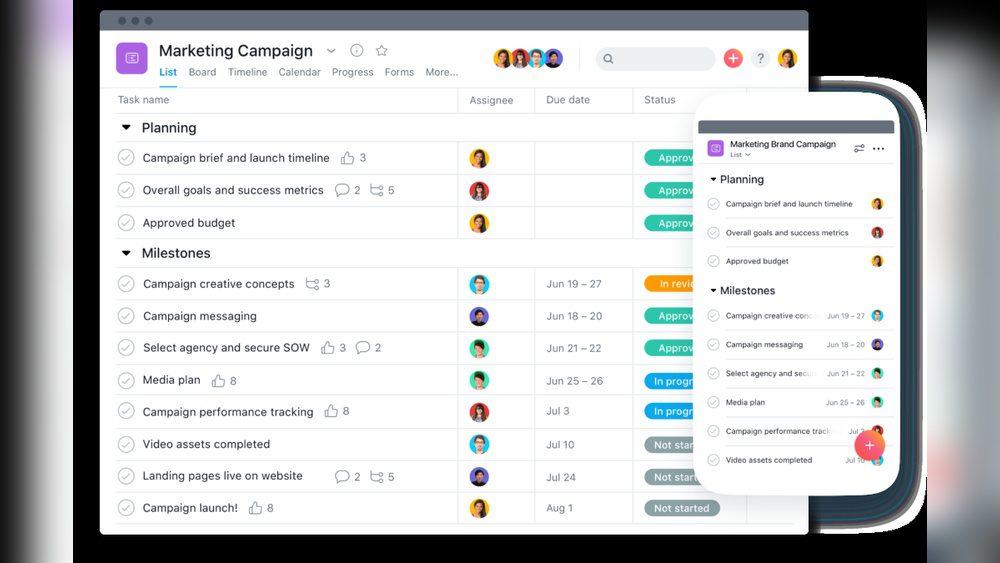
If you want a simple way to manage your team’s work, this Asana Review is for you.
Asana is a tool that helps teams plan, organize, track, and manage projects and tasks. It makes working together easier and faster.
What Is Asana?
Asana is a work management platform. It helps teams stay organized and focused on their goals.
Imagine a big digital whiteboard. Everyone can add tasks, check progress, and talk about the work.
It works on computers, tablets, and phones, so you can use it anywhere.
Key Features of Asana
This Asana Review covers the main features that make Asana special.
- Project Creation: Make new projects easily.
- Task Assignment: Give tasks to team members with due dates.
- Progress Monitoring: See how work is moving along.
- Multiple Views: Use lists, boards, or timelines to see your tasks.
- Customizable Workflows: Change steps to fit your team’s way of working.
- Automation: Save time by automating routine tasks.
- Reporting: Get reports to understand how your projects are doing.
- AI Features: Use smart tools to connect work to big goals.
How Does Asana Help Teams?
Asana makes teamwork simple. It keeps everyone on the same page.
Here is how it helps:
- Plan: Teams can plan all tasks and steps clearly.
- Organize: Group tasks by project or type.
- Track: Check which tasks are done and what is left.
- Manage: Assign who does what and when.
- Communicate: Talk about tasks inside Asana, no need for extra emails.
Different Views to Match Your Style
One great thing in this Asana Review is the way you can see your work. There are three main views:
| View |
Description |
Best For |
| List View |
Shows tasks in a checklist format. |
Simple task tracking and to-do lists. |
| Board View |
Uses columns and cards like sticky notes. |
Visualizing workflow, like moving tasks from “To Do” to “Done.” |
| Timeline View |
Displays tasks on a calendar-like timeline. |
Planning project schedules and deadlines. |

Credit: www.pcmag.com
Customizable Workflows and Automation
Asana lets you create workflows that match your team’s needs.
You can add steps, rules, and automatic actions to save time. For example:
- Automatically assign a task when it moves to a new stage.
- Set reminders for due dates.
- Send notifications when tasks change.
This helps reduce manual work and keeps projects moving smoothly.
Reporting and AI Tools
Asana includes reporting tools that show how your team is performing.
You can track:
- Completed tasks
- Upcoming deadlines
- Team workload
The AI features help you connect daily tasks to your bigger goals.
This way, you know your team is working on the most important things.
How Easy Is It to Use Asana?
This Asana Review found Asana very easy to use.
The interface is clean and simple. New users can learn quickly.
There are helpful guides and tutorials available inside Asana.
Whether you use a computer or a phone, Asana works smoothly.
Who Should Use Asana?
Asana is great for many types of teams:
- Small startups
- Large companies
- Creative teams
- Marketing groups
- Software developers
- Event planners
If your team needs to plan and track tasks clearly, Asana is a smart choice.
Pricing Overview
Asana offers several pricing plans to fit different budgets.
| Plan |
Cost |
Key Features |
| Basic |
Free |
Task management, list and board views, up to 15 team members. |
| Premium |
Starts at $10.99/user/month |
Timeline, advanced search, custom fields, automation. |
| Business |
Starts at $24.99/user/month |
Portfolios, goal tracking, workload, advanced integrations. |
| Enterprise |
Custom pricing |
Security, advanced controls, priority support. |
The free Basic plan is good for small teams just starting out.
Pros and Cons of Asana
Every tool has good and not-so-good points. Here is a quick look:
| Pros |
Cons |
| Easy to use for beginners |
Can be overwhelming for very small teams |
| Great for team collaboration |
Some advanced features need paid plans |
| Multiple views to suit any workflow |
Mobile app sometimes slow on older devices |
| Good automation options |
Learning curve for advanced workflows |
| Strong reporting and AI tools |
Prices can add up for large teams |
How to Get Started with Asana
Starting with Asana is simple. Follow these steps:
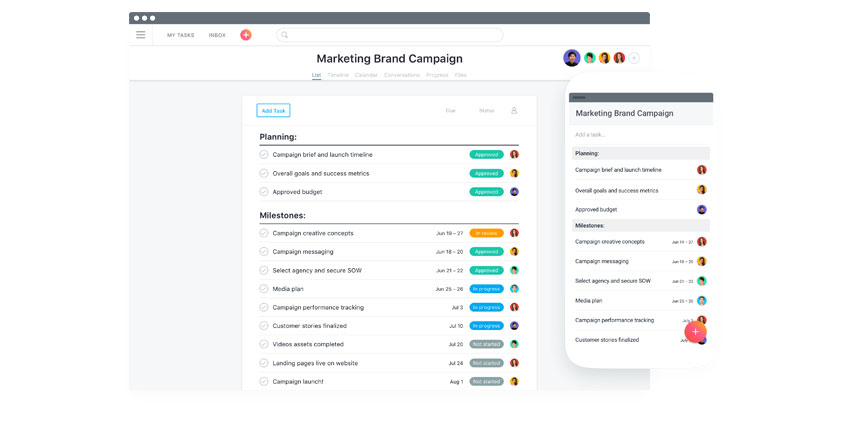
- Go to Asana’s website and create a free account.
- Invite your team members to join your workspace.
- Create your first project and add tasks.
- Assign tasks to team members with due dates.
- Choose your preferred view: list, board, or timeline.
- Use comments to communicate inside tasks.
- Try automation to save time on routine work.
- Check reports to see how work is progressing.
Credit: www.uctoday.com
Final Thoughts on This Asana Review
Asana is a powerful yet easy tool for managing work.
It helps teams plan, organize, track, and finish projects on time.
With many views and features, it fits different team needs well.
If you want to improve teamwork and get things done faster, try Asana.
First learn about the free trial, then Start with the free plan and explore its features today!
Thank you for reading this detailed Asana Review. We hope it helps you choose the right tool for your team.
Frequently Asked Questions
What Are The Main Features Of Asana For Team Projects?
Asana offers task assignment, due dates, project views, automation, and reporting to help teams work together smoothly.
How Does Asana Improve Team Collaboration And Communication?
Asana centralizes tasks and messages, letting teams share updates, track progress, and avoid confusion easily.
Can Asana Help Manage Deadlines And Project Timelines?
Yes, Asana provides timelines and reminders to keep teams on track and meet deadlines efficiently.