If you want to organize your work, you might ask: Notion Vs ClickUp, which is better? Both tools help you manage tasks and projects. But they work in different ways.
What Is Notion?
Notion is a tool that lets you take notes, manage projects, and keep all your important information in one place. It is like a big digital notebook you can use alone or with a team.
People use Notion to:
- Take notes easily
- Plan projects step by step
- Share ideas with others
- Use AI help to write and organize
Notion is very flexible. You can create pages, lists, and databases that fit your needs. It lets you work together with friends or coworkers in real time.
What Is ClickUp?
ClickUp is another popular tool used for project management and task tracking. It helps teams keep track of who does what and when.
With ClickUp, you can:
- Create tasks and assign them
- Set deadlines and reminders
- Track progress with charts and lists
- Use different views like boards or calendars
ClickUp is great for managing many tasks and projects at once. It has many features that help teams stay organized and meet deadlines.
Credit: plusai.com
Notion Vs ClickUp: Key Features Comparison
| Feature | Notion | ClickUp |
|---|---|---|
| Purpose | Note-taking, project & knowledge management | Task & project management |
| Customization | Highly customizable pages and databases | Custom statuses, fields, and workflows |
| Collaboration | Real-time collaboration with comments | Team chat, comments, and mentions |
| Task Management | Basic task lists and reminders | Advanced task management with dependencies |
| Views | Table, list, calendar, gallery | List, board, calendar, Gantt, timeline |
| AI Assistance | Built-in AI for writing and planning | Limited AI features |
| Mobile App | Available and user-friendly | Available and feature-rich |
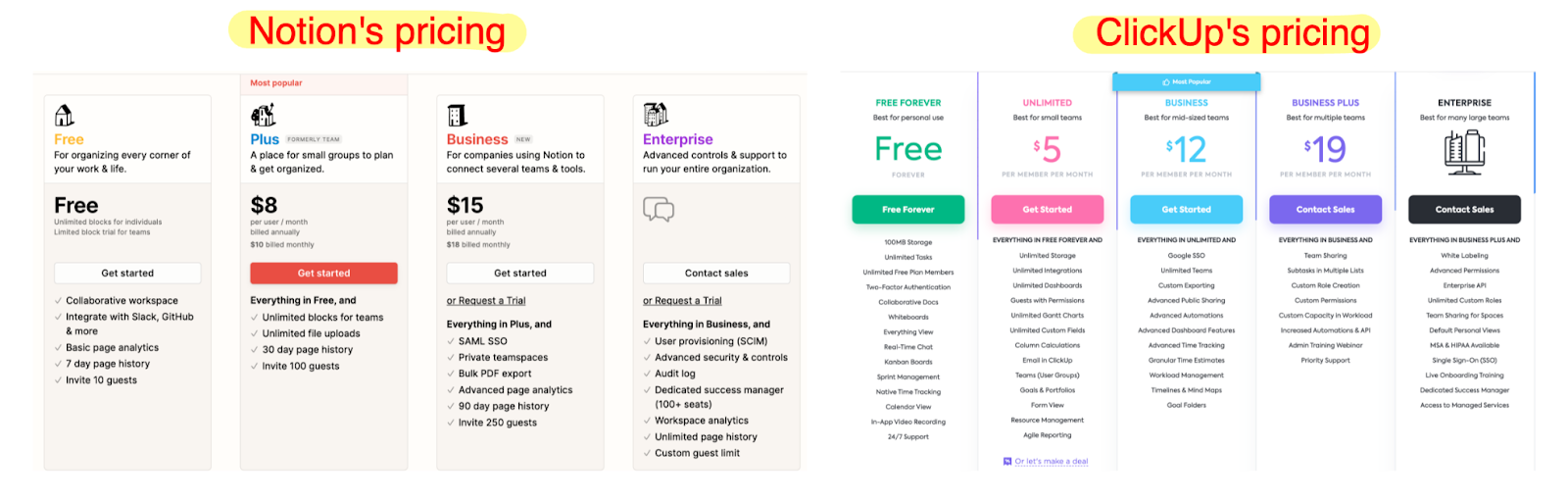
| Pricing | Free plan available; paid plans add features | Free plan available; paid plans for more tools |
How Does Notion Work?
Notion works as a single workspace for many tasks. You can write notes, make to-do lists, and store information. It helps both individuals and teams.
You start by creating pages. Each page can hold text, images, tables, or even databases. You can link pages to each other to keep things connected.
Notion’s AI can help you write faster and organize your thoughts. You just ask, and it gives ideas or summaries.
How Does ClickUp Work?
ClickUp focuses on managing work tasks. You can make lists of tasks and assign them to people. You set when tasks should be done.
ClickUp shows you progress with charts and timelines. You can see what is done and what still needs work.
It also lets teams chat and leave comments. This keeps everyone on the same page.
Credit: blog.sketchnote.co
Pros of Notion
- Very flexible and customizable
- Great for note-taking and planning
- Built-in AI helps with writing and ideas
- Good for personal use and small teams
- All-in-one workspace reduces tool clutter
Cons of Notion
- Task management is basic
- May be slow for very large projects
- Learning curve for new users
Pros of ClickUp
- Powerful task and project management
- Supports many views and workflows
- Good for large teams and complex projects
- Strong time tracking and reporting tools
- Easy to assign and track tasks
Cons of ClickUp
- Can be overwhelming for beginners
- Limited note-taking and document features
- AI features are not as strong
Who Should Use Notion?
Use Notion if you want one place to:
- Write notes and keep ideas
- Plan small to medium projects
- Work with a small team or alone
- Have AI help with writing and organizing
Who Should Use ClickUp?
Choose ClickUp if you need to:
- Manage many tasks and deadlines
- Work with a large team
- Track progress with charts and timelines
- Use advanced project management features
Final Thoughts on Notion Vs ClickUp
Both Notion and ClickUp are great productivity tools. Your choice depends on what you want to do.
If you want a flexible place to write and plan, Notion is excellent. It helps you think, write, and organize in one space. If you wanna learn more about Notion, read this article.
If you need strong task management for many projects, ClickUp might be better. It keeps your team on track and deadlines clear.
Think about your needs and team size before picking one.
Summary Table: Notion Vs ClickUp
| Aspect | Notion | ClickUp |
|---|---|---|
| Best For | Note-taking, knowledge, small projects | Task tracking, big projects, teams |
| AI Features | Built-in AI assistant | Limited AI tools |
| Ease of Use | Simple but takes time to learn | Feature-rich, may be complex |
| Collaboration | Real-time editing and comments | Comments, chat, mentions |
| Pricing | Free and paid plans | Free and paid plans |
For more details about Notion and its AI features, visit Notion’s official page.
Frequently Asked Questions
What Are The Main Differences Between Notion And Clickup?
Notion focuses on note-taking and knowledge management. ClickUp centers on task and project management with more automation.
Which Tool Is Better For Team Collaboration, Notion Or Clickup?
ClickUp offers stronger project tracking and communication features. Notion is great for shared documents and simple teamwork.
Can Notion And Clickup Integrate With Other Apps?
Yes, both support many app integrations to improve workflow and connect tools like calendars and chat apps.