
Are you looking to automate your workflows without breaking the bank? Understanding Pabbly Connect pricing could be the key to unlocking smarter, more efficient business processes.
Whether you’re managing a small team or running a growing business, knowing exactly what you’ll pay—and what you’ll get—can help you decide if Pabbly Connect is the right fit for your automation needs. You’ll discover how Pabbly’s pricing compares to competitors, what features come with each plan, and how to choose the best option for your budget and goals.
Ready to find out how much you can save while boosting your productivity? Keep reading to get the full breakdown.
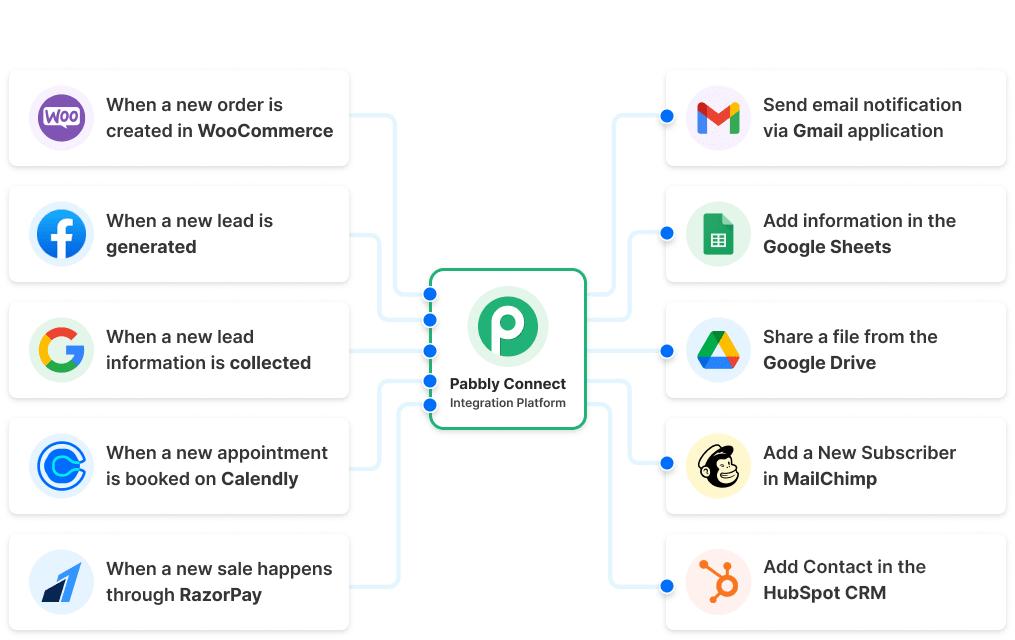
Credit: www.pabbly.com
Pricing Plans
Pabbly Connect offers a variety of pricing plans to fit different user needs. Its plans cater to beginners and businesses needing advanced automation. Users can choose from free access, one-time payments, or subscription models. Each option provides unique features and limits. This flexibility helps businesses control costs while scaling their workflow automation.
Free Plan Features
The free plan allows users to explore basic automation features. It includes limited tasks per month and access to essential integrations. This plan suits individuals or small projects with low automation needs. Users can test the platform without any financial commitment. It provides an easy way to understand Pabbly Connect’s core functions.
One-time Payment Options
Pabbly Connect offers lifetime deals with one-time payments. These plans provide unlimited tasks and workflows for a fixed price. Users avoid recurring monthly fees, saving money long term. One-time payment plans are ideal for businesses with high automation demands. They deliver strong value by removing cost worries as usage grows.
Subscription-based Models
Subscription plans offer monthly or yearly billing cycles. They vary by the number of tasks and workflows allowed. These plans suit users who prefer lower upfront costs. Subscriptions provide flexibility to upgrade or downgrade as needed. Users get ongoing access to new features and updates during their subscription.
Cost Comparison
Comparing costs is essential when choosing an automation tool like Pabbly Connect. Many users want to understand how Pabbly stacks up against competitors. Pricing impacts both short-term budgets and long-term expenses. This section breaks down key pricing differences and what they mean for your business.
Pabbly Vs Zapier
Pabbly Connect offers a one-time payment plan with unlimited tasks. This can save money for users with many automations.
Zapier uses a monthly subscription model. It charges based on task usage, which can get costly as automation needs grow.
Zapier supports more app integrations and has a user-friendly interface. Pabbly may have fewer integrations but focuses on cost efficiency.
Long-term Savings
Choosing Pabbly Connect can reduce expenses over time. The fixed price helps avoid surprise fees each month.
Zapier’s ongoing fees add up, especially with heavy automation use. This makes Pabbly a budget-friendly option for long-term users.
Businesses planning to scale automation often find Pabbly’s pricing more predictable. This helps with financial planning and control.
High-volume Automation Costs
Pabbly Connect is ideal for high-volume automation users. Unlimited tasks come at a fixed cost, making it affordable.
Zapier’s pricing increases with more tasks. High-volume users may face significant monthly bills.
For companies running many workflows daily, Pabbly offers a clear cost advantage. It reduces the financial pressure of scaling automation.
Features And Limits
Pabbly Connect offers a range of features designed to simplify automation. Its pricing plans include clear limits and capabilities. Understanding these features and limits helps users choose the right plan. The platform supports a variety of automation needs from simple to complex.
Unlimited Workflows And Tasks
Pabbly Connect allows users to create unlimited workflows. This means you can automate many processes without extra charges. Tasks run within these workflows are also unlimited. This is beneficial for businesses with heavy automation needs. Many other platforms limit tasks or workflows, but Pabbly does not. This feature helps control costs while scaling automation.
App Integrations
Pabbly Connect supports numerous app integrations. It connects popular apps like Gmail, Slack, and Shopify. However, it has fewer integrations than some competitors. This may affect users needing niche or less common apps. Still, the available integrations cover most business needs. Users can automate workflows across multiple tools easily. The platform continuously adds new app connections.
Ai And Automation Tools
Pabbly Connect includes basic AI and automation tools. These tools help improve workflow efficiency and accuracy. Features like conditional logic and filters refine automation processes. AI-driven actions can process data and trigger events automatically. Although it lacks advanced AI agents, it offers solid automation options. These tools reduce manual work and save time.

Credit: www.chillreptile.com
User Experience
User experience plays a key role in choosing the right automation tool. Pabbly Connect offers a distinct approach to pricing, but how users interact with the platform matters just as much. Understanding the ease of use, learning curve, and interface design helps users decide if it fits their needs.
Ease Of Use
Pabbly Connect provides a straightforward setup for basic automations. Users can connect apps with a few clicks. The drag-and-drop feature simplifies workflow building. It works well for beginners and those with limited technical skills. However, complex workflows may require more attention and time.
Learning Curve
New users might face a slight learning curve with advanced features. The platform offers tutorials and guides to help. Regular use quickly builds confidence and skills. Compared to some competitors, Pabbly requires patience initially but rewards users with powerful automation options. Step-by-step instructions make the process smoother.
Interface Design
The interface of Pabbly Connect is clean and organized. Navigation menus are simple to understand. Visual cues assist in building and managing workflows. Some users find the design less polished than other tools. Still, it focuses on functionality over flashy elements. The layout reduces confusion and speeds up task completion.
Best Use Cases
Pabbly Connect offers flexible pricing designed to meet different automation needs. Understanding its best use cases helps businesses choose the right plan. The platform suits various users, from small companies to those with specific integration demands. It balances cost and functionality effectively.
Here are some ideal scenarios where Pabbly Connect shines as an automation tool.
Small To Medium Businesses
Small and medium businesses benefit from Pabbly Connect’s unlimited workflows. It supports many tasks without extra charges. This helps businesses automate marketing, sales, and customer support easily. The one-time payment option lowers ongoing expenses. It fits companies wanting strong automation without a high monthly fee.
Budget-friendly Automation
Pabbly Connect suits users who need affordable automation solutions. Its pricing plans avoid costly subscriptions common in other tools. Users gain access to unlimited tasks at a fixed price. This model is perfect for businesses with growing automation needs. It helps save money while improving efficiency.
Niche Integration Needs
Some businesses require connections with less common apps. Pabbly Connect supports niche integrations that many platforms miss. This flexibility makes it useful for specialized workflows. Users can link unique software tools to streamline their processes. It suits those who need specific app connections on a budget.
Credit: ecosystem.hubspot.com
Savings Tips
Saving money on Pabbly Connect pricing is possible with smart choices. Understanding the options helps reduce costs without losing features. Follow these tips to get the best value and avoid unnecessary expenses.
Lifetime Deals
Pabbly Connect offers lifetime deals that allow a one-time payment. This option saves money over monthly or yearly subscriptions. It suits users who plan to automate many tasks long term. Paying once means no worries about future price increases.
Lifetime deals include unlimited workflows and tasks. This feature is rare in automation tools and adds great value. Businesses with high automation needs benefit the most from this plan.
Choosing The Right Plan
Select a Pabbly Connect plan based on your actual automation needs. Avoid paying for extra features you won’t use. Smaller businesses or beginners may find basic plans sufficient. Larger teams with complex workflows might need advanced plans.
Check how many tasks and workflows your business requires monthly. Pick a plan that fits without overbuying. Upgrading later is always possible if needs grow.
Avoiding Recurring Fees
Recurring fees add up over time and increase expenses. Opt for plans with one-time payments to avoid these costs. Cancel unused subscriptions to stop unwanted charges. Keep track of billing cycles to prevent surprises.
Use Pabbly Connect’s free plan if your task volume is low. This plan covers basic automation without any fees. Combine free plans with careful plan selection for maximum savings.
Frequently Asked Questions
Is Pabbly Connect Free Or Paid?
Pabbly Connect offers both free and paid plans. The free plan includes limited tasks, while paid plans provide unlimited workflows and tasks for a fixed price. It is cost-effective, especially for high-volume automation, with one-time payment options available.
Is Pabbly Connect Worth It?
Pabbly Connect offers affordable automation with unlimited tasks via one-time payment. It suits businesses needing cost-effective, high-volume workflows but has fewer integrations than competitors.
How Much Is Pabbly Compared To Zapier?
Pabbly offers one-time payment plans with unlimited tasks, making it more affordable for high-volume automation. Zapier uses a subscription model, which can get costly as tasks increase. Zapier provides more integrations and a user-friendly interface, while Pabbly suits budget-conscious users needing bulk automation.
Conclusion
Pabbly Connect pricing suits users who want affordable automation. It offers unlimited tasks with one-time fees. This makes it ideal for businesses with many workflows. The platform may have fewer app integrations than others. Still, it provides good value for its cost.
Choose Pabbly if you want to save on recurring payments. Its pricing model fits well with growing automation needs. Consider your workflow volume and app needs carefully. This will help you pick the best plan. Overall, Pabbly Connect is a practical choice for budget-conscious users.