Are you looking for a graphic design tool that’s easy to use but still packed with powerful features? Maybe you’ve heard of Crello and wonder if it’s the right choice for your creative projects.
Whether you need eye-catching social media posts, stunning videos, or professional-looking graphics, Crello promises to deliver—all without the steep learning curve. But how does it really stack up against other popular tools? In this Crello review, you’ll discover what makes this platform stand out, what could hold you back, and whether it fits your needs perfectly.
Keep reading to find out if Crello is the design solution you’ve been searching for.

Credit: www.youtube.com
Crello Features
Crello which is now called VistaCreate offers a range of features designed to make graphic design simple and accessible. It provides tools for beginners and professionals alike. Each feature is built to help users create stunning visuals fast. Below, we explore some key features that make Crello popular.
Templates Variety
Crello has thousands of templates for different needs. You find designs for social media, ads, posters, and more. Templates come in many styles and themes. This variety saves time and sparks creativity. Users can easily customize templates to fit their brand or message.
Video Design Capabilities
Crello supports video creation and editing. Users can add animations, music, and text to videos. It allows resizing videos for different platforms. This feature helps create engaging video content quickly. Videos can be shared directly or downloaded for later use.
User Interface Simplicity
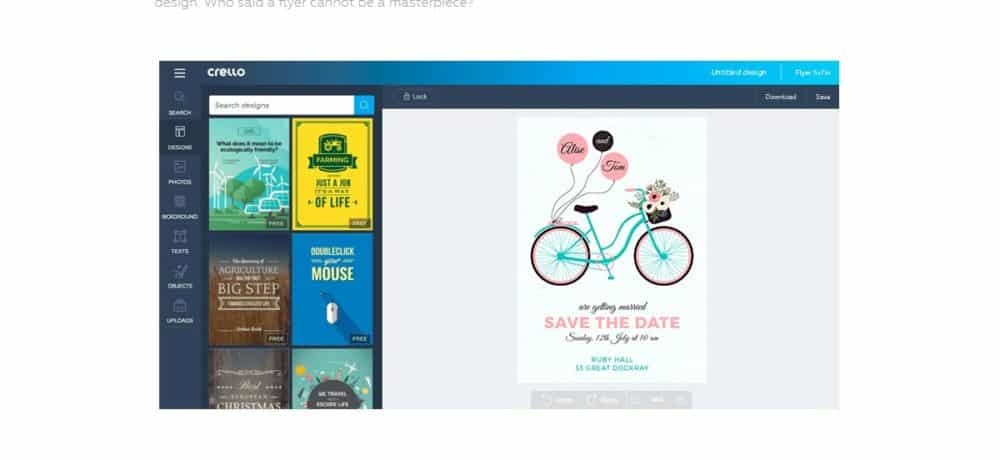
The user interface is clean and easy to use. Tools are clearly labeled and simple to find. Drag-and-drop functionality makes design easy for beginners. No steep learning curve to start creating right away. This simplicity helps save time and reduces frustration.
Stock Photo Library
Crello includes a large library of stock photos and images. Users get access to high-quality photos without extra cost. The library covers many topics and styles. This resource helps users find the perfect image for their design. It cuts down the need to search elsewhere.
Pricing Plans
Crello offers flexible pricing plans to suit different design needs and budgets. Its options range from a free plan with basic features to a Pro subscription packed with advanced tools. Understanding these plans helps users pick the best fit for their projects and goals.
Free Plan Highlights
The free plan gives access to thousands of templates and design objects. Users can create images and short videos without paying. It includes basic editing features and allows downloads in standard quality. This plan fits beginners or those who need simple projects done quickly.
Pro Subscription Benefits
The Pro plan unlocks unlimited access to premium templates and design elements. It removes watermark restrictions and offers higher download quality. Users get brand kits to keep designs consistent and resize options for various platforms. The Pro plan supports team collaboration and priority support.
Value For Money
Crello’s pricing is competitive compared to similar tools in the market. The free plan covers essential needs, while the Pro plan offers strong extras for a reasonable cost. Small businesses, marketers, and content creators find good value in its features and ease of use. Overall, Crello balances affordability with powerful design capabilities.
Ease Of Use
Crello stands out for its ease of use, making design accessible to everyone. The platform simplifies the creative process through a clean layout and clear options. Users spend less time learning and more time designing. Whether new or experienced, users find Crello straightforward and fast.
Onboarding Experience
Starting with Crello is smooth and quick. New users get guided tours that explain key features. The sign-up process is simple and does not overwhelm. Helpful tips appear as you navigate, reducing confusion. This friendly start helps users feel confident right away.
Beginner-friendly Tools
Crello offers tools anyone can use easily. Drag-and-drop features make adding images and text simple. Templates cover many styles and needs, saving time. Editing tools are clear with no hidden menus. Beginners can create professional designs without extra training. Here is the ultimate guide of it.
Integration With Workflows
Crello fits well into daily work routines. It supports common file formats for easy sharing. Users can upload their own images and fonts for consistency. Export options include PNG, JPG, and video formats. Crello works with other apps to keep projects moving smoothly.

Credit: www.youtube.com
Comparison With Canva
Crello and Canva are popular tools for graphic design and content creation. Both platforms offer user-friendly interfaces and a wide range of features. Comparing Crello with Canva helps understand which tool fits your needs better. This section covers key differences, template quality, video editing, and pricing to guide your choice.
Key Differences
Crello focuses more on simplicity and ease of use. Canva has a larger user base and more advanced collaboration tools. Crello supports animated designs with easy controls. Canva offers more integrations with other apps and services. Both platforms provide drag-and-drop editors but differ in layout options. Crello is ideal for quick, simple projects. Canva suits users who need more design flexibility.
Template And Asset Quality
Crello offers thousands of templates that look modern and fresh. Canva provides a bigger library with more variety and niche categories. Both platforms include photos, icons, and fonts for customization. Crello’s templates are easy to edit for beginners. Canva’s assets often have higher resolution and more style options. Crello’s library updates regularly but is smaller. Canva’s extensive assets support a wide range of industries and themes.
Video Editing Features
Crello includes video editing tools with animated templates and transitions. Users can create short videos and social media clips quickly. Canva also supports video editing but with more advanced timeline controls. Crello’s video features are straightforward and beginner-friendly. Canva allows multi-scene video projects and audio editing. Both tools export videos in common formats. Crello works well for basic video needs. Canva fits users who want detailed video customization.
Pricing Comparison
Crello offers a free plan with access to many templates and features. Its Pro plan is affordable and unlocks premium assets and unlimited downloads. Canva has a free tier with a larger template library but limits some features. Canva Pro costs more but includes brand kits and team functionalities. Both platforms provide monthly and annual subscriptions. Crello’s pricing is simpler and often cheaper for solo creators. Canva’s cost suits businesses needing collaboration and brand control.
User Feedback
User feedback offers valuable insights into Crello’s real-world performance. It helps reveal how users feel about its features and usability. Many users share their thoughts online, highlighting strengths and weaknesses.
Reading reviews can guide new users and businesses in deciding if Crello fits their needs. Below are key points from user feedback on this design tool.
Positive Reviews
Users often praise Crello for its simple and clear interface. Many find it easy to create designs without prior experience. The wide variety of templates receives high marks for helping users start projects quickly.
Its video editing feature stands out as a plus compared to similar tools. Users appreciate the mix of image and video options in one platform. Overall, many reviewers feel Crello offers strong value for its price.
Common Criticisms
Some users mention occasional slow loading times, especially with complex projects. A few find the free version’s features limited compared to the paid plan. Certain templates and design elements may feel repetitive or less unique.
Others desire more advanced editing tools or smoother export options. Despite these issues, most users find Crello reliable for everyday design tasks.
Use Cases From Businesses
Small businesses use Crello to create social media graphics quickly. It helps marketing teams produce ads and banners without hiring designers. Many companies rely on it for email campaign visuals and blog images.
Startups appreciate the cost-effectiveness and ease of use. Educational institutions also use Crello for presentations and promotional materials. Its versatility suits various industries and project types.
Best Use Cases
Crello offers versatile design options suited for various creative needs. It helps users produce visually appealing content quickly. The platform fits well for different projects, whether personal or professional. Understanding the best use cases can guide you to make the most of Crello’s features.
Social Media Content
Crello simplifies social media design with ready templates. Users can create posts, stories, and banners easily. The tool supports various platforms like Instagram, Facebook, and Twitter. It offers animated templates to catch more attention. Quick customization helps save time for regular posting.
Marketing Materials
Crello is great for creating flyers, posters, and brochures. It provides professional layouts that suit small businesses and startups. Users can add logos, images, and text with simple drag-and-drop actions. The platform supports both print and digital marketing needs. It helps maintain brand consistency with reusable templates.
Ebook And Thumbnail Creation
Designing ebooks becomes straightforward with Crello’s page templates. Users can format covers and inner pages without design skills. The platform also supports thumbnail creation for videos and blogs. Thumbnails created here stand out with clear visuals and text. This boosts clicks and audience engagement effectively.
Recent Updates
The recent updates to Crello bring exciting changes for users. These updates improve the design experience and add new tools. Users find the platform easier and more flexible. The updates also show the company’s plan for growth. Let’s explore the key recent updates in detail.
Rebranding To Vistacreate
Crello recently changed its name to VistaCreate. This new brand reflects a fresh identity and new goals. The change helps the platform stand out in the design market. Users will notice a new logo and website look. Despite the new name, the tool remains easy to use.
New Features Added
VistaCreate added several useful features in the latest update. Users can now access more templates and design elements. Video editing tools received improvements for smoother workflows. The platform introduced new animation options for creative projects. These features make designing faster and more fun.
Future Roadmap
VistaCreate plans to keep improving with user feedback. More templates and design assets will be added soon. The team aims to enhance mobile app performance next. Collaboration tools are also on the roadmap for teams. These updates promise a better design experience ahead.
Credit: www.predictiveanalyticstoday.com
Frequently Asked Questions
Is Crello Similar To Canva?
Crello and Canva are similar online design tools offering templates for images and videos. Crello, now VistaCreate, is user-friendly and a strong Canva alternative.
What Happened To Crello?
Crello rebranded to VistaCreate, enhancing features for easier graphic and video design. It remains a popular Canva alternative.
Is Crello Good For Beginners?
Crello (now VistaCreate) is beginner-friendly with an intuitive interface and ready-to-use templates. It helps create professional designs easily.
Conclusion
Crello offers a simple way to create images and videos quickly. It suits beginners and those who want easy design tools. The platform includes many templates and a friendly interface. Users can work without a graphic design background. Both free and paid plans are available to fit different needs.
Crello stands as a reliable choice for everyday design tasks. Its features balance creativity with ease of use. Overall, Crello remains a practical tool worth trying.