
Are you struggling to choose between Pabbly and Zapier for your automation needs? You’re not alone.
Both tools promise to save you time by connecting your apps and automating repetitive tasks, but which one fits your business best? Whether you want powerful, multi-step workflows or a budget-friendly option that covers the basics, understanding the strengths and weaknesses of each platform is key.
You’ll get a clear comparison of Pabbly vs Zapier—so you can make the smartest choice for your workflow, your budget, and your goals. Ready to find out which automation tool works best for you? Keep reading.

Credit: bloggerspassion.com
Platform Overview
Understanding the key differences between Pabbly and Zapier starts with a clear platform overview. Both tools help automate tasks and connect apps, but they serve different needs. This section breaks down their features, target users, and integration ecosystems.
Knowing these basics helps in choosing the right tool for your workflow and budget.
Core Features
Pabbly offers unlimited workflows and tasks at a fixed price. It supports multi-step automation but with simpler conditions. Zapier excels in complex workflows with advanced features like conditional logic and filters. Zapier supports paths that allow dynamic task flows. Pabbly includes some extra tools, such as email marketing features. Zapier’s interface is user-friendly for building detailed automation sequences.
Target Users
Pabbly suits small businesses and freelancers on a budget. It is ideal for users needing straightforward automations without many advanced options. Zapier targets medium to large businesses requiring complex workflows and many app connections. It fits teams needing conditional logic and multi-step processes. Both platforms are accessible to beginners, but Zapier offers more depth for power users.
Integration Ecosystem
Zapier supports over 5,000 apps, covering popular and niche tools. This wide ecosystem enables diverse automation scenarios. Pabbly integrates with fewer apps but covers major platforms like Gmail, Slack, and Shopify. Pabbly often adds new integrations based on user demand. Zapier’s extensive library suits users needing many different app connections. Pabbly remains a solid choice for essential apps and simpler setups.
Workflow Capabilities
Workflow capabilities define how well automation tools handle tasks and connect apps. Both Pabbly and Zapier offer solid options but differ in complexity and features. Understanding these differences helps choose the best fit for your needs.
Multi-step Automation
Zapier supports complex multi-step automation with ease. Users can create workflows involving many apps and actions. This suits businesses needing detailed processes and multiple triggers.
Pabbly also allows multi-step workflows but with simpler setups. It works well for straightforward automations without too many branches. This keeps things easy for beginners or small teams.
Conditional Logic And Filters
Zapier excels in conditional logic and filters. It lets users set rules to control workflow paths. This means workflows adapt based on data or user input.
Pabbly offers basic filters but lacks advanced conditional logic. Users can add simple rules to filter data but cannot build complex decisions. This limits flexibility for some workflows.
Real-time Data Handling
Zapier processes data in real-time with minimal delay. This ensures fast and accurate task execution. It benefits time-sensitive operations needing quick responses.
Pabbly handles data quickly but may have slight delays in some cases. It still works well for most business needs but might not suit very fast workflows. Overall, it balances speed and cost effectively.
Pricing Models
Understanding the pricing models of Pabbly and Zapier helps in choosing the right tool. Both offer unique plans suited for different needs and budgets. The way they charge affects how much users pay over time.
Let’s explore their subscription plans, lifetime deals, and overall cost efficiency. This will give a clear picture of what each platform offers financially.
Subscription Plans
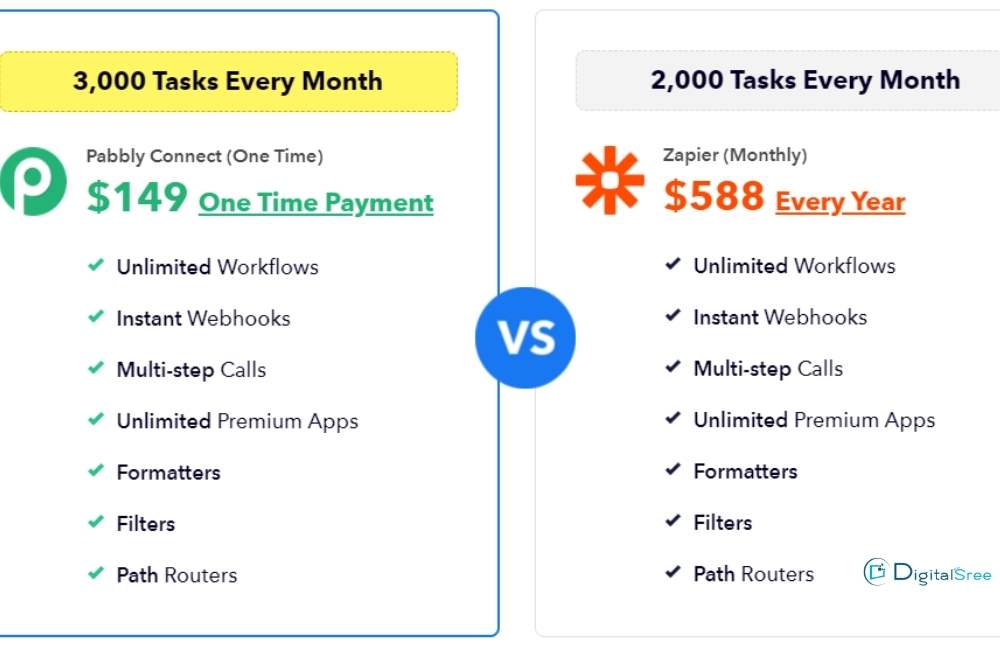
Zapier offers several monthly subscription plans. Each plan limits the number of tasks and features. Prices increase as users need more tasks or advanced options.
Pabbly also provides monthly subscription plans. It gives more tasks per plan compared to Zapier. Pabbly’s plans include unlimited workflows even on basic tiers.
Lifetime Deals
Pabbly sometimes offers one-time lifetime deals. Users pay once and get access forever. This option can save money for long-term users.
Zapier does not offer lifetime deals. It relies on monthly or yearly subscriptions only. This makes Pabbly more attractive for budget-conscious buyers.
Cost Efficiency
Pabbly tends to be more cost-efficient for users with high task volumes. It offers more tasks at lower prices. The lifetime deal adds extra savings over time. Learn more about Pabbly here.
Zapier is ideal for complex workflows needing advanced features. Its price grows with task count and feature use. This can get expensive for heavy users.
Task Execution Limits
Task execution limits define how many actions an automation tool can perform within a set period. These limits affect the overall capacity and efficiency of your workflows. Both Pabbly and Zapier have specific rules on task volume and speed. Understanding these differences helps you choose the best tool for your needs.
Task Volume
Pabbly offers a high number of tasks even on lower-priced plans. Many users find its unlimited workflows attractive for managing many tasks. Zapier limits the number of tasks based on the chosen plan. As task volume grows, Zapier’s cost can rise quickly. Pabbly suits budget-conscious users with heavy task requirements. Zapier fits better for users with fewer but complex workflows.
Speed And Reliability
Zapier is known for fast and stable task execution. It processes tasks in near real-time, which is crucial for dynamic workflows. Pabbly’s speed is good but may vary depending on the plan. Both platforms have reliable uptime but Zapier’s infrastructure is more robust. For critical tasks requiring speed, Zapier may be the preferred choice. Pabbly remains reliable for most small to medium workflows.
Additional Tools
Both Pabbly and Zapier offer more than just automation workflows. Their additional tools can help businesses save time and manage tasks easily. These extra features vary and can influence which platform suits your needs best.
Email Marketing Features
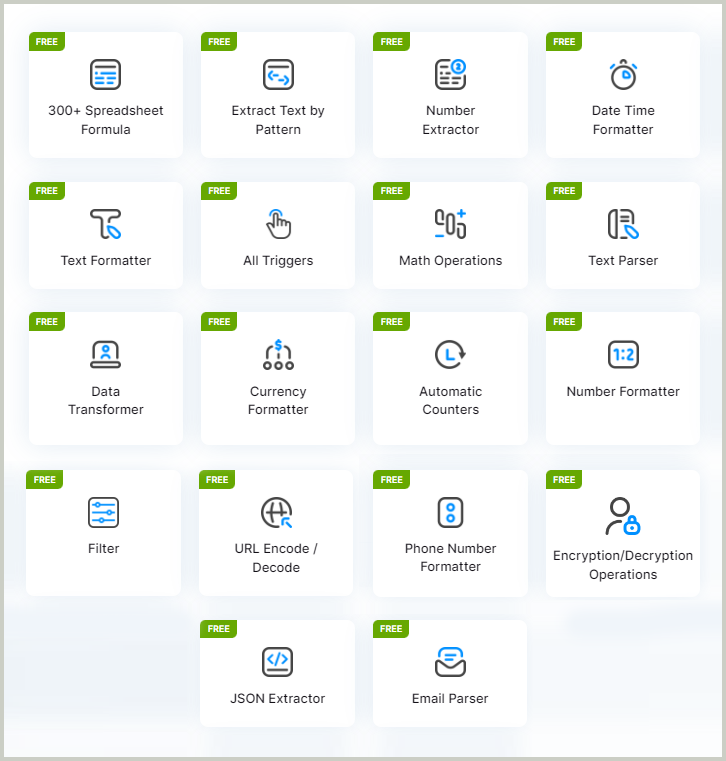
Pabbly includes built-in email marketing tools. You can create campaigns, send newsletters, and manage subscribers directly. It supports automation for follow-ups and broadcasts. This helps small businesses handle email marketing without extra software.
Zapier does not have native email marketing tools. Instead, it connects with popular email platforms like Mailchimp and ActiveCampaign. This gives users flexibility to use their preferred email service but requires separate accounts.
Form Builders
Pabbly offers its own form builder, making it easy to create online forms and surveys. These forms integrate smoothly with its automation system. This is useful for collecting leads and customer information quickly.
Zapier does not provide a form builder. Instead, it connects with many third-party form tools such as Typeform and Google Forms. Users can automate data flow from these forms into other apps.
Subscription Billing
Pabbly includes subscription billing features. It supports recurring payments, invoicing, and customer management. This helps businesses handle memberships and subscriptions in one place.
Zapier lacks built-in billing features. It relies on integrations with billing platforms like Stripe or Chargebee. This allows advanced billing setups but requires more configuration.
Credit: www.pabbly.com
User Experience
User experience plays a vital role in choosing between Pabbly and Zapier. It affects how quickly users learn the tools and how smoothly they can automate tasks. Both platforms offer unique interfaces and support systems designed to help users succeed.
Ease Of Use
Pabbly provides a simple and clean interface. It is easy for beginners to navigate. The dashboard is straightforward, showing key features at a glance. Setting up workflows requires fewer steps, which saves time. Users can connect apps with simple drag-and-drop actions. This makes it ideal for users new to automation.
Zapier has a slightly more complex layout. It supports advanced workflows with multiple steps and conditions. This complexity can be challenging for new users. However, Zapier offers detailed guides and templates to help users get started. Experienced users may find Zapier’s flexibility valuable for complex automation needs.
Customer Support
Pabbly offers responsive customer support through email and chat. The team answers questions quickly and clearly. There is also a knowledge base with tutorials and FAQs. This helps users solve common problems without waiting for help.
Zapier provides extensive support options. Users can access live chat, email, and a community forum. The forum allows users to share tips and solutions. Zapier also offers a large library of learning resources. These include webinars, articles, and video tutorials.
Best Use Cases
Choosing between Pabbly and Zapier depends on your specific automation needs. Both tools serve different users best. This section explores the best use cases for each platform to help you decide.
Small Businesses
Small businesses benefit from easy automation. Pabbly offers simple workflows and unlimited tasks at affordable prices. It suits businesses needing basic integration between apps. Automations like lead capture, email marketing, and CRM updates work well here. Pabbly’s user-friendly interface helps small teams set up workflows quickly without technical help.
Zapier also fits small businesses that want more app options. It supports thousands of apps and complex multi-step processes. Businesses needing conditional logic or filters will find Zapier useful. It scales with growing needs, but costs rise with task volume.
Enterprise Needs
Enterprises require robust, scalable automation solutions. Zapier excels with advanced features like paths, conditional workflows, and multi-step automation. It integrates well with many enterprise tools, offering flexibility for complex processes.
Pabbly may serve enterprises with simpler automation needs or smaller teams. Its lower cost appeals to those managing many tasks but not needing complex logic. Enterprises focusing on budget efficiency can consider Pabbly for basic workflows.
Budget-conscious Users
Users with limited budgets prefer value for money. Pabbly provides more tasks at lower prices than Zapier. It often offers lifetime plans, reducing long-term costs. This makes Pabbly attractive for startups and freelancers.
Zapier’s pricing increases with usage and advanced features. Budget-conscious users may find Zapier costly over time. For affordable automation with decent features, Pabbly is the practical choice.
Credit: digitalwithsree.com
Frequently Asked Questions
Is Pabbly As Good As Zapier?
Pabbly suits budget-conscious users with simple automations and unlimited tasks. Zapier excels in complex, multi-step workflows and extensive integrations. Zapier offers advanced features like conditional logic, while Pabbly provides affordable plans and extra tools, making each better for different needs.
How Much Is Pabbly Compared To Zapier?
Pabbly costs less than Zapier and offers affordable plans with more tasks. Zapier suits complex workflows; Pabbly fits budget users with simpler automations.
Is Pabbly Connect Worth It?
Pabbly Connect offers affordable automation with unlimited tasks, ideal for basic to moderate workflows. It suits budget-conscious users well.
Conclusion
Both Pabbly and Zapier offer useful automation tools for different needs. Zapier suits users who want many app integrations and complex workflows. Pabbly fits those with smaller budgets and simpler automation tasks. Choosing depends on your business size, task volume, and required features.
Think about how much you want to spend and what tasks you need to automate. Both platforms can save time and increase productivity in their own ways. Evaluate your priorities carefully before deciding. The right choice will help your business run more smoothly.