TL;DR
- The overall best AI tools for faceless YouTube channels in 2026 include CapCut, because it covers scripting, voiceover, editing, and captions for free
- ElevenLabs is the top pick for voiceover quality, with the Creator plan at $22/month giving roughly 100 minutes of natural narration (ElevenLabs, 2026)
- InVideo AI is best for turning a single prompt into a finished video in under 20 minutes
- A complete beginner can run a faceless channel for under $30/month using CapCut’s free tier plus ElevenLabs Starter
- Pictory is the strongest choice if you already have blog posts or scripts and want to convert them into video
What Are Faceless YouTube Channels and Why AI Tools Matter for Them
A faceless YouTube channel is one where the creator never appears on camera or uses their real voice. Instead, using the best AI tools for faceless YouTube channels handles the script, the voiceover, the visuals, and often the editing completely automated.
Channels like Kurzgesagt and Bright Side built audiences in the tens of millions using this exact model (NextGlobalWave, 2026). What changed in 2026 is cost. A single faceless video can now be produced for $1 to $5 using AI tools, down from hundreds of dollars when hiring scriptwriters, voice actors, and editors separately (NextGlobalWave, 2026).
For a beginner, the right AI stack removes three barriers at once: you don’t need to show your face, you don’t need to write scripts from scratch, and you don’t need editing experience.
And I highly recommend you to read the full article because I used these AI tools for my faceless YouTube channel and got results.
How the Faceless YouTube AI Workflow Works
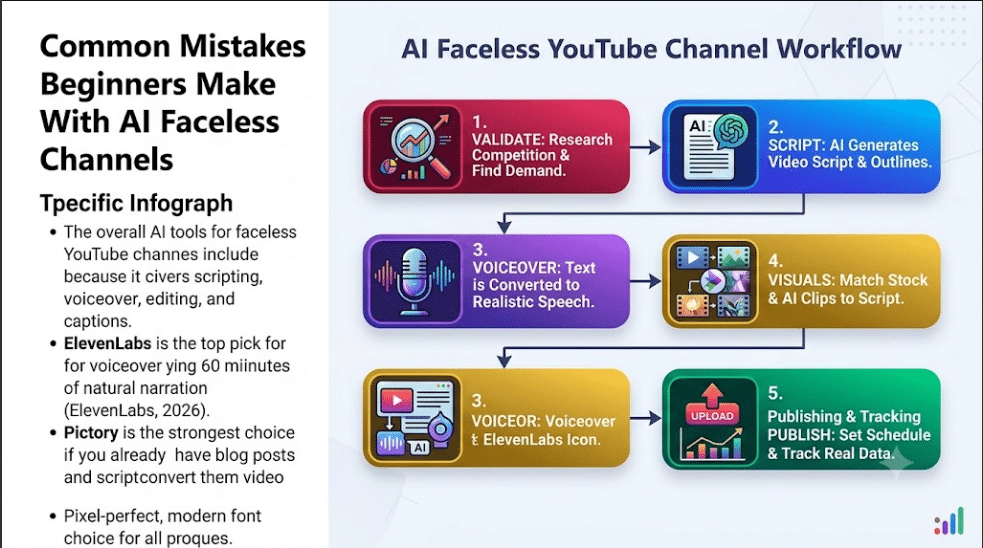
Every faceless video moves through five stages: script, voiceover, visuals, editing, and publishing. AI tools now exist for each stage.
The table below shows where each tool in this list fits.
| Stage | What Happens | Recommended Tools |
|---|---|---|
| Script | AI generates the video outline and narration text | InVideo AI, ChatGPT |
| Voiceover | Text is converted into natural-sounding speech | ElevenLabs, CapCut |
| Visuals | Stock footage, AI-generated clips, or images are matched to the script | Pictory, InVideo AI, Midjourney |
| Editing | Clips, captions, and audio are assembled into a final video | CapCut, DaVinci Resolve |
| Publishing | Videos are uploaded, scheduled, or auto-posted | FlowShorts, YouTube Studio |
A beginner doesn’t need a tool for every stage on day one. Start with one tool that covers script, voiceover, and editing together, then add specialized tools as your channel grows.
1. CapCut — Best Free All-In-One Tool for Beginners
CapCut is a free video editor from ByteDance that handles AI script-to-video generation, text-to-speech voiceover, auto-captions, and editing in one app (AIBlogFirst, 2026).
Key features:
- Script-to-video generation from a text prompt
- Built-in AI voiceover with text-to-speech
- Auto-captions for accessibility and retention
- Available on mobile, desktop, and web
Pricing: Free tier covers most beginner needs. CapCut Pro is $19.99/month or $179.99/year, adding 4K export and 1,200 AI credits per month (FluxNote, 2026). Best for: Complete beginners who want to test the faceless format without spending money.
2. ElevenLabs — Best for Realistic AI Voiceovers
ElevenLabs produces the most natural-sounding AI voices on the market, with realistic pacing and multilingual support (Faceless Directory, 2026). For faceless channels, voice quality directly affects how long viewers watch.
Key features:
- Voice cloning for a consistent channel “voice”
- Turbo v2.5 model built for fast, bulk narration
- Multilingual support for international audiences
- Commercial usage rights on paid plans
Pricing: Starter is $5/month for about 30 minutes of audio. Creator is $22/month for about 100 minutes and unlocks voice cloning (PxlPeak, 2026). Best for: Channels where narration quality is the main differentiator, such as documentary or storytelling niches.
3. InVideo AI — Best for Fast Prompt-to-Video Generation
InVideo AI turns a single text prompt into a complete video with AI voiceover, stock footage, and auto-subtitles (Cut The SaaS, 2026). Testing across 10 different Shorts topics took 18 minutes total compared to over 3 hours with script-first tools (SmartRemoteGigs, 2026).
Key features:
- AI script writing built into the platform
- Voice cloning and AI voiceover included
- Library of 10 million-plus stock assets
- UGC-style AI avatars for talking-head style Shorts
Pricing: Free plan is watermarked. Plus is around $25/month, Max around $48/month, both on annual billing (Cut The SaaS, 2026). Best for: Creators publishing daily Shorts who need speed over deep customization.
4. Pictory — Best for Turning Existing Content Into Video
Pictory converts blog posts, articles, or scripts into finished videos by matching AI-selected stock footage to your text (AI Image to Video, 2026). If you already write content, this is the fastest way to repurpose it for YouTube.
Key features:
- Blog-to-video and URL-to-video conversion
- ElevenLabs-powered voiceovers built in
- Access to Shutterstock and Getty stock footage
- AI Image to Video using Kling and Veo models
Pricing: Starter is $23/month with a 3-video cap. Professional is $35/month on the annual plan, including ElevenLabs voiceovers and stock assets (Pictory, 2026; FluxNote, 2026). Best for: Bloggers and writers who want to turn existing articles into a video channel without rewriting anything.
5. OverseerOS — Best for Research and Topic Validation
OverseerOS is a pre-production tool that handles channel analysis, competitor tracking, and topic validation before you produce a single video (OverseerOS, 2026). Skipping this step is the most common reason new faceless channels fail.
Key features:
- Competitor channel tracking and pattern analysis
- AI-generated titles and thumbnail directions
- Script generation aligned to validated topics
- ElevenLabs-powered voiceover integration
Pricing: Subscription-based; check the OverseerOS site for current tier pricing. Best for: Beginners who want to avoid wasting time producing videos on topics nobody searches for.
6. FlowShorts — Best for Full Auto-Posting Automation
FlowShorts runs the entire pipeline from script to posting without manual steps. You set a niche, connect your social accounts, and it generates and publishes videos on a schedule (FlowShorts, 2026).
Key features:
- AI script writing, image generation, and ElevenLabs voiceover
- Animated captions and background music added automatically
- Auto-posting to YouTube Shorts, TikTok, and Instagram Reels
- No manual downloading or uploading required
Pricing: Starter plan is $19/month for 8 videos. Creator plan is $39/month for daily posting (FlowShorts, 2026). Best for: Creators who want a channel that runs with minimal daily effort once set up.
7. Canva — Best for Thumbnails and Visual Branding
Canva handles thumbnail design and channel branding with AI-assisted templates. Thumbnails matter because viewers decide whether to click based on the title and thumbnail before the video plays (OverseerOS, 2026).
Key features:
- Thumbnail templates sized for YouTube
- AI-generated background images and text overlays
- Brand kit for consistent channel identity across videos
- Team collaboration on the paid plan
Pricing: Canva Pro is $15/month (ToolSurf, 2026). Best for: Beginners who need professional-looking thumbnails without hiring a designer.
8. OpusClip — Best for Repurposing Long Videos Into Shorts
OpusClip takes longer videos and automatically extracts the most engaging segments as Shorts (OverseerOS, 2026). This lets a single long-form video generate multiple pieces of Shorts content.
Key features:
- AI-identified highlight clips from long-form video
- Automatic vertical reformatting for Shorts and Reels
- Auto-captions matched to each clip
- Virality scoring to prioritize which clips to post
Pricing: Free tier available; paid plans unlock higher export limits and longer source videos. Best for: Creators who already publish long videos and want extra reach from Shorts without extra filming.
9. YouTube Studio — Best Free Tool for Tracking What Works
YouTube Studio is YouTube’s own analytics dashboard. It gives first-party data on retention, click-through rate, and impressions (OverseerOS, 2026). Every other tool on this list should be guided by what this dashboard shows.
Key features:
- Audience retention graphs by second
- Click-through rate by thumbnail and title
- Traffic source breakdown
- A/B testing for thumbnails and titles
Pricing: Free with any YouTube channel. Best for: Every faceless creator, at every stage, without exception.
Comparison Table: AI Tools for Faceless YouTube Channels at a Glance
| Tool | Best For | Price | Key Feature |
|---|---|---|---|
| CapCut | All-in-one beginner stack | Free, Pro $19.99/mo | Script, voice, edit, captions in one app |
| ElevenLabs | Voice quality | Free, Creator $22/mo | Natural voice cloning |
| InVideo AI | Speed | Free, Plus ~$25/mo | Prompt-to-video in minutes |
| Pictory | Repurposing content | Starter $23/mo, Pro $35/mo | Blog-to-video conversion |
| OverseerOS | Topic research | Subscription | Competitor and topic validation |
| FlowShorts | Auto-posting | $19-39/mo | Full pipeline with scheduling |
| Canva | Thumbnails | Pro $15/mo | Branded thumbnail templates |
| OpusClip | Shorts repurposing | Free tier available | Auto-clip long videos into Shorts |
| YouTube Studio | Analytics | Free | Retention and CTR data |
Common Mistakes Beginners Make With AI Faceless Channels
- Skipping research: Producing videos before checking whether the topic gets views leads to wasted effort. Use a research tool like OverseerOS before scripting anything.
- Picking voice quality last: A robotic voice causes viewers to click away within seconds. Test ElevenLabs or CapCut’s built-in voices before committing to a tool.
- Ignoring the thumbnail: The title and thumbnail decide whether anyone watches the video at all. Build these before finishing the script, not after.
- Buying every tool at once: A beginner only needs one all-in-one tool like CapCut to start. Add specialized tools once you know what your workflow actually needs.
Frequently Asked Questions About AI Tools for Faceless YouTube Channels
What is the best AI tool for faceless YouTube channels?
CapCut is the best starting point because it combines script generation, AI voiceover, editing, and captions in one free app. As your channel grows, ElevenLabs for voice and Canva for thumbnails are common additions.
How much does it cost to start a faceless YouTube channel with AI tools?
A beginner can start for free using CapCut’s free tier and YouTube Studio. A realistic monthly budget once you add a dedicated voice tool like ElevenLabs Starter is around $5 to $30 per month.
Can I make a faceless YouTube video without any editing skills?
Yes. Tools like CapCut and InVideo AI generate a complete video from a text prompt, including voiceover, visuals, and captions, with no manual editing required.
What is the difference between Pictory and InVideo AI?
Pictory is built to convert existing written content, such as blog posts, into video. InVideo AI generates video directly from a prompt without needing source content first. Choose Pictory if you already write content, and InVideo AI if you’re starting from an idea.
Do I need a research tool before making faceless videos?
It helps significantly. A tool like OverseerOS validates whether a topic gets views before you spend time producing the video, which avoids the most common reason new channels stall.
Is ElevenLabs worth the cost for a beginner channel?
The Starter plan at $5/month gives about 30 minutes of audio, enough for a few videos a month. If voice quality is central to your niche, such as storytelling or true crime, it’s worth the upgrade early.
Can AI tools fully automate posting to YouTube?
Yes. FlowShorts handles the full pipeline from script to auto-posting on a schedule across YouTube Shorts, TikTok, and Instagram Reels.
Key Takeaways
- Start with CapCut’s free tier to test these AI tools for faceless YouTube channels before paying for anything
- Add ElevenLabs once voice quality starts affecting retention
- Validate topics with a research tool before scripting, not after
- Use YouTube Studio data to decide which tools are actually worth paying for