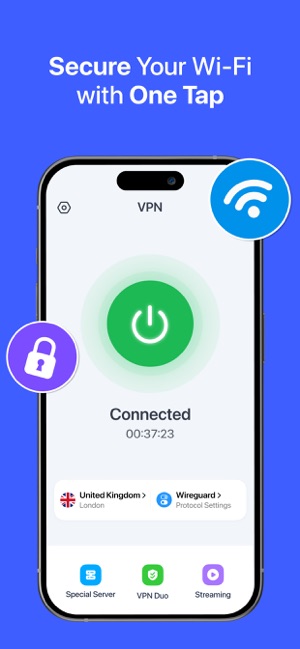
Are you worried about your privacy every time you use your iPhone on public Wi-Fi? You’re not alone.
With so much personal information stored on your device, protecting it is more important than ever. A VPN for iPhone can be your secret weapon to keep hackers out and your data safe. Imagine browsing freely, streaming your favorite shows, or accessing apps without restrictions—all while staying secure.
Curious how this simple tool can change your iPhone experience? Keep reading to discover why a VPN is a must-have for your device and how to choose the right one for you.

Credit: apps.apple.com
Why Use A Vpn On Iphone
Using a VPN on your iPhone adds a layer of security and freedom. It helps keep your data safe and private. Also, it lets you access content from different countries. Many people use public Wi-Fi, which can be risky. A VPN protects your connection in such cases. Here are key reasons to use a VPN on your iPhone.
Protecting Personal Data
A VPN encrypts your internet traffic. This means no one can easily see your information. It protects passwords, messages, and browsing history. Even hackers on public networks cannot steal your data. Your personal details stay private and secure.
Bypassing Geo-restrictions
Some websites and apps limit content by location. A VPN changes your virtual location to access these sites. Watch shows or use apps not available in your country. It helps enjoy global content without limits.
Securing Public Wi-fi Connections
Public Wi-Fi networks are often unsafe. Hackers can intercept your data on these networks. A VPN creates a secure tunnel for your connection. It stops others from spying on your online activity. Use a VPN to stay safe on public Wi-Fi.
Choosing The Right Vpn App
Choosing the right VPN app for your iPhone is important. A good VPN keeps your data safe and helps you browse privately. Many VPN apps offer different features, speeds, and security levels. Picking the best one depends on what you need most.
Some apps focus on speed, others on security or ease of use. The right VPN should work well with your iPhone and keep your information secure. It should also be easy to set up and use every day.
Key Features To Look For
Strong security is a must. Look for apps with encryption and no data logging. Fast connection speeds matter for smooth browsing and streaming. The app should support many servers worldwide. Easy-to-use interfaces save time and avoid confusion. Check if the VPN offers a kill switch to protect your data if the connection drops. Also, good customer support helps solve problems quickly.
Top Vpn Apps For Iphone
Several VPN apps work well on iPhones. ExpressVPN is popular for speed and security. NordVPN offers many servers and strong privacy. Surfshark is known for unlimited devices and budget-friendly pricing. CyberGhost provides easy setup and good speed. These apps have user-friendly designs and strong protection.
Free Vs Paid Vpn Services
Free VPNs can save money but often limit speed and data. They may show ads or collect your data. Paid VPNs usually offer better security and faster connections. They often include more servers and better support. Consider your needs and how much you want to spend. Paid VPNs usually give a safer and smoother experience.
Setting Up Vpn On Iphone
Setting up a VPN on your iPhone helps protect your privacy and secure your internet connection. It hides your IP address and encrypts your data. This section explains simple ways to set up a VPN on your iPhone.
Installing Vpn Apps
Start by choosing a trusted VPN app from the App Store. Search for the VPN provider you want and tap “Get” to download. After installing, open the app and follow the on-screen instructions. Usually, you need to log in or create an account. The app will ask permission to add VPN configurations. Allow it to set up automatically. This method is fast and easy for most users.
Manual Configuration Options
You can set up a VPN manually through iPhone settings. Open “Settings” and tap “General,” then “VPN & Device Management.” Tap “Add VPN Configuration.” Choose the type of VPN such as IKEv2, IPSec, or L2TP. Enter the server address, remote ID, and your login details. Save the configuration and switch the VPN on from the main settings screen. This way works well for custom VPNs without apps.
Enabling Always-on Vpn
Always-On VPN keeps your connection secure at all times. It automatically connects the VPN when your iPhone starts or wakes up. To enable it, go to “Settings,” then “General,” and tap “VPN & Device Management.” Select your VPN configuration, and turn on “Connect On Demand” or “Always-On VPN.” This setting ensures your online activity stays private without manual steps. It suits users needing constant protection.
Credit: apps.apple.com
Optimizing Vpn Performance
Optimizing VPN performance on your iPhone ensures smooth browsing and strong security. A well-tuned VPN reduces lag and keeps your data safe. Small changes can improve speed and connection quality. Follow these steps to get the best VPN experience.
Selecting The Best Server Location
Choose a VPN server close to your physical location. Nearby servers usually offer faster speeds and lower delays. Select servers in countries with strong internet infrastructure. Avoid crowded servers to prevent slowdowns. Some VPN apps show server load; pick one with low traffic. Try different servers to find the fastest connection for your needs.
Speed And Connection Stability Tips
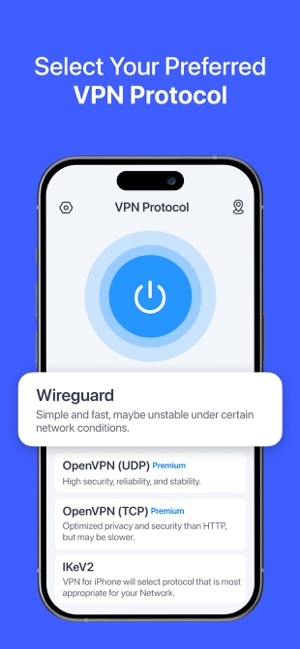
Close apps running in the background to save bandwidth. Restart your VPN app if the connection drops. Use the fastest VPN protocol available in your app settings. Update your VPN app regularly for better performance. Connect to Wi-Fi networks with strong signals. Avoid public Wi-Fi without VPN protection for safety and speed.
Managing Battery And Data Usage
VPNs can use more battery power than usual apps. Turn off the VPN when it’s not needed. Use VPN split tunneling if your app supports it. This sends only some traffic through the VPN, saving data. Monitor your data use to avoid extra charges. Adjust VPN settings to reduce background data use.
Common Vpn Issues And Fixes
Using a VPN on your iPhone can improve your privacy and security. Still, some common problems might stop it from working well. These issues can affect your connection, speed, or app performance. Knowing how to fix them helps keep your VPN running smoothly.
Troubleshooting Connection Failures
Sometimes, your VPN may not connect to the server. This can happen due to network problems or wrong settings. Start by checking your internet connection. Make sure Wi-Fi or mobile data is active and stable. Restart your iPhone to refresh network settings. Also, check the VPN app’s server list. Select a different server to see if it connects. Update the VPN app to the latest version. Old versions may have bugs causing connection issues. Finally, reset your VPN settings in the app or on your iPhone.
Resolving Slow Speeds
Slow VPN speeds can make browsing frustrating. This may happen if the server is far or crowded. Pick a server closer to your location for better speed. Close other apps that use the internet in the background. This frees up bandwidth for your VPN. Try switching from Wi-Fi to mobile data or vice versa. Sometimes, one network works faster than the other. Also, check if your VPN app offers a speed test feature. Use it to find the fastest server available.
Handling App Compatibility
Some apps may not work well with VPNs on iPhones. This issue occurs due to app restrictions or VPN settings. First, update both the VPN and the app to the newest versions. Developers often fix compatibility problems in updates. Check the VPN app’s settings for split tunneling. This feature lets you choose which apps use the VPN. Enable it to allow certain apps to bypass the VPN. If problems continue, contact the VPN support team. They can offer guidance specific to your apps and device.

Credit: www.expressvpn.com
Legal And Privacy Considerations
Using a VPN on your iPhone can protect your data and privacy. Yet, legal and privacy factors need attention before choosing and using a VPN. Different countries have different rules about VPN use. Understanding these rules helps you stay safe and avoid trouble. Privacy depends on how the VPN handles your data. Some VPNs keep logs that might expose your information. Being aware of these details improves your online security.
Vpn Use And Regional Laws
Some countries ban or limit VPN use. Others allow it but have strict rules. Breaking these laws can cause fines or worse. Check local laws before using a VPN on your iPhone. Laws can change fast, so stay updated. Using a VPN where it is legal helps protect your privacy safely.
Understanding Vpn Logging Policies
VPN logging means storing your online activity data. Many VPNs claim to have a “no-logs” policy. Not all are honest about it. Some keep logs for a short time or share data with others. Read the VPN’s privacy policy carefully. Choose a VPN with clear, strict no-logs rules to keep your data safe.
Avoiding Privacy Pitfalls
Not all VPNs protect your privacy equally. Free VPNs often collect and sell your data. Some VPN apps have hidden trackers or malware. Choose VPNs with strong encryption and good reviews. Avoid VPNs that ask for too many permissions. Protect your iPhone by selecting trustworthy VPN services only.
Advanced Vpn Tips For Iphone Users
Using a VPN on your iPhone adds a strong layer of privacy and security. You can make your VPN use smarter with some advanced tips. These tips help you protect your data and improve your online experience. Learn how to use VPN with other apps, set up split tunneling, and automate connections.
Using Vpn With Other Security Apps
Combine your VPN with other security apps for better protection. Use antivirus and anti-malware apps alongside your VPN. These apps catch threats your VPN may miss. Keep your iPhone safe from different types of attacks. Make sure all apps work well together to avoid conflicts.
Setting Up Split Tunneling
Split tunneling lets you choose which apps use the VPN. Some apps need full protection; others do not. Save battery and increase speed by excluding trusted apps. For example, use VPN only for browsing and banking apps. This setup helps you keep control over your traffic.
Automating Vpn Connections
Set your VPN to connect automatically in certain situations. Use automation to turn on VPN when joining public Wi-Fi. This stops data leaks and keeps your connection secure. Some VPN apps have built-in automation features. Use them to ensure your VPN is always active when needed.
Frequently Asked Questions
What Is The Best Vpn For Iphone In 2024?
The best VPN for iPhone offers fast speeds, strong encryption, and easy-to-use apps. Look for features like no-logs policy, reliable servers, and 24/7 support.
How Does A Vpn Protect My Iphone Online?
A VPN encrypts your internet traffic, hiding your IP address and data from hackers, ISPs, and trackers. It secures your connection on public Wi-Fi networks.
Can I Use A Free Vpn On My Iphone Safely?
Free VPNs may limit speed, data, and security. They sometimes log user data or show ads. Paid VPNs are safer and more reliable for iPhones.
Will A Vpn Slow Down My Iphone’s Internet Speed?
A VPN can slightly reduce speed due to encryption and server distance. However, premium VPNs minimize this impact with optimized servers and advanced protocols.
Conclusion
Using a VPN on your iPhone keeps your data safe and private. It helps you browse the internet without worries. You can access content from different places easily. Many VPN apps are simple to install and use. Choose one that fits your needs and budget.
Remember, staying secure online is important every day. Protect your iPhone and enjoy a safer internet experience.