If you want to take your writing to the next level, ProWritingAid Content Editing Tool is here to help. Whether you’re crafting a novel, polishing a blog post, or refining a business report, this tool offers powerful insights that go beyond basic grammar checks.
Imagine having a personal editor that spots not just errors, but also highlights style issues, pacing, and structure—helping your words flow smoothly and engage readers more effectively. You’ll discover how ProWritingAid can transform your writing process, save you time, and boost your confidence with every sentence you write.
Ready to see why so many writers swear by it? Keep reading to unlock the full potential of your content.
Features Of Prowritingaid
ProWritingAid offers a rich set of features designed to improve your writing. It helps identify errors and suggests improvements. The tool works for all types of writing, from emails to novels. Here is a closer look at its main features.
Grammar And Style Checks
ProWritingAid scans your text for grammar mistakes. It catches common errors like subject-verb agreement and punctuation. The style checks suggest clearer word choices and sentence structures. This helps make your writing easier to read and more engaging.
Detailed Writing Reports
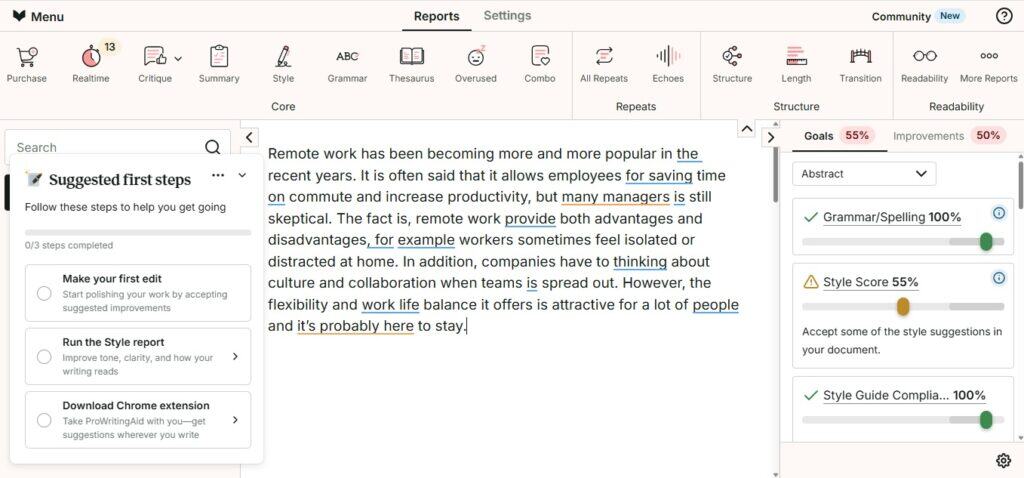
The tool generates detailed reports on your writing. These include overused words, sentence length variety, and pacing. Reports also highlight repeated phrases and clichés. Writers get insights into how to improve flow and clarity.
Integration Options
ProWritingAid works with many platforms. You can use it as a browser extension or desktop app. It also integrates with Microsoft Word and Google Docs. This makes editing convenient within your favorite writing tools.
Plagiarism Detection
The plagiarism checker compares your text against millions of sources. It helps ensure your content is original and properly cited. This feature is useful for students, bloggers, and professionals alike.
Benefits For Different Writers
ProWritingAid offers tailored benefits for various types of writers. It adapts to their unique needs and enhances writing quality. The tool supports creativity, clarity, and coherence across different genres. Writers can improve their skills and produce polished work efficiently.
Creative And Fiction Writers
ProWritingAid helps creative writers find the right tone and style. It checks pacing and dialogue to keep readers engaged. The tool also highlights repeated words and clichés to improve originality. Writers can analyze story structure and character consistency with ease. This makes crafting compelling fiction smoother and more focused.
Academic And Professional Users
For academic and professional users, ProWritingAid ensures clear and precise writing. It catches grammar mistakes and suggests better word choices. The tool supports formal tone and proper style guides. It also helps organize complex ideas for better understanding. Users can produce polished reports, essays, and business documents quickly.
Long-form Content Creators
Long-form writers benefit from ProWritingAid’s in-depth analysis tools. It breaks down lengthy texts to improve flow and readability. The tool identifies repeated phrases and weak sentence structures. Writers receive useful suggestions to maintain reader interest throughout. This makes writing books, guides, and articles less overwhelming.
Comparison With Grammarly
ProWritingAid and Grammarly are two popular tools for editing and improving writing. Both help find errors and suggest improvements. However, they differ in features and focus. Comparing these tools helps choose the best one for your needs.
Interface And Usability
ProWritingAid offers a detailed and feature-rich interface. It shows many reports and suggestions at once. This can be helpful but sometimes feels overwhelming.
Grammarly has a clean and simple interface. It highlights errors clearly and offers quick fixes. This makes it easy for beginners and fast editing.
ProWritingAid suits users who want deep analysis. Grammarly fits users who want fast and easy editing.
Depth Of Analysis
ProWritingAid provides in-depth analysis of style, structure, and readability. It helps improve creative and long writing projects. It also checks overused words and sentence length.
Grammarly focuses on grammar, spelling, and punctuation. It gives clear explanations and suggests better word choices. It works well for formal and academic writing.
ProWritingAid is better for detailed editing. Grammarly is great for quick grammar checks.
Pricing And Plans
ProWritingAid offers a free plan with limited features. Paid plans are affordable and include lifetime options. It suits writers with budget concerns.
Grammarly offers a free plan and monthly or yearly subscriptions. The paid plans provide more advanced checks and plagiarism detection.
ProWritingAid is cost-effective for heavy users. Grammarly is flexible for casual and professional users.
Plagiarism Tools
ProWritingAid includes a plagiarism checker as an add-on. It scans content against online sources but can be less accurate.
Grammarly has a built-in plagiarism checker. It uses a large database and offers real-time alerts.
Grammarly provides stronger plagiarism detection. ProWritingAid’s tool is useful but less reliable.

Credit: www.youtube.com
Limitations To Consider
ProWritingAid is a useful content editing tool with many features. Still, it has some limitations worth noting. Understanding these can help you decide if it fits your editing needs. The following points highlight key restrictions to consider before fully relying on the tool.
Free Plan Restrictions
The free version of ProWritingAid limits the number of words you can check at once. You cannot access all premium features with the free plan. Some advanced reports and style checks remain locked behind a paywall. This may slow down editing for longer texts.
Language Support
ProWritingAid supports only the English language. Writers working in other languages cannot use this tool effectively. This limits its usefulness for multilingual content creators or those writing in non-English markets.
Mobile App Availability
Currently, ProWritingAid does not offer a dedicated mobile app. Users must rely on desktop or web versions for editing tasks. This can reduce convenience for writers who prefer editing on phones or tablets.
Plagiarism Checker Accuracy
The plagiarism checker in ProWritingAid is less accurate than some competitors. It may miss some copied content or flag false positives. Users should verify plagiarism results with additional tools for important documents.
Privacy And Data Security
Privacy and data security are crucial for anyone using online tools. ProWritingAid understands the importance of protecting your content and personal information. The tool follows strict policies and uses advanced technology to keep data safe. Users can trust that their writing remains confidential and secure throughout the editing process.
Data Usage Policies
ProWritingAid collects only the data necessary to improve its service. It does not sell or share your content with third parties. The tool uses your writing solely to provide editing feedback. After processing, your text is not stored longer than needed. Users have control over their data and can request deletion at any time.
Security Measures
ProWritingAid uses encryption to protect data during transfer. The platform applies secure protocols to prevent unauthorized access. Regular security audits ensure that systems remain robust. User accounts are safeguarded with strong password requirements. These measures help keep your writing and personal details safe from cyber threats.
Credit: undetectable.ai
Tips For Maximizing Prowritingaid
ProWritingAid offers powerful tools that improve your writing beyond basic grammar checks. To get the most out of this tool, use it strategically. These tips help you tailor the software to fit your unique writing style and needs. Each feature can enhance your editing process significantly.
Customizing Style Reports
ProWritingAid allows you to adjust style reports to match your writing goals. You can select which writing elements to focus on, such as sentence length, readability, or overused words. This customization helps you target specific weaknesses in your text. Changing settings saves time by highlighting the issues that matter most to you.
Using Integrations Effectively
ProWritingAid works smoothly with many platforms like Microsoft Word, Google Docs, and browsers. Use these integrations to edit your work directly in your favorite apps. This avoids copying and pasting text back and forth. The real-time feedback from integrations keeps your writing polished as you create.
Combining With Human Editing
Though ProWritingAid is strong, human editing adds a critical layer. A person can catch tone, context, and meaning that software may miss. Use the tool first to fix basic errors. Then, review the text yourself or ask a trusted editor for feedback. This approach improves clarity and flow in your writing.

Credit: www.youtube.com
Frequently Asked Questions
What Are The Disadvantages Of Prowritingaid?
ProWritingAid’s disadvantages include a limited free plan, no mobile editing apps, English-only support, and less accurate plagiarism detection.
Which Is Better, Grammarly Or Prowritingaid?
Grammarly suits quick, formal, and professional writing with real-time feedback and plagiarism checks. ProWritingAid excels in detailed style analysis and long-form, creative writing at a lower cost. Choose based on your writing needs: Grammarly for clarity and teams, ProWritingAid for depth and affordability.
Does Prowritingaid Use Your Writing?
ProWritingAid does not use or store your writing for any purpose. Your content remains private and secure.
Is Prowritingaid Better Than A Human Editor?
ProWritingAid offers detailed style and structure analysis, ideal for creative writers. A human editor provides personalized, nuanced feedback that software cannot fully match. Combining both yields the best editing results for clarity, creativity, and accuracy.
Conclusion
ProWritingAid helps writers improve their work step by step. It offers many tools to check grammar, style, and structure. Writers of stories or long texts find it useful. The tool highlights areas to make writing clearer and stronger. While it may lack a mobile app, its detailed reports stand out.
For those who want deeper editing help, it fits well. Give it a try to see how your writing grows. Simple, thorough, and designed to support your writing journey.