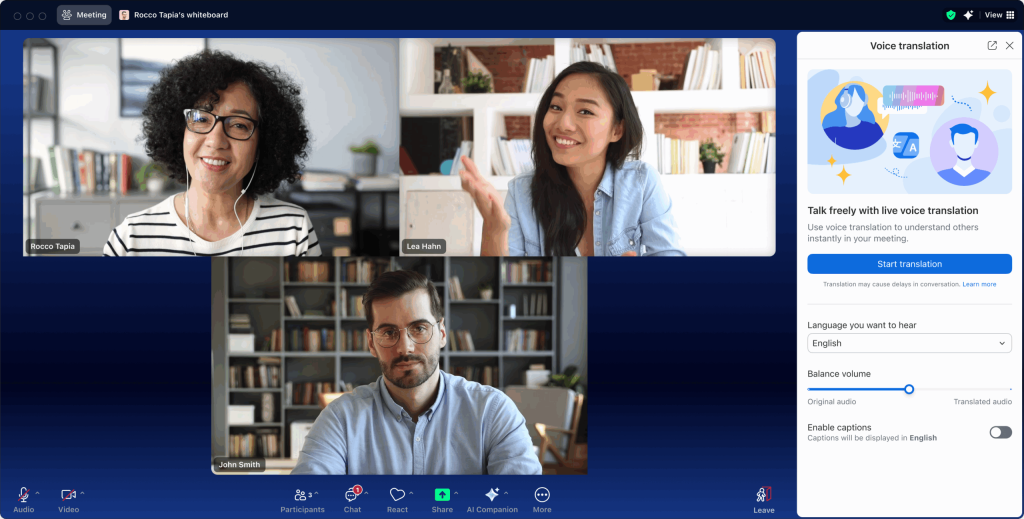
Imagine attending your meetings without worrying about taking notes or missing key points. What if you had a smart helper that captures everything for you, so you can focus fully on the conversation?
That’s exactly what the Zoom AI Meeting Assistant offers. If you want to save time, stay organized, and never lose track of important details again, this tool is made for you. Keep reading to discover how Zoom’s AI Meeting Assistant can transform your meetings and boost your productivity like never before.
Zoom Ai Meeting Assistant Features
Real-time transcriptionshelp capture every word spoken during meetings. This feature makes it easy to follow conversations and review details later. No need to take notes manually. The text appears on screen as people talk.
Automated meeting summariesprovide quick overviews after calls. They highlight main points and decisions. This saves time and helps everyone stay on the same page.
| Feature | Benefit |
|---|---|
| Action Item Tracking | Keeps track of tasks assigned during meetings. Reminders help ensure nothing is missed. |
| Voice Command Integration | Allows users to control the assistant by speaking. Makes meeting management hands-free and easier. |
Enhancing Productivity With Zoom Ai
Zoom AI Meeting Assistanthelps by reducing manual note-taking. It listens and writes down key points automatically. This saves time and lets people focus on the discussion. No need to worry about missing important details.
Streamlining follow-upsbecomes easy with Zoom AI. It creates clear action lists and sends reminders. Teams stay on track without extra effort. Tasks get done faster and with less confusion.
Improving meeting focusis another benefit. No distractions from writing notes. Participants can listen and talk more. Meetings feel shorter and more productive. Everyone stays engaged and alert.
Setting Up Zoom Ai Meeting Assistant
Start by downloading the Zoom AI Meeting Assistant from the Zoom App Marketplace. Click on installand follow the simple steps to activate it in your Zoom account. Once activated, the assistant is ready to help during meetings.
Set your preferencesto make the assistant work best for you. Choose options like note-taking, transcription, or summary generation. Adjust settings to fit your meeting style and needs.
| Tool | Integration Benefits |
|---|---|
| Google Calendar | Syncs meetings and adds notes automatically |
| Slack | Sends meeting summaries to your channels |
| Microsoft Teams | Shares AI notes directly in chat |
Linking Zoom AI with other tools saves time and keeps information in one place. It helps teams stay updated and organized without extra effort.

Credit: venturebeat.com
Best Practices For Using Zoom Ai
Preparing meetingshelps the AI capture key points well. Share the agenda before starting. Clear topics make AI notes accurate. Test your audio and video to avoid errors. Use simple language during the talk. This helps the AI understand better.
Collaborating with AI outputsmeans checking the notes carefully. AI may miss some details or mix ideas. Edit the summary to fit your needs. Share the AI notes with your team. Use the outputs to help plan next steps. AI can save time but needs human review.
Ensuring data privacykeeps your information safe. Use Zoom’s security features like passwords and waiting rooms. Avoid sharing sensitive info during recording. Review who can access the AI-generated notes. Trust only authorized people with meeting data. Protecting privacy builds trust and safety.
Common Challenges And Solutions
Transcription errorscan make meeting notes hard to understand. Clear speech and good microphones help reduce mistakes. Editing transcripts quickly fixes errors. Using AI tools that learn accents also improves accuracy.
Managing sensitive informationneeds care. Always encrypt meeting data and use strong passwords. Limit access to only trusted people. Remind team members not to share private info outside the meeting.
Optimizing performancemeans making the assistant work faster and smoother. Close unused apps during meetings to save memory. Update the AI software regularly. Use a strong internet connection to avoid delays. Test the system before important meetings.

Credit: techcrunch.com
Future Of Ai In Virtual Meetings
Zoom AI Meeting Assistantis bringing new features soon. It can take notesand highlight important pointsautomatically. This helps people focus on the talk, not writing. It also can translate languagesduring meetings, so everyone understands.
The tool is changing how remote workhappens. Teams can save time and stay organized. No more missing tasks or forgetting ideas. People feel more connected even when far apart.
AI is shaping the meeting culture. Meetings will be shorter and clearer. AI can suggest next stepsand remind about deadlines. It also helps make meetings fair by giving everyone a chance to speak.

Credit: www.aicerts.ai
Frequently Asked Questions
What Is Zoom Ai Meeting Assistant?
Zoom AI Meeting Assistant is an intelligent tool that automates meeting tasks. It records, transcribes, and summarizes discussions to save time and improve productivity.
How Does Zoom Ai Meeting Assistant Improve Meetings?
It captures key points, generates summaries, and highlights action items. This helps participants stay focused and quickly review important information after meetings.
Is Zoom Ai Meeting Assistant Secure For Confidential Meetings?
Yes, Zoom AI Meeting Assistant uses end-to-end encryption and strict data privacy policies. Your meeting content remains confidential and protected from unauthorized access.
Can Zoom Ai Meeting Assistant Integrate With Other Tools?
Zoom AI Meeting Assistant supports integration with popular apps like calendar and task managers. This streamlines workflow by syncing meeting notes and action items automatically.
Conclusion
Zoom AI Meeting Assistant helps save time and stay organized. It takes notes and highlights key points during meetings. You can focus on the conversation without worrying about missing details. It also helps share summaries with your team quickly. This tool makes meetings clearer and more efficient.
Try it to see how it supports your work. Simple and smart support for every online meeting.