Are you looking for powerful tools like Airtable but want something that fits your unique needs better? Maybe you’re seeking more flexibility, advanced project management features, or even a self-hosted solution to keep full control over your data.
Whatever your reason, finding the right Airtable alternative can transform how you organize tasks, collaborate with your team, and manage your data. You’ll discover top Airtable alternatives that match a variety of workflows and budgets, helping you work smarter and faster.
Keep reading to find the perfect fit for your projects and watch your productivity soar.
Project Management Alternatives
Project management alternatives to Airtable offer various tools designed to keep teams organized and productive. These platforms help manage tasks, track progress, and streamline collaboration. Each tool comes with unique features suited for different project needs.
Asana Features
Asana allows users to create tasks, assign team members, and set deadlines. It offers boards and lists to visualize work in progress. Users can track project timelines with calendar views. Asana supports integrations with many popular apps. Notifications and reminders help keep teams on schedule.
Monday.com Workflows
monday.com provides customizable workflows to fit any project style. Automations reduce repetitive tasks and save time. The platform uses visual boards that show project stages clearly. Teams can add files, comments, and updates in real time. monday.com supports tracking budgets and timelines easily.
Smartsheet Interface
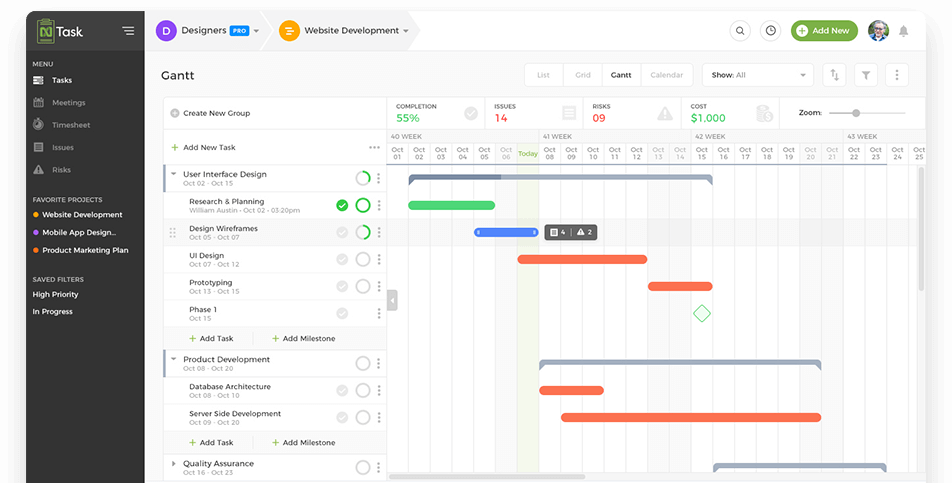
Smartsheet looks like a spreadsheet but offers more power. It combines grid, card, and Gantt chart views for flexible project tracking. Users can automate alerts and approval requests. Collaboration happens directly on the platform through comments and attachments. Smartsheet suits large teams and complex projects well.
Clickup Benefits
ClickUp lets teams manage all work in one place. It offers task lists, docs, goals, and chat features. The platform is highly customizable to match any workflow. ClickUp provides time tracking and reporting tools. It helps improve productivity by reducing the need for multiple apps.

Credit: blog.elest.io
All-in-one Workspace Tools
All-in-one workspace tools combine multiple functions into a single platform. They help teams organize tasks, data, notes, and projects without switching apps. These tools offer flexibility and simplicity for various work styles. Users can customize their workspace to fit unique needs. Two popular options are Notion and Coda. Both provide powerful features beyond traditional spreadsheets or databases.
Notion Capabilities
Notion blends notes, databases, and task management seamlessly. It allows users to create pages with various content types. Tables, calendars, lists, and boards work together in one place. Collaboration is easy with shared pages and real-time updates. Templates help start projects quickly and reduce setup time. Notion supports embedding files and media for richer content. Its simple interface suits beginners and advanced users alike. Here is a comparison between Notion and Airtable.
Coda Customization
Coda offers a flexible document system with powerful building blocks. Users combine text, tables, and buttons to create custom apps. It supports formulas similar to spreadsheets for dynamic data. Automation features reduce repetitive work by triggering actions automatically. Packs integrate with external services like Google Calendar or Slack. Coda’s modular design fits complex workflows and unique project demands. Teams can build tailored solutions without coding knowledge.
Open-source And Self-hosted Options
Open-source and self-hosted Airtable alternatives offer full control over your data. They allow customization to fit unique workflows and ensure privacy by hosting on your own servers. These options often come with active communities that contribute to constant improvements and new features. Choosing open-source tools can reduce costs and avoid vendor lock-in, giving freedom to adapt the software as needed.
Two popular open-source alternatives stand out for their flexibility and control: Baserow and NocoDB. Both provide powerful features similar to Airtable, but with the added benefit of self-hosting. They are designed to be user-friendly, making database management accessible without advanced technical skills.
Baserow Flexibility
Baserow is a no-code database tool built for easy customization. It supports a wide range of data types and powerful filtering options. Users can create and share collaborative tables with simple drag-and-drop tools. Baserow’s open-source nature means developers can add plugins or integrate it with other apps. Hosting Baserow on your own server ensures complete data privacy and control. It works well for teams that want a visual database but need flexibility without relying on cloud services.
Nocodb Control
NocoDB turns your existing databases into smart spreadsheets. It connects to MySQL, PostgreSQL, and other popular databases. NocoDB’s interface mimics spreadsheet software, making it familiar and easy to use. Self-hosting NocoDB gives you full control over your data and infrastructure. It offers automation, API access, and integrations with other tools. This makes it ideal for teams that want database power with spreadsheet simplicity. NocoDB’s open-source model allows constant community-driven improvements and customization options.
Simpler Alternatives
Some users seek simpler alternatives to Airtable for basic project and data management. These options offer ease of use without complex features. They suit small teams or individuals managing straightforward tasks. Simple tools reduce the learning curve and speed up adoption. Here are two popular choices that many find easy to use.
Trello Usability
Trello uses boards, lists, and cards to organize tasks visually. It mimics sticky notes on a board, making it intuitive. Users drag and drop cards to show progress. Trello works well for tracking simple projects and daily tasks. It has fewer features than Airtable, which keeps it straightforward. Integration options add some flexibility without overwhelming users. Trello is ideal for people who prefer visual task management.
Google Sheets Basics
Google Sheets is a spreadsheet tool familiar to many users. It stores data in rows and columns and supports basic formulas. Users can share sheets with team members for collaboration. Google Sheets lacks Airtable’s database features but handles simple data lists well. It’s free and easy to start using immediately. Sheets also allow sorting and filtering to find information quickly. Great for those who want straightforward data handling without extra complexity.
Choosing The Right Tool
Choosing the right Airtable alternative depends on several key factors. Understanding these can help you pick a tool that fits your work style and project goals. Each option offers different strengths. Focus on what matters most for your team. Consider your team size, the features you need, and your budget limits.
Team Size Considerations
Small teams often need simple, easy-to-use tools. They work best with basic task management and collaboration features. Larger teams require more robust options. Look for tools that support multiple users without slowing down. Some platforms offer tiered pricing based on user count. This helps control costs as your team grows.
Feature Needs
Make a list of must-have features before choosing a tool. Do you need workflow automation? Or strong reporting capabilities? Maybe integration with other apps is key. Some alternatives focus on project tracking, while others excel at data organization. Pick a tool that matches your daily tasks. Avoid paying for features you won’t use.
Budget Factors
Budget plays a major role in tool selection. Free plans suit freelancers or small groups well. Paid plans provide advanced features and more storage. Check for hidden costs like user fees or extra charges for add-ons. Balance cost with value. Choose a tool that fits your budget and meets your needs.
Credit: www.workstreams.ai
Credit: www.ntaskmanager.com
Frequently Asked Questions
What Can I Use Instead Of Airtable?
Alternatives to Airtable include Asana, monday. com, Smartsheet, ClickUp, Notion, Coda, Baserow, and NocoDB. Choose based on your project, customization, or collaboration needs.
Is There A Google Equivalent To Airtable?
Google Sheets serves as a basic Google alternative to Airtable. It offers simple spreadsheet functions but lacks Airtable’s advanced database features. For more robust options, consider Google Workspace apps combined or third-party tools like Notion and Coda.
Is Airtable An Israeli Company?
Airtable is not an Israeli company. It is an American cloud collaboration service headquartered in San Francisco, USA.
Conclusion
Choosing the right Airtable alternative depends on your specific needs. Some tools focus on project management, while others emphasize customization or simplicity. Explore options like Asana, monday. com, or open-source platforms to find the best fit. Test a few to see which matches your workflow.
The right choice will help your team stay organized and productive.