
Are you looking for the best way to manage your team’s work? Choosing the right software is important. Today, we will compare two popular tools: Basecamp and Trello. This article will help you decide which one fits your team better.
What Is Basecamp?
Basecamp is a cloud-based project management and team collaboration software. It helps small to medium-sized teams organize work, talk with each other, and share files all in one place.
Basecamp is known for its simple and easy-to-use design. It focuses on the essential features without overwhelming users with too many tools. This makes Basecamp perfect for teams that want a straightforward way to manage projects.
What Is Trello?
Trello is also a popular project management tool. It uses boards, lists, and cards to help you organize tasks visually. Many people like Trello because it looks like sticky notes on a board, which makes it easy to understand and use.
Trello is flexible and can be used for many types of work. You can add colors, labels, and due dates to cards, making your tasks clear and simple to follow.
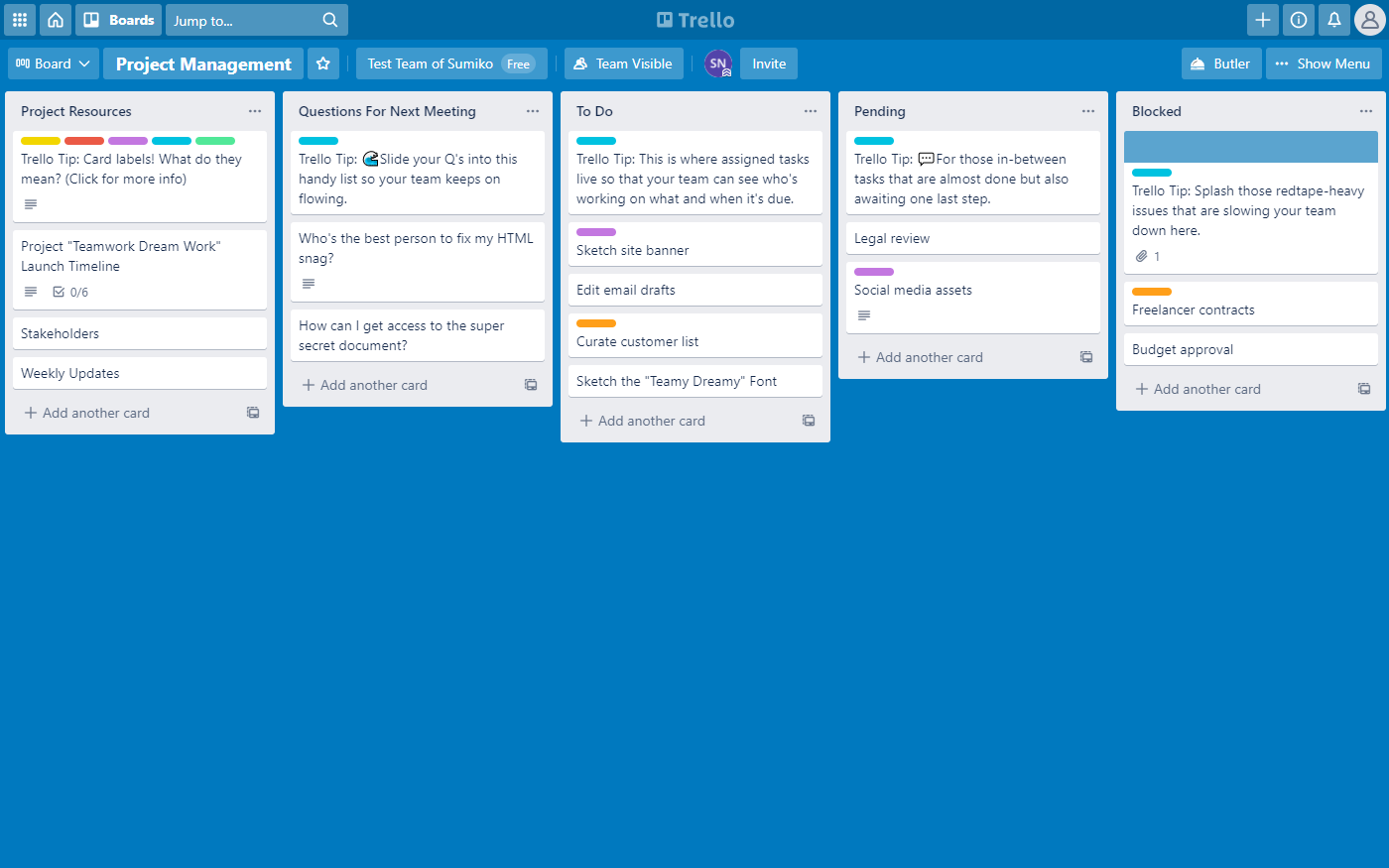
Credit: www.nuclino.com
Basecamp Vs Trello: Main Features Comparison
Let’s look at the main features of both tools to see how they compare.
| Feature | Basecamp | Trello |
|---|---|---|
| Task Management | To-do lists with simple task tracking | Visual cards on boards for tasks |
| Team Communication | Built-in group chat and message boards | Comments on cards, but no group chat |
| File Sharing | Easy file uploads and storage | File attachments on cards |
| Ease of Use | Simple and straightforward interface | Very visual and intuitive |
| Customization | Limited customization to keep things simple | Highly customizable with power-ups and add-ons |
| Pricing | Flat fee for unlimited users | Free plan available; paid plans based on users |
How Basecamp Helps Your Team
Basecamp keeps everything in one place. This means your team members do not need to switch between many apps.
- Organize Work: You can make to-do lists and assign tasks easily.
- Talk Easily: Use message boards or group chat to talk about work.
- Share Files: Upload files and keep them safe in the project.
- Simple Design: The tool is easy to learn and use.
How Trello Helps Your Team
Trello uses a visual style to help you see your work clearly.
- Boards and Cards: Organize tasks as cards on boards.
- Drag and Drop: Move cards easily between lists to show progress.
- Labels and Due Dates: Add colors and deadlines to stay on track.
- Power-Ups: Add extra features like calendars or time tracking.
Who Should Use Basecamp?
Basecamp is best for teams who want simple, all-in-one software. If your team needs to chat, share files, and track tasks without many complicated options, Basecamp is a great choice.
It works well for small and medium teams who want to stay organized without spending much time learning software.
Who Should Use Trello?
Trello is perfect if you like to see work visually. It fits teams that want to customize their workflow a lot.
If your team likes moving tasks around on boards and adding labels and reminders, Trello can make your work fun and easy.
Pros and Cons of Basecamp and Trello
Basecamp Pros
- Simple and easy to use.
- All tools in one place.
- Flat pricing for unlimited users.
- Great for team communication.
Basecamp Cons
- Less customization.
- Fewer integrations with other apps.
Trello Pros
- Highly visual and intuitive.
- Many customization options.
- Free plan available.
- Lots of power-ups and integrations.
Trello Cons
- No built-in group chat.
- Can become cluttered with many boards.
- Pricing grows with more power-ups and users.
Credit: www.onethreadapp.com
Pricing Comparison
Here is a quick look at the pricing for both tools:
| Plan | Basecamp | Trello |
|---|---|---|
| Free Plan | No free plan, 30-day free trial | Yes, with limited features |
| Paid Plan | Flat fee of $99/month for unlimited users | Starts at $5 per user/month |
Which Tool Is Easier to Learn?
Basecamp has a simple design with fewer features, so it is easy to learn quickly.
Trello’s drag-and-drop interface is very user-friendly, especially for visual thinkers.
For beginners, Basecamp might be less confusing. Trello is easy but may take time to customize fully.
Integration and Add-ons
Basecamp focuses on simplicity and offers basic integrations.
Trello supports many third-party add-ons called power-ups, which add features like calendars, time tracking, and automation.
If you need many integrations, Trello is the better choice.
Security and Support
Both Basecamp and Trello offer secure cloud storage and data protection.
Basecamp provides email support and a detailed help center.
Trello offers support through email and a community forum.
Final Thoughts on Basecamp Vs Trello
Choosing between Basecamp Vs Trello depends on your team’s needs.
If you want a simple, all-in-one tool with chat and file sharing, Basecamp is a smart choice.
If you prefer a visual board style with lots of custom options and free plans, Trello may be better.
Both tools help teams work better. Think about your team size, budget, and work style before deciding. For more, check this article about Basecamp review
Learn More About Basecamp
For more details, visit the official Basecamp website: https://basecamp.com/
Frequently Asked Questions
What Are The Main Differences Between Basecamp And Trello?
Basecamp offers all-in-one project management, while Trello uses boards and cards for task tracking.
Which Tool Is Better For Small Teams: Basecamp Or Trello?
Basecamp suits small teams needing simple collaboration; Trello fits teams wanting flexible task boards.
Can Basecamp And Trello Integrate With Other Apps Easily?
Yes, both support integrations, but Trello has a wider range of third-party app connections.