Are you looking for a simple way to grow your email list and connect with your audience? GetResponse might be just what you need.
But how does GetResponse work, and can it really help you boost your business? You’ll discover exactly how this powerful tool can make your marketing easier and more effective. Keep reading to find out how you can turn your ideas into results with GetResponse.
Getresponse Features
Email Creation Toolslet users design emails with easy drag-and-drop features. Templates help save time and keep emails looking good.
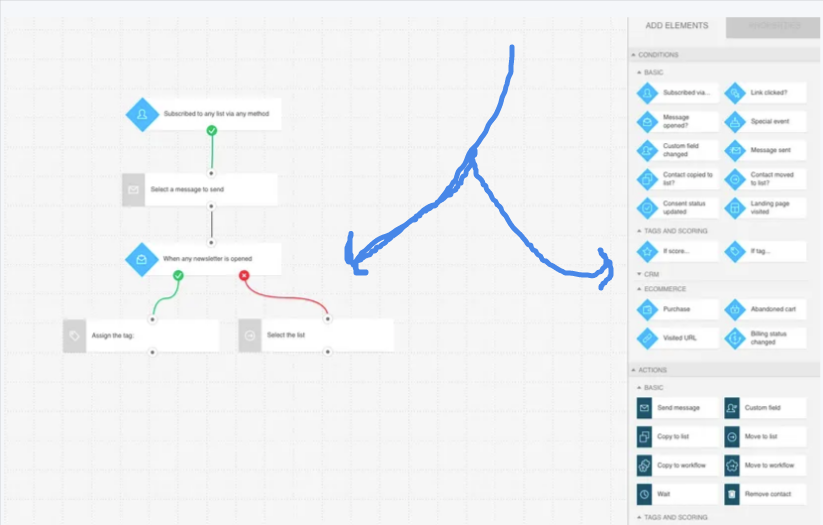
Automation Workflowsallow setting up automatic email sequences. These workflows send emails based on user actions or dates.
The Landing Page Builderhelps create pages without coding. It offers templates and simple editing to build pages fast.
Webinar Integrationconnects live online events directly with email campaigns. It helps manage sign-ups and send reminders.
CRM Capabilitiesstore customer data in one place. This helps track contacts and improve communication easily.

Credit: miloudimarketing.com
Setting Up Campaigns
GetResponse offers many email templatesto choose from. These templates save time and make emails look good. Users can pick one that fits their campaign style. Templates can be changed easily to add images, text, and links.
Segmenting audiences means dividing contacts into smaller groups. This helps send targeted emailsthat match each group’s interests. Groups can be based on age, location, or past actions.
Personalizing emails makes messages feel special. Adding the recipient’s nameor other details can increase email open rates. Personal touches make readers pay more attention.
Scheduling allows emails to be sent at the best time. Users can pick a date and time for their emails to reach inboxes. After setting up, campaigns can be sent automatically with one click.
Automation And Workflows
Trigger-based actionsstart automation when a user does something. This could be opening an email or clicking a link. Each action leads to a specific next step. It helps send the right message at the right time.
Lead scoringrates contacts based on their activity. Higher scores mean more interest. This helps focus on people who want to hear from you more.
Behavioral targetingsends emails based on what users do. It makes messages more personal and useful. This can increase the chance they will read and act.
Drip campaignssend emails automatically over time. They keep users engaged step-by-step. You can set how often and what message comes next.

Credit: miloudimarketing.com
Analyzing Campaign Performance
Tracking open ratesshows how many people read your emails. It helps you see which subject lines work best. You can improve your messages based on this data.
Click-through metricstell how many readers clicked links in your email. This shows interest in your offer or content. It helps you understand what catches attention.
Conversion trackingmeasures how many people take action after clicking. Actions can be buying, signing up, or downloading. This data reveals how effective your campaign is.
A/B testingcompares two versions of an email to find out which works better. You change one thing like the subject line or image. The version with better results wins.
Integrations And Extensions
GetResponseconnects smoothly with many popular e-commerce platforms. This helps you manage sales and email marketing from one place. You can sync customer data and order details easily. It supports platforms like Shopify and WooCommerce.
Social media tools link your accounts for better audience reach. You can share emails or collect leads directly from Facebook and Instagram. This makes growing your contact list simple and fast.
Many third-party appswork well with GetResponse. Tools for analytics, CRM, and payment gateways can be added. This boosts your marketing power without switching programs.
API access lets developers create custom connections. This means businesses can tailor GetResponse to fit their specific needs. The API is easy to use and well documented.

Credit: miloudimarketing.com
Benefits Of Using Getresponse
GetResponsehelps businesses keep their audience interested. It uses tools that send emails based on what users do. This improves engagementby sending the right message at the right time.
More people who get emails often buy products or services. This leads to increased conversions. The platform also automates many tasks, saving a lot of time.
Time-saving automationmeans less work for marketers. They can set up emails to send automatically. This frees up time for other important tasks.
Many marketing tools are costly, but GetResponse offers good value. It is a cost-effective marketingsolution for small and big businesses alike.
Frequently Asked Questions
What Is Getresponse Used For?
GetResponse is an all-in-one online marketing platform. It helps businesses create email campaigns, landing pages, and automate marketing workflows efficiently.
How Does Getresponse Automate Email Marketing?
GetResponse uses workflows to send targeted emails based on user actions. This automation improves engagement and nurtures leads effectively.
Can Getresponse Integrate With Other Tools?
Yes, GetResponse integrates with popular apps like Shopify, WordPress, and Zapier. This streamlines marketing efforts across platforms seamlessly.
Is Getresponse Suitable For Beginners?
Absolutely. GetResponse offers an intuitive interface and helpful templates, making it easy for beginners to start email marketing quickly.
Conclusion
GetResponse helps you send emails and reach your audience easily. It offers tools to create campaigns and track results. You can build mailing lists and automate messages too. The platform is user-friendly and saves time. Using GetResponse can improve your online communication.
It fits well for small businesses and marketers. Try it to see how it suits your needs. Simple, clear, and effective—GetResponse works for many.