Do you want to keep your personal information safe on the internet? Learning how to protect your online privacy is very important. Every day, many people use the internet to chat, shop, watch videos, and play games. But, did you know your data can be seen or stolen by hackers and other strangers?
In this article, we will explain simple ways to keep your online information safe. We will also talk about a powerful tool called NordVPN, which helps protect your privacy easily and quickly.
Why Is Online Privacy Important?
Your online privacy means keeping your personal details safe when you use the internet. These details include your name, address, photos, passwords, and even what websites you visit. If someone steals this information, they can use it to cause trouble.
- Protects your identity: Stops people from pretending to be you.
- Keeps your data safe: Prevents hackers from stealing your files and passwords.
- Blocks unwanted ads: Stops ads from following you around on the web.
- Prevents tracking: Stops websites and companies from watching what you do online.
How to Protect Your Online Privacy – Simple Steps
Follow these easy tips to keep your online life private and safe.
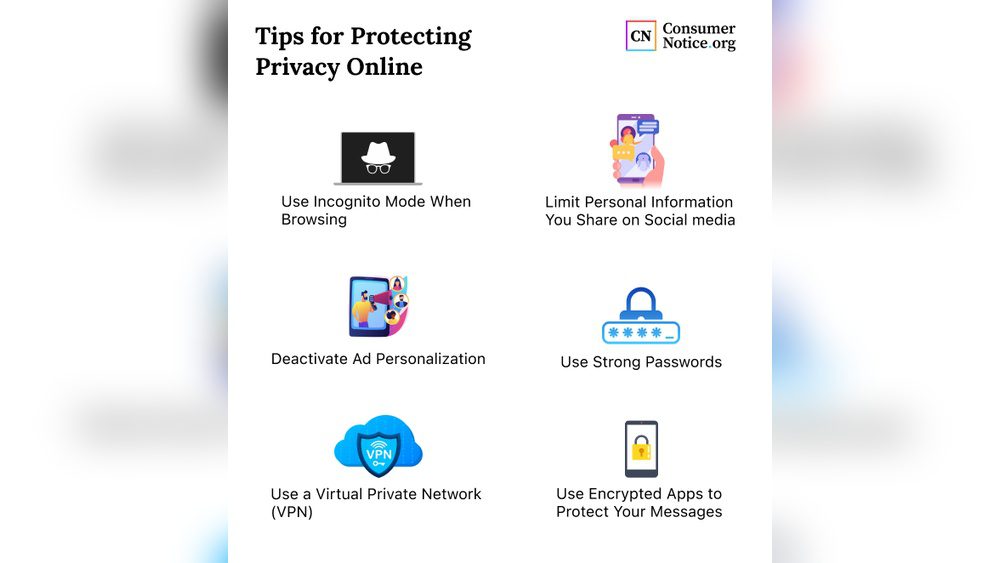
1. Use Strong Passwords
Always create strong passwords for your accounts. Use a mix of letters, numbers, and symbols. Avoid using easy words like “12345” or your name.
2. Keep Your Software Updated
Your computer and phone need updates to fix security problems. Always install updates when they are ready.
3. Be Careful What You Share
Think twice before sharing personal information online. Avoid posting your address or phone number on social media.
4. Use Secure Websites
When shopping or entering information, check if the website starts with https://. The “s” means the website is secure.
5. Turn On Two-factor Authentication
This adds an extra step to log in, like a code sent to your phone. It makes it harder for strangers to access your accounts.
6. Avoid Public Wi-fi For Sensitive Activities
Public Wi-Fi can be unsafe. Don’t check bank accounts or enter passwords on public networks.
What Is a VPN and Why Do You Need It?
A VPN stands for Virtual Private Network. It helps you stay safe online by hiding your internet activity.
When you use a VPN, your internet traffic is encrypted. This means the information you send and receive is scrambled and unreadable to others.
The VPN also changes your IP address. An IP address is like your internet home address. Changing it helps you stay anonymous and avoid tracking.
Why Choose NordVPN to Protect Your Online Privacy?
NordVPN is one of the best tools to keep you safe on the internet. Here is why it stands out:
| Feature | Benefit |
|---|---|
| Fast Speeds | Browse, stream, and download without slowdowns. |
| Secure Encryption | Protects your data with strong security like a locked tunnel. |
| Risk-Free Usage | Safe to use with no worries about data leaks or hacking. |
| IP Address Masking | Hides your real location and identity online. |
| No Ads or Restrictions | Browse freely without annoying ads or blocked content. |
NordVPN creates a secure, encrypted tunnel for your internet traffic. This means hackers, your internet provider, and others cannot see what you do online. It keeps your personal data safe.
With NordVPN, you can change your IP address to a different country. This helps you access websites that might be blocked in your area.
How to Get Started with NordVPN
- Visit the NordVPN website and choose a plan.
- Download and install the app on your device.
- Open the app and sign in with your account.
- Connect to a server in the country you want.
- Start browsing safely and privately.
Extra Tips to Boost Your Online Privacy
- Clear your cookies and history: Regularly delete browsing data.
- Use privacy-focused search engines: Try DuckDuckGo or Startpage.
- Disable location tracking: Turn off location sharing on apps and devices.
- Be careful with emails and links: Avoid clicking unknown links to prevent scams.
Credit: www.kaspersky.com