
Are you looking for a simple way to stay connected with your audience without spending hours every day? Using the GetResponse autoresponder can change how you manage your emails and grow your business effortlessly.
Imagine sending the right message to the right person at the perfect time—automatically. This guide will show you exactly how to set up and use GetResponse autoresponder step-by-step, so you can save time, boost engagement, and watch your email list thrive.
Keep reading to discover the secrets that make your email marketing smarter and more effective.
Setting Up Getresponse Account
Start by entering your basic informationlike name, email, and password. This creates your GetResponse profile. Verify your email address to activate the account quickly. Setting up your profile helps with smooth communication and account security.
The dashboardis your control center. It shows your campaigns, contacts, and reports. Use the left menu to find tools like email creatorand autoresponder setup. The dashboard updates in real-time, so you see your progress instantly.
| Feature | Description |
|---|---|
| Profile Setup | Enter personal details and verify your email. |
| Dashboard | View campaigns, contacts, and performance metrics. |
| Navigation Menu | Access tools like email editor and autoresponders. |
Building Your Email List
Start by importing contactsto get your list ready. You can upload files like CSV or copy-paste emails. Ensure your contacts have given permission to receive emails.
Create signup formsto attract new subscribers. Customize forms with simple fields like name and email. Place these forms on your website or social media pages. This helps grow your list naturally.
Use segmentingto send the right message to the right people. Divide your audience by interests, location, or behavior. This makes your emails more personal and relevant. Segments help keep your list organized and engaged.
Crafting Effective Autoresponder Emails
Choosing the right email templatehelps create a good first impression. Templates save time and keep emails neat. Pick a design that fits your brand styleand message tone. Simple layouts work best for clear reading.
Personalizing messages makes readers feel special. Use the subscriber’s first nameto greet them. Tailor content to their interestsor actions. Personalized emails get more opensand clicks.
Setting up email sequences lets you send messages automatically. Plan a series of emails to welcome, educate, and engageyour audience. Space emails a few days apart. This keeps readers interested without overwhelming them.
Credit: www.elegantthemes.com
Automating Email Campaigns
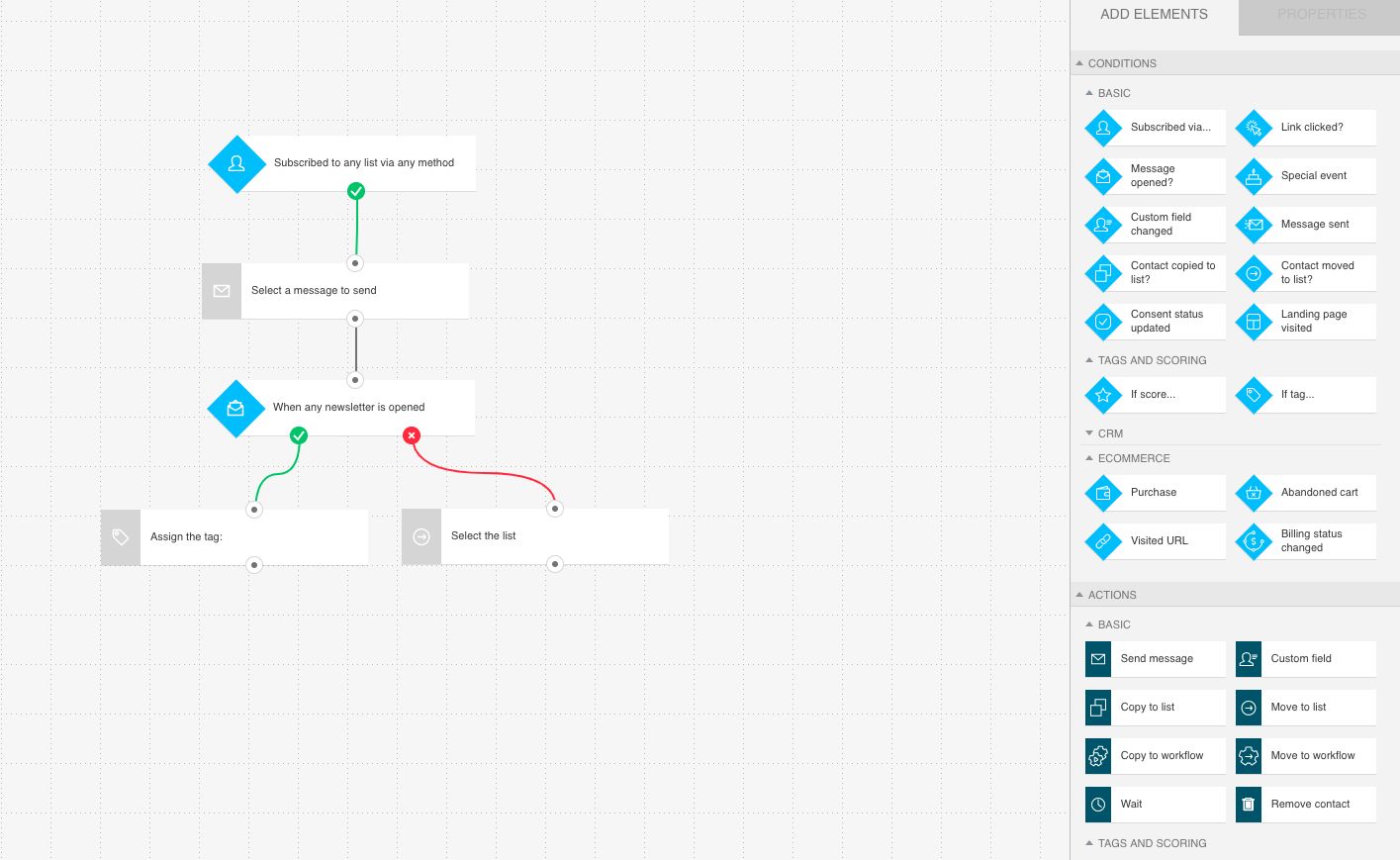
GetResponse lets you automate emailswith easy-to-use tools. Workflow automation helps send emails based on what users do. For example, an email can be sent after someone signs upor clicks a link. This keeps your messages timely and relevant.
Scheduling campaigns is simple. Set the date and time for emails to go out. You can plan a series of emails to send over days or weeks. This keeps your audience engaged without doing the work every day.
| Feature | How It Works |
|---|---|
| Workflow Automation | Sends emails based on user actions like sign-ups or clicks |
| Triggering Emails | Starts email sequences when specific events happen |
| Scheduling Campaigns | Plans email delivery for chosen dates and times |
Tracking And Optimizing Results
Open and click ratesshow how many people read and interact with emails. Tracking these numbers helps understand what works best. Emails with high open rates catch attention well. High click rates mean readers find content useful and take action.
A/B testingsends two versions of an email to small groups. It compares which email gets better results. Testing subject lines, images, or call-to-actions can improve performance. Small changes often make a big difference.
Adjusting strategiesmeans changing emails based on data. If open rates are low, try new subject lines. If click rates drop, improve links or content. Testing and changing keeps readers interested and engaged.
Integrating Getresponse With Other Tools
GetResponseworks well with many CRM systems. This helps keep all your customer data in one place. Sync your contacts and sales info easily. No need to enter data twice. Changes in one tool update the other automatically.
It also connects with popular e-commerce platforms. This lets you send targeted emails based on shopping behavior. Track orders and send follow-up messages fast. Use data like abandoned carts to boost sales. Integration saves time and keeps customers happy.
Tips For Boosting Email Marketing Fast
Strong subject linescatch readers’ attention quickly. Keep them short and clear. Use action wordsand ask questions to spark curiosity. Avoid spammy words like “free” or “buy now” to stay in inboxes.
Sending emails at the right timeincreases open rates. Early mornings or late afternoons often work best. Test different times to find what fits your audience. Consistency helps readers expect your messages.
Clean your email list regularly. Remove inactive or wrong addresses. This improves delivery and engagement. Ask subscribers to update their info. A healthy list keeps your emails relevant and trusted.
Credit: www.getresponse.com

Credit: www.youtube.com
Frequently Asked Questions
What Is Getresponse Autoresponder Used For?
GetResponse autoresponder automates email replies to subscribers. It helps nurture leads, save time, and improve engagement. You can schedule emails and send personalized content automatically.
How Do I Create An Autoresponder In Getresponse?
Log into GetResponse, go to “Autoresponders,” and click “Create Autoresponder. ” Set the trigger, email content, and timing. Save the settings to activate your autoresponder sequence.
Can Getresponse Autoresponder Segment My Email List?
Yes, GetResponse allows list segmentation. You can target specific groups based on behavior or demographics. This improves email relevance and boosts open and click rates.
How To Track Autoresponder Performance In Getresponse?
Use the built-in analytics dashboard to monitor open rates, clicks, and conversions. This data helps optimize your autoresponder campaigns for better results.
Conclusion
Using GetResponse autoresponder can save you time and effort. It helps send emails automatically to your contacts. You can create messages that reach people at the right moment. This tool fits well for small businesses and beginners. Try setting up simple campaigns to start.
Watch how your email communication improves day by day. Stay consistent and check your results often. This way, you keep your audience engaged and informed. Give it a try, and see the difference yourself.