Are you ready to take your marketing efforts to the next level? HubSpot Marketing Automation is the key to working smarter, not harder.
Imagine freeing up hours of your time by automating repetitive tasks like email campaigns, social media posts, and lead nurturing—all while delivering personalized experiences your audience will love. Whether you want to boost efficiency, generate more leads, or build stronger customer relationships, HubSpot gives you the tools to do it seamlessly.
Keep reading to discover how you can unlock the full potential of marketing automation and transform the way you connect with your customers.
.jpg)
Credit: www.signitysolutions.com
Hubspot Marketing Automation Essentials
HubSpot Marketing Automation Essentials offer a powerful way to streamline marketing tasks. This tool helps businesses save time and improve customer engagement. It automates repetitive tasks, allowing teams to focus on strategy and creativity.
HubSpot’s automation features work well for companies of all sizes. The platform provides a user-friendly interface that simplifies complex workflows. It also ensures consistent communication with leads and customers.
Core Features
HubSpot includes email marketing, lead nurturing, and campaign management. It offers tools to create targeted email sequences and track their performance. The platform supports landing pages and forms to capture leads efficiently.
Users can segment contacts based on behavior and demographics. This makes personalization easier and more effective. Reporting dashboards provide insights into campaign success and areas for improvement.
Crm Integration
HubSpot Marketing Automation connects seamlessly with its CRM system. This integration gives a complete view of customer interactions. Sales and marketing teams can access shared data in real time.
Contacts, deals, and communication history sync automatically. This reduces manual data entry and errors. The CRM also helps score leads to prioritize follow-ups.
Automation Capabilities
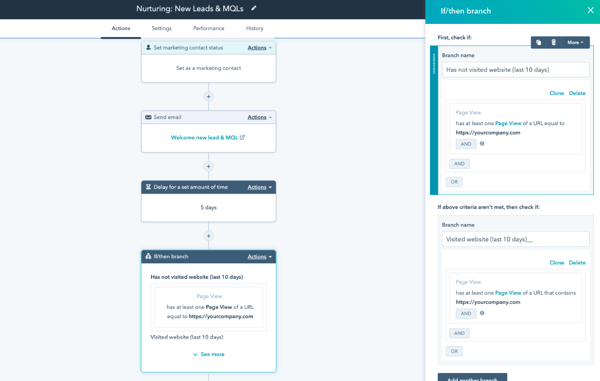
HubSpot allows setting up workflows that trigger actions automatically. These include sending emails, assigning tasks, and updating contact properties. Workflows can be simple or complex, based on needs.
Automation helps deliver timely messages and follow-ups. It improves lead nurturing and boosts conversion rates. Users can test and optimize workflows to increase effectiveness.
%20(1).png?width=600&name=Smart%20CRM%20-%20Journey%20Reports%20(1)%20(1).png)
Credit: www.hubspot.com
Setting Up Automated Workflows
Setting up automated workflows in HubSpot simplifies many marketing tasks. It helps businesses save time and reach customers more effectively. Automation ensures the right message goes to the right person at the right time. Below are key areas to focus on when creating workflows.
Email Campaign Automation
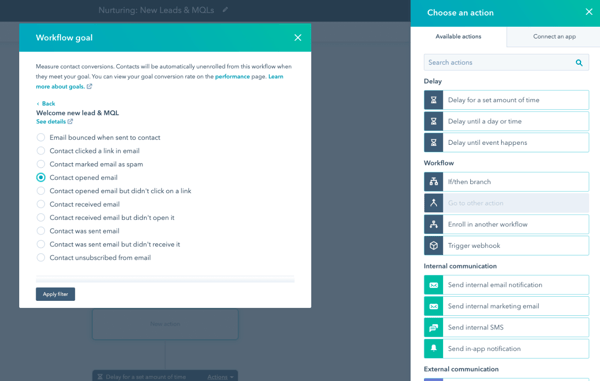
Email campaigns run smoothly with HubSpot automation. You can schedule emails to send automatically based on user actions. For example, sending a welcome email after someone signs up. It allows personalization by using contact details and behaviors. This keeps your audience engaged without manual effort.
Lead Nurturing Processes
Lead nurturing becomes easy with automated workflows. HubSpot tracks where leads are in the buyer’s journey. It sends targeted content to guide them toward making a decision. Automation scores leads and triggers follow-up tasks for sales teams. This keeps leads warm and increases the chance of conversion.
Social Media Scheduling
HubSpot automates social media posts to maintain a consistent presence. You can create schedules for different platforms in one place. Posts publish automatically at the best times for your audience. This saves time and keeps your brand visible without daily manual posting.
Boosting Sales With Smart Tools
HubSpot Marketing Automation offers smart tools that help increase sales efficiently. These tools save time and improve how businesses reach customers. Automation makes marketing and sales tasks easier to manage. It helps teams focus on what matters most: connecting with potential buyers and closing deals.
Using HubSpot’s automation features, companies can attract more leads, create better customer experiences, and keep their sales process smooth. These smart tools improve the entire sales journey from start to finish.
Lead Generation Strategies
HubSpot helps capture leads through forms, landing pages, and emails. Automation sends the right message at the right time to potential customers. It tracks their behavior and scores leads based on interest. This way, sales teams know who to contact first. Lead generation becomes faster and more targeted with HubSpot’s tools.
Personalized Customer Experiences
HubSpot allows businesses to send personalized emails and messages automatically. Customers get content that fits their needs and actions. This personal touch builds trust and keeps customers engaged. Automation also remembers customer details to improve future interactions. Personalized experiences increase the chances of making a sale.
Sales Pipeline Automation
HubSpot automates tasks within the sales pipeline to keep deals moving. It creates reminders, updates deal stages, and assigns tasks to sales reps. Automation reduces manual work and prevents missed opportunities. Sales teams can focus on closing deals instead of managing paperwork. Pipeline automation ensures a steady flow of deals to completion.
Comparing Top Marketing Automation Platforms
Choosing the right marketing automation platform can shape your business growth. These tools save time and improve campaign results. Each platform offers unique features, pricing, and integrations. Understanding their strengths helps find the best fit for your needs.
Hubspot Marketing Hub
HubSpot Marketing Hub offers an all-in-one marketing solution. It combines email marketing, lead management, and analytics. Its user-friendly interface suits beginners and experts alike. Automation workflows streamline repetitive tasks effectively. Integration with HubSpot CRM enhances customer data use.
Activecampaign
ActiveCampaign focuses on email marketing and customer experience. It provides advanced automation with conditional content. The platform supports multi-channel campaigns across email, SMS, and social media. It offers strong segmentation and personalization options. Reporting tools help measure campaign success clearly.
Klaviyo
Klaviyo specializes in e-commerce marketing automation. It integrates well with platforms like Shopify and Magento. The platform uses customer data to create targeted email and SMS campaigns. Its detailed analytics provide insights into customer behavior. Klaviyo is ideal for online stores wanting tailored communication.
Brevo
Brevo offers simple marketing automation with email and SMS campaigns. It suits small to medium businesses. The platform provides easy drag-and-drop editors and pre-built templates. Automation triggers help engage customers at the right time. Brevo also includes basic CRM features for contact management.
Customer.io
Customer.io targets data-driven marketers with its automation tools. It allows sending personalized messages based on customer actions. The platform supports email, push notifications, and SMS. Its workflow builder is flexible for complex campaigns. Customer.io excels in behavior-based marketing automation.
Zapier
Zapier connects multiple apps to automate workflows without coding. It does not offer traditional marketing tools but links platforms together. Users can automate repetitive tasks across email, CRM, and social media apps. Zapier is perfect for businesses needing custom integrations. It enhances automation beyond one platform.
Adobe Marketo Engage
Adobe Marketo Engage suits large enterprises with complex marketing needs. It offers advanced lead management and scoring systems. The platform supports multi-channel campaigns and account-based marketing. Marketo provides deep analytics and AI-powered insights. It requires more technical skills but delivers powerful automation.
Salesforce Pardot
Salesforce Pardot integrates tightly with Salesforce CRM. It focuses on B2B marketing automation. Features include lead nurturing, scoring, and ROI reporting. Pardot supports email marketing and campaign management. Its automation tools help sales and marketing teams work together smoothly.
Keap
Keap targets small businesses and solopreneurs. It combines CRM, marketing automation, and sales tools. Keap automates follow-ups, appointment reminders, and invoicing. The platform is easy to use with customizable templates. It helps small teams manage contacts and communications efficiently.
Omnisend
Omnisend specializes in e-commerce marketing automation. It offers email, SMS, and push notification campaigns. The platform features pre-built automation workflows for cart recovery and welcome series. Omnisend integrates with many online store platforms. It helps increase sales through timely customer engagement.
Choosing The Right Automation Tool
Choosing the right marketing automation tool is key to improving your marketing efforts. The right tool fits your business needs and helps you save time. It also supports your team in managing campaigns and leads effectively. Take time to evaluate several important factors before making a decision.
Business Size Considerations
Small businesses may need simpler automation features. Larger companies often require advanced tools to handle more data. Make sure the tool matches your company size and team capacity. This helps avoid paying for features you do not need.
Feature Requirements
List the features you must have for your marketing tasks. Common needs include email automation, lead scoring, and analytics. Check if the tool supports integration with other software you use. The right features improve your workflow and campaign success.
Budget And Affordability
Set a clear budget before selecting a tool. Consider both upfront costs and ongoing fees. Some platforms offer tiered pricing based on features and users. Choose a solution that fits your financial plan without sacrificing quality.
Scalability And Growth
Pick a tool that grows with your business. It should handle more contacts and complex campaigns as you expand. Scalability prevents the need for frequent platform changes. This saves time and reduces disruption to your marketing efforts.
Credit: www.hubspot.com
Maximizing Efficiency With Hubspot
HubSpot helps businesses save time and work smarter. Its marketing automation tools simplify many daily tasks. This allows teams to focus on strategy and creativity. Efficiency improves as routine work becomes automatic. Campaigns run smoother with clear tracking and easy app connections.
Automating Repetitive Tasks
HubSpot automates tasks like sending emails and posting on social media. It handles lead nurturing without manual input. Workflows trigger actions based on customer behavior. This reduces errors and speeds up processes. Teams spend less time on routine jobs and more on growth.
Tracking Campaign Performance
HubSpot tracks all marketing efforts in one place. Users see which emails get opened and links clicked. Campaign results appear in clear dashboards. This helps marketers understand what works best. Real-time data guides quick decisions for better results.
Integrating Third-party Apps
HubSpot connects easily with other business tools. It integrates with CRMs, analytics, and social platforms. This centralizes data and streamlines workflows. Teams avoid switching between multiple apps. Integration saves time and keeps information accurate.
Tips For Successful Automation
Successful marketing automation with HubSpot requires thoughtful planning and ongoing effort. It is not just about setting up workflows and letting them run. Careful steps improve results and save time. Follow these tips to make the most of your automation strategy.
Setting Clear Goals
Start by defining what you want to achieve with automation. Clear goals guide every decision and action. Goals may include generating leads, nurturing contacts, or increasing sales. Write down specific targets and timelines. This focus helps measure success and adjust tactics.
Segmenting Your Audience
Divide your contacts into groups based on interests, behavior, or demographics. Segmentation allows sending relevant messages to each group. Tailored content increases engagement and response rates. Use HubSpot’s tools to create dynamic lists that update automatically. Keep segments focused and avoid mixing different types of contacts.
Testing And Optimization
Regularly test your automated campaigns to find what works best. Experiment with subject lines, send times, and content formats. Use HubSpot’s analytics to track performance and identify weak points. Make small changes, then compare results. Continuous optimization improves efficiency and boosts your marketing impact.
Frequently Asked Questions
What Is Marketing Automation Hubspot?
HubSpot Marketing Automation automates tasks like emails, social media, and lead nurturing. It personalizes marketing, saves time, and boosts ROI.
Is Hubspot A Crm Or Marketing Automation?
HubSpot is both a CRM and marketing automation platform. It manages customer relationships and automates marketing tasks efficiently.
Can Hubspot Do Automations?
Yes, HubSpot offers powerful automation tools for marketing, sales, and customer service. It automates emails, workflows, deals, and more.
What Is The Best Marketing Automation Platform?
The best marketing automation platform depends on your needs. HubSpot excels in all-in-one usability. ActiveCampaign offers affordability and advanced features. Klaviyo suits e-commerce. Brevo provides cost-effective solutions. Choose based on your business size, budget, and goals for optimal results.
Conclusion
HubSpot Marketing Automation helps businesses save time and work smarter. It automates tasks like emails and social media posts easily. This tool also helps send the right message to the right people. Users can track results and improve their marketing plans.
Small and large companies find it useful to grow their customer base. Using HubSpot can make marketing simpler and more effective every day. Try it to see how automation can support your business goals.