If you want a powerful tool for teamwork, Miro is a great choice. It is an online collaborative whiteboard platform that helps teams brainstorm, plan projects, and work visually together. This article will explain Miro Pricing clearly so you can decide which plan fits your needs.
What Is Miro?
Miro is a smart digital whiteboard where people can work together from anywhere. It lets teams create mind maps, sticky notes, drawings, and more on an endless canvas. You can also use templates and connect Miro to other tools to make teamwork easier.
With Miro, everyone in a team can see updates in real-time. Plus, its AI features help generate ideas quickly and organize information well.
Why Check Miro Pricing?
Understanding Miro Pricing helps you pick the right plan. Different plans offer different features and limits. You want to pay only for what your team uses.
Choosing the right plan saves money and boosts productivity. So, knowing the details about Miro’s pricing is very helpful.

Credit: www.facilitator.school
Miro Pricing Plans Overview
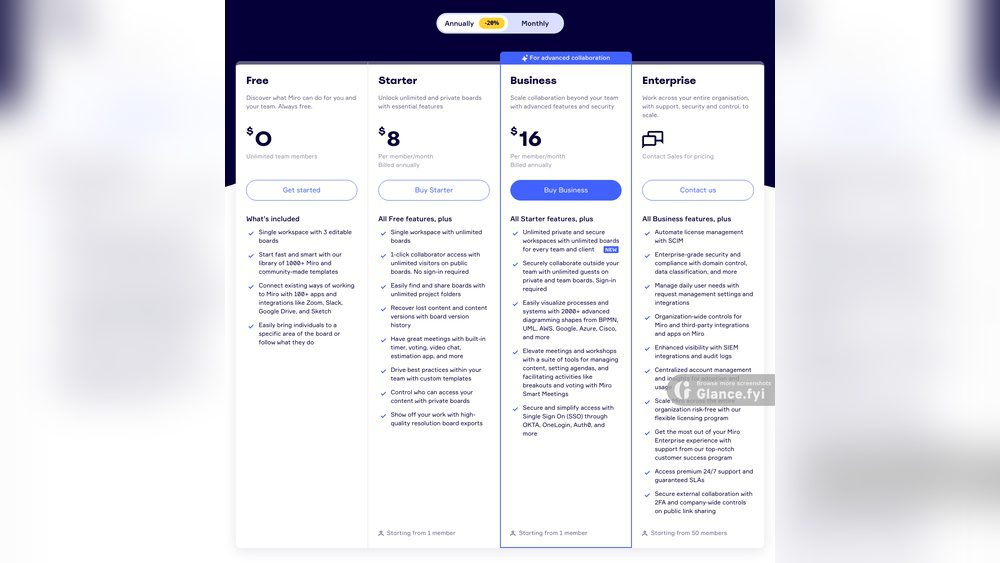
Miro offers several pricing plans. Each plan has unique features and limits. Here is a simple table summarizing the main plans:
| Plan | Price (per user/month) | Key Features | Best For |
|---|---|---|---|
| Free | $0 |
|
Individuals and small teams |
| Starter | Approx. $8 |
|
Small teams and startups |
| Business | Approx. $16 |
|
Growing teams and companies |
| Enterprise | Custom Pricing |
|
Large organizations |
Detailed Look at Each Miro Pricing Plan
1. Free Plan
The Free plan is perfect if you want to try Miro or have a very small group. You get three boards that you can edit. This is good for simple projects or personal use.
You can use many templates and basic tools. However, some advanced features are locked. This plan is a great way to test Miro without paying.
2. Starter Plan
The Starter plan costs around $8 per user each month. It allows unlimited boards. So, your team can work on many projects at once without limits.
This plan also lets you invite guests who can edit anonymously. That means people outside your team can join easily. Starter plan gives more collaboration tools than the Free plan.
3. Business Plan
The Business plan costs about $16 per user per month. It is made for growing teams that need better management and security.
You get advanced integrations, such as connections with Slack or Jira. You also get private board sharing, which keeps your work secure.
Team management tools help you control who can see or edit boards. This plan suits teams who want professional features.
4. Enterprise Plan
The Enterprise plan has custom pricing. You need to contact Miro sales for a quote.
This plan is for large companies that want special security and support. You get dedicated help and advanced admin controls.
It includes features like single sign-on and compliance with corporate policies. If your company needs a secure and flexible solution, this plan fits well.
Credit: miro.com
What Features Affect Miro Pricing?
Miro Pricing depends on several features. Here are key ones that change with different plans:
- Number of Editable Boards: Free users get limited boards.
- Collaboration Tools: Advanced tools come with paid plans.
- Templates and Integrations: Business and Enterprise plans offer more options.
- Security and Admin Controls: Enterprise offers the highest level.
- Guest Access: Starter and above allow anonymous guest editors.
- AI Assistance: Helps teams brainstorm faster, mostly in paid plans.
How to Choose the Best Miro Pricing Plan?
Choosing the right plan depends on your team size and needs. Ask yourself these questions:
- How many people will use Miro?
- Do you need many boards or just a few?
- Will you invite guests or clients to collaborate?
- Do you need integrations with other apps?
- Is security important for your work?
If your team is small and just starting, the Free or Starter plan is enough. If you need more features and control, Business is better. For large companies, Enterprise is the right choice.
Benefits of Using Miro
Before deciding on Miro Pricing, remember why Miro is useful. It helps teams:
- Brainstorm ideas together easily.
- Plan projects visually with templates.
- Work in real-time from anywhere.
- Use AI to get ideas and organize thoughts.
- Connect with popular apps like Slack and Jira.
Miro saves time and makes teamwork more fun and clear.
Tips to Save Money on Miro Pricing
Here are some ideas to save money when picking a Miro plan:
- Start with the Free plan to test the platform.
- Choose annual payment to get discounts.
- Only pay for the number of users you need.
- Use templates and AI tools to work faster.
- Check if your company qualifies for special offers.
Summary: Miro Pricing Made Simple
Miro Pricing fits different team sizes and needs. The Free plan is great for individuals and small teams. Starter and Business plans add more boards and features at affordable prices. Enterprise plan is for big companies needing security and support.
Think about what your team needs most. Then pick the plan that gives you the best tools without paying extra.
Ready to try Miro? Visit Miro’s official website today to explore plans and start collaborating smarter.
Frequently Asked Questions
What Are The Main Miro Pricing Plans Available?
Miro offers Free, Team, Business, and Enterprise plans with different features and user limits.
Does Miro Provide A Free Version For Teams?
Yes, Miro’s free plan includes basic tools for up to 3 editable boards.
Can I Upgrade Or Change My Miro Plan Anytime?
You can upgrade or switch plans anytime from your account settings without losing data.