Thinking about investing in Salesforce but unsure how much it will cost you? You’re not alone.
Understanding Salesforce pricing can feel overwhelming with all its plans, features, and add-ons. But here’s the good news: knowing exactly what you’re paying for can help you get the most value for your money and choose the perfect plan for your business needs.
You’ll find a clear breakdown of Salesforce’s pricing options, what each plan includes, and tips to make the smartest choice. Keep reading to discover how Salesforce pricing works and how it can fit your budget without surprises.
Credit: softteco.com
Salesforce Pricing Models
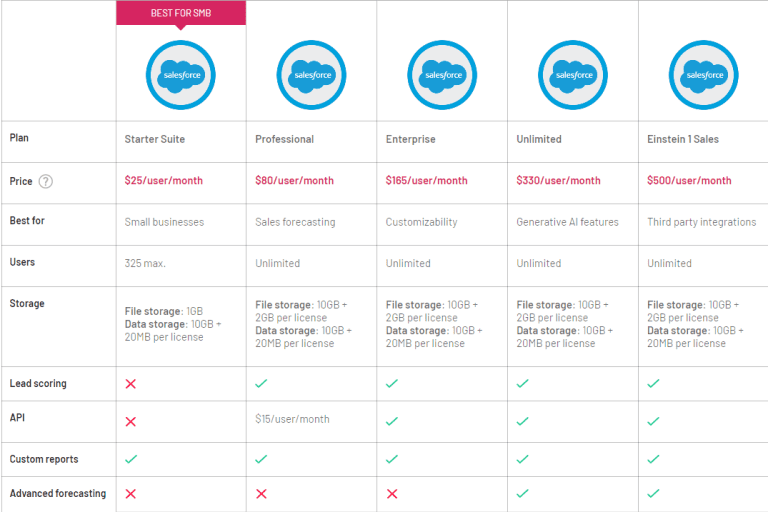
Salesforce pricing models offer flexible options for businesses of all sizes. They include different subscription plans, billing cycles, and user-based pricing. This variety helps companies pick the best fit for their needs and budget. Understanding these models is key to managing costs effectively.
Subscription Plans
Salesforce provides several subscription plans. Each plan has unique features and limits. Plans range from basic to advanced, designed for small to large businesses. Subscribers can upgrade or change plans as their needs grow. This approach ensures access to the right tools without overspending.
Billing Cycles
Salesforce offers monthly and annual billing cycles. Annual billing usually comes with a discount. Monthly billing gives more flexibility with shorter commitments. Businesses can choose what suits their cash flow and planning. Clear billing cycles make expense tracking easier.
User-based Pricing
Pricing depends on the number of users. Each user requires a separate license. This model ensures companies pay only for active users. It also allows scaling by adding or removing users. User-based pricing keeps costs aligned with team size.
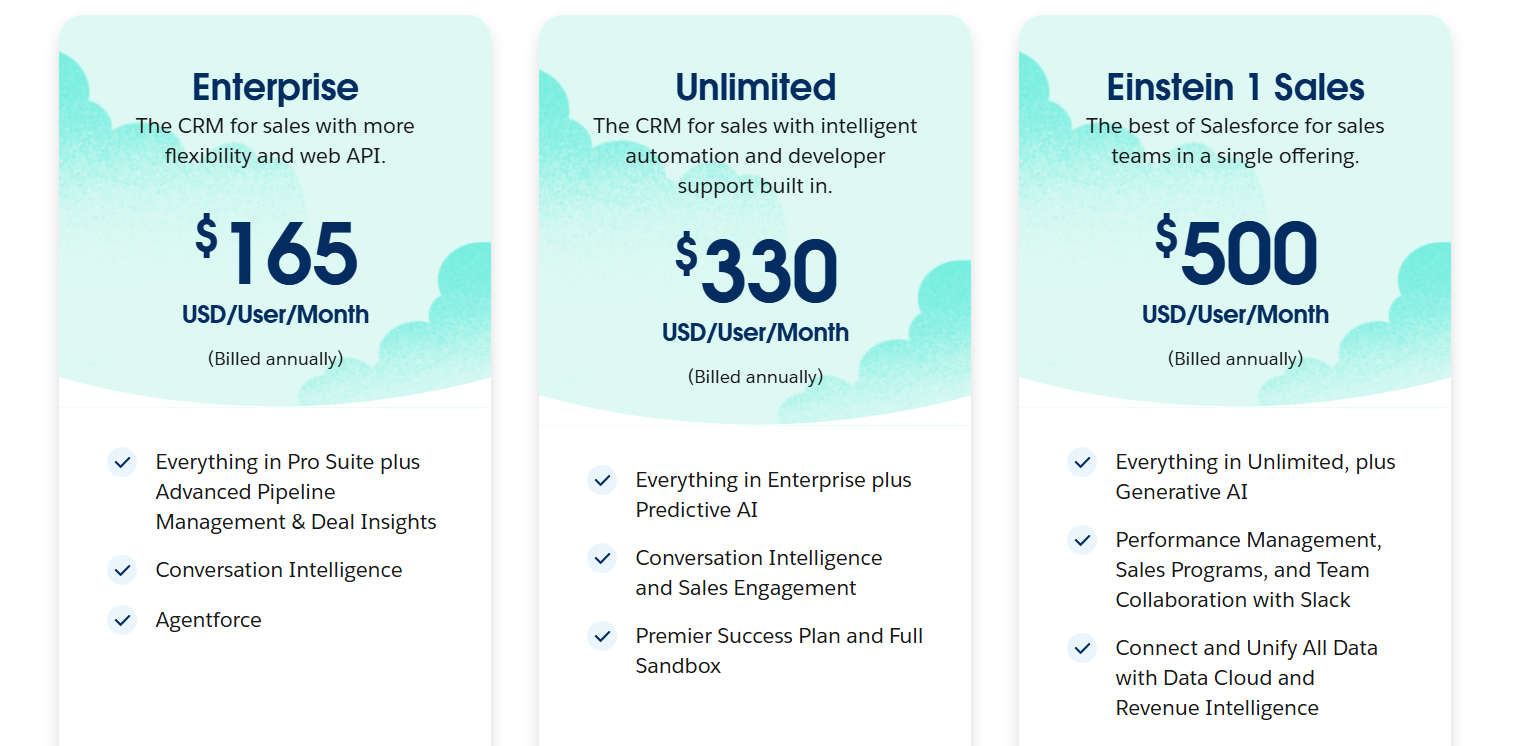
Sales Cloud Pricing Tiers
Sales Cloud offers pricing tiers designed for various business sizes and needs. Each tier provides different features and tools to support your sales process. Understanding these tiers helps you choose the right plan for your company.
Starter Plan Features
The Starter Plan is perfect for small teams just beginning with CRM. It includes basic contact and account management. Users can track leads and opportunities easily. Mobile access allows sales reps to work on the go. Email integration helps keep communication in one place.
Professional Plan Benefits
The Professional Plan suits growing businesses needing more advanced tools. It adds automation for sales processes and forecasting. Customizable dashboards give better insights into sales performance. Collaboration tools improve team communication and productivity. Integration with other apps enhances workflow efficiency.
Enterprise Plan Capabilities
The Enterprise Plan fits larger teams requiring deep customization. It offers advanced automation with workflow rules and approval processes. Role-based permissions ensure data security and control. AI-powered analytics provide smarter sales predictions. It supports integration with external systems for seamless data flow.
Unlimited Plan Advantages
The Unlimited Plan delivers full access to all features and support. It includes 24/7 customer service and unlimited custom apps. Advanced analytics and AI tools help drive strategic decisions. Sandbox environments allow testing without affecting live data. This plan is ideal for complex sales operations needing maximum flexibility.
Service Cloud Pricing Options
Salesforce Service Cloud offers flexible pricing plans to fit different business needs. These plans range from basic support options to advanced features and customizable add-ons. Understanding these options helps you choose the right plan for your service goals and budget.
Basic Service Plan
The Basic Service Plan is ideal for small teams and startups. It provides core customer service tools such as case management and a knowledge base. This plan helps track customer issues efficiently and improves response times. It includes essential automation features to reduce manual tasks.
Advanced Service Features
Advanced Service Features target growing businesses needing deeper customer insights. This plan adds tools like AI-powered chatbots and omnichannel support. It allows service agents to handle requests from phone, chat, email, and social media in one place. Advanced analytics help measure team performance and customer satisfaction.
Customizable Add-ons
Customizable Add-Ons let you tailor Service Cloud to your unique business needs. Options include enhanced automation, field service management, and AI-driven recommendations. You can add extra storage or integrate third-party apps. These add-ons help scale your service capabilities as your business grows.
Credit: cmcglobal.com.vn
Marketing Cloud Pricing
Salesforce Marketing Cloud pricing varies based on the features you choose. It offers flexible plans to meet different business needs. Understanding these costs helps you plan your marketing budget better.
Email Marketing Costs
Email marketing pricing depends on the volume of emails sent. Plans usually start with a base fee plus charges for extra emails. Small businesses pay less, while large enterprises have custom pricing.
The cost includes tools for creating, sending, and tracking emails. Some packages offer templates and analytics to improve campaigns. Choose a plan that matches your email volume and goals.
Social Media Campaign Pricing
Social media pricing varies by the number of channels and posts. Basic plans cover a few accounts with limited posts per month. Advanced plans include more channels and detailed performance reports.
Costs also depend on audience targeting and ad spend integration. Businesses can select options that fit their social media strategy and budget. Salesforce helps manage campaigns efficiently across platforms.
Automation And Ai Tools
Automation and AI tools add to the Marketing Cloud price. These features help personalize campaigns and save time. Pricing depends on the complexity and number of automated workflows.
AI-powered insights improve customer targeting and content suggestions. Businesses pay more for advanced AI capabilities. Decide which automation features bring the most value to your marketing.
Salesforce Suite For Small Business
Salesforce Suite for Small Business offers tailored solutions that fit small teams and budgets. It simplifies customer management by combining sales, service, and marketing tools. Small businesses gain access to essential features without complex setups or high costs. This suite helps streamline daily operations and improve customer relationships effectively.
Starter Suite Overview
The Starter Suite is designed for new and growing businesses. It includes basic CRM features to track leads and manage contacts. Users can automate simple sales processes and access customer support tools. Pricing is affordable, making it easy for small businesses to begin using Salesforce. This suite is perfect for teams that need essential CRM functions without extra complexity.
Pro Suite Benefits
The Pro Suite offers advanced features for more demanding needs. It supports automation of sales workflows and deeper customer insights. Businesses get access to marketing tools and analytics to improve strategies. This suite also allows more customization and integration options. It suits small businesses ready to expand their CRM capabilities and drive growth efficiently.
Choosing The Right Suite
Selecting the right Salesforce Suite depends on business size and goals. The Starter Suite fits smaller teams with basic needs and tight budgets. The Pro Suite suits companies requiring more features and flexibility. Evaluate your sales process, customer service needs, and marketing plans. This ensures you pick a suite that supports your growth without overspending.
Additional Costs To Consider
Salesforce pricing involves more than just monthly or annual subscription fees. Several extra costs can impact your total investment. These costs vary based on your business needs, customization, and usage.
Understanding these additional costs helps you budget better and avoid surprises. Let’s explore the key extra expenses to consider beyond the base price.
Implementation Fees
Setting up Salesforce requires technical work. Implementation fees cover the cost of configuring the system to fit your business. This may include data migration, custom workflows, and system integration.
These fees depend on project complexity and chosen service providers. Sometimes, you may hire Salesforce consultants or developers for this task. Implementation can take weeks or months, adding to the cost.
Training And Support Charges
Training ensures your team knows how to use Salesforce effectively. Many businesses pay for formal training sessions or online courses. Support charges may apply if you want faster help or dedicated assistance.
Salesforce offers different support plans, some with extra fees. Investing in training and support reduces user errors and boosts productivity over time. Consider these costs when planning your budget.
Third-party Integrations
Salesforce works with many third-party apps to extend its features. Some integrations are free, but many require paid licenses or subscriptions. These apps can add valuable functions like marketing automation or analytics.
Costs vary widely based on the number and type of integrations. Check pricing for each third-party tool before adding it. This step prevents unexpected expenses and keeps your CRM ecosystem efficient.
Pricing Updates And Changes In 2025
Salesforce announced important pricing updates for 2025. These changes affect many users and plans. Understanding these updates helps businesses plan their budgets better. The new pricing reflects Salesforce’s evolving product features and market demands.
Pricing adjustments aim to balance customer needs and company growth. Salesforce remains committed to delivering value while adapting its pricing structure. Let’s explore the recent changes and what they mean for users.
Recent Price Adjustments
Salesforce increased prices for several key plans in early 2025. The Sales Cloud and Service Cloud saw moderate rises. Some add-on features now cost more than before. These changes apply mostly to new subscriptions and renewals.
Smaller businesses may notice slight increases in Starter and Pro packages. Enterprise-level plans experienced higher percentage hikes. Salesforce also introduced new tiers with enhanced capabilities, priced accordingly.
Impact On Existing Customers
Current customers received notifications about upcoming price changes. Most retain their existing rates until contract renewal. After renewal, new pricing takes effect automatically. Salesforce offers consultation to help clients adjust budgets.
Some long-term customers qualify for grandfathered pricing discounts. Others can negotiate terms based on their usage and contract size. The company encourages early communication to avoid surprises.
Future Pricing Trends
Salesforce may continue refining prices based on product updates. Expect more tier options and feature-based pricing models. Cloud services and AI tools could influence future costs. Subscription flexibility may increase to suit diverse business needs.
Businesses should monitor announcements and plan for gradual price growth. Staying informed helps avoid budget shocks and ensures smooth CRM operations.
Comparing Salesforce Pricing To Competitors
Comparing Salesforce pricing to its competitors reveals important differences in cost and features. Many businesses evaluate CRM platforms based on what each offers for the price. This section breaks down these comparisons, helping readers understand Salesforce’s position in the market.
Cost Vs Features
Salesforce pricing tends to be higher than some competitors. The platform offers extensive features like automation, analytics, and integrations. Some competitors charge less but offer fewer tools. For many users, the higher cost reflects the broad capabilities included. Choosing depends on which features are essential for the business.
Value For Small Businesses
Small businesses often seek affordable CRM solutions. Salesforce provides a Starter Suite aimed at smaller teams with basic CRM needs. Competitors may offer simpler, cheaper plans with limited features. Salesforce’s small business plans focus on scalability and support. This makes it a strong option for growing companies.
Enterprise-level Comparisons
At the enterprise level, Salesforce shines with advanced customization and robust security. Larger companies benefit from its deep integration options and AI-driven insights. Competitors may offer competitive pricing but often lack the same level of enterprise tools. Salesforce’s pricing reflects its extensive enterprise capabilities and global support.
Tips For Optimizing Salesforce Costs
Managing Salesforce costs effectively can save your business a lot of money. Understanding how to optimize expenses helps you get the best value. Smart choices about plans, licenses, and features reduce unnecessary spending. Here are some practical tips to control your Salesforce budget without losing essential benefits.
Selecting The Right Plan
Choose a Salesforce plan that fits your business size and needs. Avoid paying for features you won’t use. Start with basic plans if your team is small. Upgrade only when your business requires advanced tools. Review each plan’s features carefully before deciding.
Maximizing User Licenses
Assign licenses only to active users who need Salesforce access. Regularly audit user accounts to remove inactive ones. Share licenses among team members if possible. Use permission sets to control access without buying extra licenses. This approach keeps license costs low and efficient.
Leveraging Free Features
Salesforce includes many free tools and features. Use basic reports, dashboards, and automation tools available in all plans. Take advantage of Salesforce Trailhead for free training. Use community forums and support resources to solve problems. Using these free features reduces the need for costly add-ons.
Credit: trailhead.salesforce.com
Frequently Asked Questions
How Much Does Salesforce Cost?
Salesforce pricing starts at $25 per user/month for the Essentials plan. Higher tiers range from $75 to $300 per user/month. Custom pricing applies for enterprise solutions and additional products. Annual billing usually offers discounts. Check Salesforce’s official site for the latest plan details and offers.
How Much Is The Salesforce Price?
Salesforce pricing starts at $25 per user/month for the Essentials plan. Advanced plans range from $75 to $300 monthly. Custom pricing applies for enterprises. Annual billing offers discounts. Visit Salesforce’s official site for detailed, up-to-date pricing on all products and plans.
Is Salesforce Worth It In 2025?
Salesforce remains valuable in 2025 for businesses seeking scalable CRM solutions. It offers robust features, flexible pricing, and strong integration capabilities. Its continuous innovation supports sales, marketing, and customer service growth, making it a worthwhile investment for improving customer relationships and driving revenue.
Conclusion
Salesforce pricing offers options for many business sizes and needs. Plans vary by features and user count. Choose a plan that fits your budget and goals. Keep track of updates as prices may change over time. Understanding costs helps you plan better for your CRM needs.
Take time to compare plans before deciding. This ensures you get value without overspending.