Are you trying to understand how your website visitors behave and make better decisions for your business? Choosing the right analytics tool can feel overwhelming.
You might have heard about Sitebehaviour and Google Analytics, but which one truly fits your needs? This article will help you see the key differences clearly. By the end, you’ll know exactly which tool can give you the insights you need to boost your website’s performance and grow your business. If you’re new to behavior tracking, understanding website heatmap software can give you a strong foundation before comparing these tools.
Keep reading “Sitebehaviour Vs Google Analytics” article to find out which analytics platform is the best match for you.

Credit: www.youtube.com
Key Features Comparison
Comparing Sitebehaviour and Google Analytics helps to understand their strengths. Both tools track website data but differ in how they collect and show information. This section breaks down key features of each platform. The goal is to highlight what makes each tool unique and useful.
Data Collection Methods
Sitebehaviour uses tag-based tracking and server logs to gather data. It tracks user actions like clicks, page views, and form submissions. Google Analytics relies mainly on JavaScript tags embedded in web pages. For a deeper understanding, reading a detailed Sitebehaviour review can help you see how it works in real scenarios. It collects data on user sessions, traffic sources, and behavior. Both tools offer reliable data, but Sitebehaviour provides more detailed user interaction tracking.
User Interface And Reporting
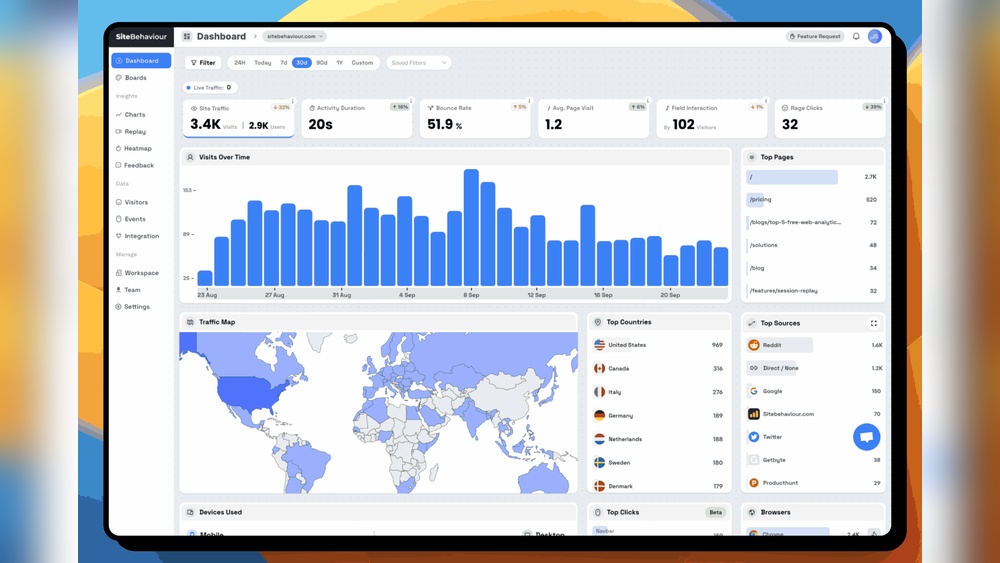
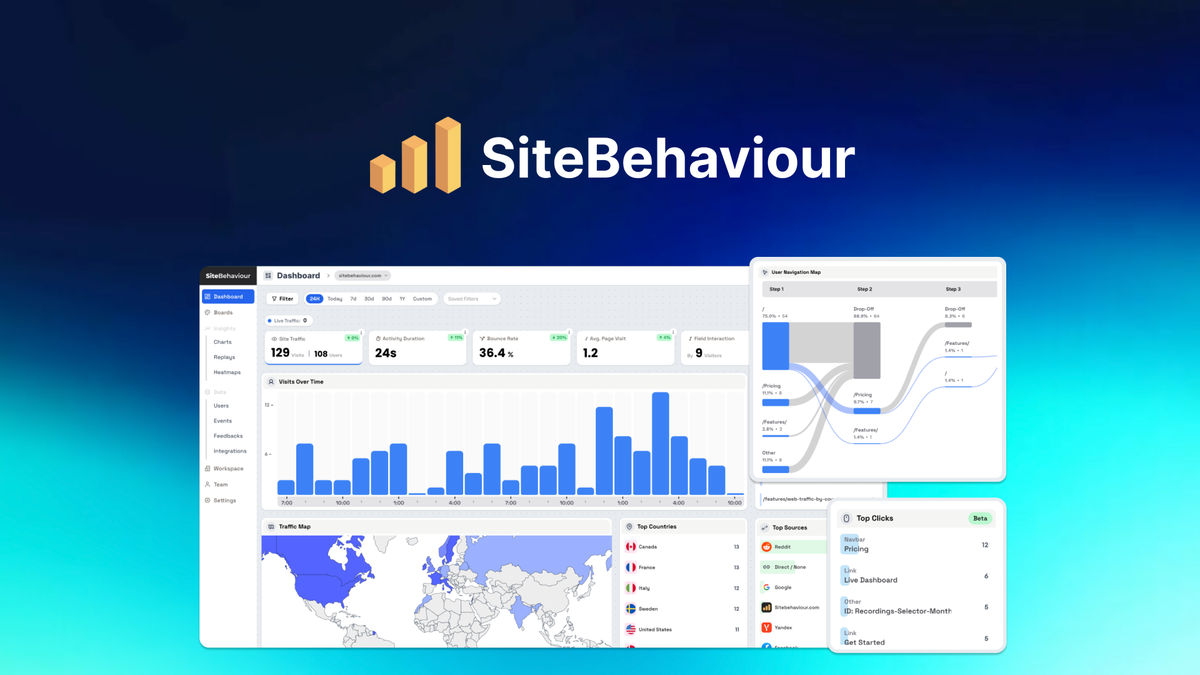
Sitebehaviour offers a clean, simple interface with easy-to-read reports. It focuses on clear visuals and straightforward data presentation. Google Analytics has a more complex dashboard with many menus and options. It provides in-depth reports but can be overwhelming for beginners. Sitebehaviour suits users who want quick insights. Google Analytics fits those who need detailed analysis.
Real-time Analytics
Sitebehaviour shows real-time data on visitor activity and conversions. Users can watch live interactions and page performance. Google Analytics also offers real-time reports but with a slight delay. Both tools help monitor traffic spikes and user behavior as they happen. Sitebehaviour’s real-time features are easier to access and interpret.
Customization Options
Sitebehaviour allows users to customize dashboards and report filters. Users can set specific goals and track custom events. Google Analytics offers advanced customization with segments, custom reports, and goals. It supports complex setups but requires more time to configure. Sitebehaviour provides quick setup for common needs, while Google Analytics suits detailed customization.

Credit: www.youtube.com
Accuracy And Data Reliability
Accuracy and data reliability are key factors in choosing a web analytics tool. They affect how well you understand your website’s performance. Both Sitebehaviour and Google Analytics offer data tracking, but they differ in precision and trustworthiness. Knowing these differences helps you pick the right tool for your needs.
Tracking Accuracy
Sitebehaviour uses a simple tracking method that captures every user action. It focuses on real-time data without delays. Google Analytics tracks user behavior with complex scripts. This can sometimes miss quick actions or slow down data collection. Sitebehaviour tends to have fewer missed hits in fast sessions.
Handling Of Bots And Spam
Google Analytics filters out many bots and spam automatically. It uses built-in filters and regular updates to block fake visits. Sitebehaviour also blocks bots but relies more on manual settings. This can lead to some spam data slipping through. Google’s larger database helps it identify bots more accurately.
Data Sampling Differences
Google Analytics uses data sampling in reports for large sites. It shows estimates instead of exact numbers when traffic is high. This may reduce data accuracy. Sitebehaviour does not use sampling and reports full data. For small and medium websites, Sitebehaviour offers more precise numbers without sampling errors.
Privacy And Compliance
Privacy and compliance are vital topics for any website owner. Visitors want to know their data is safe. Laws like GDPR and CCPA set strict rules for handling personal information. Comparing Sitebehaviour and Google Analytics helps understand their approach to privacy.
Gdpr And Ccpa Compliance
Sitebehaviour offers built-in tools to support GDPR and CCPA rules. It limits data collection and respects user privacy. Google Analytics also follows these laws but requires extra setup. Users must adjust settings to meet compliance. Both platforms provide options to control data use.
Data Ownership And Storage
Sitebehaviour gives clear data ownership to the site owner. Data stays on servers within specific regions. Google Analytics stores data on Google’s global servers. This may raise concerns about data jurisdiction. Knowing where data lives is key for compliance and trust.
User Consent Management
Sitebehaviour includes features to manage user consent easily. It helps show consent banners and track permissions. Google Analytics needs third-party tools for this task. Proper consent management avoids legal issues and builds visitor confidence.
Integration Capabilities
Integration capabilities define how well analytics tools work with other software. Sitebehaviour and Google Analytics offer different levels of integration. Understanding their strengths helps choose the right tool for your needs.
Third-party Tools Support
Google Analytics connects with many third-party tools easily. It supports CRM systems, content management platforms, and social media. Sitebehaviour also integrates with popular tools but has fewer options than Google Analytics. For businesses using various software, Google Analytics offers broader compatibility.
E-commerce Platforms
Google Analytics works smoothly with major e-commerce platforms like Shopify, WooCommerce, and Magento. It tracks sales, conversions, and customer behavior effectively. Sitebehaviour supports e-commerce tracking but focuses more on user experience data. For detailed sales reports, Google Analytics remains the stronger option.
Marketing Automation
Google Analytics integrates with many marketing automation tools such as HubSpot and Mailchimp. This helps marketers track campaigns and customer journeys. Sitebehaviour offers limited marketing automation connections. Marketers who rely on automated workflows may find Google Analytics easier to use.
Pricing And Plans
Pricing and plans play a key role in choosing between Sitebehaviour and Google Analytics. To understand the full cost structure, checking the Sitebehaviour pricing guide will help you choose the right plan.
If you’re comparing tools, exploring Sitebehaviour alternatives can give you better options based on your needs.
Both tools offer different options that suit various needs and budgets. Understanding their pricing models helps businesses decide which fits best.
Free Vs Paid Features
Google Analytics provides a free version with many features. It is enough for small websites and beginners. Sitebehaviour also offers a free plan but with limited tools. Paid plans unlock more reports and deeper insights on both platforms.
Google Analytics’ paid version is called Google Analytics 360. It targets large companies with advanced needs. Sitebehaviour’s paid plans focus on user behavior tracking and conversion analysis. Each platform balances free access with premium services.
Scalability For Businesses
Google Analytics scales well for businesses of all sizes. The free version handles small to medium websites easily. Larger enterprises benefit from Google Analytics 360’s advanced features and support. Sitebehaviour works best for small to mid-sized businesses. Its pricing grows with added features and traffic volume.
Both tools offer options to upgrade as business grows. Sitebehaviour provides flexible plans to match different stages. Google Analytics suits companies needing detailed data at scale.
Cost Efficiency
Google Analytics’ free plan provides strong value for small sites. Paid plans can be costly and fit only large firms. Sitebehaviour’s plans tend to be more affordable for small and medium businesses. It offers essential features without high costs.
Choosing a cost-efficient tool depends on the business size and needs. Sitebehaviour may save money on advanced user behavior tracking. Google Analytics offers extensive data but can require investment for premium access.
Ease Of Setup And Use
Setting up analytics tools should be simple and fast. Easy setup saves time and helps users start tracking data quickly. Both Sitebehaviour and Google Analytics aim to provide clear paths for installation and use. This section explores their ease of setup and daily use.
Installation Process
Sitebehaviour offers a straightforward installation. Users add a small tracking code to their website. The process is quick and does not require deep technical knowledge.
Google Analytics also uses a tracking code snippet. It requires access to website files or a tag manager. Some users may find this step tricky without help.
Learning Curve
Sitebehaviour presents data in a simple, clean layout. New users can understand reports faster. The interface avoids complex jargon and uses plain language.
Google Analytics has more detailed features. It takes time to learn all options. Beginners might feel overwhelmed at first.
Customer Support
Sitebehaviour provides friendly customer support. Users can get help via chat or email. Support answers questions promptly and clearly.
Google Analytics relies mostly on online resources. Users find help through forums and guides. Direct support is limited unless using paid services.
Performance And Speed
Performance and speed are key for any web analytics tool. They affect user experience and data reliability. Fast tools keep your website smooth and visitors happy. Slow tools can delay insights and frustrate users.
Impact On Website Load Time
Sitebehaviour uses lightweight scripts that load quickly. This reduces the impact on your website’s loading speed. Google Analytics scripts are heavier and can slow down your pages. Faster load times help keep visitors on your site longer.
Data Processing Speed
Sitebehaviour processes data in real-time with minimal delay. This allows quick access to fresh reports and stats. Google Analytics may take longer to update data, especially for large sites. Faster data processing helps you make timely decisions.
Credit: appsumo.com
Use Cases And Suitability
Choosing the right analytics tool depends on your specific needs. Sitebehaviour and Google Analytics offer different strengths. Understanding use cases helps pick the best fit. Each tool suits various business sizes and industries differently.
Small Business Needs
Small businesses need easy setup and clear reports. Sitebehaviour provides simple dashboards and user-friendly features. It offers quick insights without heavy technical skills.
Google Analytics is free and widely known. It gives detailed data but can be complex for beginners. Small businesses may find it overwhelming at first.
Enterprise Requirements
Enterprises need deep data analysis and custom tracking. Google Analytics supports advanced integrations and large-scale data handling. It offers powerful tools for marketing and user behavior.
Sitebehaviour focuses on user experience and behavior patterns. It helps enterprises understand visitor actions in real time. This supports quick decision-making and user engagement.
Specific Industry Applications
Retail businesses benefit from Sitebehaviour’s session replay and heatmaps. These features show how users navigate and shop online.
Google Analytics suits industries needing detailed traffic sources and conversion tracking. It helps optimize campaigns and measure ROI effectively.
Both tools adapt to various industries but excel in different areas. Knowing your industry demands guides the right choice.
Pros And Cons Summary
Choosing between Sitebehaviour and Google Analytics depends on your needs. Both tools track website data but offer different features and experiences. Below is a simple summary of their main pros and cons. It helps to see which tool fits your goals best.
Pros Of Sitebehaviour
- Easy to use for beginners and small businesses.
- Offers real-time visitor tracking without delay.
- Focuses on user behavior with clear visual reports.
- Good for understanding how users interact with pages.
- Privacy-friendly with simple data management options.
Cons Of Sitebehaviour
- Limited advanced features for large websites.
- Smaller user community and fewer tutorials.
- Less integration with other marketing tools.
- Some detailed reports missing compared to competitors.
Pros Of Google Analytics
- Free and widely used by many websites.
- Offers deep insights with advanced data analysis.
- Supports integration with many other Google tools.
- Customizable reports for various marketing needs.
- Strong support and lots of online learning resources.
Cons Of Google Analytics
- Complex interface may confuse beginners.
- Data processing can have delays up to 24 hours.
- Privacy concerns due to data sharing with Google.
- Setup requires more time and technical knowledge.
Frequently Asked Questions
What Are The Main Differences Between Sitebehaviour And Google Analytics?
Sitebehaviour focuses on real-time user behavior and session replay. Google Analytics offers detailed traffic reports and broad data analysis. Both tools serve different needs for website insights.
Which Tool Is Easier To Use For Beginners, Sitebehaviour Or Google Analytics?
Sitebehaviour has a simpler interface aimed at quick insights and user sessions. Google Analytics is more complex but offers deeper data and custom reports. Beginners may find Sitebehaviour easier to start with.
Can Sitebehaviour Replace Google Analytics For Website Tracking?
Sitebehaviour complements Google Analytics by showing user actions visually. It does not cover all traffic and conversion metrics like Google Analytics. Using both together gives a fuller picture of website performance.
Conclusion
Both Sitebehaviour and Google Analytics offer useful data for websites. Sitebehaviour focuses more on visitor behavior and user experience. Google Analytics provides detailed traffic and conversion reports. If you want a complete breakdown before deciding, going through a full Sitebehaviour review can help you choose with confidence.
Choosing depends on your specific needs and goals. Try both tools to see which fits best.
Data helps improve your site and attract visitors. Use insights to make smart decisions. Stay consistent and watch your website grow. Simple steps lead to better results.