Choosing the right communication tool can make or break how smoothly your team works together. You might be wondering: should you go with Slack or Microsoft Teams?
Both promise to boost your productivity and keep everyone connected, but which one fits your style and needs better? By the end of this article, you’ll clearly see which platform can help you work smarter, not harder. Ready to find out which tool will transform your teamwork?
Let’s dive in.
Platform Features
Platform features define how well a communication tool fits team needs. Slack and Microsoft Teams offer strong features that help teams work together smoothly. Each platform has unique strengths in messaging, structure, search, and file sharing. Understanding these areas helps choose the right tool.
Messaging And Threads
Slack uses a clean chat interface with threaded conversations. Threads keep discussions organized under one message. This helps reduce clutter and makes it easy to follow replies.
Microsoft Teams also supports threaded messages in channels and chats. It allows users to reply directly to a message, keeping context clear. Teams offers rich text formatting and emojis to enhance chats.
Channels Vs Teams Structure
Slack organizes conversations into channels. Channels can be public or private and focus on topics or projects. Users can join or leave channels freely.
Microsoft Teams uses a team-based structure with channels inside each team. Teams represent departments or groups, and channels are subtopics. This hierarchy provides clear boundaries but can feel more rigid.
Search Capabilities
Slack’s search is fast and filters by people, channels, dates, and file types. It highlights matching words in messages, making results easy to scan.
Microsoft Teams has a powerful search that covers chats, files, and apps. It uses Microsoft Graph to show relevant results across the Office 365 suite. Search in Teams can feel more integrated for users of Microsoft products.
File Sharing And Collaboration
Slack allows file uploads directly in chats and channels. It integrates with cloud storage like Google Drive and OneDrive. Users can preview files without leaving the app.
Microsoft Teams ties file sharing to SharePoint and OneDrive. Files shared in channels are stored automatically in SharePoint folders. This setup works well for teams using Office apps for collaboration.

Credit: www.reddit.com
User Experience
User experience plays a big role in choosing the right communication tool. It affects how easily teams can work and share ideas. Both Slack and Microsoft Teams offer different experiences that fit various needs. Understanding their design, notification system, and reliability helps users pick the best option for their work.
Interface Design
Slack uses a clean, colorful layout that feels light and simple. Its design focuses on conversations with channels and direct messages easy to find. Icons and menus are clear, making navigation smooth for new users.
Microsoft Teams has a more structured interface. It groups chats, teams, and files in a sidebar. The design matches other Microsoft apps, which helps users familiar with Office tools. It can feel busier but offers many features in one place.
Notification Management
Slack gives users strong control over notifications. You can mute channels or set alerts for keywords. This helps reduce distractions while keeping important messages visible.
Microsoft Teams provides flexible notification options too. It allows alerts for mentions, replies, and reactions. Users can customize notifications per channel or team, balancing focus and awareness.
Performance And Reliability
Slack runs smoothly on desktop and mobile. It loads quickly and rarely crashes. Its cloud-based system ensures messages sync fast across devices.
Microsoft Teams performs well but can slow down with many active users or files. Updates improve stability often. Its integration with Microsoft 365 adds reliability for businesses using those tools.
Integration And Extensions
Integration and extensions shape how communication tools fit into daily workflows. Both Slack and Microsoft Teams offer ways to connect with other apps. These connections help teams work smoother and faster.
Choosing a platform with strong integration can save time and reduce app switching. Extensions add useful features that enhance productivity. Below, explore how Slack and Microsoft Teams handle integrations and extensions.
Third-party App Support
Slack supports over 2,000 third-party apps. This wide range covers project management, file sharing, and more. Users can easily add apps from Slack’s App Directory. The process is simple and quick.
Microsoft Teams also supports many third-party apps, though fewer than Slack. Its integration library grows steadily. Teams users can add apps directly from the Teams store.
Both platforms let users integrate popular tools like Trello, Asana, and Zoom. Slack’s app ecosystem is larger but Teams focuses on deep app connections.
Native Tool Integration
Slack integrates smoothly with Google Workspace and other cloud services. It also supports built-in file sharing and video calls. These features work seamlessly within Slack’s interface.
Microsoft Teams excels at native integration with Microsoft 365. Apps like Word, Excel, and SharePoint work inside Teams. This allows editing documents without leaving the app.
Teams’ tight Microsoft 365 integration benefits organizations using Microsoft products. Slack offers flexibility for users relying on diverse tools.
Customization Options
Slack offers custom workflows with its Workflow Builder. Users can automate routine tasks without coding. Custom bots and slash commands extend functionality further.
Microsoft Teams provides customization through Power Automate. Users can build complex workflows connecting Teams to many services. Teams also supports custom apps and bots.
Both platforms allow tailoring the experience to fit team needs. Slack focuses on ease and speed. Teams offers powerful automation for advanced users.
Security And Compliance
Security and compliance are crucial factors for businesses choosing a communication platform. Both Slack and Microsoft Teams offer strong security features to protect your data. They help maintain privacy and meet legal requirements in many industries. Understanding their approaches to data protection, access controls, and compliance standards can guide your decision.
Data Protection
Slack uses encryption to secure data in transit and at rest. Microsoft Teams also encrypts data both during transfer and storage. Both platforms apply advanced security protocols to prevent unauthorized access. Slack offers enterprise key management for extra control. Teams integrates with Microsoft’s broader security tools for enhanced protection.
Access Controls
Slack allows administrators to set permissions for users, channels, and integrations. It supports multi-factor authentication to add an extra security layer. Microsoft Teams provides detailed access controls linked to Azure Active Directory. It enables conditional access policies to manage user access based on conditions. Both platforms help limit access to sensitive information effectively.
Compliance Standards
Slack complies with GDPR, HIPAA, SOC 2, and other major standards. Microsoft Teams meets GDPR, HIPAA, FedRAMP, and ISO certifications. Teams often benefits from Microsoft’s long-standing enterprise compliance experience. Both platforms offer audit logs and data retention policies. These features assist businesses in staying compliant with regulatory rules.
Pricing And Plans
Pricing and plans play a big role in choosing between Slack and Microsoft Teams. Both offer free versions with basic features. Their paid plans unlock more tools and storage. Understanding what each plan offers helps businesses pick the right fit for their needs.
Free Vs Paid Features
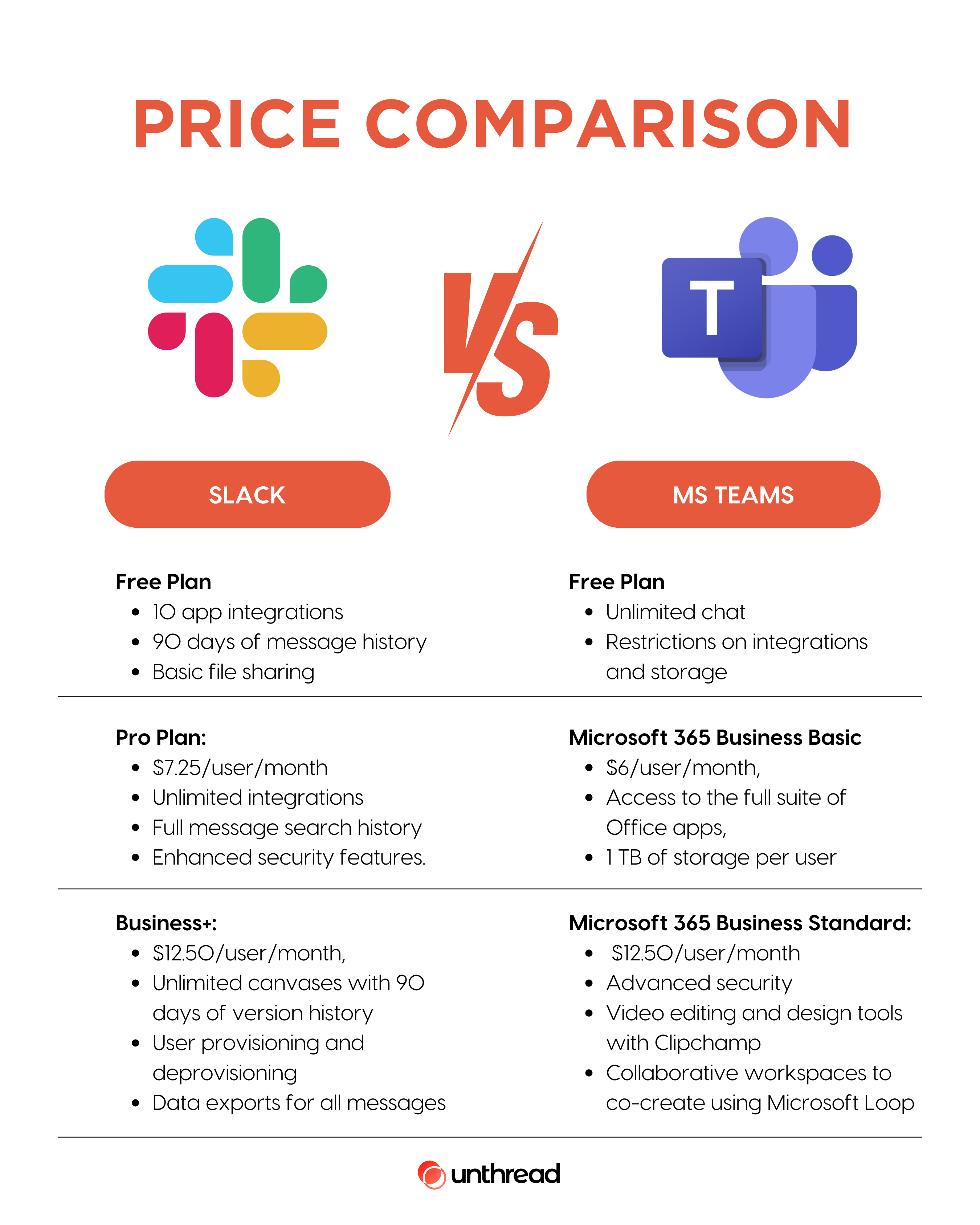
Slack’s free plan includes 90-day message history and 10 app integrations. Microsoft Teams free version allows unlimited chat and search, but limits meeting time and storage. Paid Slack plans add features like group calls and advanced security. Paid Microsoft Teams plans offer more storage and full Office app access.
Cost Comparison
Slack’s paid plans start at $7.25 per user each month. You can learn more about Slack pricing here. Microsoft Teams comes with Microsoft 365 subscriptions starting at $5 per user monthly. Microsoft Teams pricing bundles email, cloud storage, and Office apps. Slack charges separately for some of these tools. Microsoft Teams may cost less if you need multiple services.
Value For Small Businesses
Small businesses may find Microsoft Teams more cost-effective. It combines chat, video, and productivity apps in one package. Slack offers a simpler chat experience with many third-party app options. Teams suits businesses using Microsoft tools heavily. Slack fits teams wanting flexible integrations and a user-friendly interface.

Credit: www.nimblework.com
Collaboration Across Teams
Collaboration across teams is vital for smooth workflows and fast decision-making. Both Slack and Microsoft Teams offer tools that help teams communicate and work together. These platforms support different ways to connect within and outside the organization. Understanding how they handle external communication, guest access, and cross-organization collaboration helps choose the best fit.
External Communication
Slack allows users to connect with other companies using Slack Connect. Teams can send messages, share files, and hold calls securely. Microsoft Teams supports external communication through guest access and federation. It lets users chat or meet with people outside their organization. Both platforms keep conversations safe and private.
Guest Access
Slack offers guest accounts for people who need limited access to channels. Guests can participate in discussions but cannot access all workspace features. Microsoft Teams also provides guest access with more control over permissions. Guests can join teams, share files, and collaborate on projects. Managing guest access is simple in both tools.
Cross-organization Collaboration
Slack excels at connecting different companies with shared channels. These channels work like regular ones but include members from multiple organizations. Microsoft Teams supports cross-organization collaboration through shared channels and meetings. It integrates well with Microsoft 365 apps, helping teams work on documents together. Both platforms encourage teamwork beyond company borders.
Adoption And Market Presence
The adoption and market presence of Slack and Microsoft Teams reveal how widely these platforms are used. Both tools have grown rapidly, securing strong footholds in business communication. Their popularity reflects changing work environments and digital collaboration needs.
Understanding their user base, industry reach, and platform switching trends helps businesses make informed choices. These factors highlight where each platform stands in the competitive landscape.
User Base Size
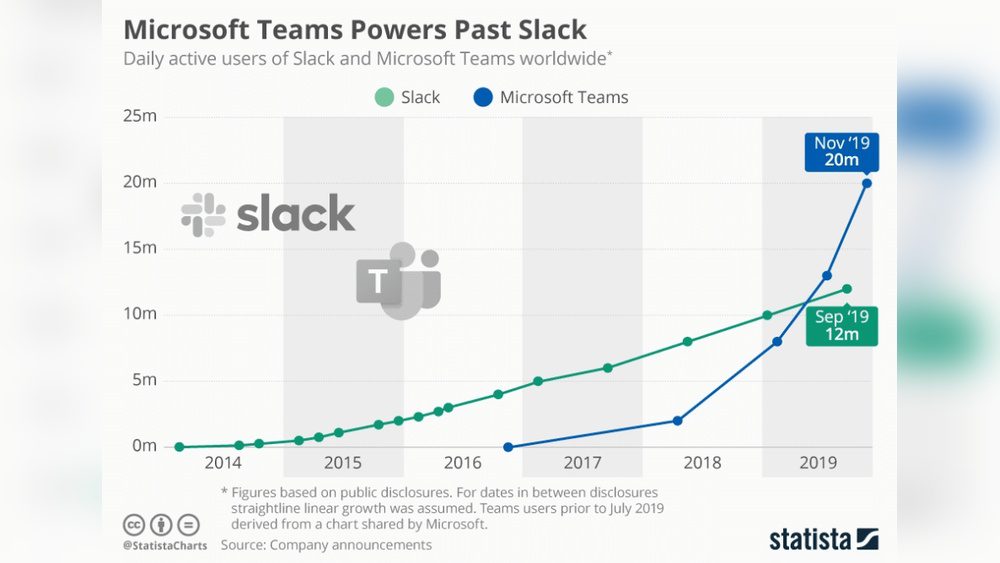
Slack has over 18 million daily active users worldwide. Many startups and tech companies prefer Slack for its user-friendly design. Microsoft Teams boasts more than 280 million monthly active users. It benefits from deep integration with Microsoft 365 products. Teams serves large enterprises and government organizations extensively.
Industry Usage
Slack is popular in tech, media, and creative industries. Its flexibility supports fast-paced, innovative teams. Microsoft Teams finds strong adoption in education, healthcare, and finance sectors. Its security features attract regulated industries. Both platforms extend beyond their core markets, adapting to various business sizes.
Trends In Switching Platforms
Many companies move from Slack to Microsoft Teams to unify communication and reduce costs. Teams’ integration with Office tools simplifies IT management. Some users switch from Teams to Slack for a more intuitive chat experience. Platform choice often depends on existing software ecosystems and team preferences.
Common Challenges
Both Slack and Microsoft Teams face common challenges that affect user experience and productivity. These issues can slow down communication and cause frustration. Understanding these challenges helps teams choose the right tool and manage their workflows better.
Notification Overload
Users often get too many notifications in both Slack and Teams. Constant alerts can distract and reduce focus. Important messages may get lost in the noise. Managing notification settings is necessary but can be tricky. This overload affects both individual users and entire teams.
Information Management
Keeping information organized is difficult on both platforms. Conversations spread across channels and threads create confusion. Finding past messages or files can take too much time. Lack of clear structure leads to lost or duplicated data. Teams must set clear rules to manage information well.
Technical Issues
Both Slack and Teams sometimes face technical problems. Users report slow loading times and sync delays. Integration with other software can fail or cause errors. Connectivity issues also disrupt meetings and chats. Regular updates and good IT support help reduce these problems.
Migration Considerations
Migrating from Slack to Microsoft Teams requires careful planning. This process involves more than just changing tools. It affects how your team communicates and collaborates daily. Understanding the key migration considerations helps ensure a smooth transition. The following sections explain important aspects of switching platforms.
Switching From Slack To Teams
Switching from Slack to Teams needs clear steps. Begin by informing your team about the change. Prepare them for new features and a different interface. Set a timeline for the switch to avoid confusion. Keep communication open to answer questions quickly. This approach reduces resistance and builds confidence.
Data Transfer
Moving data from Slack to Teams takes effort. Export your Slack messages, files, and channels first. Use available tools to import data into Teams. Check if all content has transferred correctly. Some data may not move automatically, so manual steps might be needed. Secure backups before migration protect against data loss.
User Training
User training is vital after migration. Offer simple guides and tutorials for Teams basics. Schedule training sessions to cover chat, meetings, and file sharing. Encourage hands-on practice to build skills. Provide ongoing support to address user challenges. Well-trained users adapt faster and use Teams effectively.
Credit: unthread.io
Frequently Asked Questions
Why Are Companies Switching From Slack To Teams?
Companies switch from Slack to Teams to save costs with bundled Microsoft licenses, improve integration, and manage collaboration in one platform. Teams offers seamless Office 365 integration, enhanced security, and better scalability for enterprises. This boosts productivity and simplifies IT management across organizations.
Does Anyone Still Use Slack?
Yes, millions still use Slack daily. It offers seamless collaboration, strong integrations, and secure external communication through Slack Connect. Many businesses value its user-friendly interface and productivity features despite competition from Microsoft Teams.
Is Slack Expensive Than Teams?
Slack generally costs more than Microsoft Teams, especially for larger teams or advanced features. Teams offers more affordable plans with bundled Microsoft 365 apps.
Conclusion
Choosing between Slack and Microsoft Teams depends on your team’s needs and preferences. Slack offers easy-to-use messaging and many app integrations. Microsoft Teams combines chat, video calls, and Office tools in one place. Both tools help teams communicate and work together efficiently.
Consider your budget, existing software, and collaboration style before deciding. The right platform will support your team’s productivity and connection. Test both to see which fits best with your daily work.