Typeform Review: A Deep Dive Into Modern Online Forms and Surveys
The way people collect feedback, leads, and information online has changed. Gone are the days of boring, static forms that look the same everywhere. Now, businesses and creators want tools that are smart, interactive, and enjoyable for people to use. That’s where Typeform comes in. If you’ve ever filled out a beautiful, conversational survey or form online, there’s a good chance it was built with Typeform.
But what makes Typeform stand out from all the other form builders out there? Is it really worth your time and money? In this review, we’ll go deep into every part of Typeform, from the way it works and feels, to the features that set it apart, and how it compares with big names like Google Forms and SurveyMonkey.
Whether you’re a small business owner, marketer, teacher, or just someone looking for a better way to collect answers, this article will help you decide if Typeform is the right tool for you.
What Is Typeform?
Typeform is an online form builder that lets anyone create interactive surveys, quizzes, registration forms, feedback forms, and more. Unlike most traditional form tools, Typeform uses a one-question-at-a-time design that feels more like a conversation than a form. This approach helps people stay focused, increases completion rates, and makes filling out forms less boring.
Founded in 2012 in Barcelona, Typeform quickly became popular for its beautiful forms and easy-to-use interface. Today, millions of people and companies—like Apple, Airbnb, Nike, and Uber—use Typeform to create forms that people actually want to fill out.
Key Features Of Typeform
Conversational Form Design
The main thing that separates Typeform from other form builders is its conversational style. Instead of showing all questions at once, Typeform presents one question at a time. This makes the experience feel more personal and less overwhelming. People are more likely to finish the form because it’s simple, clean, and even a little fun.
Drag-and-drop Builder
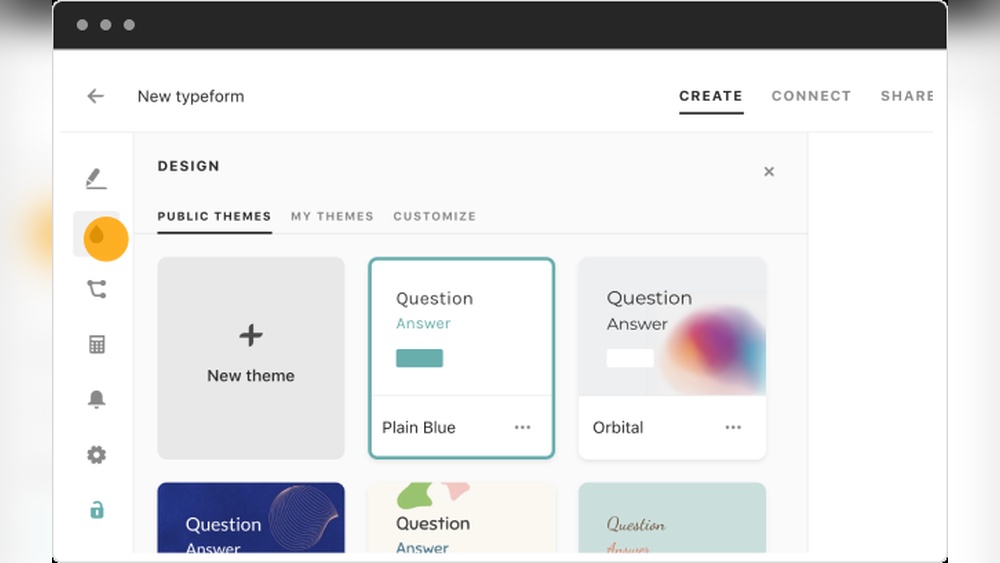
You don’t need to know any coding to build a Typeform. The drag-and-drop builder makes it easy to add, move, or delete questions. You can also change the order, add images or videos, and customize the design to match your brand. The builder gives you real-time previews, so you always know what your form will look like.
Rich Media Support
Most form builders let you add basic text and maybe an image. Typeform goes further. You can include images, GIFs, and videos right inside your questions. This makes forms more engaging and helps you explain things better. For example, a product feedback form can show a picture of the product being discussed.
Question Logic (conditional Logic)
Typeform supports logic jumps, which means the form can adapt to people’s answers. If someone says they’re not interested in a certain topic, you can skip related questions. This makes the experience more relevant for each person and keeps forms shorter.
Integration With Other Tools
Typeform connects with hundreds of apps and services, such as Google Sheets, Slack, Mailchimp, and Zapier. You can send form responses directly to your email, update your CRM, or trigger automated workflows. This saves time and helps you act on your data faster.
Templates Library
Not sure how to start? Typeform offers a large library of pre-designed templates for surveys, quizzes, event registrations, job applications, and more. You can use these as-is or customize them to fit your needs.
Analytics And Reporting
After collecting responses, Typeform gives you detailed analytics. You can see how many people started and finished the form, average completion time, drop-off points, and more. You can also export data as CSV, XLS, or connect to Google Sheets for deeper analysis.
Custom Design And Branding
Typeform lets you use your logo, colors, and fonts to match your brand. This is important for making your forms look professional and trustworthy. You can also remove Typeform branding on paid plans.
Mobile Optimization
All Typeforms are mobile-friendly by default. They look and work great on any device, so people can respond from their phone, tablet, or computer without problems.
Security And Compliance
Typeform takes privacy seriously. Forms and data are SSL-encrypted, and the company follows GDPR rules for handling personal information. You can also set up password protection, response limits, and other security features.
How Typeform Solves Real Problems
Higher Completion Rates
Many people start a form or survey but never finish it. Typeform’s one-question-at-a-time design helps people stay focused and less stressed. Studies show that interactive forms like Typeform can boost completion rates by up to 30% compared to traditional forms.
Better Data Quality
When people enjoy the experience, they give more thoughtful and honest answers. The conversational style and logic jumps help keep questions relevant, so you get better data with less noise.
Saving Time With Integrations
Manually copying data from forms into spreadsheets or other tools is slow and risky. With Typeform’s integrations, you can automate these tasks and avoid mistakes. For example, you can send leads straight to your sales team or trigger a welcome email to new signups.
Easy Collaboration
Typeform allows team members to work together on forms. You can invite others, assign roles, and make edits in real-time. This is a big plus for businesses that need input from different departments.
Flexible Use Cases
From customer feedback to event registrations, Typeform fits many situations. You don’t need separate tools for different types of data collection—Typeform does it all.
Typeform Vs. Other Form Builders
To see how Typeform stands out, let’s compare it with two of the most popular alternatives: Google Forms and SurveyMonkey.
| Feature | Typeform | Google Forms | SurveyMonkey |
|---|---|---|---|
| Design | Modern, conversational, customizable | Basic, traditional, limited customization | Professional, but less interactive |
| Logic Jumps | Advanced | Basic | Available (paid plans) |
| Integrations | Hundreds (Zapier, Slack, Mailchimp, etc.) | Google Workspace only | Many (Zapier, CRMs, paid) |
| Rich Media | Yes (images, video, GIFs) | Limited | Limited |
| Branding | Full branding (paid) | Basic | Full branding (paid) |
| Analytics | Detailed, exportable | Basic charts | Advanced (paid) |
| Mobile Friendly | Yes | Yes | Yes |
| Price | Free & Paid plans | Free | Free & Paid plans |
Main Advantages Over Google Forms
- User Experience: Typeform feels more personal and less like a test.
- Branding: Google Forms are hard to customize. Typeform lets you add your look and feel.
- Logic and Media: Typeform supports advanced logic and media that Google Forms cannot match.
- Integrations: Google Forms is limited to Google’s own apps; Typeform integrates with many more services.
Main Advantages Over Surveymonkey
- Design: Typeform’s modern design is more engaging.
- Ease of Use: SurveyMonkey can feel complex, especially for beginners. Typeform is more intuitive.
- Value for Money: SurveyMonkey locks many features behind expensive plans. Typeform offers more for less at the mid-tier.
Credit: qzzr.com
Pricing: Is Typeform Worth It?
Typeform has both free and paid plans. Here’s a quick overview:
| Plan | Best For | Main Features | Monthly Price |
|---|---|---|---|
| Free | Personal use, testing | Up to 10 questions per form, 10 responses/month, basic features | $0 |
| Basic | Freelancers, small teams | 100 responses/month, unlimited forms, basic logic, remove Typeform branding | Starts at $29 |
| Plus | Growing businesses | 1,000 responses/month, advanced logic, integrations | Starts at $59 |
| Business | Large teams, enterprises | 10,000+ responses/month, team collaboration, priority support | Starts at $99 |
You can pay yearly for a discount. The free plan is good for trying things out, but most features that make Typeform special (like removing branding, higher limits, advanced logic, and integrations) require a paid plan.
Is It Expensive Compared To Others?
Typeform is not the cheapest option, but you get more value for the price. The forms look and feel better, which can increase your response rates and data quality. Cheaper tools like Google Forms or Jotform can work for simple needs, but they lack the design and logic features that make Typeform unique.
A Non-obvious Insight: Time Saved Is Money Earned
Many people only look at the price per month. But think about the time you save because Typeform automates data entry, integrates with your other tools, and gets more people to complete your forms. Saving an hour or two per week can easily cover the cost of a paid plan.
Real-world Examples: Who Uses Typeform And How?
Marketing Teams
Marketers use Typeform to collect leads, feedback, and customer preferences. For example, a real estate company can use Typeform to qualify leads, asking about budget, location, and home type. With logic jumps, only relevant questions show up, making the process smoother for clients.
Hr And Recruitment
HR teams use Typeform for job applications and employee feedback. The interactive format helps job seekers feel more comfortable, and logic jumps can guide people through complex applications.
Education
Teachers and trainers use Typeform for quizzes, course feedback, and registrations. The conversational style keeps students engaged, and analytics help teachers see where students struggle.
E-commerce
Online stores use Typeform to gather product feedback, conduct customer satisfaction surveys, and run contests. Typeform can also help segment customers by interests, sending each group to the right product or offer.
Events
Event organizers use Typeform for RSVPs, surveys, and collecting questions for speakers. The forms look professional and can be branded to match the event’s style.
Non-obvious Use Case: Customer Onboarding
Some companies use Typeform as an onboarding tool for new customers. By asking the right questions in a friendly way, businesses can learn about their customers and provide a more personalized experience from day one.

Credit: www.greatsoftware.io
How Easy Is Typeform To Use?
Typeform is designed for non-technical people. Here’s how you can get started:
- Sign Up: Create an account using email or Google login.
- Choose a Template or Start From Scratch: Select from hundreds of templates or build your own.
- Add Questions: Use the drag-and-drop editor to add multiple choice, short text, ratings, file uploads, and more.
- Apply Logic: Set up logic jumps to personalize the journey.
- Design: Customize colors, fonts, backgrounds, and add your logo.
- Preview: Test your form on desktop and mobile.
- Integrate: Connect with other tools if needed.
- Share: Get a link, embed on your website, or share via email and social media.
- Analyze: Watch responses come in and review analytics.
A Common Beginner Mistake
Some new users try to add too many questions. Remember, less is more. Shorter forms get more responses. Use logic jumps to keep things relevant and only ask what you need.
Typeform’s Customer Support
Typeform offers a help center, community forums, and email support for all users. Paid plans get faster response times. The help center is detailed, with guides, videos, and best practices for building better forms.
Hidden Gem: Typeform’s Blog And Inspiration Gallery
Typeform’s website features a blog with articles on form design, survey best practices, and case studies. The Inspiration Gallery showcases real forms made by other users, which can spark ideas for your own projects.

Credit: katebernal.com
Advanced Features For Power Users
Hidden Fields
You can pass data into Typeform forms using hidden fields. For example, you can send a user ID, campaign name, or referral source into the form without the user seeing it. This is great for tracking and personalized follow-ups.
File Uploads
Need people to upload a resume, image, or document? Typeform supports file uploads on paid plans. This is especially useful for job applications or support requests.
Payment Collection
With Stripe integration, you can collect payments directly through Typeform. This is handy for event registrations, donations, or selling simple products.
Partial Responses
If someone starts a form but doesn’t finish, Typeform can capture partial responses. This can give you clues about where people lose interest, so you can improve your form.
What Could Be Better?
No tool is perfect. Here are a few areas where Typeform could improve:
- Response Limits on Paid Plans: Some users wish the response limits were higher, especially at the lower price tiers.
- No Offline Forms: Typeform is web-based only. You need an internet connection to fill out or submit forms.
- Limited Free Plan: The free plan is good for testing but very limited for real projects.
Common Issues And How Typeform Handles Them
Spam And Fake Responses
Online forms can attract spam. Typeform helps by supporting CAPTCHA, password protection, and limiting responses per person.
Accessibility
Typeform works to meet accessibility standards, but forms with lots of images or videos may be harder for screen readers. Keep accessibility in mind when designing.
Data Privacy
Typeform follows GDPR and other privacy laws. You can add consent checkboxes and privacy notices to your forms.
Two Insights Beginners Miss
- Logic Jumps Are Powerful But Easy to Overlook: Many new users don’t use logic jumps, missing out on more personal and relevant forms. Even simple logic can make a big difference.
- Integrations Save Manual Work: Beginners often download CSV files and handle data by hand. Connecting Typeform to tools like Google Sheets or Zapier can automate your workflow and prevent mistakes.
Is Typeform Right For You?
Choose Typeform if you care about:
- High response rates
- Modern, attractive forms
- Personalized experiences
- Easy automation and integrations
Skip Typeform if you only need the simplest forms and don’t care about looks, logic, or branding. In that case, free options like Google Forms may be enough.
If you want forms that people enjoy and that give you better data with less work, Typeform is hard to beat. It’s a smart investment for anyone serious about online data collection.
For more on Typeform’s background and growth, see the official Typeform Wikipedia page.
Frequently Asked Questions
What Is Typeform Best Used For?
Typeform is best for creating interactive forms and surveys that people enjoy filling out. It’s ideal for customer feedback, lead generation, event registrations, job applications, and quizzes. The conversational style and design make it great for increasing response rates.
Can I Use Typeform For Free?
Yes, Typeform offers a free plan. You can create unlimited forms with up to 10 questions each and collect 10 responses per month. For more features, higher limits, and branding removal, you’ll need a paid plan.
How Does Typeform Handle Data Privacy?
Typeform follows GDPR and uses SSL encryption to protect data. You can add privacy notices and consent checkboxes to your forms. All data is stored securely, and you control who can access your responses.
How Does Typeform Compare To Google Forms?
Typeform offers a more modern design, better branding, advanced logic jumps, and deeper integrations than Google Forms. Google Forms is free and simple, but Typeform makes forms that look and feel better, which leads to more completions and better data.
Can Typeform Integrate With Other Apps?
Yes, Typeform integrates with hundreds of tools like Google Sheets, Mailchimp, Slack, and Zapier. This helps you automate workflows, send data where you need it, and save time.
Typeform isn’t just another form builder—it’s a tool designed to help you get better answers, save time, and make your brand stand out. If you want forms that work harder for you and your business, Typeform is a top choice.