Imagine browsing the internet without a worry, knowing your data is safe even if your VPN suddenly drops. That’s exactly what a VPN with a kill switch offers you—an extra layer of protection that keeps your online activity private no matter what.
If you value your privacy and want to avoid unexpected exposure, understanding how this feature works is crucial. Keep reading to discover why a kill switch could be the missing piece in your online security puzzle and how it can give you complete peace of mind every time you go online.
How Vpn Kill Switch Works
A VPN kill switch is a security feature that protects your data. It stops internet traffic if the VPN connection drops. This prevents your real IP address from showing. The kill switch works automatically, without needing any action from you. It keeps your online activity private and secure.
Many users do not realize how important this feature is. It acts as a safety net to maintain your anonymity. The kill switch ensures no data leaks happen during connection failures. Let’s explore how it works and the types available.
Role In Connection Protection
The kill switch blocks all internet access when the VPN disconnects. It stops apps and websites from sending or receiving data. This prevents exposure of your location and identity. The kill switch works until the VPN connection is fully restored. This constant protection keeps your information safe from hackers and trackers.
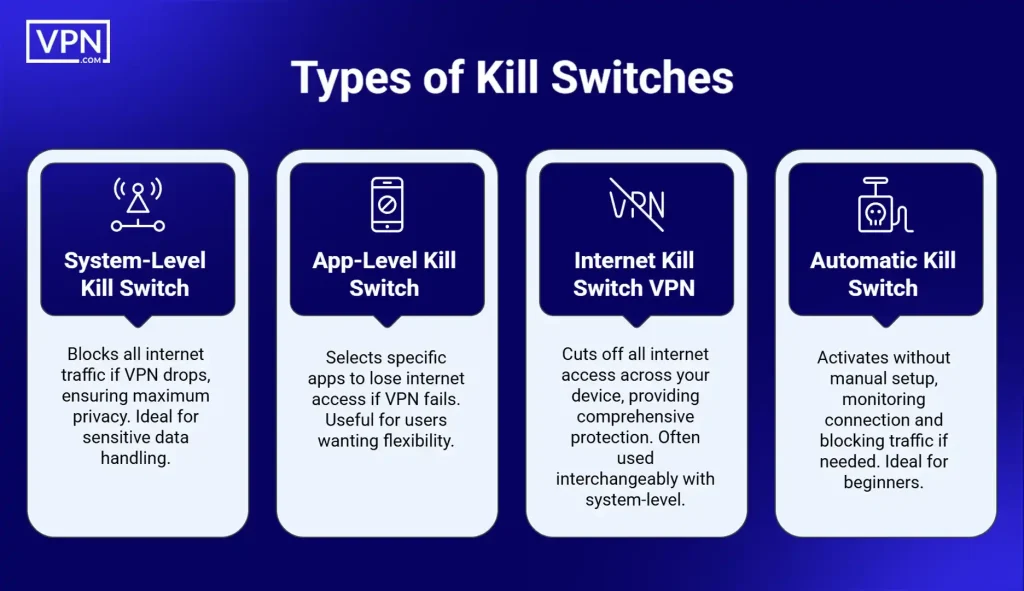
Types Of Kill Switches
There are two main types of kill switches. The first is the system-wide kill switch. It stops all internet activity on your device. This ensures complete protection but can interrupt all online tasks.
The second type is the app-based kill switch. It blocks internet access only for specific apps. This allows other apps to keep working without interruption. Users choose this type for more control over their connection.

Credit: www.expressvpn.com
Benefits Of Using A Kill Switch
A VPN with a kill switch offers important benefits. It protects your data and privacy if the VPN connection drops. This feature stops your device from sending data over an unsecured internet connection. It keeps your information safe and hidden at all times.
Preventing Data Leaks
A kill switch stops data leaks instantly. When the VPN disconnects, it blocks internet access. This prevents your real IP address from showing. Your personal data stays private and secure. No unwanted information leaves your device.
Maintaining Anonymity
A kill switch keeps you anonymous online. It hides your identity by cutting internet access if the VPN fails. This stops websites and trackers from seeing your real location. Your online actions stay private and untraceable.
Enhancing Security On Public Wi-fi
Public Wi-Fi networks are risky and easy to hack. A kill switch protects your device on these networks. If the VPN drops, it blocks internet use. This stops hackers from stealing your data. Your connection stays safe on any Wi-Fi.
Choosing A Vpn With Kill Switch
Choosing a VPN with a kill switch is vital for online safety. It stops your data from leaking if the VPN connection drops. This feature keeps your identity and browsing secure. Not all VPNs offer a reliable kill switch. Knowing what to look for helps you pick the best one for your needs.
Key Features To Look For
A good kill switch must work automatically and quickly. It should block internet access instantly if the VPN disconnects. Look for options to customize the kill switch for specific apps or the whole system. The VPN should have strong encryption to keep data safe. Check if the VPN has no-logs policy to protect your privacy. Easy setup and clear instructions matter for beginners. Compatibility with your device and operating system is important too.
Popular Vpns With Reliable Kill Switches
Many top VPNs include dependable kill switches. NordVPN offers a fast, automatic kill switch on all platforms. ExpressVPN has a simple kill switch called Network Lock that works well. Surfshark includes a kill switch with app and system-wide control. CyberGhost provides an easy-to-use kill switch for added protection. These VPNs also have strong security and good speeds. Choosing any of them ensures your connection stays secure.

Credit: www.vpn.com
Setting Up And Testing The Kill Switch
Setting up and testing the kill switch is crucial for your VPN security. This feature stops internet traffic if the VPN connection drops. It protects your real IP address from exposure. Follow simple steps to enable and check this feature. Stay safe online by making sure the kill switch works correctly.
Enabling The Kill Switch
Open your VPN app on your device. Find the settings or preferences menu. Look for the kill switch option. Toggle the kill switch to “on” or “enable.” Some apps call it “network lock” or “internet kill switch.” Save your changes before exiting the settings. This activates the kill switch feature for your VPN.
Verifying Functionality
Test the kill switch by disconnecting your VPN manually. Watch your internet connection after the VPN drops. The kill switch should block all internet access immediately. If your connection stays active, the kill switch is not working. Restart the VPN app and try again. Confirm the kill switch stops all traffic until the VPN reconnects.
Common Kill Switch Issues
VPNs with kill switches help protect your data by stopping internet traffic if the VPN drops. Despite this safety feature, users face some common problems. These issues can disrupt your internet use or cause confusion. Understanding these problems helps you use your VPN better and stay safe online.
Troubleshooting Connection Drops
Connection drops happen when the VPN suddenly stops working. The kill switch then blocks internet access to avoid leaks. This can seem like the internet is broken. Restarting your device often fixes this problem. Also, check if your VPN app needs an update. Sometimes, switching servers can help restore connection. Make sure your internet is stable before connecting to VPN.
Compatibility Concerns
Some devices or apps do not work well with kill switches. Older operating systems may not support this feature fully. This can cause slowdowns or crashes. Certain VPNs work better on some devices than others. Check your VPN’s compatibility with your device before use. Using a kill switch on incompatible devices can block important apps. Always test your VPN setup to avoid these troubles.
Best Practices For Online Privacy
Protecting your online privacy is important in today’s digital world. Many people use VPNs with a kill switch to keep their data safe. The kill switch stops internet access if the VPN connection drops. This stops your real IP address from showing. Still, using a kill switch alone is not enough. Follow best practices to increase your online privacy and security.
Combining Kill Switch With Other Security Tools
Using a kill switch works best with other security tools. Antivirus software helps block harmful files and viruses. Firewalls keep unwanted traffic away from your device. Password managers create and store strong passwords. These tools work together to protect your data and identity online. Combine them with a VPN kill switch for stronger privacy.
Regular Updates And Monitoring
Keep your VPN and security tools updated. Updates fix bugs and improve protection. Old software can have security holes. Check your VPN’s kill switch regularly to make sure it works. Watch your internet activity for unusual behavior. Regular monitoring helps catch problems early. Stay alert to keep your online privacy safe.

Credit: vpnpro.com
Frequently Asked Questions
What Is A Vpn With Kill Switch?
A VPN with kill switch automatically blocks internet if VPN disconnects. This prevents data leaks and protects your privacy online.
How Does A Kill Switch Enhance Vpn Security?
It stops all internet traffic when VPN fails. This ensures your real IP and data stay hidden from hackers or ISPs.
Can I Use Vpn Without A Kill Switch Safely?
Using VPN without a kill switch risks exposing your data during connection drops. It’s safer to choose a VPN with this feature.
Does Kill Switch Affect Internet Speed?
A kill switch only activates on VPN failure. It does not slow down your internet during normal VPN use.
Conclusion
A VPN with a kill switch keeps your data safe at all times. It stops internet traffic if the VPN connection drops. This feature protects your privacy and avoids leaks. Everyone who cares about online security should use it. It gives peace of mind while browsing or streaming.
Choose a VPN with a reliable kill switch for better safety. Stay protected and enjoy the internet without worry.