
Are you looking for an easy way to turn your ideas into eye-catching videos without spending hours learning complex software? That’s exactly where Lumen5 comes in.
This tool helps you create stunning videos quickly, using just your existing text like blog posts or articles. Whether you want to boost your social media, improve your marketing, or simply engage your audience better, Lumen5 makes it simple and fun.
Keep reading to discover how Lumen5 can transform your content and save you valuable time.

Credit: technologicinnovation.com
Lumen5 Overview
Lumen5 is a video creation platform designed for simplicity and speed. It helps users turn text content into engaging videos. The platform uses artificial intelligence to automate much of the video-making process.
Many marketers, bloggers, and businesses use Lumen5 to create videos without special skills. It offers a wide range of templates and media assets to customize videos easily.
What Is Lumen5?
Lumen5 is an online tool that converts articles or blog posts into videos. It uses AI to select key points and match them with visuals. Users can edit videos by changing text, images, and music.
How Does Lumen5 Work?
The platform starts by analyzing your text content. It picks important sentences to build a video script. Then, it suggests images and video clips to support the story. Users can adjust timing, colors, and styles quickly.
Key Features Of Lumen5
It offers drag-and-drop editing for ease of use. The library includes millions of royalty-free images and videos. Text animations and background music enhance video appeal. Lumen5 also supports branding with logos and custom colors.
Who Can Use Lumen5?
Lumen5 suits content creators with little video experience. Small businesses use it to promote products and services. Educators create videos to explain lessons clearly. Social media managers make posts more engaging with videos.
Core Features
Lumen5 offers a range of core features that simplify video creation for everyone. These tools help turn written content into engaging videos quickly. The platform provides options to customize videos, access a vast media library, and automate video production.
Ai-powered Content Conversion
Lumen5 uses artificial intelligence to convert text into video scripts. It reads blog posts or articles and creates a storyboard automatically. This saves time and effort in video planning. The AI selects key points and arranges them visually.
Media Library And Assets
The platform includes a large collection of images, video clips, and music tracks. All assets are royalty-free, so users can use them without worries. This library helps enhance videos with professional-quality visuals and sounds. Users can easily search and add these assets to their projects.
Customization Options
Users can adjust the look and feel of their videos with various styles and templates. Fonts, colors, and layouts can be changed to match branding needs. This flexibility allows videos to stand out and fit different purposes. Simple drag-and-drop tools make editing easy and fast.
Text-to-video Automation
Lumen5 automates the process of turning text into videos. It syncs text with relevant visuals and music to create smooth storytelling. This automation reduces manual work and speeds up video production. It is perfect for users who want quick results without technical skills.
How It Works
Lumen5 simplifies video creation with a clear, step-by-step process. It uses smart technology to turn text into engaging videos quickly. This tool suits beginners and professionals alike. Understanding how it works helps users make the most of its features.
Creating A Video From Text
Start by entering your text or article into Lumen5. The tool scans the content and selects key points automatically. It then matches these points with relevant images and clips. This creates a basic video storyboard within minutes. Users can adjust the text to better fit the video flow.
Editing And Enhancing Videos
Lumen5 allows easy editing to improve videos further. Users can change scenes, add text overlays, and adjust timing. It supports adding music tracks and voiceovers to enrich the video. Simple drag-and-drop tools make customization fast and intuitive. This ensures the final video matches your vision perfectly.
Using Templates And Themes
The platform offers many templates and themes to fit different styles. These templates provide a ready-made structure for videos. Themes control the overall look, including colors, fonts, and transitions. Choosing the right template saves time and maintains a professional appearance. It helps keep videos consistent with your brand or message.

Credit: lumen5.com
Pricing Plans
Lumen5 offers a variety of pricing plans to meet different needs. These plans range from free options to advanced enterprise solutions. Each plan provides unique features designed to help users create engaging videos efficiently. Understanding the pricing structure helps you choose the best fit for your video creation goals.
Free Plan Benefits
The free plan lets users create videos at no cost. It includes access to basic video templates and media libraries. Users can make short videos with standard resolution. This plan is ideal for beginners or those testing the platform. It allows creating videos without a time commitment or payment.
Paid Plan Features
Paid plans offer more tools and higher video quality. Users get access to premium templates and a larger media library. Video resolution can go up to 1080p HD. Paid options include branding customization and more export options. These features suit businesses and content creators needing polished videos. Learn more about Lumen5 Pricing here.
Enterprise Solutions
Enterprise plans provide advanced features for large teams. They include collaboration tools to work on projects together. Custom integrations and priority support come with these plans. Enterprises can manage multiple users under one account. This solution fits organizations requiring scalable video production tools.
Ideal Users
Lumen5 is a versatile video creation tool designed for a wide range of users. Its simple interface and smart features help people turn text into engaging videos fast. Many find it useful because it does not require advanced skills in video editing. Here are some ideal users who benefit most from Lumen5.
Content Creators
Content creators use Lumen5 to make videos that attract and engage viewers. It helps turn blog posts and articles into short videos easily. Creators can add images, music, and text to tell their story. This tool saves time and makes videos look professional without complex software.
Marketers And Businesses
Marketers use Lumen5 to promote products and services through videos. Businesses create brand awareness and increase customer engagement. The platform offers templates and stock assets that fit many marketing goals. Videos made with Lumen5 can be shared on social media and websites to reach more people.
Educators And Trainers
Educators and trainers create instructional videos with Lumen5 to explain topics clearly. They can transform lesson plans into visual content that helps students understand better. This tool supports different learning styles by combining text and visuals. It makes teaching materials more appealing and easier to follow.
Advantages Over Competitors
Lumen5 stands out among video creation tools because it offers clear benefits. It combines technology and simplicity to help users create videos quickly. The advantages over competitors make it a popular choice for many content creators.
Ease Of Use
Lumen5 has a simple interface anyone can use. Drag-and-drop features let users build videos without skills. Templates guide the design process step-by-step. This saves time and reduces frustration for beginners.
Ai Integration
The platform uses artificial intelligence to turn text into video scenes. It automatically selects images and matches music to the content. This smart automation makes video creation faster and more creative. Users get polished videos with less effort.
Speed And Efficiency
Lumen5 helps produce videos in minutes, not hours. It cuts down editing time with automated tools. Content creators can focus on ideas, not technical details. This speed improves workflow and meets tight deadlines easily.
Tips For Best Results
Creating videos with Lumen5 is simple, but some tips can improve your results. Paying attention to key elements helps produce clear and engaging videos. This section offers practical advice on optimizing your content and visuals.
Optimizing Scripts
Keep your script short and focused. Use simple words and clear sentences. Break information into small chunks for easy reading. Highlight key points to guide viewers. Avoid long paragraphs to maintain interest. Use active voice to make messages strong and direct.
Choosing Visuals
Select images and clips that match your script. Use high-quality visuals for a professional look. Pick bright and clean graphics to attract attention. Avoid cluttered or confusing images. Use consistent colors and styles to keep videos unified. Match visuals with the tone of your message.
Enhancing Engagement
Add text overlays to emphasize important ideas. Use smooth transitions to keep flow natural. Include background music that fits the mood but does not distract. Make use of Lumen5’s animation features to add movement. Keep video length short to hold viewer focus. End with a clear call to action or summary.
Common Challenges
Lumen5 is a popular tool for creating videos quickly. It uses AI to help turn text into video content. While it offers many benefits, users face some common challenges. These issues can affect how smoothly the video creation process goes. Understanding these challenges helps users make better decisions.
Customization Limits
Lumen5 has some limits on how much you can customize videos. Templates and styles are fixed to some degree. You cannot fully control every design element. This may restrict creative freedom for advanced users. Custom fonts, colors, or layouts are sometimes limited. The tool focuses on simplicity over deep customization.
Video Length Restrictions
The platform limits the length of videos you can create. Most plans allow only short videos, often under five minutes. Longer videos may require higher-tier plans or different software. This can be a problem for users needing detailed or extended content. The limit supports quick and engaging videos but reduces flexibility.
Learning Curve
New users may find Lumen5 takes time to learn. The interface is user-friendly but still requires practice. Understanding how to best use AI features needs trial and error. Beginners might feel unsure about video editing basics at first. With patience, users gradually get comfortable creating videos.
Future Developments
The future of Lumen5 looks promising with ongoing advancements designed to enhance user experience. The platform aims to simplify video creation further and expand its capabilities. These developments will help users create content faster and with better quality.
Continuous improvements in artificial intelligence will play a key role. Lumen5 plans to integrate smarter AI tools to make video production more intuitive. These updates will reduce manual work and boost creativity.
Enhanced Ai Video Editing
Lumen5 will introduce more advanced AI video editing features. The system will better understand text and visuals to create more coherent videos. Expect smoother transitions, improved scene selection, and automatic pacing adjustments.
Expanded Media Library
The platform will increase its collection of royalty-free media assets. Users will get access to more images, video clips, and music tracks. This growth will allow for richer and more diverse video content.
Improved User Interface
Lumen5 is working on a cleaner and easier-to-use interface. This upgrade will help beginners navigate the platform quickly. Clearer menus and drag-and-drop functions will speed up the video-making process.
Integration With More Platforms
Future versions will support integration with popular social media and marketing tools. This will enable direct sharing and publishing from Lumen5. Users can save time by managing campaigns within a single platform.
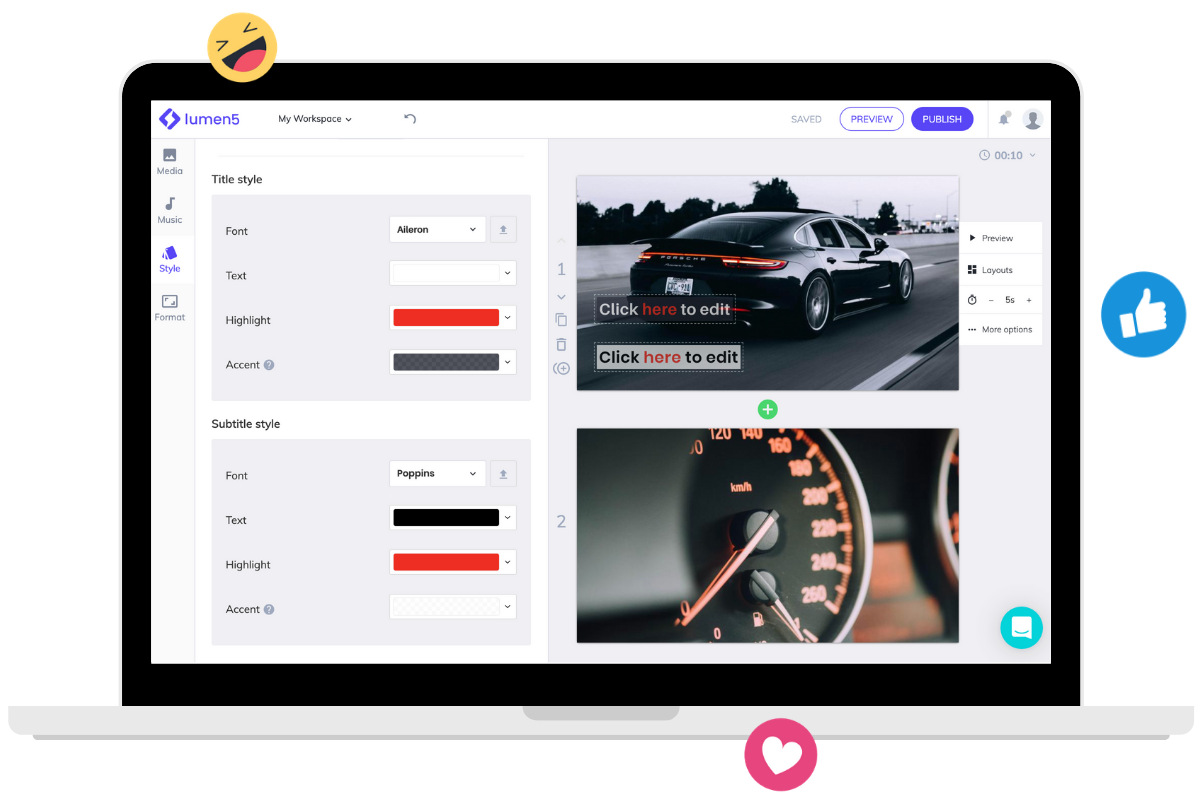
Credit: lumen5.com
Frequently Asked Questions
Is Lumen5 Free To Use?
Lumen5 offers a free plan with basic features and watermark on videos. Paid plans unlock advanced tools and remove watermarks.
What Is The Use Of Lumen5?
Lumen5 helps users create engaging videos quickly using AI. It converts text content into video scripts and storyboards effortlessly.
What Is Lumen Ai Used For?
Lumen AI helps users analyze and explore tabular data through natural language chat. It requires no coding skills.
Conclusion
Lumen5 makes video creation simple and fast for everyone. It turns text into engaging videos using AI. No special skills or software needed. This tool helps share ideas visually and reach more people. Anyone can create videos for blogs, social media, or learning.
With Lumen5, video content becomes easy and accessible. Try it and see how it fits your needs. Videos help tell your story in a clear way. Lumen5 supports creativity without complexity or high costs.