If you’re using Zoho CRM but feel it’s not quite the perfect fit for your business, you’re not alone. Finding the right CRM can make or break how you manage your sales, customer relationships, and overall growth.
You want a system that works smoothly, fits your unique needs, and doesn’t slow you down. That’s why exploring Zoho CRM alternatives can open up new possibilities for your team. Whether you’re after something simpler, more customizable, or packed with advanced features like AI-driven insights, there’s a solution waiting for you.
Keep reading to discover top Zoho CRM alternatives that could transform the way you work and help you achieve your goals faster.
Credit: stackby.com
Top Zoho Crm Alternatives
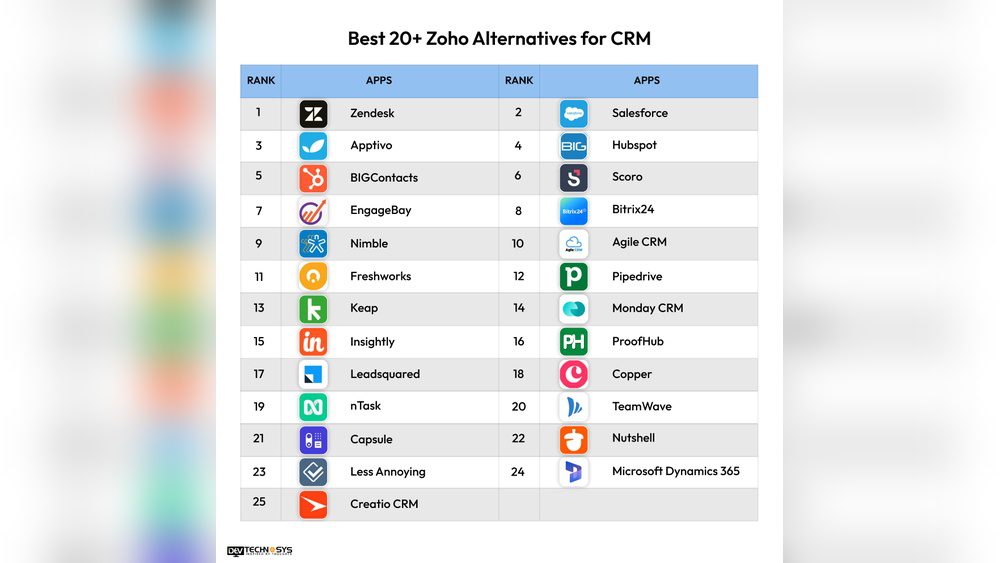
Finding the right CRM software can boost your business efficiency. Zoho CRM is popular, but many alternatives offer unique features. Exploring these options helps businesses choose the best tool for their needs. Here are some top Zoho CRM alternatives worth considering.
Hubspot Crm
HubSpot CRM is user-friendly and ideal for startups and small businesses. It offers a free plan with essential features. The platform supports marketing, sales, and customer service. Its AI tools simplify lead management and customer tracking. HubSpot grows with your business, but advanced features may require payment.
Salesforce
Salesforce leads the market with a powerful, scalable platform. It suits large organizations with complex sales processes. The system integrates well with many business tools. Customization options allow tailored workflows and reports. Salesforce offers strong analytics and automation for improved sales results. You can also read this article about Salesforce Review here.
Pipedrive
Pipedrive focuses on managing sales pipelines efficiently. It provides a visual interface to track deals and progress. The platform helps sales teams stay organized and close deals faster. Pipedrive’s simple design reduces the learning curve for users. It supports integrations with popular apps to streamline workflows.
Freshsales
Freshsales includes AI-powered features to enhance sales insights. It automates lead scoring and customer data management. The platform offers email tracking, phone, and chat support. Freshsales suits businesses wanting AI to boost sales performance. Its interface is clean and easy to navigate.
Suitecrm
SuiteCRM is an open-source option for deep customization. It gives full control over data and workflows. The platform supports sales, marketing, and customer service modules. SuiteCRM is ideal for businesses needing a tailored CRM solution. Its community-driven development ensures continuous improvements.
Odoo
Odoo offers a comprehensive business suite with a flexible CRM module. It is open-source and highly customizable. The platform integrates CRM with inventory, accounting, and project management. Odoo fits companies wanting an all-in-one business management tool. Its modular design allows adding features as needed.

Credit: monday.com
Best For Sales Pipeline
Choosing the right CRM for managing your sales pipeline is crucial for business growth. A clear view of your sales process helps close deals faster. Pipedrive stands out as a strong alternative to Zoho CRM for this purpose. It offers tools focused on tracking and managing leads effectively.
Its design simplifies pipeline management, making it easy for sales teams to stay organized. Users can visualize each stage of their sales funnel and focus on the most important deals. This clarity boosts productivity and helps meet sales targets.
Pipedrive Features
Pipedrive provides a visual sales pipeline that shows all deals in progress. It allows users to drag and drop deals between stages. Automated reminders ensure no follow-up is missed. The platform integrates with email and calendar apps to keep all information connected.
Customizable pipelines let teams fit the tool to their unique sales process. Reporting features give insights into sales performance and trends. Mobile apps keep teams productive on the go. Overall, Pipedrive keeps sales activities clear and manageable.
Pipeline Tracking Benefits
Tracking your sales pipeline helps spot bottlenecks early. It shows which deals need attention and which are close to closing. Teams can prioritize tasks and allocate resources wisely. This focus reduces lost opportunities and increases revenue.
Pipeline tracking also improves communication within sales teams. Everyone sees the same updates and progress. It supports data-driven decisions that improve sales strategies. Clear tracking leads to better forecasting and planning for future growth.
Ai-powered Crm Options
AI-powered CRM options are changing how businesses manage customer relationships. These systems use artificial intelligence to automate tasks, analyze data, and offer smart insights. This helps sales teams work smarter and close deals faster. AI tools can predict customer behavior, prioritize leads, and personalize communication.
Choosing an AI-driven CRM can boost efficiency and improve customer satisfaction. Many alternatives to Zoho CRM now include strong AI features. These make handling large data easier and provide clear sales insights. Below is a look at Freshsales and its AI capabilities.
Freshsales Ai Tools
Freshsales offers a range of AI tools designed to simplify sales processes. Its AI assistant helps with lead scoring, identifying the hottest prospects automatically. The system tracks customer interactions and suggests the best next steps. It also automates routine tasks like data entry and follow-ups.
These AI tools reduce manual work and help sales teams focus on closing deals. Freshsales integrates AI in email campaigns to personalize messages based on customer behavior. This increases the chance of engagement and builds stronger relationships.
Improving Sales Insights
AI in Freshsales analyzes sales data to provide clear insights. It identifies trends and patterns that humans might miss. Sales teams get real-time reports and forecasts to plan better strategies.
The system highlights opportunities and risks early. This helps managers make informed decisions quickly. Improving sales insights leads to higher conversion rates and better customer retention. Freshsales AI tools create a smarter, data-driven sales environment.
Customizable And Open-source Crms
Customizable and open-source CRMs offer businesses full control over their customer management systems. These platforms allow deep modifications to match unique business needs. They provide transparency and flexibility that proprietary software often lacks. Open-source CRMs usually have active communities that contribute to continuous improvement. This makes them ideal for companies wanting tailored solutions without vendor lock-in.
Two popular open-source CRM options are SuiteCRM and Odoo Business Suite. Both provide extensive customization capabilities and can integrate with various business tools. They support scalable growth and adapt to evolving business processes. Exploring these options can help find a CRM that fits specific requirements perfectly.
Suitecrm Customization
SuiteCRM is a highly customizable open-source CRM. It builds on SugarCRM’s community edition and adds many features. Users can change modules, layouts, and workflows with ease. The platform supports custom fields and logic hooks for automation. SuiteCRM’s flexibility lets businesses design their ideal sales and marketing processes.
Developers can create new plugins or extend existing functions. SuiteCRM also offers strong reporting tools and dashboards. This helps track sales performance and customer data effectively. The open-source nature ensures no licensing fees, reducing overall costs. Businesses that want full control over their CRM often choose SuiteCRM.
Odoo Business Suite
Odoo is a comprehensive open-source business suite with a powerful CRM module. It integrates sales, marketing, inventory, and accounting in one system. Odoo’s modular design lets users add or remove apps as needed. This flexibility supports diverse business models and workflows.
The CRM module can be customized with drag-and-drop tools and custom scripts. Odoo supports automated lead scoring, email campaigns, and activity scheduling. It also connects with other Odoo apps, creating a seamless business management experience. Odoo’s community edition is free, making it accessible to small and medium businesses.
Project And Team Management Tools
Project and team management tools help businesses organize tasks and improve teamwork. These tools offer features like task tracking, communication, and file sharing. They keep teams connected and projects on schedule. Choosing the right tool depends on your team size and project needs.
Clickup For Teams
ClickUp is a flexible platform designed to manage projects and teams. It offers task lists, calendars, and time tracking. Teams can assign tasks and set priorities easily. ClickUp integrates with many apps for better workflow. Its simple interface helps teams stay productive and organized.
Lark Collaboration Features
Lark combines messaging, video calls, and document sharing in one app. It allows teams to chat and work on files together in real time. Lark’s calendar and task management tools help schedule work and track progress. The platform supports smooth communication and efficient teamwork.

Credit: www.fahimai.com
Simple And User-friendly Crms
Simple and user-friendly CRMs help businesses manage customer relationships without confusion. These tools focus on ease of use, clear design, and quick learning curves. They suit small teams or those new to CRM software. A straightforward CRM speeds up adoption and reduces errors. This means teams can focus on building customer connections instead of learning complex systems.
Folk Crm Overview
folk CRM offers a clean and modern interface. It keeps features simple and accessible for users. The tool focuses on contact management and easy collaboration. Users can track customer info, tasks, and communications in one place. folk CRM works well for small to medium teams wanting a no-fuss system. It avoids clutter and unnecessary options. This allows users to find what they need quickly. The platform also supports basic automation to save time.
Bigcontacts For Small Businesses
BIGContacts is designed specifically for small businesses. It provides an intuitive layout with straightforward tools. Users can easily add and organize contacts and sales opportunities. The CRM includes helpful features like email tracking and task reminders. BIGContacts aims to reduce the learning time for new users. Its simple setup helps teams start managing relationships fast. The software also offers clear reporting to monitor progress. This makes BIGContacts a solid choice for small teams needing easy CRM software.
Unified Crm And Marketing Platforms
Unified CRM and marketing platforms combine customer relationship management and marketing tools in one system. This integration helps businesses manage contacts, track sales, and run marketing campaigns seamlessly. Having a single platform reduces the need for multiple apps and saves time. Businesses can improve customer engagement and boost sales with better data insights and automated processes.
Insightly Features
Insightly offers a simple CRM with marketing and project management tools. It helps track leads, manage contacts, and automate workflows. Users can create email campaigns and monitor their success directly in the platform. Insightly also provides detailed reports to analyze sales and marketing efforts. Its user-friendly interface suits small to medium businesses. The integration with popular apps like Gmail and Outlook makes it easy to use daily.
Brevo Marketing Toolkit
Brevo combines CRM functions with a marketing toolkit for smooth customer communication. It offers email marketing, SMS campaigns, and marketing automation features. Users can design campaigns with drag-and-drop tools without coding skills. Brevo tracks customer behavior and sends personalized messages at the right time. The platform also includes contact management and sales pipeline tracking. This unified approach helps businesses keep marketing and sales aligned for better results.
Flexible Platforms For Custom Dashboards
Custom dashboards help businesses visualize data clearly. Flexible platforms allow users to tailor dashboards to match their unique needs. These tools provide various ways to organize, track, and report information. Choosing a platform that supports customization enhances team productivity and decision-making. Below are two notable options for custom dashboard creation.
Monday.com Data Views
Monday.com offers multiple data views to display information in different formats. Users can switch between tables, charts, timelines, and calendars easily. This flexibility makes it simple to adapt dashboards for various projects or teams. Drag-and-drop features allow quick layout changes without technical skills. Monday.com also supports real-time updates, keeping dashboards current and relevant.
Report Building Strengths
Many Zoho CRM alternatives excel in report building for custom dashboards. Platforms provide drag-and-drop editors and pre-built templates. These tools simplify creating detailed reports without coding knowledge. Users can combine data from multiple sources to get a complete picture. Strong report builders help teams monitor key metrics and track goals effectively.
Small Business Crm Integrations
Small businesses often need CRM systems that work well with their existing tools. Integrations make managing sales, marketing, and accounting easier. Choosing a CRM with strong integration options saves time and reduces errors. It also helps keep customer data consistent across platforms. Below are two notable CRM options with useful integrations for small business needs.
Method Crm And Accounting
Method CRM connects directly with QuickBooks, a popular accounting software. This integration allows automatic syncing of customer and sales data. It reduces manual entry and ensures accurate financial records. Small businesses can track invoices, payments, and sales from one place. The seamless flow between CRM and accounting improves cash flow management. This CRM suits businesses that rely heavily on QuickBooks for finance.
Capsule Crm Benefits
Capsule CRM offers many integration options with common business apps. It works well with Google Workspace, Mailchimp, and Zapier. These connections help streamline email marketing and task automation. Capsule keeps customer data organized and accessible across platforms. Its simple interface makes it easy for small teams to adopt. Capsule CRM supports efficient communication and better customer tracking.
Additional Noteworthy Alternatives
Exploring additional CRM options broadens your choices beyond the usual names. These alternatives offer unique features that cater to different business sizes and needs. Each CRM stands out with distinct strengths and usability. Understanding these can help you pick the right tool.
Nutshell Crm
Nutshell CRM combines simplicity with powerful sales tools. It suits small to mid-sized teams aiming for straightforward sales tracking. The platform offers easy contact management and automated workflows. Users benefit from clear reporting and pipeline visualization. Its intuitive interface reduces the learning curve for new users.
Creatio
Creatio focuses on process-driven CRM and BPM (Business Process Management). It helps businesses automate complex workflows and customer journeys. The low-code platform allows customization without heavy coding. Creatio supports sales, marketing, and service needs in one system. It adapts well to growing companies needing scalable solutions.
Zendesk Crm
Zendesk CRM is known for excellent customer support integration. It bridges customer service with sales and marketing efforts. The system offers ticketing, live chat, and customer interaction history. It helps teams respond quickly and personalize communication. Zendesk is ideal for businesses prioritizing strong customer relationships.
Agile Crm
Agile CRM provides an all-in-one platform for sales, marketing, and service automation. It includes email tracking, telephony, and social media integration. Small businesses appreciate its affordability and feature-rich environment. The drag-and-drop interface simplifies campaign creation and lead scoring. Agile CRM supports efficient customer engagement across channels.
Choosing The Right Crm
Choosing the right CRM is crucial for business success. It helps manage customer data, track sales, and improve communication. The perfect CRM fits your business needs and grows with you. Consider key factors before selecting a Zoho CRM alternative to ensure smooth operations and better results.
Factors To Consider
Focus on your business size and industry. Look at the CRM’s features and how they match your goals. Check if the CRM supports your sales process and integrates with tools you use. Security and data privacy are also important. Choose a CRM that keeps your customer information safe.
Pricing And Scalability
Compare pricing plans and what they offer. Some CRMs have free versions with basic features. Others charge more for advanced tools or more users. Think about how your business will grow. Select a CRM that can scale up without high costs. Avoid paying for features you don’t need now but might want later.
User Experience
Pick a CRM that is easy to learn and use. A simple interface saves time and reduces errors. Check if the CRM offers good customer support and training. Mobile access is important for teams on the go. A positive user experience ensures your team will use the CRM effectively every day.
Frequently Asked Questions
What Are The Best Zoho Crm Alternatives For Small Businesses?
HubSpot and Pipedrive are ideal for small businesses due to their user-friendly design and affordable plans.
Which Zoho Crm Alternative Offers Strong Ai Sales Insights?
Freshsales stands out by providing AI-powered tools to help improve sales and manage customer data.
Are There Open-source Alternatives To Zoho Crm For Customization?
SuiteCRM and Odoo are popular open-source options allowing deep customization and full control over data.
Conclusion
Choosing the right CRM depends on your business needs and budget. Some alternatives focus on sales pipelines, while others offer AI tools or project management. Open-source options allow more customization and control. Many platforms provide free versions or trials to test features.
Take time to compare features and usability before deciding. The best CRM will help you organize customers and grow your business efficiently. Explore these options to find the perfect fit for your team.