Choosing the right CRM can make or break your small business growth. You want a system that not only fits your budget but also simplifies how you manage customers and sales.
That’s why the battle between Zoho CRM and HubSpot CRM matters to you. Both offer powerful tools, but which one truly matches your unique needs? You’ll discover clear differences, real benefits, and practical insights that help you decide the best CRM for your business — no jargon, no confusion.
Keep reading to find the CRM that will boost your productivity and keep your customers coming back.
Key Features Comparison
Zoho CRMoffers a clean and simple user interface but with many options. It suits users who want to explore features deeply. HubSpot CRMhas a very friendly and easy interface. It helps new users get started quickly without confusion.
Zoho provides wide customizationoptions. You can change fields, modules, and workflows a lot. HubSpot also allows customization but with fewer options. It focuses on ease and speed.
Zoho CRM shines in reporting and analytics. It gives detailed reports with many filters. HubSpot offers ready-made dashboards that are easy to use. It is good for quick insights.
Both CRMs support many integrations. Zoho works well with other Zoho apps and popular tools. HubSpot connects easily with marketing and sales software.
| Feature | Zoho CRM | HubSpot CRM |
|---|---|---|
| User Interface | Detailed, many options | Simple, beginner-friendly |
| Customization | Highly customizable | Basic customization |
| Reporting | Advanced, detailed | Easy, pre-built |
| Integrations | Strong with Zoho apps | Good with marketing tools |
| Pricing | Affordable, tiered plans | Free tier, paid upgrades |
Credit: www.upviron.com
Performance And Speed
HubSpot CRMis known for its fast loading times. Pages open quickly, which helps users work without delays. Zoho CRMalso loads fast but can be a bit slower with many custom features active.
Both CRMs offer workflow automation. HubSpot makes it easy to set up simple automations for tasks like emails and follow-ups. Zoho allows more complex workflows, which can save time but may need extra setup.
The mobile appsfor both CRMs work well. HubSpot’s app is simple and user-friendly, perfect for quick checks on the go. Zoho’s app has more features, which is good for managing many tasks but might feel crowded on smaller screens.
Sales And Marketing Tools
Lead managementin Zoho CRM offers detailed tracking and scoring of leads. HubSpot CRM provides simple, easy-to-use lead capture and nurturing tools. Zoho allows more customization in handling leads, while HubSpot focuses on user-friendly workflows.
Email marketingtools in HubSpot CRM include ready-made templates and automation for follow-ups. Zoho CRM supports email campaigns with personalized messages and scheduling options. Both systems help businesses stay connected with customers effectively.
Pipeline visualizationin HubSpot CRM uses clean, visual boards to show deal stages clearly. Zoho CRM offers customizable pipelines with drag-and-drop features. HubSpot makes it easy to see progress at a glance; Zoho provides more flexibility for complex sales processes.
AI and automation featuresin Zoho CRM include AI-powered predictions and workflow automation. HubSpot CRM uses automation to send emails and assign tasks automatically. Both help save time, but Zoho’s AI tools are more advanced for data analysis.
Credit: dx.smartosc.com
Customer Support And Resources
Helpdesk availabilityvaries between Zoho CRM and HubSpot CRM. Zoho offers 24/7 support through email, phone, and live chat. HubSpot provides support mostly during business hours, with live chat and email options. Both have paid plans with faster response times.
Both platforms provide learning resourcesto help users. Zoho has a detailed knowledge base, video tutorials, and webinars. HubSpot offers an extensive library of courses and certifications through HubSpot Academy. These resources help users understand how to use the CRM effectively.
Active community and user forumsexist for both. Zoho’s community includes product experts and users sharing tips. HubSpot’s community is large, with many discussions, user groups, and events. These forums are useful for problem-solving and networking.
Security And Compliance
Zoho CRMand HubSpot CRMboth use strong data protection measures. Zoho encrypts data at rest and in transit. HubSpot uses similar encryption to keep data safe. Both CRMs back up data regularly to prevent loss.
Regarding compliance certifications, Zoho holds certifications like GDPR, HIPAA, and SOC 2. HubSpot also complies with GDPR and SOC 2 standards. These certifications show their commitment to legal and security standards.
User permissionsand access controlare key for both. Zoho allows admins to set detailed roles and permissions. HubSpot lets users control who can see or edit data easily. Both ensure only authorized people access sensitive info.
Suitability For Small Businesses
Zoho CRMoffers a user-friendly setup with step-by-step guidance. It suits small businesses needing quick deployment without technical help. HubSpot CRMalso provides easy setup, focusing on simple tools for beginners. Both platforms allow users to start fast and customize later.
For scalability, Zoho CRM grows well with business size. It supports many users and complex workflows as companies expand. HubSpot CRM works best for small to medium businesses, with smooth upgrades but fewer advanced options compared to Zoho.
| Industry | Zoho CRM | HubSpot CRM |
|---|---|---|
| Retail | Custom workflows and inventory tracking | Simple customer tracking and marketing tools |
| Service | Strong project and client management | Focus on lead nurturing and communication |
| Technology | Advanced automation and integrations | Easy lead capture and email tracking |
Pros And Cons Summary
Zoho CRMoffers deep customizationand affordable pricing. It supports multiple integrationsand advanced reporting. Zoho is great for businesses needing complex workflows. The interface might feel complexfor beginners.
HubSpot CRMprovides a free versionwith easy setup. It has user-friendly dashboardsand good marketing tools. HubSpot works well for small teams wanting simple, fast solutions. It lacks some advanced customization features.
| Common Limitations |
|---|
| Both CRMs may require time to learnfor new users. |
| Some features need paid plansto unlock fully. |
| Integration optionscan be limited depending on needs. |
| Customer support quality varies between plans and regions. |
Credit: www.larksuite.com
Making The Choice
Assessing business needshelps decide between Zoho CRM and HubSpot CRM. Zoho offers deep customizationand works well for businesses needing detailed reports. HubSpot provides a simple, user-friendly interfacewith ready-to-use dashboards, ideal for quick adoption.
Budget plays a key role. Zoho CRM is usually more affordablefor small businesses wanting advanced features. HubSpot has a free versionwith essential sales and marketing tools, good for startups or those on a tight budget.
| Feature | Zoho CRM | HubSpot CRM |
|---|---|---|
| Customization | Highly customizable | Basic customization |
| Pricing | Affordable paid plans | Free version available |
| Ease of Use | Moderate learning curve | Very user-friendly |
| Reports & Dashboards | Advanced reports | Simple dashboards |
Trying free trials or demos provides hands-on experience. Test both to see which fits your team’s workflow better. Pay attention to ease of setupand how well the CRM integrates with your current tools.
Frequently Asked Questions
Which Crm Is Better, Zoho Or Hubspot?
Zoho CRM offers deep customization and advanced analytics at an affordable price. HubSpot CRM provides easy setup with free, user-friendly dashboards. Choose Zoho for complex needs and HubSpot for quick, straightforward use. Both suit small businesses but differ in features and usability focus.
What’s The Best Crm For Small Business?
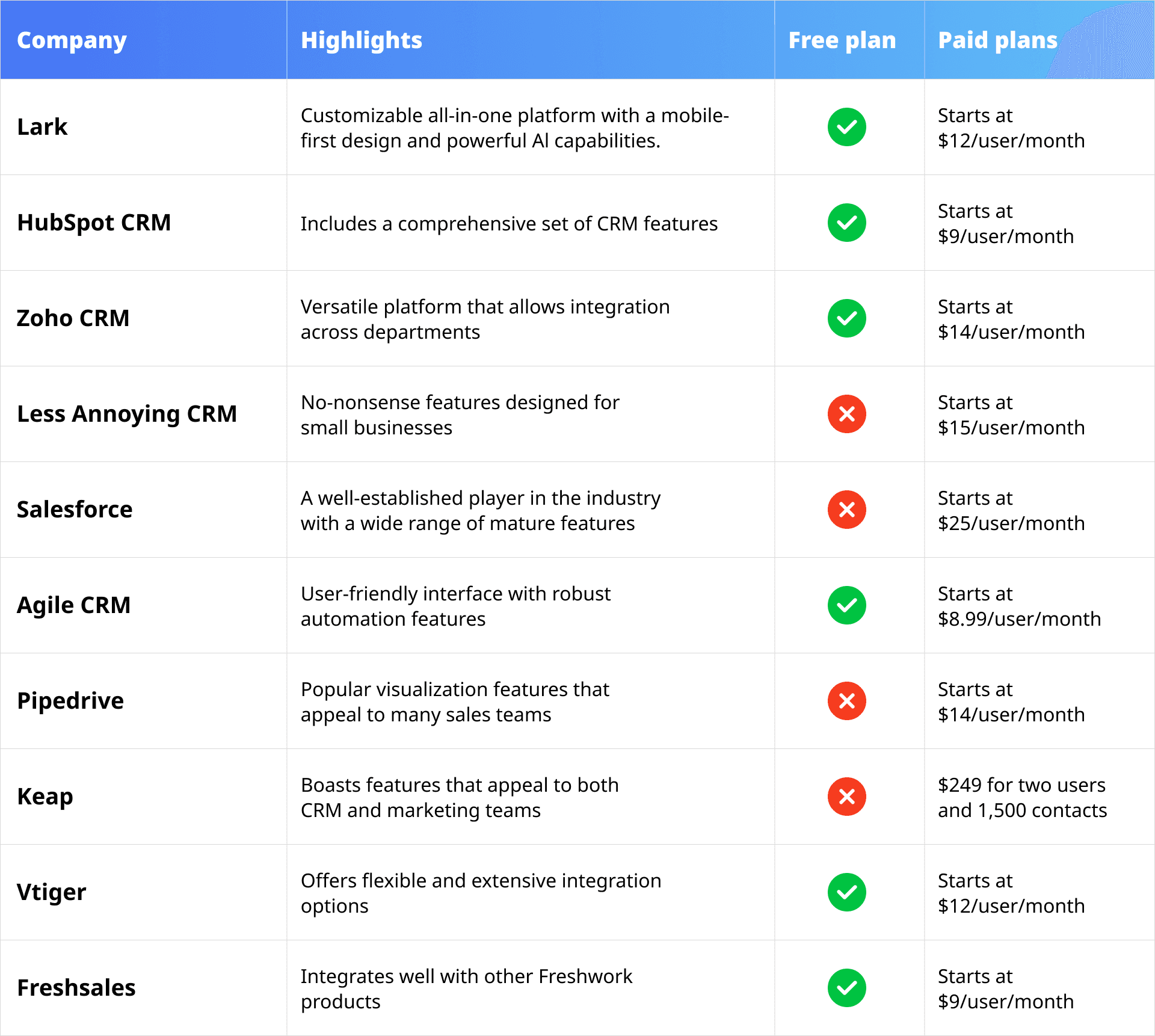
The best CRM for small businesses depends on needs. HubSpot offers free, user-friendly tools. Zoho provides affordable, customizable options. Freshsales uses AI for insights. Pipedrive excels in visual pipelines. Salesforce Essentials suits growing businesses. Capsule CRM emphasizes simplicity and speed.
What Are The Disadvantages Of Zoho Crm?
Zoho CRM can be complex for beginners and may require time to master. Its customization options sometimes overwhelm users. Integration with non-Zoho apps can be limited. Reporting features may feel complicated. Customer support response times vary, affecting user experience.
Which Crm Is Better Than Zoho?
HubSpot CRM excels in ease of use and free tools, while Freshsales offers AI-driven insights. Salesforce supports growth. Choose based on your business needs.
Conclusion
Choosing between Zoho CRM and HubSpot CRM depends on your business needs. Zoho suits those needing deep customization and detailed reports. HubSpot works well for easy setup and ready-to-use dashboards. Both offer valuable tools for small businesses. Think about your budget, technical skills, and growth plans.
The right CRM will help manage customers and sales better. Take time to explore each option before deciding. Your business deserves a CRM that fits just right.