
If you’re managing a remote team or working from home, you know how important it is to stay connected and productive. That’s where Zoom Online Meeting Software comes in.
Zoom makes it easy for you to hold clear, reliable video meetings no matter where you are—whether that’s your home office, a coffee shop, or even the beach. With its user-friendly design and powerful features, Zoom helps you communicate, collaborate, and get things done without missing a beat.
Ready to discover why Zoom is the best choice for your remote work setup? Keep reading to find out how it can transform the way you work.
Zoom Features For Remote Work
Zoomoffers HD video and audio qualitythat makes remote meetings clear and natural. Participants see and hear each other well, which helps communication.
Screen sharinglets users show their screens easily. This tool supports teamwork by allowing everyone to see documents or presentations live.
With breakout rooms, hosts split meetings into smaller groups. This feature works great for group discussions or team projects.
The chatfeature allows instant messaging during meetings. Reactionslike thumbs up or clapping help express ideas quickly without interrupting.

Credit: www.gather.town
Choosing The Right Zoom Plan
The Free Basic Planlets you host meetings up to 40 minutes. You can have up to 100 participants. Meetings can be scheduled but will end at the 40-minute mark. After the meeting ends, you can rejointo start again, but the timer resets.
Paid plansremove the 40-minute limit and add features like cloud recording and reporting. They also allow you to host more participants and get admin controls. These plans suit businesses needing longer, larger meetings.
| Plan | Meeting Duration | Participants | Key Features |
|---|---|---|---|
| Pro | Up to 30 hours | Up to 100 | Cloud recording, user management |
| Business | Up to 30 hours | Up to 300 | Company branding, admin dashboard |
| Enterprise | Up to 30 hours | Up to 500 or 1000 | Unlimited cloud storage, dedicated support |
Extending Meeting Duration
The Free Planlimits meetings to 40 minutes. To extend time, try ending and rejoining the meeting. This resets the timer but can be disruptive.
Using multiple free accountsis another option. Each account has its own 40-minute limit. You must switch accounts carefully to avoid confusion.
Assigning an alternate hosthelps continue meetings smoothly. The alternate host can start a new session if the first one ends.
For those needing longer meetings, upgrading to a paid planis best. Paid plans offer meetings up to 30 hours. Paid Zoom Rooms also remove limits when joining meetings.
| Method | Description | Limit |
|---|---|---|
| End and Rejoin | End the meeting and start again to reset time | 40 minutes per session |
| Multiple Accounts | Use different free accounts to host back-to-back meetings | 40 minutes per account |
| Alternate Host | Assign a host to continue meeting after time ends | 40 minutes per host |
| Upgrade Plan | Buy paid plan for longer meeting times | Up to 30 hours |
Credit: www.techradar.com
Maximizing Productivity With Zoom
Scheduling meetingsin Zoom is simple and fast. Use the calendar integration to set meeting times that work for everyone. Assign an alternate hostto help manage the session if you cannot attend. Start meetings on time and keep the agenda clear to stay productive.
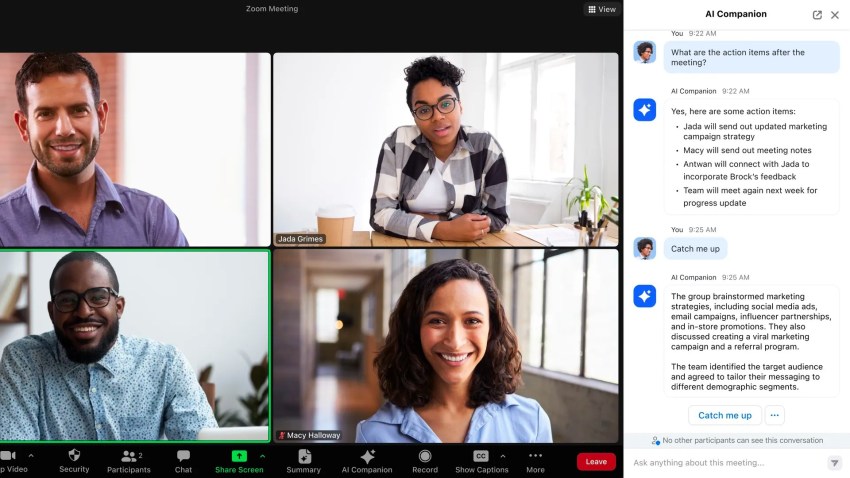
Managing participantsis key for smooth meetings. Use the waiting roomfeature to control who joins. Mute participants when needed to avoid background noise. Use the chat box for questions to keep the main talk clear. Assign co-hosts to help manage large groups.
Zoom allows recording meetingsfor later review. Enable transcriptsto read what was said easily. This helps team members who missed the meeting catch up quickly. Store recordings safely and share links with your team for reference.
Best Practices For Hybrid Teams
Engaging both remote and onsite team memberstakes effort and good tools. Zoom helps by letting everyone see and hear each other clearly. Use features like screen sharing and breakout rooms to keep meetings lively and interactive.
Using Zoom for hybrid collaborationmeans setting clear agendas before meetings. Encourage all members to participate by asking questions and sharing ideas. Mute when not speaking to reduce background noise. Use chat for quick comments without interrupting.
Maintaining communication flowis key. Schedule regular check-ins to keep everyone updated. Share meeting notes and recordings so no one misses important details. Use Zoom’s polling and reactions to get fast feedback from the team.
Zoom App And Platform Compatibility
The Zoom desktop appoffers a full set of features. It supports screen sharing, virtual backgrounds, and recording. The mobile appis handy for joining meetings on the go but has fewer options. Both apps work well on Windows, Mac, iOS, and Android.
The web clientlets users join meetings without installing software. It is easy to use but has limitations. For example, some features like breakout rooms and virtual backgrounds are missing.
| Integration | Purpose | Benefit |
|---|---|---|
| Google Calendar | Scheduling | Easy meeting invites |
| Slack | Communication | Start meetings from chat |
| Microsoft Teams | Collaboration | Seamless video calls |
Security And Privacy Settings
Meeting passwordsprotect your Zoom calls from unwanted guests. Enabling waiting roomslets hosts control who joins. This stops strangers from entering before you approve them.
Host controlslet the meeting leader mute or remove participants. Hosts can also control screen sharing and chat features. These tools help keep meetings focused and safe.
Zoom uses data protection measuresto keep information private. All meetings have end-to-end encryptionoptions. This means data is scrambled and safe from hackers.
Credit: www.nextiva.com
Tips For Smooth Zoom Meetings
Choose a quiet, well-lit placeto avoid distractions. Make sure your background is tidy and neutral. Good lighting helps others see you clearly.
Test your internet connectionto avoid disruptions. Check your microphone and camera before joining. Update Zoom app regularly for best performance.
- Mute your micwhen not speaking to reduce noise.
- Use headphonesto improve audio quality.
- Be on time and ready to participate.
- Stay focused and avoid multitasking during meetings.
- Raise your handor use chat to ask questions politely.
Frequently Asked Questions
Can You Work Remotely With Zoom?
Yes, you can work remotely with Zoom. It offers reliable video conferencing, collaboration, and communication tools for any location.
Which Type Of Video Conferencing Is Best For Remote Workers?
Zoom is the best video conferencing tool for remote workers due to its reliability, ease of use, and collaboration features. It supports global teams effectively.
What Platform Does Zoom Work Best On?
Zoom works best on its desktop and mobile apps for full features and smooth performance. Use the web client if apps aren’t accessible.
Can I Use Zoom For Free For More Than 40 Minutes?
Zoom’s free plan limits group meetings to 40 minutes. You can host unlimited one-on-one meetings without time limits. To exceed 40 minutes for groups, upgrade to a paid plan. Alternatively, end and restart meetings to continue without upgrading.
Conclusion
Zoom remains a reliable choice for remote work communication. Its simple interface helps teams connect easily. Features like screen sharing and chat boost collaboration. Users can join from phones, tablets, or computers. Free plans offer basic tools, while paid plans add more options.
This flexibility suits individuals and growing businesses alike. Consistent updates keep Zoom secure and user-friendly. Remote teams can stay productive no matter where they work. Overall, Zoom supports smooth communication for today’s remote workforce.