Are you wondering how much Slack will cost your team and whether it’s worth the investment? Choosing the right pricing plan can make a huge difference in how smoothly your team communicates and collaborates every day.
Whether you’re a small startup or a growing business, understanding Slack’s pricing options helps you get the most value without overspending. You’ll discover the key features of each Slack plan, how they fit different team needs, and tips to decide which option suits your budget best.
Keep reading to unlock the smartest way to power up your team’s productivity with Slack pricing that works for you.
Slack Pricing Plans
Slack offers a range of pricing plans to suit different team sizes and needs. Each plan includes specific features designed to improve communication and collaboration. Understanding these plans helps teams choose the best fit for their workflow and budget.
Free Plan Features
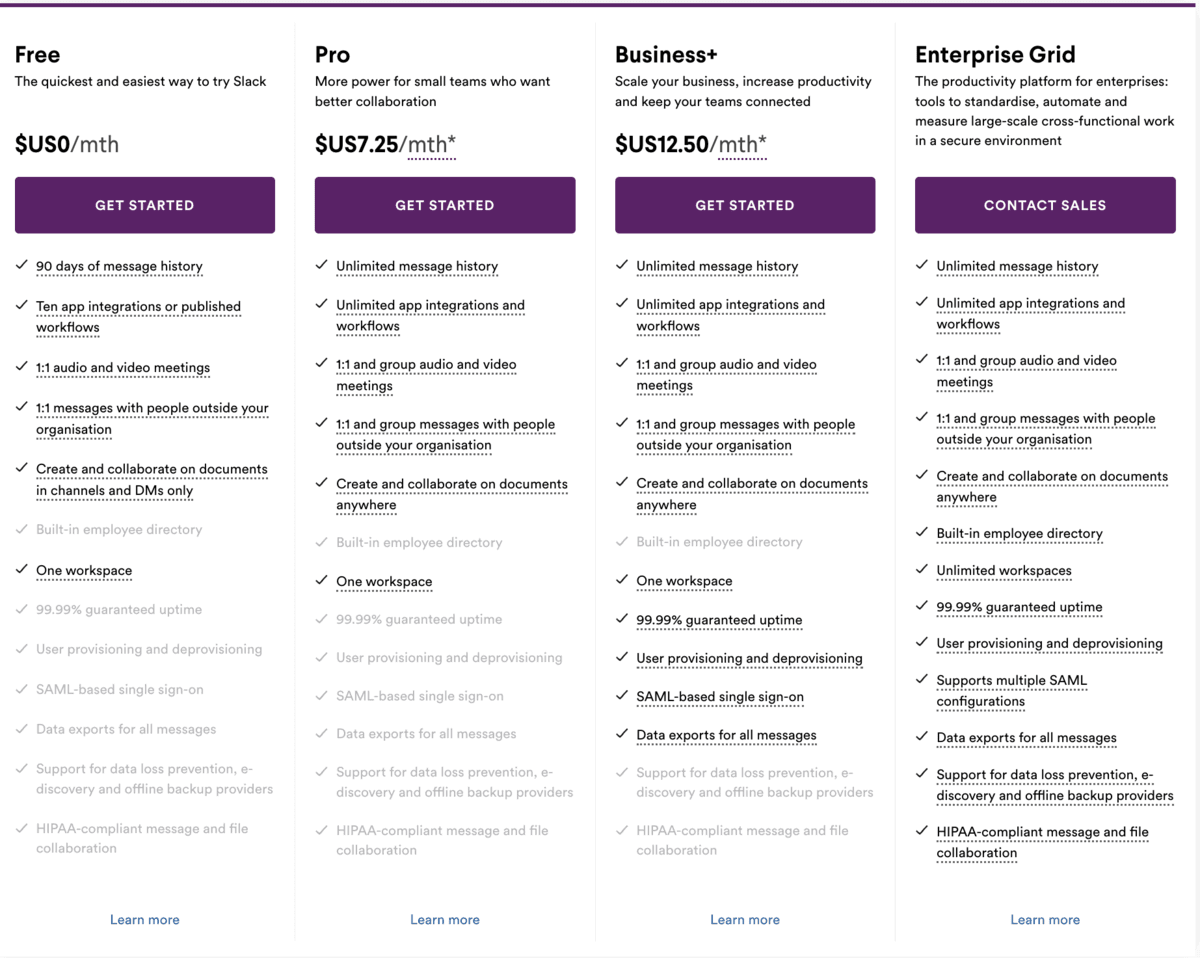
The Free Plan provides essential tools for small teams. It limits message history to 90 days and allows up to 10 app integrations. Users can create channels and send direct messages. Video calls support up to two participants. This plan works well for startups or small groups.
Pro Plan Benefits
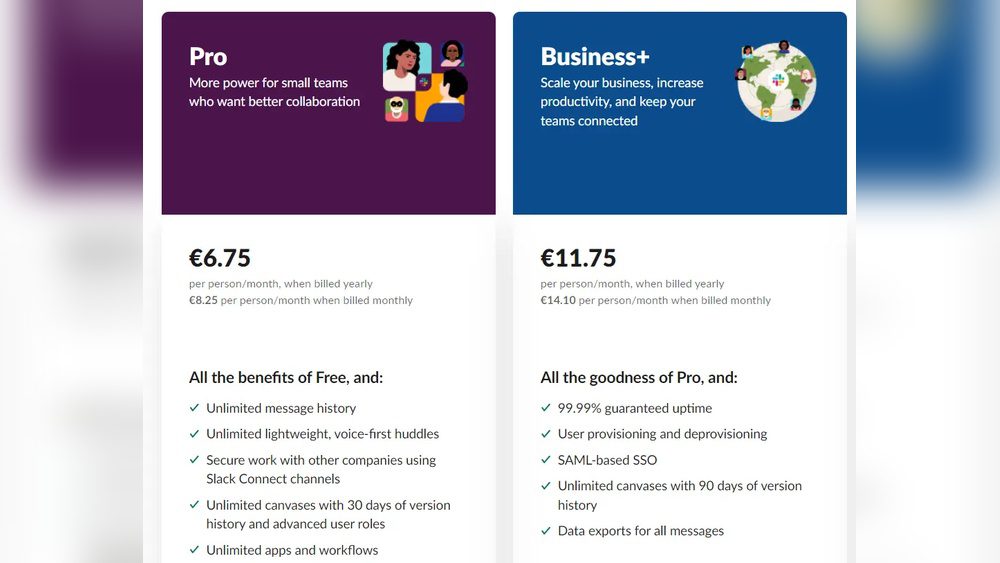
The Pro Plan offers unlimited message history and up to 15 app integrations. Group video calls can include up to 15 people. It provides screen sharing and guest access. Teams get priority support and advanced search features. This plan suits growing teams needing more flexibility.
Business+ Plan Advantages
Business+ adds enhanced security and compliance features. It includes user provisioning and single sign-on options. Teams benefit from 24/7 support and guaranteed uptime. Workspace analytics help track team activity. This plan is ideal for larger organizations requiring stronger control.
Enterprise Grid Overview
Enterprise Grid targets very large companies with complex needs. It supports multiple interconnected workspaces under one organization. Advanced security controls and compliance certifications come standard. Dedicated account management and personalized support are included. This plan fits enterprises needing scalability and governance.
Credit: blog.xoxoday.com
Cost Comparison
Understanding the cost differences between Slack and its competitors helps teams choose the right tool. Pricing depends on features, team size, and long-term needs. Comparing Slack with other popular platforms clarifies what you pay for and what you get.
Slack Vs Microsoft Teams
Microsoft Teams generally offers a lower starting price than Slack. Teams start at around $4 per user per month. Slack’s paid plans begin higher, around $7.25 per user per month. Teams often include Office 365 apps, adding value for users already in Microsoft’s ecosystem. Slack charges more for advanced features and app integrations. As teams grow, Slack costs can rise faster. Microsoft Teams may suit budget-conscious organizations. You can also read the full comparison between Slack and Microsoft teams here.
Slack Vs Google Workspace
Google Workspace bundles communication tools with cloud storage and productivity apps. Slack focuses mainly on messaging and collaboration features. Google Workspace pricing starts near $6 per user per month. Slack’s price is slightly higher for similar user limits. Google Workspace offers integrated email, calendar, and docs. Slack provides deeper chat customization and third-party app support. The choice depends on whether your team needs broader productivity tools or focused messaging.
Pricing Impact On Team Size
Small teams often benefit from Slack’s free plan, but it limits message history and integrations. Medium to large teams may find paid Slack plans costly. Microsoft Teams and Google Workspace scale better with larger user bases. Per-user pricing adds up as teams expand. Budget planning should consider future growth and required features. Choosing a platform with flexible pricing helps control expenses over time.
Hidden Costs To Consider
Extra charges can appear beyond base subscription fees. Add-ons like premium support or advanced security may increase costs. Integration with other software might require additional licenses. Training and onboarding also add to the total cost of ownership. Consider potential downtime or productivity loss during migration. Evaluate all expenses to avoid surprises after purchase.
Saving Strategies
Saving money on Slack can boost your team’s budget without cutting features. Smart choices help you pay less while keeping the tools you need. Explore simple ways to reduce your Slack costs today.
Annual Payment Discounts
Paying for Slack yearly instead of monthly cuts costs. Annual plans offer a discount of up to 20%. This saves money over time and reduces billing hassle. Choose annual billing when you plan to use Slack long term.
Nonprofit And Education Discounts
Slack supports nonprofits and schools with special pricing. These groups can get Slack at lower rates or free. Verify your status to apply for these discounts. It helps organizations stretch their funds further.
Optimizing User Licenses
Review your Slack users regularly to avoid paying for unused accounts. Remove inactive users or switch some to free plans. Assign licenses only to active team members. This keeps your Slack bill lean and fair.
Bundling With Other Tools
Combine Slack with other software subscriptions to save more. Some vendors offer package deals that include Slack. Bundles often cost less than buying each tool separately. Check your existing services for bundle options.
Feature Highlights By Plan
Slack offers different pricing plans, each with unique features. Understanding these features helps you pick the right plan for your team. The plans vary in message history, app integrations, calls, and automation.
Message History Limits
The Free plan stores up to 90 days of message history. Paid plans like Pro and Business+ offer unlimited message archives. This helps teams access past conversations anytime. Unlimited history is useful for larger teams or long projects.
App Integrations
Free users can connect up to 10 apps or services. Paid plans allow unlimited app integrations. More integrations mean better workflow and smoother communication. Popular apps include Google Drive, Trello, and Zoom.
Video And Voice Calls
The Free plan supports one-on-one calls only. Pro and Business+ plans allow group calls with screen sharing. This feature improves remote team collaboration. Higher plans offer better call quality and larger participant limits.
Workflow Automation
Free users get basic workflow automation with simple steps. Paid plans provide advanced automation with multi-step workflows. Automations save time by handling repetitive tasks. This feature boosts productivity across teams.
Choosing The Right Plan
Choosing the right Slack plan can shape how well your team communicates and collaborates. Different plans offer unique features and limits. Understanding your team’s needs helps pick the best option. Consider size, project demands, security, and support when making your choice.
Team Size Considerations
Small teams may find Slack’s free plan enough to start. It allows basic messaging and limited app integrations. Larger teams benefit from paid plans with unlimited message archives. These plans support more users and offer advanced collaboration tools. Think about how many people will use Slack daily.
Project Complexity Needs
Simple projects need fewer features. Basic messaging and file sharing may work well. Complex projects require features like workflow automation and video calls. Paid plans provide these tools. They help keep tasks organized and communication clear across channels. Match the plan to your project’s demands.
Security And Compliance
Data safety is crucial for many businesses. Paid Slack plans include stronger security controls. Features like data encryption, compliance certifications, and single sign-on add protection. Choose a plan that meets your industry’s rules. This ensures your information stays safe and private.
Support And Service Levels
Free plans offer limited support options. Paid plans provide faster and more comprehensive help. Some include 24/7 customer service and dedicated account managers. Consider how much support your team needs. Reliable service can reduce downtime and keep your workflow smooth.

Credit: www.spendflo.com
User Experience Impact
Slack pricing not only affects budgets but also shapes the user experience. The costs influence which features teams access. These features impact how users handle communication and collaboration daily.
Understanding this impact helps teams choose the right Slack plan. It also guides them to use Slack effectively without stress. User experience is key to productivity and satisfaction.
Notification Management
Slack’s plans offer different controls for notifications. Paid plans provide advanced settings to filter alerts. Users can mute channels or set keywords to stay focused.
Better notification management reduces distractions. It helps users respond to important messages faster. This leads to a smoother workflow and less frustration.
Collaboration Efficiency
Slack pricing affects access to collaboration tools. Paid tiers unlock features like unlimited message history and group calls. These tools make teamwork faster and clearer.
Teams can share files easily and keep conversations organized. This efficiency saves time and prevents repeated work. Collaboration becomes more natural and less chaotic.
Avoiding Communication Overload
Slack’s pricing plans offer features to manage message volume. Paid plans include better search and channel controls. These help users find key information quickly.
Limiting unnecessary messages reduces overload. It keeps users from feeling overwhelmed. Clear communication helps teams focus on what matters.
Maintaining Work-life Balance
Slack’s pricing impacts tools for setting work boundaries. Higher plans allow scheduling notification pauses or setting custom statuses. These features support personal time and reduce burnout.
Users can control when to be reachable. This balance improves mental health and job satisfaction. A good work-life balance encourages steady productivity.
Credit: www.enterpriseready.io
Frequently Asked Questions
How Much Does Slack Cost Per User?
Slack costs $7. 25 per user monthly on the Pro plan. Free and Business+ plans offer different features and pricing.
Why Are Companies Moving Away From Slack?
Companies leave Slack due to constant notifications, pressure for instant replies, high costs, limited message history on free plans, and preference for integrated tools.
Is Slack Worth Paying For?
Paying for Slack is worth it for unlimited message history, advanced integrations, group video calls, and workflow automation. It suits mid-to-large teams managing complex projects.
Conclusion
Choosing the right Slack plan depends on your team’s size and needs. Free plans work well for small groups with basic needs. Paid plans offer more features like unlimited message history and app integrations. Consider how much your team will use these extras before deciding.
Balancing cost and functionality helps you get the best value. Slack pricing fits different budgets and work styles. Take time to compare plans carefully. This ensures your team stays connected without overspending.