If you’re considering Salesforce for your business, you probably want to know what it’s really like to use. Is it worth the investment?
Will it fit your team’s needs or just add extra complexity? You’ll get clear, honest Salesforce reviews that highlight both the powerful benefits and the common challenges. By the end, you’ll have a solid understanding of what to expect—and whether Salesforce is the right choice to boost your sales, marketing, and customer service efforts.
Keep reading to discover insights that can save you time, money, and frustration.

Credit: www.salesforce.com
Salesforce Features
Salesforce offers a wide range of features that support businesses in managing customer relationships effectively. These features cover sales, marketing, customer service, and more. The platform is designed to grow with your business and adapt to various needs.
Its tools help teams work smarter and faster, improving overall productivity. Below are key features that make Salesforce a popular choice among companies of all sizes.
Extensive Product Suite
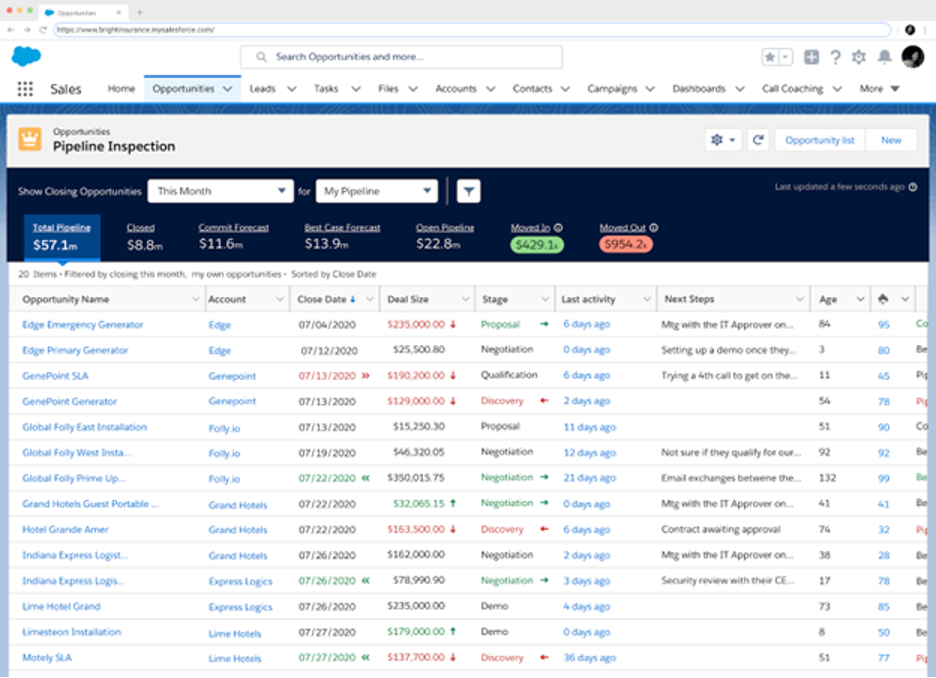
Salesforce provides many products for different business areas. Sales Cloud helps manage leads and opportunities. Marketing Cloud supports campaign management and email marketing. Service Cloud improves customer support with case tracking. Commerce Cloud offers solutions for online stores. Each product works alone or together for a full solution.
Customization Options
Businesses can tailor Salesforce to fit their unique processes. Custom fields, layouts, and workflows can be created easily. Users build apps with drag-and-drop tools without coding. This flexibility allows teams to work exactly how they want. Customization ensures the platform matches specific business needs.
Automation Tools
Salesforce automates repetitive tasks to save time. Workflow rules and Process Builder trigger actions automatically. Email alerts, task assignments, and updates happen without manual work. Automation reduces errors and speeds up business processes. Teams focus on important work instead of routine tasks.
Integration Ecosystem
Salesforce connects with many third-party apps through AppExchange. Popular tools like Slack, Mailchimp, and QuickBooks integrate smoothly. APIs allow custom connections with other software. Integration keeps data in sync across platforms. It creates a unified system for business operations.
Analytics And Ai Capabilities
Salesforce offers strong analytics tools for data insights. Reports and dashboards show real-time business performance. Einstein AI provides predictions and recommendations. AI helps identify sales opportunities and customer trends. These insights assist teams in making smarter decisions.
Cloud-based Benefits
Being cloud-based means Salesforce is accessible anywhere with internet. No need to install software or manage servers. Updates and maintenance happen automatically. Data is stored securely with backups. Cloud access supports remote work and collaboration across teams.
Credit: www.business.com
Salesforce Benefits
Salesforce offers many benefits that help businesses grow and operate smoothly. Its features suit companies of all sizes and industries. The platform supports sales, marketing, customer service, and more. Users gain tools to improve efficiency and decision-making. Cloud-based technology keeps data accessible and secure. These benefits make Salesforce a popular choice worldwide.
Scalability For Businesses
Salesforce adapts easily as a business grows. Small startups and large enterprises use it without issues. The platform supports adding more users, data, and features. Companies do not need to change software when expanding. This flexibility saves time and reduces costs.
Improved Productivity
Automation tools reduce repetitive tasks and manual work. Employees spend less time on data entry and follow-ups. Salesforce offers task reminders and workflow management. Teams communicate better and track progress clearly. These features help workers focus on important activities.
Seamless Third-party Connections
Salesforce connects with many popular apps and services. It integrates with email, marketing tools, and accounting software. The AppExchange marketplace provides thousands of add-ons. Businesses customize their setup to match their needs. These connections create a smooth work environment.
Data-driven Decision Making
Salesforce collects and organizes business data effectively. It creates reports and dashboards for quick insights. Users identify trends and measure performance easily. Advanced AI tools suggest actions based on data. Informed decisions lead to better outcomes and growth.
Maintenance And Updates
Being cloud-based means Salesforce handles updates automatically. Users get the latest features without downtime. Security patches protect data continuously. IT teams spend less time on maintenance tasks. This ensures the platform runs smoothly and securely.
Salesforce Drawbacks
Salesforce is a popular CRM platform with many benefits. Yet, it has some drawbacks that businesses should consider. These issues may affect overall satisfaction and use. Understanding these downsides helps companies make better decisions.
High Cost Factors
Salesforce pricing can be high for small businesses. Many features come with extra fees. Users may pay for tools they do not need. This increases the total cost without added value. Budgeting for Salesforce requires careful planning.
Learning Curve Challenges
New users often find Salesforce complex. It takes time to learn its features and tools. Training is necessary to use it efficiently. Without guidance, users may feel overwhelmed. This can slow down adoption across teams.
Customization Delays
Customizing Salesforce to fit business needs takes time. Some changes require technical skills or developers. Delays in customization can impact workflow improvements. Quick changes may not always be possible. Patience is needed during setup and updates.
Internet Dependence
Salesforce is cloud-based, so it needs internet access. Poor connectivity affects performance and access to data. Offline work is limited or unavailable. This reliance may disrupt business operations in some areas. Stable internet is essential for smooth use.
User Interface Issues
Some users find the Salesforce interface cluttered. Navigating through many options can be confusing. The design may seem outdated to new users. Customizing views helps but requires effort. A simpler interface would improve user experience.
Implementation Timeframes
Setting up Salesforce can take weeks or months. Complex businesses face longer implementation times. Integration with other systems adds to the delay. Fast deployment is rare, especially for custom solutions. Planning and resources affect the timeline significantly.

Credit: cargas.com
Pricing And Licensing
Understanding Salesforce’s pricing and licensing is key for budgeting your CRM investment. The platform offers various plans and licenses suited for different business sizes and needs. Knowing the cost structure and license types helps you pick the best fit without overspending. You can learn more about Salesforce pricing here.
Cost Breakdown
Salesforce pricing depends on the product and plan level. Basic plans start with a monthly fee per user. Higher-tier plans include more features but cost more. Extra add-ons or services can increase the total price. Budgeting for Salesforce means considering these base costs and potential extras.
Suitability For Small Businesses
Small businesses may find entry-level plans affordable and useful. These plans offer essential CRM features without high costs. However, some advanced features come only with expensive plans. Small teams should evaluate their needs carefully to avoid paying for unused tools. Salesforce can scale as business grows, but initial costs must match current budgets.
Licensing Options
Salesforce offers different license types for users with distinct roles. For example, Sales Cloud licenses focus on sales features, while Service Cloud suits customer support teams. Platform licenses allow access to custom apps only. Understanding each license type helps optimize costs by assigning correct access levels. Mixing licenses can reduce expenses while meeting user needs.
User Experiences
User experiences with Salesforce reveal a mix of satisfaction and challenges. Many users appreciate the platform’s power and versatility. Others find certain aspects difficult or costly. Understanding these experiences helps new users set realistic expectations and existing users find solutions.
Positive Feedback Highlights
Users praise Salesforce for its wide range of features. The platform suits many business needs like sales and marketing. Customization options allow companies to match their processes. Automation tools save time and reduce repetitive tasks. Integration with other apps works smoothly for most. Reporting and analytics help users make smarter decisions.
Common Complaints
Some users find Salesforce too expensive for their budgets. The learning curve can feel steep and overwhelming. Complex setups require time and skilled staff to manage. Slow implementation delays project timelines in some cases. Dependence on internet speed affects user experience. Others mention paying for features they never use.
Why Some Leave Salesforce
High costs are a main reason users switch to other platforms. Overpaying for unnecessary functions frustrates many businesses. Some leave due to slow or complex customization processes. Others seek simpler tools with easier learning paths. Businesses may outgrow Salesforce or change their needs. These factors lead some users to find alternatives.
Salesforce Alternatives
Exploring Salesforce alternatives can help businesses find a CRM that fits their needs and budget. Many companies seek simpler or more affordable options that still offer essential features. Understanding these alternatives allows better decision-making for customer relationship management.
Other Crm Options
Several CRM platforms compete with Salesforce in the market. HubSpot CRM offers a free plan with basic tools for small teams. Zoho CRM provides a wide range of features at a lower price point. Microsoft Dynamics 365 integrates well with other Microsoft products. Pipedrive focuses on sales pipeline management with an easy-to-use interface. Each option suits different business sizes and industries.
Comparing Features And Costs
Salesforce is rich in features but comes with a higher price tag. HubSpot’s free plan is good for startups but lacks advanced automation. Zoho CRM offers a balance between features and affordability. Microsoft Dynamics 365 is strong in integration but can be complex to set up. Pipedrive is cost-effective and user-friendly but less customizable. Choosing a CRM depends on which features matter most and the budget available.
Choosing Salesforce
Choosing Salesforce is a critical step for any business aiming to improve customer relationships and streamline operations. The platform offers many tools but selecting the right fit requires careful thought. Understanding your business needs and resources helps ensure you get the most value from Salesforce.
Breaking down your decision into key factors simplifies the process. Focus on what your business truly requires, how much you can spend, and what level of customization is necessary.
Business Needs Assessment
Identify your core business goals first. What problems do you want Salesforce to solve? Consider sales tracking, customer service, or marketing automation. Knowing your priorities helps narrow down the features you need. Avoid paying for unnecessary functions that don’t add value.
Customization Requirements
Evaluate how much you need to tailor Salesforce. The platform supports high customization for workflows, reports, and dashboards. Some businesses need simple setups, while others require complex adjustments. Check if your team has the skills to manage customizations or if you need outside help.
Budget Considerations
Set a clear budget for Salesforce costs. Pricing varies based on features, user numbers, and add-ons. Keep in mind ongoing expenses like training and support. Balance your desired features with what you can afford. Overspending risks wasting resources without enough benefit.
Frequently Asked Questions
Why Do People Leave Salesforce?
People leave Salesforce due to its high cost, complex features, steep learning curve, slow customization, and reliance on constant internet connectivity.
Is It Worth It To Work For Salesforce?
Working for Salesforce offers strong career growth, excellent benefits, and innovative technology exposure. The learning curve and fast-paced environment challenge many employees. Overall, it suits those seeking dynamic, rewarding roles in cloud computing and CRM industries.
What Are The Pros And Cons Of Salesforce?
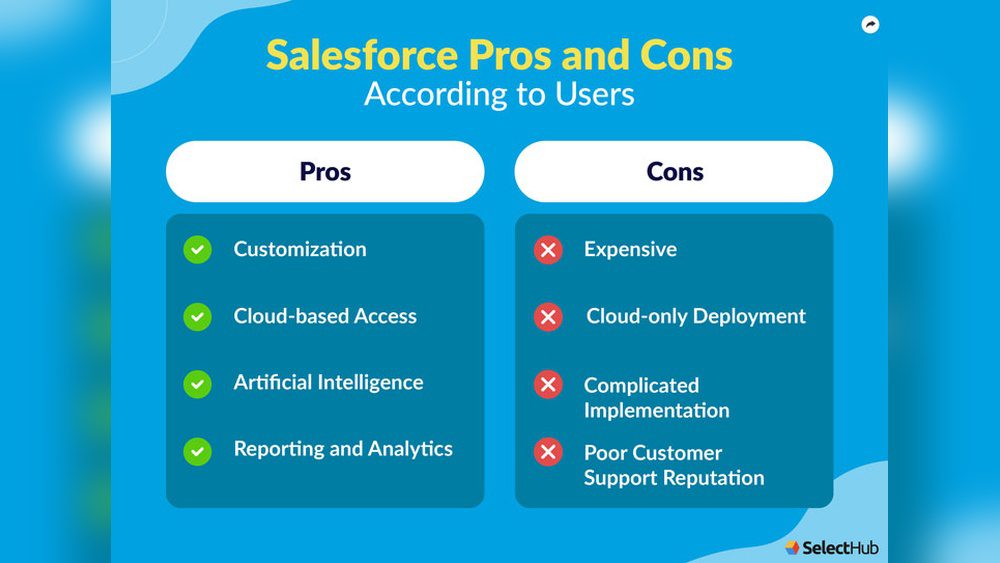
Salesforce offers extensive features, high customization, strong automation, seamless integration, and powerful analytics. Its drawbacks include high cost, steep learning curve, complex customization, slow implementation, and reliance on internet connectivity.
Conclusion
Salesforce offers many powerful tools for businesses of all sizes. It helps improve sales, marketing, and customer service. Customization and automation make workflows smoother. Yet, it can be costly and hard to learn. Some users find setup slow and complex.
Think about your business needs before choosing Salesforce. It works best when tailored carefully. Overall, Salesforce remains a strong option for many companies seeking growth and efficiency.