When you need to collect information online—whether for surveys, feedback, lead generation, or event registrations—choosing the right tool is critical. Two names often come up in this space: Typeform and Jotform. Both offer modern, easy-to-use form builders. But which one is truly better for your needs? If you’re looking for a solution that not only collects data but also boosts engagement and feels enjoyable to use, this comparison will guide you. By the end, you’ll understand the real differences, the strengths and weaknesses, and why many professionals are choosing Typeform as their top choice.
What Are Typeform And Jotform?
Typeform and Jotform are both online platforms that let you build forms, surveys, and quizzes. Their main goal is to help you collect information from users without needing to code. You simply drag and drop fields, set up your questions, and share the link.
- Typeform is known for its conversational approach. It shows one question at a time, making the experience feel like a real conversation. This leads to higher completion rates and more thoughtful answers.
- Jotform offers a more traditional form layout. It’s flexible, full of features, and suitable for many use cases. However, it lacks the interactive feel that makes Typeform stand out.
Both platforms are trusted by millions worldwide. But subtle differences can have a big impact on your results, especially if you care about user experience and completion rates.
Core Features Comparison
To help you choose, let’s break down the most important features side by side.
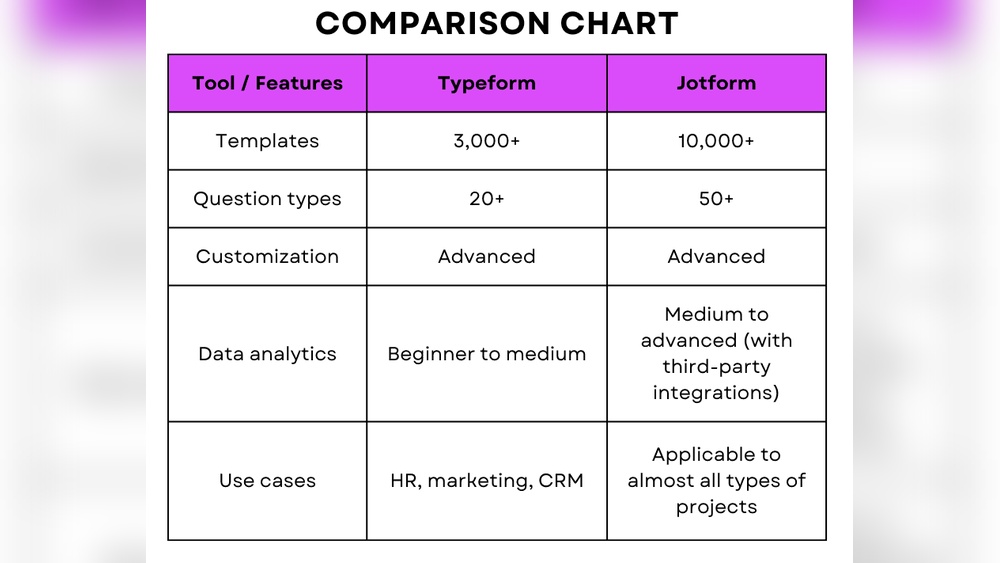
| Feature | Typeform | Jotform |
|---|---|---|
| User Experience | Conversational, one question at a time | Traditional, all questions visible |
| Templates | Hundreds, modern and visually appealing | Thousands, wide variety but less focus on aesthetics |
| Question Types | All basics, plus logic jumps and calculators | All basics, many advanced fields |
| Integrations | Over 120, focused on key business tools | Over 150, broad range |
| Mobile Responsiveness | Excellent, designed for any device | Good, but sometimes less smooth |
| Branding Options | Easy branding, no-code customization | Customizable, some options require paid plans |
| Reporting & Analytics | Clear reports, visual dashboards | Advanced analytics, export features |
| Support | Help center, live chat, email | Help center, email, priority support on higher plans |
| Pricing | Free plan, paid starts at $25/mo | Free plan, paid starts at $34/mo |
User Experience: Where Typeform Shines
Most people underestimate the importance of user experience in forms. But the way your form looks and feels can change everything—from how many people start to how many finish.
Typeform’s biggest advantage is its one-question-at-a-time approach. Here’s why it matters:
- Less Overwhelming: When people see a long list of questions, they may feel stressed or bored and leave before finishing. Typeform shows only one question, making it easier to focus.
- More Personal: The conversational style feels like chatting, not filling out a boring survey. This leads to better, more honest answers.
- Higher Completion Rates: Data shows that forms with this style can get up to 20-30% higher completion rates compared to traditional layouts.
Jotform’s interface is clear and easy to use, but it’s more like classic forms—everything is on one page, which can be overwhelming for longer surveys.
Non-obvious insight: Many beginners forget that the way a form “feels” can matter more than the number of features. If you want more people to actually finish your form, Typeform’s design gives you a real advantage.
Design And Customization
Looking professional isn’t just about colors and logos. It’s about building trust and making users comfortable.
- Typeform offers sleek, modern templates and easy branding. You can adjust colors, fonts, images, and even background videos. There’s no code required.
- Jotform has thousands of templates, but many feel outdated or generic. You can customize, but some advanced branding features are locked behind higher paywalls.
Typeform’s visual flow helps your brand stand out. For example, adding your logo or custom backgrounds is quick, making your form feel like a real extension of your business.
Practical tip: If you want your forms to feel unique and memorable, Typeform’s customization tools are both easier and more powerful for non-designers.
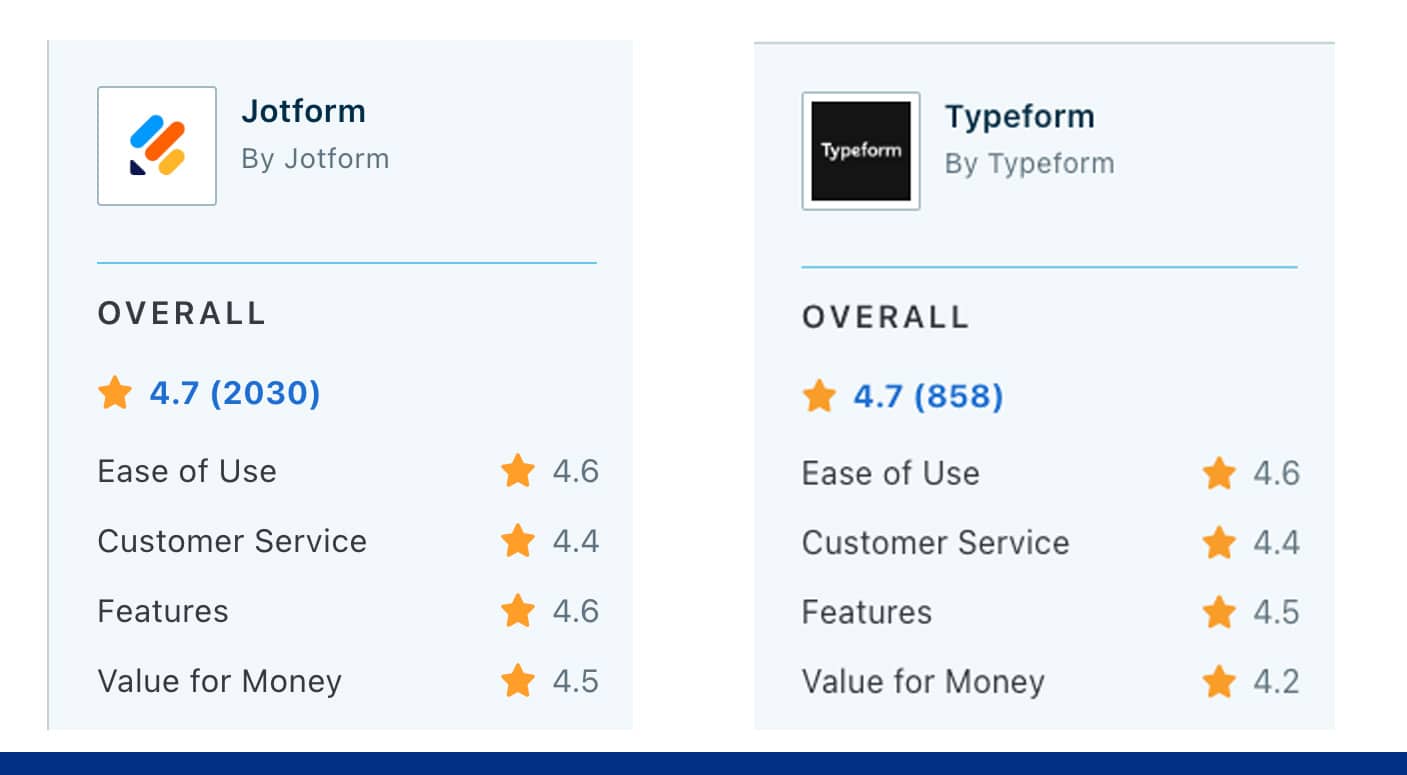
Credit: www.questionpro.com
Question Types And Logic
Both platforms cover all the basics: text fields, multiple choice, dropdowns, ratings, and file uploads.
Typeform, however, makes it easier to add logic jumps—meaning the next question can change based on the previous answer. This is great for personalizing the experience and collecting better data.
For example, if someone says they are interested in “Product A,” Typeform can instantly show more questions about that product and skip unrelated sections.
Jotform also has logic and conditional fields, but the setup is more complex. Beginners can get confused or make mistakes with advanced logic, leading to broken forms.
Non-obvious insight: Personalization doesn’t just help with data quality—it makes users feel heard and valued. Typeform’s logic jumps are simpler and less error-prone, making them safer for beginners.
Integrations With Other Tools
You often need your form data to connect with other apps, such as email marketing tools, CRMs, or Google Sheets.
- Typeform has over 120 direct integrations, focused on popular business tools like Slack, HubSpot, Mailchimp, and Google Sheets. These are easy to set up—no tech skills needed.
- Jotform offers more total integrations, including payment gateways, e-signature tools, and industry-specific software.
However, Typeform’s main integrations are smoother and less buggy, especially when syncing responses in real-time.
Example: If you want every new response to automatically create a lead in HubSpot, Typeform’s integration works seamlessly with just a few clicks.

Credit: zapier.com
Reporting And Analytics
Collecting data is only half the battle. You also need to understand it.
- Typeform has built-in visual dashboards, showing response rates, completion times, and drop-off points. You can also export data to Excel or Google Sheets for deeper analysis.
- Jotform provides advanced analytics, custom reports, and export options. For more detailed analysis, you may need to upgrade to higher plans.
For most users, Typeform’s reporting is easier to read and act on, especially if you’re not a data expert.
Helpful guidance: If you’re new to analytics, start with Typeform’s visual reports. They show you what matters without overwhelming you with numbers.
Mobile Experience
More than half of form responses come from smartphones. If your form isn’t mobile-friendly, you’ll lose valuable data.
Typeform’s forms are fully responsive. The one-question-at-a-time display works perfectly on small screens, making it easy to answer on the go.
Jotform is also mobile-friendly, but long forms can feel cramped or messy on phones, especially when many questions are stacked together.
Real-world tip: Try filling out your own form on a phone before publishing. You’ll notice Typeform’s interface is less stressful and more user-friendly.
Pricing: What Do You Really Get?
Let’s look at what you pay—and what you get in return.
| Plan | Typeform | Jotform |
|---|---|---|
| Free | Up to 10 responses/month, limited features | Up to 100 responses/month, limited features |
| Starter Paid | $25/month, 100 responses/month, logic jumps, branding | $34/month, 1,000 responses/month, more basic features |
| Higher Tiers | $50–$83/month, more responses, advanced integrations | $39–$99/month, more responses, HIPAA, approvals |
Jotform’s free plan offers more responses, which may appeal to some. But Typeform’s paid plans include all the key features—like branding and logic jumps—at a lower starting price.
It’s easy to get drawn in by “more responses,” but ask yourself: Do I care more about quantity, or quality and completion rates? For most businesses, Typeform’s higher engagement more than makes up for the lower response cap.
Common mistake: Focusing only on the number of responses, and ignoring how many people actually finish your form and give meaningful answers.
Security And Compliance
Both platforms take security seriously, using industry-standard encryption and data protection measures.
- Typeform is GDPR-compliant and offers data residency in the EU. You can delete responses and users easily.
- Jotform also offers GDPR and HIPAA compliance (on higher tiers). You can enable two-factor authentication and set permissions for team members.
If you handle sensitive healthcare data, Jotform’s HIPAA support on business plans is a plus. For most businesses, Typeform’s security is more than enough.
Unique Features That Matter
Typeform’s hidden strengths:
- Conversational Forms: The chat-like flow increases engagement.
- Logic Jumps Made Easy: Personalize the experience with simple setup.
- Video and Rich Media: Add videos and images to questions, making forms more interactive.
- Google Sheets Sync: Real-time syncing without technical setup.
- Hidden Fields: Pass data from emails or ads to personalize questions.
Jotform’s unique perks:
- PDF Form Creation: Build forms that can be downloaded as fillable PDFs.
- Approval Workflows: Route responses for team approval (for HR, finance, etc. ).
- Payment Integrations: More payment options, including Square, Stripe, and PayPal.
But for most users, Typeform’s unique features are the ones that lead to higher completion and better data.
Customer Support And Community
When you run into a problem, good support can save hours.
- Typeform provides a detailed help center, email support, and live chat on paid plans. Their guides are clear and easy to follow.
- Jotform offers email support, a large help center, and faster responses at higher tiers.
Typeform’s support is often praised for being more personal and proactive, especially for beginners.
Pro tip: Don’t underestimate the value of good onboarding. Typeform’s guided setup and tutorials help you avoid common mistakes.
Real-world Use Cases
Let’s look at how both platforms work for different needs.
- Lead Generation: Typeform’s conversational style makes users more likely to finish, giving you more qualified leads. Jotform can collect leads too but may result in more drop-offs if your form is long.
- Employee Feedback: Typeform’s one-at-a-time questions encourage honest, detailed responses. Jotform is better for quick, checklist-style feedback.
- Event Registration: Both work well, but Typeform’s design stands out and feels more premium—important if you’re hosting a high-profile event.
- Market Research: Typeform’s logic jumps let you ask follow-up questions based on answers, which leads to richer data.
- Payments and Orders: Jotform supports more payment processors, making it better for e-commerce or donations.
Experience-based insight: If your main goal is to get people to finish your form and feel good about your brand, Typeform delivers a better experience in most real-world situations.
Ease Of Use: Setup And Building
Both tools use drag-and-drop builders, but the workflows feel different.
- Typeform has a cleaner, more modern interface. You see your form exactly as users will see it. Adding questions, logic, and design is fast and intuitive.
- Jotform is powerful but can feel cluttered. There are more settings, which can be confusing for beginners. Advanced features require more digging.
If you want to build and launch forms quickly, without reading long guides, Typeform is the better choice.
Common beginner mistake: Trying to use every feature at once. Start simple, then add complexity as you get comfortable.
Accessibility And International Support
If your audience includes people with disabilities or non-English speakers, accessibility and language support are essential.
- Typeform is designed to be accessible (WCAG-compliant), and you can build forms in over 30 languages. The simple interface makes it easier for screen readers and keyboard-only users.
- Jotform supports multiple languages and offers accessibility features, but some templates are not fully compliant.
Typeform’s minimal, clean design is a real advantage for accessibility and global reach.
Examples: When To Choose Each Tool
Choose Typeform if:
- You want higher completion rates for surveys, lead forms, or feedback.
- Design and user experience matter for your brand.
- You need quick, simple logic jumps and easy setup.
- You care about accessibility and global reach.
- You’re new to online forms and want a gentle learning curve.
Choose Jotform if:
- You need many advanced features, like approvals or PDF forms.
- You collect lots of payments and need extra payment options.
- You want HIPAA compliance for healthcare data.
- You need a large number of responses on a free plan.
For most general business, marketing, and feedback uses, Typeform’s strengths make it the better choice.
Data Table: Summary Of Key Differences
Here’s a quick summary of what really sets these platforms apart.
| Area | Typeform | Jotform |
|---|---|---|
| User Engagement | High (conversational, engaging) | Medium (standard form style) |
| Design Quality | Modern, premium templates | Wide variety, mixed quality |
| Ease of Use | Very easy, minimal learning | Feature-rich, steeper learning curve |
| Logic & Personalization | Simple, powerful logic jumps | Advanced, but more complex to set up |
| Integrations | All essentials, smooth setup | Wider range, sometimes buggy |
| Price for Key Features | Lower starting price for logic, branding | Higher price for same features |
| Best For | Surveys, feedback, lead gen, events | Payments, approvals, PDF forms |
How To Decide: Key Questions To Ask Yourself
- What matters most—looks and engagement, or advanced features? If engagement is your priority, Typeform wins.
- Do you need to collect payments? If yes, and you want many payment gateways, Jotform may be better.
- How tech-savvy are you? Typeform is easier for beginners.
- How important is branding? Typeform offers better customization for a professional look.
- Is accessibility required? Typeform’s design is more accessible out of the box.
Pro insight: Many businesses switch from Jotform to Typeform after noticing low completion rates or poor user feedback. Starting with Typeform can save you time and headaches later.
Final Thoughts
Both Typeform and Jotform are capable, reliable tools. But if you want your forms to stand out, create a positive impression, and get more people to respond, Typeform has a clear edge. Its conversational interface, easy customization, and focus on user experience make it the top choice for modern businesses and anyone who values engagement.
If you need very specific features like payment processing or approval workflows, Jotform is worth considering. But for most uses—especially marketing, surveys, and feedback—Typeform’s strengths lead to better results.
For more details on the platforms’ security practices, you can check the official Typeform GDPR compliance documentation.
Frequently Asked Questions
What Makes Typeform Better For Surveys Than Jotform?
Typeform’s conversational design keeps users engaged by showing one question at a time. This reduces overwhelm and makes people more likely to finish the survey. Its logic jumps are easy to set up, letting you personalize the experience for each user. For most survey use cases, this leads to higher completion rates and better data.
Can I Collect Payments With Typeform?
Yes, Typeform supports payment collection through Stripe integration. However, if you need more payment options (like PayPal or Square), Jotform offers a wider range. For simple, branded payment forms, Typeform is easy to use, but for complex payment needs, consider Jotform.
Is Typeform Suitable For Beginners?
Absolutely. Typeform has a clean, simple interface and clear tutorials. You can set up and launch a form in minutes without prior experience. Many beginners actually find Typeform less confusing than Jotform, which has more features but also more complexity.
Can I Use Typeform For Free?
Typeform offers a free plan with up to 10 responses per month and basic features. This is enough to try the platform and see if it fits your needs. For more responses and advanced features like branding and logic jumps, you’ll need a paid plan.
How Secure Are My Responses On Typeform And Jotform?
Both platforms use encryption and follow industry standards for data security. Typeform is GDPR-compliant and lets you delete responses easily. Jotform also offers HIPAA-compliant plans for healthcare use. For most standard business needs, both are secure, but always check your country’s regulations if handling sensitive data.

Credit: www.typeform.com