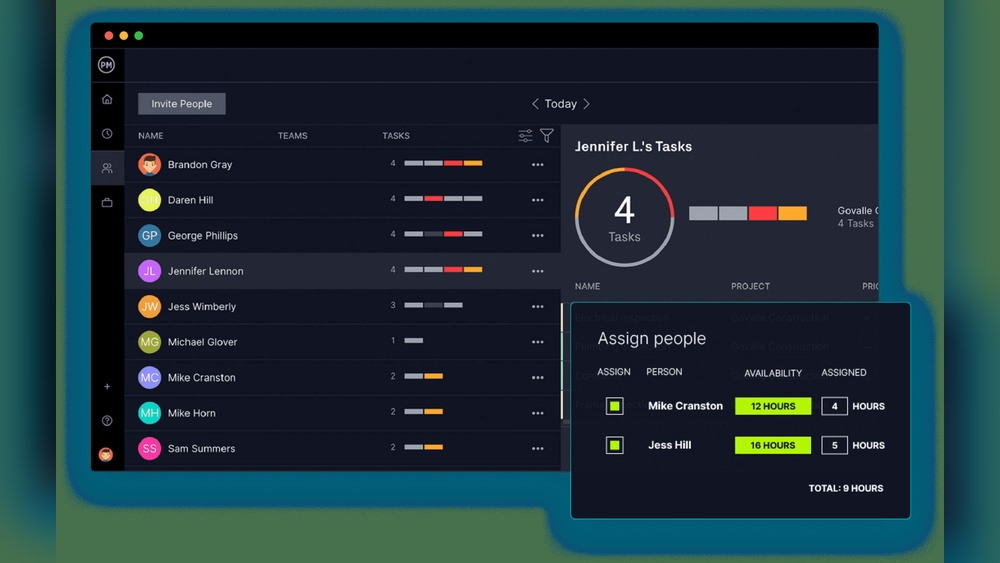
Are you struggling to keep your team on the same page? Managing projects can quickly become overwhelming without the right tools to connect everyone’s efforts.
That’s where a project collaboration platform steps in—designed to bring your team together, simplify communication, and streamline task management. Imagine having all your files, chats, and deadlines organized in one place, helping you move faster and avoid costly mistakes. Whether you’re working remotely or in the office, choosing the right collaboration platform can transform how your team works and delivers results.
Ready to discover how to boost your team’s productivity and make collaboration effortless? Keep reading to find out which tools fit your needs and how to get started today. A great example of an AppSumo collaboration tool that can help is FuseBase – read our full FuseBase Review to see how it boosts team productivity.

Credit: resources.businesstalentgroup.com
Top Collaboration Platforms
Effective teamwork depends on the right collaboration platform. These tools help teams communicate, share files, and manage tasks efficiently. Choosing the best platform boosts productivity and keeps projects on track. Several top platforms stand out for their features and ease of use. If you want to explore other AppSumo-based tools that offer similar collaboration features, check out FuseBase Alternatives.
Slack For Real-time Chat
Slack offers instant messaging with organized channels. Teams can create topic-based channels for focused discussions. It supports file sharing and integrates with many apps. Notifications keep everyone updated without overwhelming inboxes. Slack’s search function helps find past messages easily.
Microsoft Teams Integration
Microsoft Teams combines chat, video calls, and file storage. It works well with Office 365 apps like Word and Excel. Teams supports group meetings and screen sharing. Its integration with Outlook simplifies calendar management. Teams is ideal for businesses using Microsoft products.
Google Workspace Document Sharing
Google Workspace allows real-time collaboration on documents, spreadsheets, and presentations. Multiple users can edit files simultaneously. Changes save automatically, ensuring no data loss. Google Drive stores all files securely in the cloud. Sharing settings control who can view or edit documents.
Zoom Video Conferencing
Zoom provides reliable video meetings with clear audio and video. It supports large groups and breakout rooms for smaller discussions. Screen sharing helps with presentations and demonstrations. Zoom records meetings for later review. It is popular for remote team communication.
Notion And Monday.com For Project Management
Notion offers a flexible workspace for notes, databases, and project tracking. It adapts to different workflows with templates and customization. Monday.com provides visual project boards and task automation. Both platforms enhance team organization and progress monitoring. Wondering how FuseBase compares to Notion for project management? See FuseBase vs Notion – a detailed comparison of AppSumo’s FuseBase and Notion.
They simplify managing deadlines and responsibilities.
Key Features To Consider
Choosing the right project collaboration platform means focusing on essential features. These features help teams work smoothly and stay organized. To understand how these features relate to cost, check out FuseBase Pricing – see all plans and AppSumo options available.
Each feature plays a vital role in how your team communicates and manages tasks.
Understanding these key features helps pick a tool that fits your team’s workflow. Here are the most important features to consider.
Seamless Communication
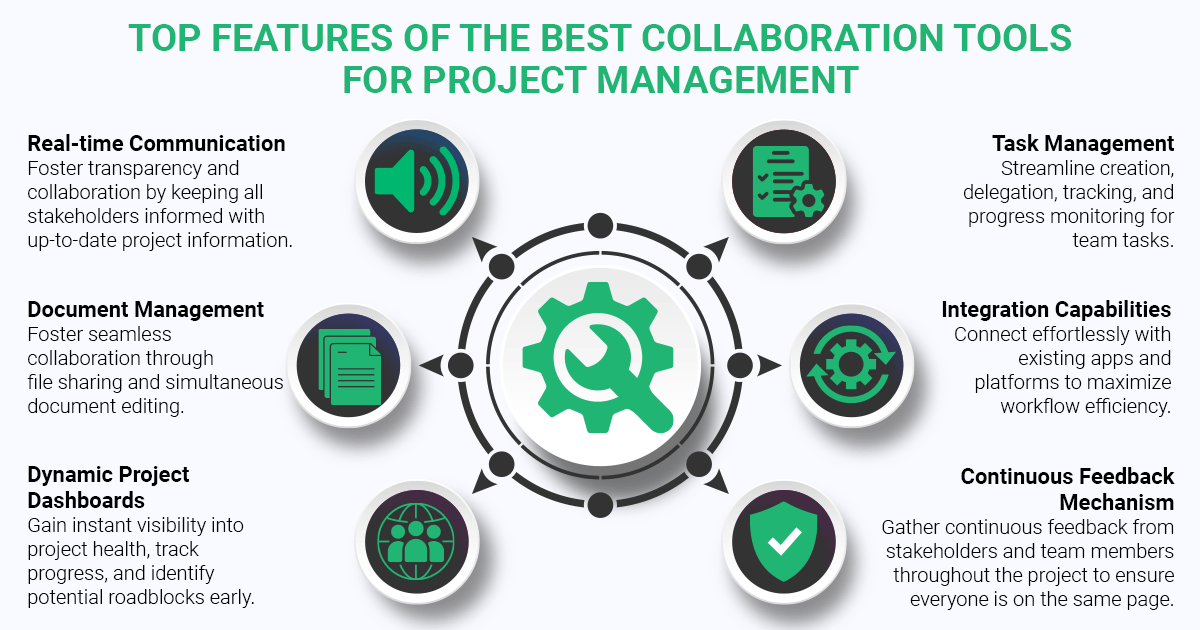
Clear and fast communication keeps projects on track. Look for platforms with chat, video calls, and notifications. These tools help team members share ideas instantly. Group chats and direct messages make it easy to reach anyone. Communication tools should be simple and reliable for daily use.
Task Management Tools
Task management features organize work and deadlines. Good platforms allow creating, assigning, and tracking tasks. They often include checklists, due dates, and priorities. Visual tools like Kanban boards or calendars help teams see progress. These tools keep everyone focused and aware of responsibilities.
File Sharing Capabilities
Sharing documents fast is crucial for collaboration. The platform should support uploading, downloading, and previewing files. Look for options to comment and edit documents together. Secure storage and easy access to files save time. File sharing features reduce email clutter and confusion.
App Integrations
Integrations connect the platform with other apps your team uses. This might include calendar apps, email, or design tools. Integrations automate tasks and reduce switching between apps. They help centralize work and improve efficiency. Choose a platform with the most useful app connections for your needs.
Communication And Chat Tools
Communication and chat tools form the backbone of any project collaboration platform. They allow team members to exchange ideas quickly and clearly. These tools reduce delays and keep everyone on the same page. Effective communication improves productivity and helps solve problems faster.
Different platforms offer various features to support team conversations. Some focus on instant messaging, others on video calls or screen sharing. Choosing the right tools depends on how your team works best and the kind of projects you handle.
Slack Channels And Integrations
Slack offers organized channels to group conversations by topic or team. Channels keep discussions focused and easy to follow. Users can send direct messages for private talks. Slack supports many app integrations, like Google Drive and Trello. These integrations help centralize work and reduce switching between apps. Notifications keep everyone updated on important messages and tasks.
Microsoft Teams Messaging
Microsoft Teams provides a robust messaging system within the Microsoft 365 ecosystem. It combines chat, video calls, and file sharing in one place. Teams allows threaded conversations, making it easier to track replies. It integrates well with Outlook, SharePoint, and OneDrive. This integration streamlines communication and document collaboration for businesses. Teams also supports guest access for external partners.
Zoom Screen Sharing And Webinars
Zoom is known for reliable video meetings and webinars. Screen sharing lets participants show their work in real time. This feature improves clarity during discussions and training sessions. Zoom webinars support large audiences, useful for presentations or workshops. Meeting recordings allow team members to review information later. Zoom’s tools help remote teams stay connected and engaged.

Credit: filestage.io
Project And Knowledge Management
Effective project and knowledge management is vital for team success. It keeps tasks organized and information accessible. If you want a practical example of an AppSumo collaboration tool supporting project and knowledge management, read our FuseBase Review.
Teams can work smarter by using the right tools. These platforms help manage workflows, track progress, and store knowledge in one place. Let’s explore some top tools that support project and knowledge management.
Customizable Workflows With Monday.com And Clickup
Monday.com and ClickUp offer flexible workflows for any project. They let teams create custom task boards and automate routine steps. These platforms adapt to different industries and team sizes. Users can assign tasks, set deadlines, and track progress easily. Visual workflow builders make managing complex projects simple.
Task Tracking In Asana
Asana helps teams keep track of all tasks in one place. It offers lists, timelines, and calendars for clear scheduling. Users can comment directly on tasks to share updates. The platform supports setting priorities and dependencies to avoid delays. Asana’s notifications ensure nothing is missed.
Versatile Workspaces With Notion
Notion combines notes, docs, and databases in a flexible workspace. Teams use it to store meeting notes and project plans. It supports creating custom templates for consistent documentation. Notion’s all-in-one design reduces the need for multiple apps. It is ideal for teams that want to centralize knowledge and tasks.
Visual Boards In Trello
Trello uses simple Kanban boards for task management. Cards represent tasks that move through customizable columns. Teams benefit from its drag-and-drop interface and easy setup. Trello supports checklists, attachments, and due dates on each card. Its visual approach helps teams see project status at a glance.
Documentation With Confluence
Confluence focuses on documentation and knowledge sharing. It integrates well with Jira for software projects. Teams use it to create, organize, and collaborate on documents. Version control and permissions keep information secure and up to date. Confluence ensures that important knowledge stays accessible to all team members.
File And Design Collaboration
File and design collaboration is key for smooth teamwork in any project. It allows multiple team members to work together on documents and creative assets without delay. Efficient collaboration tools keep everyone on the same page and reduce mistakes.
These platforms offer real-time editing, easy file sharing, and design co-creation. Teams save time by avoiding back-and-forth emails and version conflicts. Let’s explore some popular tools that enhance file and design collaboration.
Real-time Docs With Google Workspace
Google Workspace lets teams edit documents, sheets, and slides simultaneously. Changes appear instantly for all collaborators. Comments and suggestions help improve content quickly. Version history tracks all edits for easy review.
Its cloud-based system means files are accessible anywhere with internet. Google Workspace integrates well with other apps, making it a flexible choice. Teams can assign tasks and share files without leaving the platform.
File Syncing Via Dropbox
Dropbox provides reliable file storage and syncing across devices. Files update automatically so everyone has the latest version. It supports many file types, making it easy to share documents, images, and videos.
Teams can create shared folders to organize project files. Permissions control who can view or edit content. Dropbox also offers offline access, so work continues without internet connection.
Collaborative Design In Figma
Figma enables teams to design user interfaces and graphics together in real time. Multiple designers can work on the same file without conflicts. Comments and feedback tools keep communication clear.
The platform runs in a browser, so no software installation is needed. Figma supports prototyping and developer handoff, streamlining the design workflow. It is ideal for UI/UX teams and creative projects.
Choosing The Right Platform
Choosing the right project collaboration platform shapes how your team works daily. The platform must fit your team’s size, goals, and workflow style. A good fit boosts productivity and cuts down confusion.
Teams vary. Some need strong chat tools, others want visual aids or automation. Picking a platform means balancing features and ease of use. The right choice keeps projects on track and communication smooth.
General Use Options
For many teams, general use platforms cover all basics well. Google Workspace offers real-time document editing and sharing. Microsoft Teams blends chat, video, and files in one place. These tools suit teams that want simple, all-in-one solutions.
Platforms like Monday.com and ClickUp add task tracking. They help teams organize work and deadlines easily. These tools also let users customize views and workflows. This makes them flexible for many project types.
Internal Communication Focus
Some teams need fast, clear communication above all. Slack is a top choice here. It offers channels, direct messages, and app integrations. Conversations stay organized, reducing email overload.
Microsoft Teams also excels in communication, especially for companies using Microsoft products. It supports video calls, chats, and file sharing in tight integration. Clear communication helps teams respond quickly and avoid mistakes.
Tools For Visual Projects
Visual projects need different tools. Miro provides online whiteboards for brainstorming and flowcharts. Figma offers real-time design collaboration for UI and graphics. These tools let teams work together on visuals without confusion.
Project managers like Monday.com or Asana pair well with visual tools. They keep tasks aligned with creative work. This combo helps teams meet deadlines while refining designs.
Automation With Zapier And Reclaim.ai
Automation saves time by linking apps and workflows. Zapier connects hundreds of apps to automate repetitive tasks. For example, it can move data between your project tool and email automatically.
Reclaim.ai helps manage calendars smartly. It finds the best times for meetings without conflicts. Automation reduces manual work and keeps teams focused on key tasks.
Teamwork Pillars
Teamwork pillars form the foundation of successful collaboration on any project. They ensure that every team member works well together and contributes effectively. These pillars create a positive environment where tasks flow smoothly and goals are met efficiently. Understanding these core elements helps teams build trust and stay focused.
Communication And Coordination
Clear communication keeps all team members informed. It reduces mistakes and speeds up decisions. Coordination helps align tasks and deadlines. Teams that communicate well avoid confusion and overlap. Using tools for messaging and updates supports this pillar strongly.
Commitment And Confidence
Every member must commit to their responsibilities. Confidence in each other’s skills builds trust. This trust encourages risk-taking and creativity. Committed teams meet deadlines and maintain quality. Confidence also helps members support each other through challenges.
Connection And Camaraderie
Strong personal bonds improve teamwork. Connection makes collaboration more enjoyable and productive. Camaraderie boosts morale and reduces stress. Teams that share a positive spirit overcome obstacles better. Simple social interactions can build these important ties.
Clarity And Coachability
Clear goals give teams a focused direction. Clarity ensures everyone knows their role and tasks. Coachability means being open to feedback and learning. Teams that embrace coachability improve faster and avoid repeated errors. This pillar helps maintain steady growth and adaptability.
Credit: www.trueprojectinsight.com
Frequently Asked Questions
Which Is The Best Collaboration Platform?
The best collaboration platform varies by team needs. Top options include Slack for chat, Microsoft Teams for enterprise communication, Google Workspace for document sharing, Zoom for video calls, and Monday. com or Notion for project management. Choose based on communication, task management, file sharing, and app integration features.
What Are The 5 C’s Of Collaboration?
The 5 C’s of collaboration are Communication, Coordination, Cooperation, Commitment, and Creativity. These elements foster teamwork, enhance productivity, and build trust within groups. Effective collaboration depends on clear communication and shared goals.
What Is A Collaborative Project Platform?
A collaborative project platform enables teams to plan, communicate, and manage tasks in one shared online space. It supports real-time collaboration, file sharing, and integrates with other tools. These platforms enhance productivity and streamline project workflows for better teamwork and results.
Conclusion
Choosing the right project collaboration platform boosts teamwork and productivity. Clear communication and easy task tracking keep projects on track. Integrations with other tools simplify daily workflows. Teams work better when everyone stays connected and informed. Experiment with different platforms to find what fits best.
Start small, then expand as your team grows. Efficient collaboration leads to faster project success and happier team members.