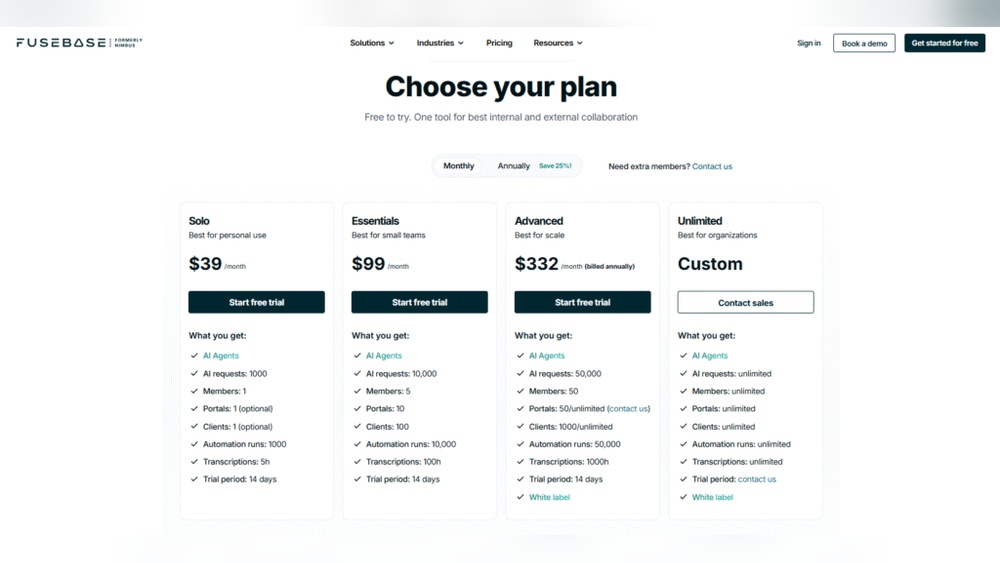
Are you curious about how much FuseBase costs and whether it fits your budget? Whether you’re a freelancer, a small business owner, or part of a growing team, understanding FuseBase pricing is key to making the right decision.
FuseBase offers powerful tools to simplify your workflows, improve collaboration, and keep your projects on track—but how much will it cost you?
For a deeper look at all of FuseBase’s features, read our full FuseBase Review. You’ll discover clear, straightforward details about FuseBase’s pricing plans, what features come with each option, and how you can get the most value for your money.
Keep reading to find the perfect plan that matches your needs and helps your business thrive.
Fusebase At A Glance
FuseBase is a business platform that helps teams work better. It combines project management, client communication, and invoicing in one place.
Its design simplifies daily tasks and saves time. If you’re exploring other tools, check out FuseBase Alternatives to see options that might better fit your workflow.
FuseBase uses AI to keep everyone updated and connected.
Core Features
Project tracking tools keep work organized and on schedule. Team chat and client messaging make communication easy.
Invoicing features help manage payments quickly and securely. AI-powered updates reduce manual work and improve efficiency.
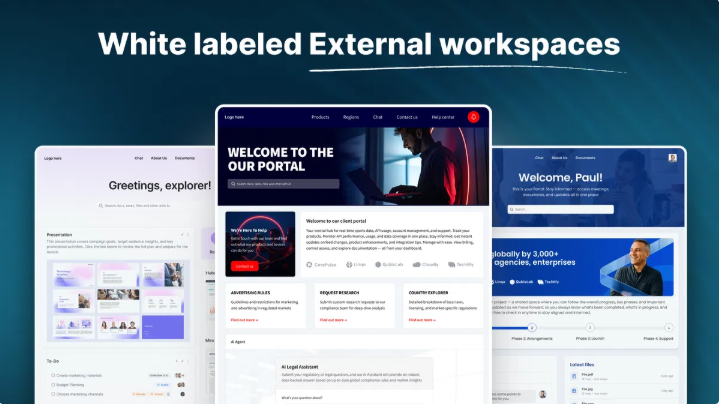
Custom portals allow safe sharing of information with clients and partners. Integration with other apps keeps data synced.
Target Users
Small to medium businesses benefit from FuseBase’s all-in-one platform. Freelancers and consultants use it to manage clients smoothly.
Teams needing better collaboration and task tracking find FuseBase useful. Businesses aiming to reduce manual updates gain from its AI tools.
FuseBase suits users who want secure client portals and easy invoicing. It is ideal for those who want to improve workflow without complex software.
Credit: thefusebase.com
Pricing Plans Breakdown
FuseBase offers pricing plans designed to fit different user needs. These plans range from free options for individuals to tailored solutions for large enterprises. Understanding the pricing options helps choose the right plan for your business or personal use.
Each plan provides unique features and support levels. You can select a plan that matches your budget and requirements without paying for extra services you don’t need.
Free Individual Plan
The Free Individual Plan is perfect for solo users and small projects. It offers basic access to FuseBase’s core features at no cost. You can manage tasks, communicate with clients, and organize your work efficiently. This plan allows users to explore the platform risk-free before upgrading.
Business Packages
Business Packages suit small to medium-sized teams. These plans include more advanced tools for collaboration, project management, and client interaction. Pricing is based on the number of users and additional features. Businesses get access to priority support and enhanced security options to protect their data.
Enterprise Solutions
Enterprise Solutions are tailored for large organizations with complex needs. These plans offer custom integrations, dedicated account management, and scalable resources. Enterprises benefit from personalized onboarding and advanced analytics. The pricing depends on specific requirements and the scale of deployment.
Cost Comparison
Understanding the cost of FuseBase is essential for businesses planning their budgets. This section breaks down how FuseBase pricing stands against competitors and what value it offers. It helps in making an informed choice without overspending.
Fusebase Vs Competitors
FuseBase offers a free plan for individuals, which many competitors do not. To see how FuseBase compares feature-by-feature with a popular alternative, check our FuseBase vs Notion guide.
Paid plans start at a competitive rate, providing access to AI-powered collaboration tools. Some rivals charge more for similar features. FuseBase includes client portals, team collaboration, and project management in one package. Competitors often require separate subscriptions for these services. This integrated approach can save money and reduce complexity.
Value For Money
FuseBase delivers strong value through its all-in-one platform. Users gain automation tools that reduce manual work. The AI features help keep clients updated without extra effort. This efficiency can lower costs over time. FuseBase also supports unlimited clients in higher-tier plans, unlike some competitors with strict limits. The pricing is transparent and easy to understand. Overall, FuseBase balances cost with powerful features for small and medium businesses.
Payment Options
Fusebase offers flexible payment options to suit different business needs. Understanding these options helps you plan your budget effectively. The payment system is designed to be clear and straightforward.
Billing Cycles
Fusebase provides monthly and annual billing cycles. Monthly payments offer flexibility to change plans anytime. Annual billing comes with cost savings, billed once per year. This option is ideal for long-term users seeking value. Both cycles include the same features, ensuring consistent service.
Discounts And Offers
Fusebase often provides discounts for annual subscriptions. Early sign-up promotions reduce the initial cost. Non-profits and startups may qualify for special pricing. Seasonal sales also offer limited-time price cuts. These offers make Fusebase more affordable for many businesses.
Add-ons And Extras
FuseBase offers a flexible pricing model that includes useful add-ons and extras. These options help businesses customize their experience. You pay only for what you need. This makes FuseBase a practical choice for many users.
Additional Features
FuseBase provides extra features that enhance core functions. These include advanced reporting tools and priority support. You can add extra storage space if your projects grow. Some features improve security and compliance. These options allow businesses to tailor FuseBase to their needs.
Custom Integrations
Custom integrations connect FuseBase with other tools your team uses. You can link it to accounting software or CRM systems. This saves time by reducing manual data entry. FuseBase supports API access for building unique connections. Custom integrations help streamline workflows and improve efficiency.
User Access And Account Types
Understanding user access and account types is key to managing your FuseBase experience effectively. FuseBase offers tailored access options to fit different user needs. This structure helps keep your workspace organized and secure.
Each account type serves a specific role within your business or project. Clear distinctions between client and team member accounts simplify collaboration. You can control who sees what and who can do what within the platform.
Client Accounts
Client accounts focus on external users who need access to project details. These accounts allow clients to view progress and communicate with your team. Clients get a simplified interface tailored to their needs.
Client accounts limit editing rights to protect your data. Clients can review documents, leave comments, and approve work. This keeps the workflow smooth without giving full control to clients.
Team Member Roles
Team member roles define internal user permissions and responsibilities. FuseBase supports different roles like admin, editor, and viewer. Each role has specific rights to edit, manage, or only view content.
Assigning roles helps maintain order and security within your workspace. Admins can manage settings and user access. Editors work on projects, while viewers can only read documents and updates.
Ai-powered Collaboration
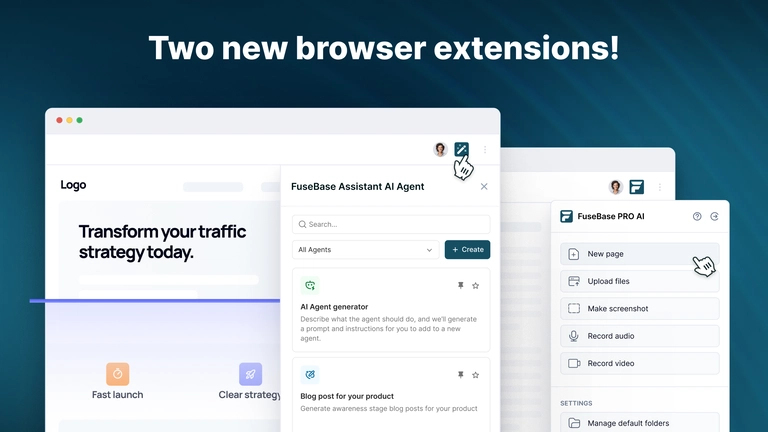
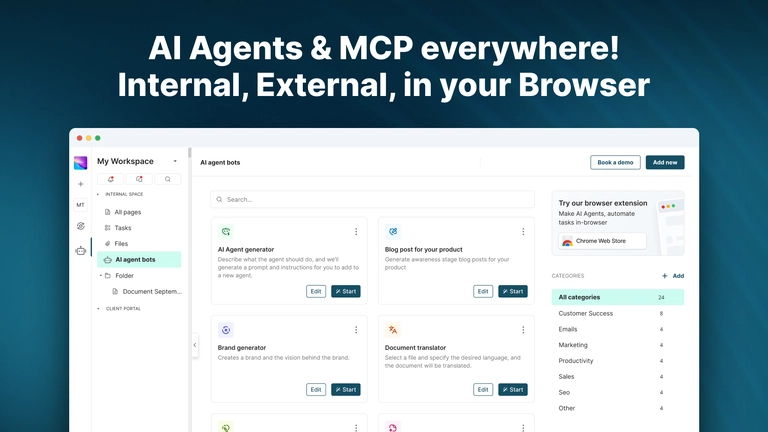
FuseBase leverages AI to enhance teamwork and client interactions. This AI-powered collaboration helps teams work smarter and faster. It reduces manual tasks and keeps everyone aligned on projects. The AI also improves communication, making client management smoother and more transparent.
Workspace Automation
Automation in FuseBase workspaces saves time and effort. Routine updates happen automatically, reducing errors and delays. The AI organizes tasks and files, so teams focus on important work. It also sends reminders and status updates without manual input. This leads to higher productivity and fewer missed deadlines.
Client Portal Benefits
FuseBase offers secure client portals that improve communication. Clients can access project information anytime, increasing transparency. The portal allows easy sharing of files and messages in one place. It strengthens trust and speeds up feedback cycles. Clients feel more involved and informed throughout the project.

Credit: appsumo.com
How To Choose The Right Plan
Choosing the right FuseBase pricing plan is important for your business success. Each plan offers different features and limits. Picking the best plan saves money and fits your needs perfectly. This guide helps you decide which plan works best for your business size and goals.
Assessing Business Needs
Start by listing your current business tasks. Many teams use project collaboration platforms to organize tasks and improve efficiency—see our guide for top recommendations.
Think about project management, client communication, and invoicing needs. Check how many team members will use FuseBase. Understand which features are essential for daily operations. Knowing this prevents paying for unused tools. Also, consider your budget limits and expected growth.
Scaling With Fusebase
Plan for future business growth. FuseBase offers plans that grow with your team and workload. Choose a plan that allows easy upgrades. This avoids service interruptions or data loss. Look for flexible user limits and added features in higher tiers. Scaling smoothly supports your business as it expands. Keep your operations efficient without extra hassle.
Tips To Maximize Value
Maximizing value from FuseBase pricing means using the platform smartly. Small steps can save costs and boost efficiency. Focus on key features and control your spending. FuseBase offers tools that help you do more with less.
Using Templates
Templates save time by providing ready-made structures. Use them for projects, invoices, and client portals. Customize templates to fit your needs. This reduces setup time and avoids errors. Consistent use of templates keeps your work organized and professional.
Managing Access Efficiently
Control who can see and edit information. Assign roles based on team members’ tasks. Limit access to sensitive data to avoid confusion. Regularly review permissions to keep security tight. Proper access management prevents unnecessary costs from extra user seats.
Credit: zenereviews.com
Frequently Asked Questions
How Much Does Fusebase Cost?
FuseBase offers a free plan for individuals. Paid plans with advanced features start at affordable monthly rates. Visit FuseBase’s official site for detailed pricing.
How Much Does Nimbus Note Cost?
Nimbus Note offers a free plan with basic features. Paid plans start at $5 per month for personal use. Business plans begin at $8 per user monthly. Annual subscriptions provide cost savings. Prices vary based on features and team size.
What Is Fusebase?
FuseBase is an AI-powered business platform that streamlines team collaboration, client communication, and project management. It automates updates and improves productivity. FuseBase unites teams, clients, and partners in one secure workspace to simplify operations and boost customer retention effectively.
Conclusion
FuseBase offers flexible pricing to fit different business needs. Individuals can start using FuseBase for free. Paid plans add more features and support larger teams. This makes FuseBase suitable for small and growing businesses alike. Understanding the pricing helps you choose the right plan easily.
Consider your team size and required features before deciding. FuseBase’s transparent pricing ensures you know what you pay for. Overall, it provides good value for managing projects and clients. Explore the plans to find the best fit for your work.
See Also
- FuseBase Review – Complete overview of FuseBase features and AI tools
- FuseBase Alternatives – Other tools worth considering
- FuseBase vs Notion – Detailed comparison guide
- Project Collaboration Platform – Best tools for managing teams efficiently