Every SaaS founder starts with the same dream: build a great product, launch it to the world, and watch the recurring revenue roll in automatically while they focus on high-level strategy.
Then reality hits.
Before you know it, your days aren’t spent talking to big investors or designing killer new features. Instead, you are drowning in “micro-tasks.” You are manually copying customer data from Stripe into your CRM. You are hunting down team members on Slack to remind them to follow up on a high-value lead. You are manually formatting weekly KPI spreadsheets, and spending your evenings copy-pasting customer feedback into your product roadmap.
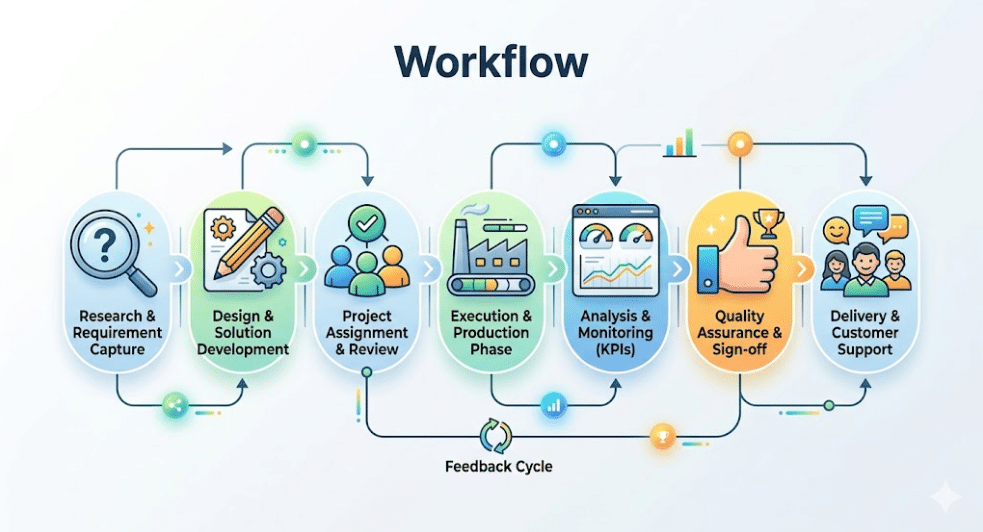
This is the hidden tax on SaaS founders. It’s a slow, exhausting drain on your time and focus that keeps your business from scaling.
The secret of fast-growing SaaS startups isn’t that they have bigger teams; it’s that they treat human attention as a scarce resource. They don’t let humans do things that machines can do for pennies.
To fix this, you need a solid automation strategy. We aren’t talking about complicated code or hiring expensive developers. By using modern, no-code automation platforms like Zapier or Make, you can build a self-running operational engine.
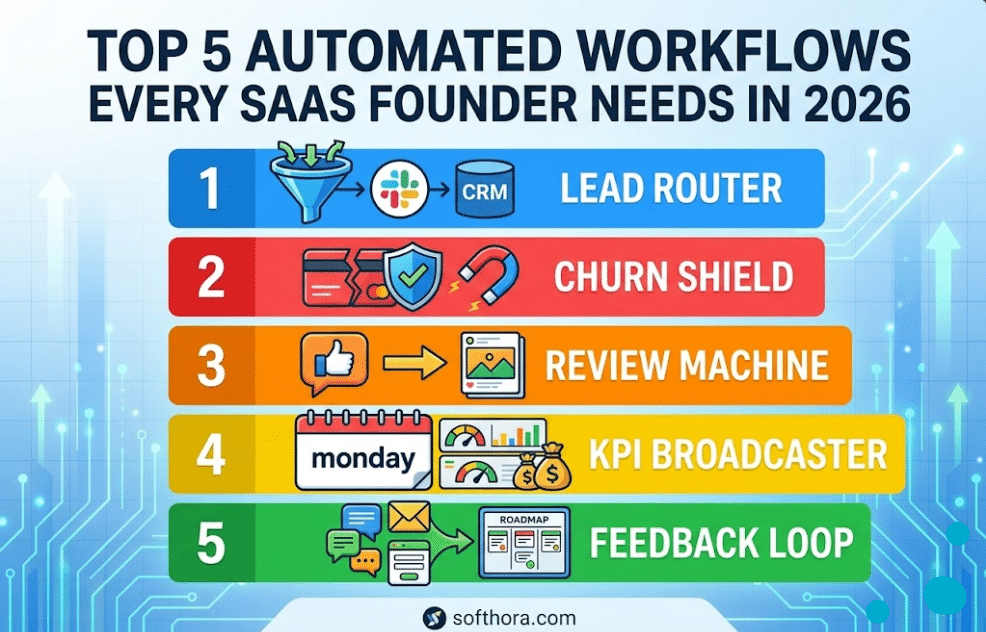
Here are the top 5 automated workflows every SaaS founder needs to buy back their time, streamline operations, and scale smoothly.
The Quick Verdict: Which Platform Rules Your Workflows?
- Choose Zapier if: You want a linear, beginner-friendly text setup that integrates with thousands of niche apps instantly, and you want your core lead trackers running in under 5 minutes.
- Choose Make if: You are building complex, multi-branch systems with deep visual data mapping, data loops, and high-volume processing where Zapier’s per-task fees would become too expensive.
The Automation Overview
If you want to quickly see how these five systems protect your time and grow your business, here is the master blueprint:
| Workflow System | The Trigger (What Starts It) | The Engine (What Happens) | The Result (The Value) |
| 1. The Lead Router | A high-intent lead fills out your website form or books a demo. | Enriches company data, scores the value, routes to Slack and CRM. | Speed to Lead: High-value prospects get a personal touch within minutes. |
| 2. The Churn Shield | A customer cancels their Stripe subscription or a payment fails. | Pauses account access, triggers a personal email, alerts customer success. | Revenue Retention: Saves accounts before they leave forever. |
| 3. The Review Machine | A user leaves a 4 or 5-star review, or a high NPS score. | Captures the quote, pings the team, schedules a social media post. | Social Proof Engine: Continuous stream of authentic marketing material. |
| 4. The KPI Broadcaster | The clock strikes 9:00 AM every Monday morning. | Pulls metrics from Stripe, Analytics, and Ads into a unified summary. | Complete Clarity: The entire team aligns on growth numbers without manual work. |
| 5. The Feedback Loop | A customer submits a feature request via email, chat, or form. | Tags by topic, categorizes by account size, drops into Product Board. | Smart Roadmap: Product decisions are driven by real revenue impact, not guesses. |
Workflow 1: The High-Intent Automated Workflows for Lead Routing
The Problem
When a potential high-value customer fills out your “Request a Demo” form, they are at peak interest. If you wait 24 hours to respond, they have already checked out three of your competitors, booked demos with two of them, and forgotten who you are. In SaaS sales, speed is your ultimate competitive advantage. But as a busy founder, you can’t sit around staring at your inbox all day waiting for form submissions. If you route every single lead directly to your personal email, you quickly get overwhelmed by spam, low-tier accounts, and fake signups.
The Automated Solution
This workflow acts as an intelligent digital assistant. It catches every form submission, filters out the noise, looks up background information on the company, figures out if they are a great fit, and immediately notifies you where you already spend your time: Slack or Microsoft Teams.
[ High-Intent Lead Form Fills Out ]
               │
               ▼
[ Clearbit / ZoomInfo Data Enrichment ] ──► (Finds Company Size & Revenue)
               │
               ▼
    [ FILTER: Is Employee Count > 50? ]
         ├──► NO  ──► Route to standard self-service email sequence.
         └──► YES ──►  Send Hot Lead Alert to Slack + Create Hubspot CRM Deal.
Step-by-Step Blueprint
- The Trigger: A new form entry is submitted via your website form software (like Typeform, Fillout, or Webflow Forms).
- The Enrichment Step: The automation passes the lead’s email address to an enrichment tool like Clearbit, HubSpot, or Apollo. This tool automatically finds out the company’s size, industry, and annual revenue without making the user fill out a massive, annoying form.
- The Filter Step: A conditional rule filters the incoming data. For example: Only proceed if company size is greater than 50 employees OR if they use a business email rather than Gmail.
- The Action: The system automatically creates a new deal in your CRM (like HubSpot or Pipedrive) and sends an formatted alert to your sales Slack channel:
New Enterprise Lead: John Doe from Acme Corp (250 employees).
Email: john@acmecorp.com
Estimated Value: $1,200/month
Click here to open CRM and send a booking link.
Why This Matters for Growth
You never miss a high-ticket buyer again. Your self-service users get routed to automated onboarding emails, while enterprise accounts get a fast, personal touch from you within five minutes of showing interest.
Workflow 2: The Churn Shield & Failed Payment Recovery
The Problem
SaaS growth is a leaking bucket problem. You can spend thousands of dollars on marketing to acquire new users, but if customers leave just as fast as they join, your business stands completely still.
A large portion of customer churn isn’t even intentional; it’s passive churn caused by expired credit cards, banks blocking international SaaS transactions, or outdated billing details. If you manually email every user whose card declines, you waste hours acting like a collections agency. But if you ignore it, you lose thousands in Monthly Recurring Revenue (MRR).
The Automated Solution
This workflow protects your revenue. It monitors your payment processor around the clock. The moment a transaction fails or a user hits “cancel,” it kicks off a coordinated effort to recover that revenue without you lifting a finger.
[ Stripe Action: Payment Failed / Cancel Clicked ]
                        │
                        ▼
          [ SPLIT PATH BASED ON LOGIC ]
         ├──► PATH A: Failed Payment ──► Trigger Churnio/Stripe Smart Dunning
         └──► PATH B: Intentional Cancel ──► Post to Slack + Send Founder Email
Step-by-Step Blueprint
- The Trigger: A user clicks “cancel subscription” in their settings dashboard, or Stripe logs a
charge.failedevent. - The Logic Split (Failed Payment): If it’s a failed card, the automation instructs an app like Churnio or Stripe’s built-in dunning system to pause account access gracefully and send a slick, secure in-app notification link to update their card.
- The Logic Split (Intentional Cancellation): If they intentionally cancelled, the automation instantly updates their user profile status in your database and posts an update to your internal team Slack channel:
Cancellation Alert: User
alex@designco.comhas cancelled their Pro Plan ($99/mo).Reason Given: “Too expensive, switching to an internal tool.”
- The Recovery Action: The automation triggers a delayed, personalized plain-text email directly from the founder’s personal inbox (via Gmail or Outlook) 6 hours later:
“Hey Alex, I saw you closed your account today. No worries at all, but I wanted to personally reach out to see if there was a specific feature we missed, or if the product felt too complicated? Your feedback helps me make this tool better for everyone. Best, [Your Name].”
Why This Matters for Growth
This simple step recovers 15% to 30% of cancellations on autopilot. Customers frequently respond to these automated founder emails because they look completely personal. This gives you invaluable feedback or a direct opportunity to offer a temporary discount to save the account.

Workflow 3: The Automated Social Proof Engine
The Problem
Potential customers don’t buy your SaaS because of your sleek landing page copy; they buy because other people love using it. Social proof is the highest-converting asset a SaaS founder can own.
However, collecting reviews is a huge chore. You have to remember to check G2, Capterra, Product Hunt, Twitter, and your internal Net Promoter Score (NPS) tools. Once you find a nice comment, you have to screenshot it, crop it, format it, and manually schedule it across your social media channels. Because it takes so much work, most founders just don’t do it.
The Automated Solution
This workflow captures happiness. It monitors your reviews and customer surveys. The moment a user says something fantastic about your app, the automation captures that feedback, alerts your team to boost morale, and prepares it for your marketing channels.
[ Customer Submits 5-Star Review / High NPS Score ]
                        │
                        ▼
         [ MULTI-CHANNEL DISTRIBUTION ]
         ├──► Channel 1: Post to #win-wall in Slack (Team Morale)
         ├──► Channel 2: Save text/author to a master Notion database
         └──► Channel 3: Send to Buffer/Buffer to queue as a Twitter post
Step-by-Step Blueprint
- The Trigger: A customer leaves a 4 or 5-star review on an integration platform, submits an internal NPS score of 9 or 10, or mentions your brand name on X (Twitter).
- The Internal Notification: The automation grabs the quote, the user’s name, and their profile picture, and posts it directly into a dedicated
#win-wallchannel in your team Slack. This keeps your engineering and support teams incredibly motivated. - The Database Log: The text is saved into a master “Testimonials” database inside Notion or Airtable, neatly categorized by use-case or industry vertical for easy copy-pasting into future sales decks.
- The Marketing Action: The automation drops the testimonial text into a social media scheduler (like Buffer or Publer), putting it into your content queue to go out as an organic post later that week.
Why This Matters for Growth
Your marketing engine practically runs itself. You get a steady stream of user-generated content pointing back to your product, while your team gets a regular reminder of the real value they are building for customers.
Workflow 4: The Monday Morning KPI Broadcaster
The Problem
If you don’t know your numbers, you don’t know your business. To run a SaaS company successfully, you need to track your metrics closely: Monthly Recurring Revenue (MRR), Active Users, Churn Rate, Marketing Ad Spend, and Customer Acquisition Cost (CAC).
Yet, collecting these metrics usually involves logging into Stripe, open Google Analytics, opening Meta Ad Manager, and opening your database console. It takes an hour of manual copying and pasting every single week. Because it’s such a hassle, founders often skip it, running their business completely blind based on “gut feeling” rather than actual hard data.
The Automated Solution
This workflow acts as your automated business intelligence team. Every single week, it connects to your data sources, extracts the core metrics, performs the necessary calculations, and delivers a clean, scannable executive report directly to your team or investor channels.
                  [ Every Monday at 9:00 AM ]
                               │
                               ▼
   [ Data Extraction: Stripe / Google Analytics / Meta Ads ]
                               │
                               ▼
   [ Make/Zapier Logic: Sums total spend & divides by conversions ]
                               │
                               ▼
    [ Output: Format and publish complete dashboard report to Slack ]
Step-by-Step Blueprint
- The Trigger: A schedule-based utility (like “Schedule by Zapier”) triggers automatically every Monday morning at exactly 9:00 AM.
- The Data Gathering Steps: * Connects to Stripe to pull current MRR and net new revenue from the last 7 days.
- Connects to Google Analytics to pull weekly active users and landing page conversion rates.
- Connects to Meta/Google Ads to pull total ad dollar spend.
- The Calculation Step: The automation passes these numbers into a basic formula step to calculate your approximate weekly CAC:$$\text{Weekly CAC} = \frac{\text{Total Ad Spend}}{\text{Net New Signups}}$$
- The Broadcast: The system formats this data into a clean, easy-to-read text block and posts it to your executive Slack channel:
Weekly Growth Report:
- Current MRR: $14,250 (+3.2% vs last week)
- Weekly Active Users: 1,840
- Gross Churn: 0.8%
- Ad Spend: $450 | New Users: 45
- Blended CAC: $10.00
Why This Matters for Growth
It removes all emotional guesswork from your business decisions. You and your team see exactly what’s working and what’s broken every single Monday morning, allowing you to pivot quickly before small issues turn into major problems.
Workflow 5: The Product Feedback Loop (Revenue-Driven Roadmap)
The Problem
Customers constantly drop product feedback and feature requests across five different places: support chats (Intercom/Crisp), direct emails, Twitter replies, sales calls, and community forums.
When your feedback is scattered all over the place, your product roadmap becomes a chaotic guessing game. You often end up building features requested by the loudest, most annoying user on a free plan, while completely ignoring quiet, high-paying enterprise customers who actually keep your business alive.
The Automated Solution
This automation acts as a central collector for your product feedback. It captures requests from any channel, standardizes the formatting, looks up how much that specific customer is actually paying you, and drops the request into your product pipeline with a clear dollar value attached to it.
[ Input: Intercom Tag / Email / Form Request ]
                        │
                        ▼
       [ Stripe Lookup: Identify User's Plan Value ]
                        │
                        ▼
    [ Sync to Product Board with MRR Tag: "Feature X ($499/mo)" ]
Step-by-Step Blueprint
- The Trigger: A team member adds a specific tag (like
#FeatureRequest) to a customer conversation inside your helpdesk software, or a user submits an entry to your public feedback form. - The Revenue Match Step: The automation takes the user’s email address and queries your payment processor (Stripe) to see their current plan status.
- The Categorization Step: The system processes the text and pulls out the key request details.
- The Centralized Output: The automation logs the request into your product management tool (like Productboard, Linear, or a master Notion Roadmap):
New Feature Request: Advanced User Roles (RBAC)
User: Sarah Jenkins (Enterprise Tier)
Account Value: $499/month
Context: “We need granular permissions before we can roll this out to our 50-person marketing department.”
Why This Matters for Growth
It gives you complete clarity on your product roadmap. When planning your next development sprint, you don’t guess what to build next. You simply sort your database by account value, showing you exactly which features will unlock the most revenue and prevent high-value churn.
Tech Stack Integration: Zapier vs. Make for SaaS Founders
To build these workflows successfully, you need to choose the right automation platform. The two dominant players in this space are Zapier and Make (formerly Integromat). Choosing the wrong one can cost you a lot of money or limit your technical setup down the line.
+-----------------------------------------------------------------------+
|                      AUTOMATION PLATFORM SELECTION GUIDE              |
+-----------------------------------------------------------------------+
|                                                                       |
|   [ ZAPIER ]                                        [ MAKE.COM ]      |
|   - Simple text interface                           - Visual 2D grid  |
|   - Built-in apps work perfectly                    - Complex paths   |
|   - Best for fast, straightforward setups           - Advanced logic  |
|   - Priced per task execution (Expensive)          - Low cost scaling|
|                                                                       |
+-----------------------------------------------------------------------+
Zapier: Best for Speed and Simplicity
Zapier is the easiest tool for absolute beginners. It uses a very clean, linear, step-by-step text interface. If you want to connect a simple form directly to Slack or Hubspot, Zapier can do it in under three minutes. It has native integrations with almost every software app on earth.
The Catch: Zapier is expensive. They charge you per executed task. If you run a high-volume SaaS product where thousands of signups trigger workflows every day, your monthly Zapier bill can quickly become a major expense.
Make.com: Best for Complex Logic and Cost Control
Make uses a visual, two-dimensional node editor where you map out workflows visually like a flowchart. It is incredibly powerful for building complex routines with branches, advanced mathematical loops, and deep data parsing.
The Catch: Make has a slightly steeper learning curve. However, it is significantly cheaper than Zapier. Make charges you based on “operations” (individual data processing steps), allowing you to run heavy data-crunching workflows for a fraction of the cost of Zapier.
The Founder Recommendation: Start with Zapier if you are solo, short on time, and just want to get your basic lead routers and Slack alerts up and running quickly. Switch to Make when you need to build advanced, multi-step data systems (like the Weekly KPI Broadcaster) where processing thousands of lines of data in Zapier would become too costly.
The Step-by-Step Implementation Strategy
Do not try to build all five of these automated systems this afternoon. If you try to build everything at once, you will create a messy web of apps, get overwhelmed by error messages, and abandon automation entirely.
Instead, follow this phased approach to scale your operations smoothly:
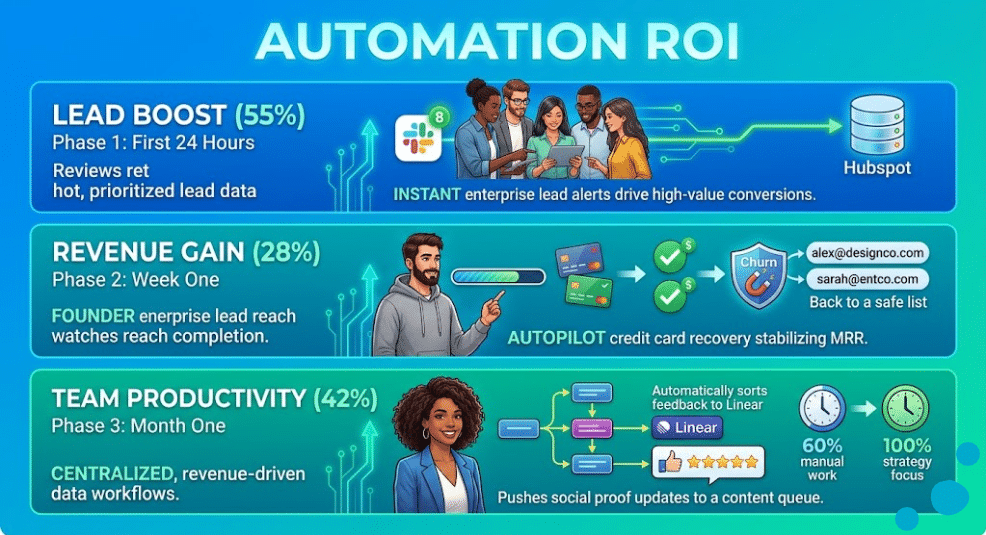
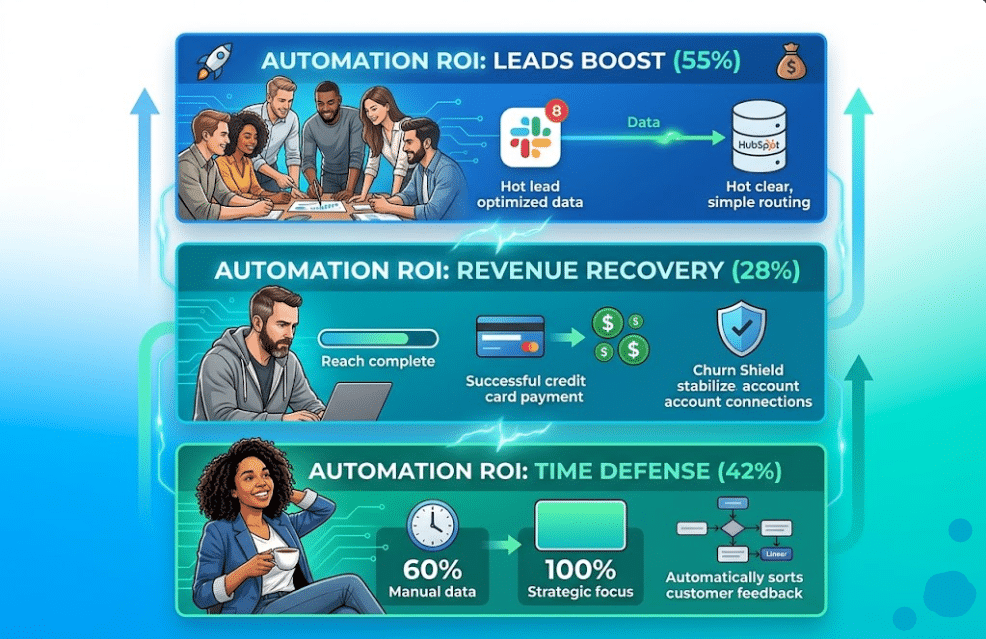
Phase 1: The First 24 Hours (Protect the Leads)
Build Workflow 1 (The High-Intent Lead Router) first. This has the most immediate, direct impact on your cash flow. Ensuring that your high-value demo requests never sit unanswered overnight completely changes your sales conversion rates.
Phase 2: Week One (Protect the Revenue)
Build Workflow 2 (The Churn Shield). Set up basic Stripe triggers to notify your team when charges fail or users hit cancel. Getting a clear view of your revenue leaks is the first major step toward stabilizing your growth metrics.
Phase 3: Month One (Scale the Insights)
Build the remaining three workflows over the course of a month. Automate your weekly KPI tracking, set up your customer feedback loops, and let your social proof engine collect reviews on autopilot.
The Final Verdict: Step Away from the Keyboard
As a SaaS founder, your value to your company isn’t measured by how many manual tasks you complete each day. Your value lies in your creative product vision, your long-term strategic decisions, and your ability to talk to key customers.
Every minute you spend copying data between spreadsheets, manually chasing down failed invoices, or moving feedback around boards is time stolen directly from your company’s growth.
[ MANUALLY MANAGED SAAS ]
Founder Time: ──► [ Admin Work (60%) ] ──► [ Strategy/Growth (40%) ] = Slow Scaling

[ AUTOMATED SAAS ENGINE ]
Founder Time: ──► [ Automation Engine ]  ──► [ Strategy/Growth (100%) ] = Hyper Scaling
By taking a few hours to set up these five core automations, you stop working in your business and start working on your business. You turn your startup from a fragile, manual setup into a highly efficient, automated software engine built to scale.
The Automation Journey Doesn’t End Here…
While setting up these five core operational workflows will save you dozens of hours each week, choosing between the simple setup of Zapier and the cost-effective power of Make can be tricky. If you scale your automations incorrectly, you could accidentally run into high monthly subscription fees or broken loops that disrupt your operations.
Before you start building your workflows or putting your credit card info into an automation tool, you need to see the full, technical breakdown of how these tools perform under heavy production loads.
Read the complete, detailed 2026 platform showdown on Softhora where we uncover:
- The Hidden Task Trap: The exact points where Zapier’s pricing plan spikes significantly, and how to safely bypass it using webhooks.
- Advanced Data Routing: A click-by-click guide to building multi-branch conditional logic paths without writing a single line of JavaScript.
- The Hybrid Integration Model: How fast-growing software teams combine both platforms to get maximum speed for simple tasks while keeping data costs low.
Frequently Asked Questions
1. What is the difference between an action in Zapier and an operation in Make?
An action in Zapier counts when data is pushed to a new app. An operation in Make counts every single time a step executes—even if it just checks for updates and finds nothing.
2. Can I use automation to route leads based on company size?
Yes. You can use data enrichment tools (like Clearbit or Apollo) inside your workflow to automatically find a lead’s employee count, then use a filter to route high-value accounts directly to Slack.
3. How do I prevent automated emails from sounding like spam?
Send them as plain text directly from your personal inbox instead of using styled HTML templates. Removing graphics and keeping the tone personal causes response rates to skyrocket.
4. Is it safe to connect Stripe directly to Slack via no-code tools?
Yes, as long as you use official, secure OAuth connections. For privacy, configure your alerts to only broadcast high-level details (like plan names and values) rather than sensitive billing data.