If you’ve been using Basecamp for project management but feel something’s missing, you’re not alone. Maybe you need more advanced features, better customization, or simply a tool that fits your team’s unique style.
Finding the right alternative can transform how you work, boost your productivity, and make collaboration smoother than ever. You’ll discover top Basecamp alternatives that cater to different needs—whether you want simplicity, powerful analytics, or flexible workflows. Keep reading to find the perfect fit for your projects and take your teamwork to the next level.
Feature-rich Alternatives
Feature-rich alternatives to Basecamp bring powerful tools to manage projects efficiently. These platforms offer extensive capabilities to handle complex workflows and team collaboration. They suit teams needing more than basic project tracking.
Such alternatives provide advanced task management, automation, and reporting features. These help teams stay organized and meet deadlines without hassle. Exploring these options can improve how teams plan and execute projects.
Clickup Capabilities
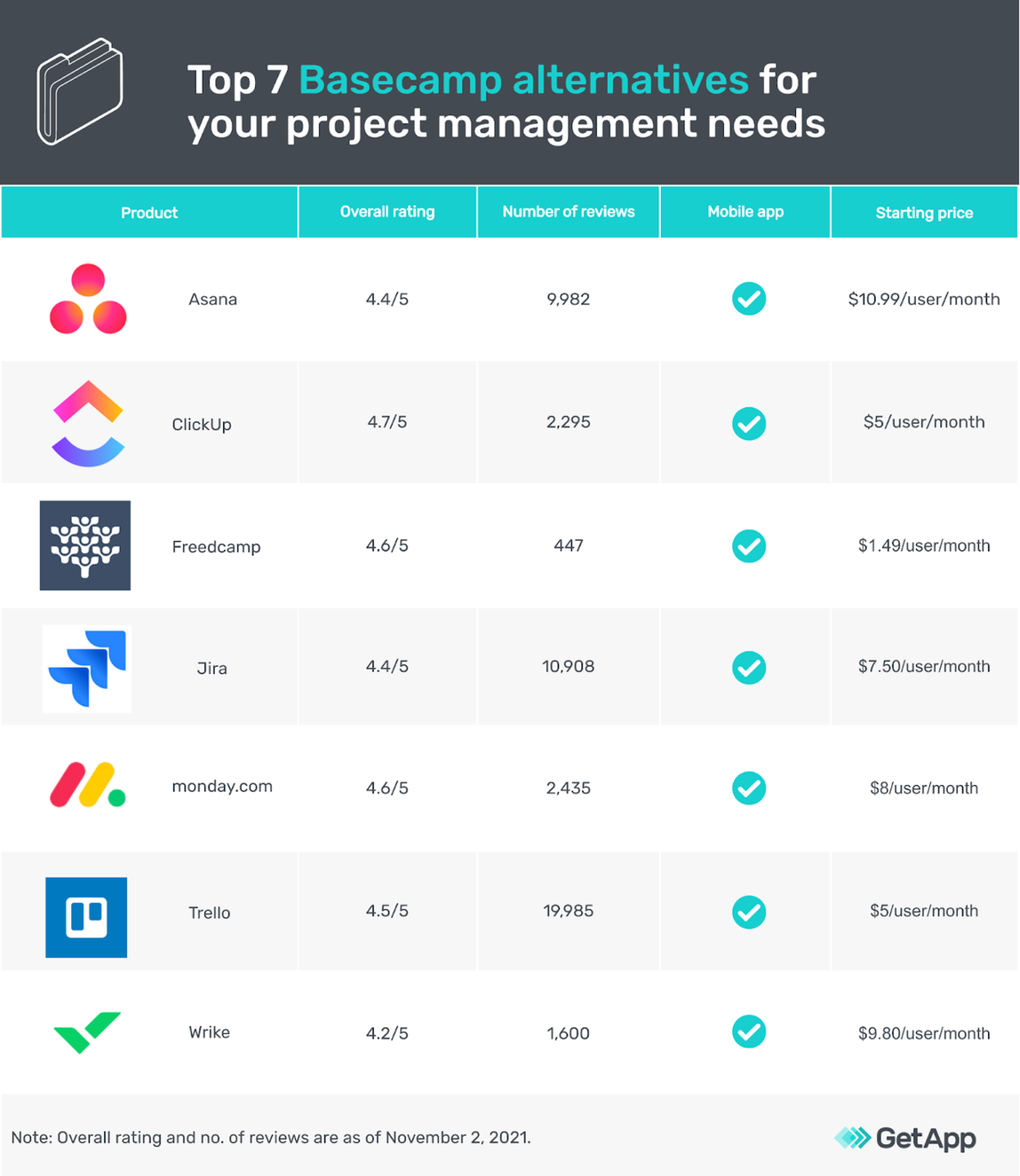
ClickUp combines many project management features in one place. It offers task lists, calendars, and timelines to track progress easily. Users can customize workflows to fit specific project needs.
Automation reduces repetitive tasks, saving time and effort. ClickUp supports goal setting and progress tracking for better team focus. It integrates with many apps, making it flexible for various workflows.
Asana Strengths
Asana excels in visual project management with clear task boards and timelines. Teams can set milestones and track task dependencies to meet deadlines. It supports communication through comments and notifications.
Asana’s interface is simple yet powerful, helping teams stay on the same page. It offers reporting tools to analyze project performance and workload. The platform scales well for growing teams and complex projects.
Wrike For Large Teams
Wrike is built for large teams needing strong collaboration and control. It offers detailed task tracking, time management, and workload balancing features. Teams can create custom dashboards to monitor progress clearly.
Wrike supports real-time collaboration and document sharing. Its advanced reporting helps managers make informed decisions quickly. The platform handles multiple projects and teams efficiently without confusion.
Credit: thedigitalprojectmanager.com
Flexible And Simple Tools
Flexible and simple tools help teams work without confusion. They keep tasks clear and easy to manage. These tools fit different styles and needs. They let users focus on what matters most. This section explores some popular options that balance ease and flexibility.
Trello’s Kanban Approach
Trello uses boards, lists, and cards to organize work. This visual setup shows tasks in columns. Users move cards to show progress. It feels like using sticky notes on a wall. Trello keeps project steps clear and easy to follow. Teams can add comments, due dates, and attachments quickly.
Notion’s Custom Workspaces
Notion offers a blank canvas for many uses. Users create pages, databases, and notes in one place. It adapts to personal or team workflows. Notion helps organize information with tables, lists, or calendars. Teams build a workspace that fits their style. It keeps everything connected and easy to find.
Airtable’s Database Style
Airtable blends spreadsheets with databases. It lets users create detailed records and link them. Teams track projects, assets, and contacts in one view. Airtable supports grids, calendars, and galleries to see data. This tool works well for managing complex info simply. It helps teams stay organized without extra hassle.
Budget-friendly Options
Finding budget-friendly project management tools can save your team money while keeping work organized. Many alternatives to Basecamp offer strong features without high costs. These options help small businesses and startups manage projects effectively. They provide essential tools like task tracking, collaboration, and time management.
Choosing an affordable tool does not mean sacrificing quality. Many platforms deliver smooth user experiences and useful functions. Here are some budget-friendly Basecamp alternatives worth considering.
Zoho Projects Features
Zoho Projects offers task management with easy-to-use interfaces. It includes time tracking and Gantt charts for planning. Users can create milestones and set priorities for tasks. It supports file sharing and document collaboration. Zoho Projects also integrates with other Zoho apps and popular tools. Its pricing plans are designed for small and medium teams. The platform supports mobile apps for work on the go.
Freedcamp Benefits
Freedcamp provides a free plan with many useful features. It covers task lists, calendars, and project templates. Users can add unlimited users without extra cost. It supports discussions, file uploads, and time tracking. Freedcamp’s interface is simple and easy to navigate. It offers third-party integrations for better workflow. The paid plans add more storage and advanced tools. This makes Freedcamp ideal for budget-conscious teams.
Proofhub For Collaboration
ProofHub combines task management and team collaboration in one tool. It has features like discussions, notes, and file sharing. The platform provides time tracking and reports for project insights. ProofHub’s interface is clean and user-friendly. It supports real-time chat and online proofing. Pricing is fixed with unlimited users, helping control costs. Teams can manage multiple projects without confusion.
Enterprise-grade Solutions
Enterprise-grade solutions offer powerful tools designed for large organizations. They handle complex projects, multiple teams, and strict security needs. These platforms provide advanced features such as detailed reporting, resource management, and deep integrations. Enterprises benefit from reliable support and scalability to match their growth. Below are some notable Basecamp alternatives built for enterprise use.
Monday.com Overview
Monday.com is a flexible work operating system. It allows teams to plan, track, and manage work in one place. The platform supports automation to reduce manual tasks. Visual project tracking helps teams stay aligned on goals. Monday.com offers robust security features suitable for enterprises. Its user-friendly interface helps teams adopt quickly.
Microsoft Project Integration
Microsoft Project is a trusted tool for enterprise project management. It excels in handling complex schedules and budgets. Integration with Microsoft 365 tools improves collaboration. Enterprises can link Project with Teams and SharePoint easily. This integration ensures smooth communication across departments. Microsoft Project supports detailed reporting for informed decisions.
Smartsheet For Scalability
Smartsheet combines the ease of spreadsheets with powerful project tools. It adapts well as organizations grow in size and complexity. The platform supports workflow automation and real-time collaboration. Smartsheet offers customizable dashboards for clear project visibility. Its security standards meet enterprise compliance requirements. Teams can connect Smartsheet with many third-party apps.
Client-focused Platforms
Client-focused platforms prioritize clear communication and easy project tracking.
They help teams and clients stay connected and understand progress.
These tools improve collaboration by providing simple interfaces and organized workflows.
Teamwork Communication Tools
Teamwork offers strong communication features tailored for client needs.
It includes message boards, direct chat, and email integration.
Clients can easily follow project updates and share feedback in one place.
The platform supports task comments and file sharing to keep conversations clear.
Nifty For Project Tracking
Nifty focuses on simplifying project tracking with client transparency.
It combines task management, milestones, and timelines in a single view.
Clients see real-time progress without logging into complex systems.
Nifty’s clean design helps avoid confusion and keeps everyone on track.
Credit: www.getapp.com
Key Features To Compare
Choosing the right Basecamp alternative requires understanding key features. These features shape how well a tool fits your team’s workflow. Focus on core functions that improve collaboration and productivity. Compare how each platform handles tasks, reporting, and customization. This helps find a tool that matches your needs.
Task Management Styles
Task management varies widely between platforms. Some use lists, others use boards or timelines. Choose a style that suits your team’s working habits. Kanban boards offer visual progress tracking. List views provide clear task details. Timelines or Gantt charts help plan deadlines and dependencies. Flexibility in task views can boost productivity and clarity.
Reporting And Analytics
Good reporting shows project progress and team performance. Look for dashboards with easy-to-read charts. Some tools provide real-time updates and customizable reports. Analytics help spot bottlenecks and improve future planning. Basic reports may cover task completion rates and time spent. Advanced options include workload forecasting and risk analysis.
Customization And Automation
Customization lets you tailor the tool to your workflow. Options like custom fields, tags, and templates add efficiency. Automation reduces repetitive tasks, saving time and reducing errors. Common automations include task assignments, status updates, and notifications. The best tools offer easy setup without complex coding. This ensures your team stays focused on important work.
Choosing The Right Tool
Choosing the right project management tool affects your team’s workflow and success. Each tool offers different features and benefits. Understanding your needs helps find the best fit. This section covers key points to consider before making a choice.
Assessing Team Size And Needs
Start by evaluating your team size. Small teams may need simpler tools with basic task tracking. Larger teams often require advanced features like workload management and reporting. Consider how your team collaborates and communicates. Identify must-have features such as file sharing or real-time updates. Match the tool’s capabilities with your daily tasks.
Budget Considerations
Set a clear budget for your project management software. Some platforms offer free plans with limited features. Paid plans vary in price based on users and functionalities. Avoid overspending on features you won’t use. Look for a tool that balances cost and value. Check for hidden fees like add-ons or user limits.
Integration With Existing Tools
Check if the new tool integrates with software your team already uses. Common integrations include email, calendars, and cloud storage. Smooth integration reduces manual work and errors. It keeps all project data connected and accessible. Verify the tool supports popular apps your team depends on. This ensures a seamless workflow without disruptions.
You can also check Basecamp review

Credit: toggl.com
Frequently Asked Questions
What Has Replaced Basecamp?
Popular Basecamp alternatives include ClickUp, Asana, Wrike, Monday. com, Trello, Notion, Airtable, Teamwork, and Zoho Projects. These tools offer more advanced features and customization options. Many users choose them for enhanced project management and collaboration capabilities.
What Are The Disadvantages Of Basecamp?
Basecamp lacks advanced reporting, detailed analytics, and workload forecasting. It offers limited customization and may require extra tools for complex projects.
What Does Garmin Use Instead Of Basecamp?
Garmin uses the Garmin Explore website instead of Basecamp for managing waypoints, routes, activities, and user data. It supports many Garmin devices and offers improved data management features.
Conclusion
Choosing the right project management tool matters. Many Basecamp alternatives offer unique features and pricing. Some tools focus on simplicity, while others provide advanced options. Consider your team’s size and workflow needs carefully. Testing a few platforms helps find the best fit.
Clear communication and task tracking improve with the right software. Explore options like ClickUp, Asana, Trello, or Notion. Each brings different strengths to your projects. A suitable tool supports productivity and keeps your team aligned. Take your time to pick what works best.