
Are you looking to improve how visitors interact with your website but feel Sitebehaviour isn’t the perfect fit for your needs? You’re not alone.
Finding the right tool can be confusing and time-consuming, especially when your website’s success depends on it. What if there were smarter, easier-to-use options that could help you understand your audience better and boost your conversions? Keep reading to discover top Sitebehaviour alternatives that could transform your online strategy and make your website work harder for you.

Why Look Beyond Sitebehaviour
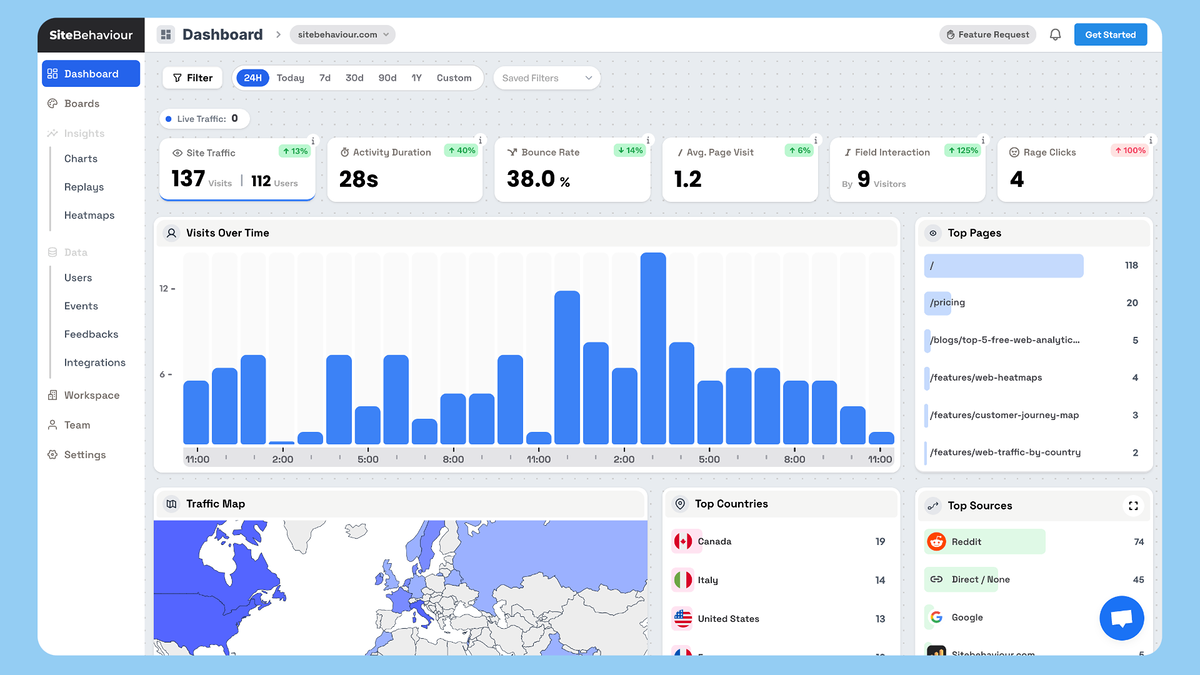
Sitebehaviour offers useful tools for website analysis and user tracking. It helps understand how visitors interact with your site. Yet, it may not meet every business need or goal. Some users find it lacks certain features or flexibility. Choosing the right tool is key to better insights and growth. If you’re still evaluating whether it’s worth sticking with, reading a detailed Sitebehaviour review can help you understand its real strengths and limitations.
Exploring alternatives can reveal options with unique benefits. Different tools suit different budgets and technical skills. A broader view can improve your data strategy. This section explains why many consider other analytics tools besides Sitebehaviour.
Limitations Of Sitebehaviour
Sitebehaviour has limits in data depth and customization. It may not track all user actions needed for complex sites. Some users report slow updates and limited integrations. Reporting options can feel basic and lack detail. If pricing is one of your concerns, checking the full Sitebehaviour pricing breakdown can give you a clearer idea of whether it delivers value for money. These issues can hinder detailed analysis and decision-making.
Support and documentation may not be enough for beginners. Advanced users may miss tools for in-depth analysis. These constraints make it harder to get full value. Businesses with specific needs often seek more robust features.
Need For Diverse Analytics Tools
Different websites require different data and features. One tool cannot serve every niche perfectly. Some focus on real-time data, others on user behavior or marketing metrics. To better understand how Sitebehaviour stacks up against industry standards, you might want to explore Sitebehaviour vs Google Analytics for a clearer comparison. Using diverse tools can fill gaps left by one platform.
Varied analytics help track multiple goals clearly. They allow businesses to compare data and confirm trends. This leads to smarter choices and better website performance. Trying different tools provides a clearer picture of user behavior.

Credit: www.g2.com
Google Analytics
Google Analytics is a popular tool for tracking website traffic and user behavior. It helps website owners understand how visitors interact with their sites. This tool offers detailed reports that show which pages are popular and where users come from. Many businesses use it to improve their online presence and marketing strategies.
Features And Benefits
Google Analytics provides real-time data on website visits. It tracks user actions like clicks, scrolls, and time spent on pages. You can see visitor demographics such as age, location, and device. The tool also measures conversion rates and sales. Reports are easy to read and customize. Users can set goals to track specific actions. This helps improve website design and content. Data from Google Analytics supports better decision-making.
Integration Capabilities
Google Analytics connects with many other tools. It works well with Google Ads for advertising insights. The platform integrates with content management systems like WordPress. It supports e-commerce platforms to track sales and customer behavior. Integration with marketing tools helps automate reporting. Users can link it to customer relationship management (CRM) systems. This creates a full view of customer journeys. The wide range of integrations makes it flexible for many businesses.
Hotjar
Hotjar is a popular tool for understanding user behavior on websites. It helps website owners see how visitors interact with their pages. Hotjar offers several features that make it easier to improve user experience and boost conversions.
This tool collects data visually and directly from users. It shows where visitors click, scroll, and spend time. Hotjar also gathers user opinions to guide website changes.
Heatmaps And Session Recordings
Heatmaps display areas with the most clicks and attention. They use colors to show hot and cold spots on a page. This helps identify which parts attract visitors and which are ignored.
Session recordings capture real user visits. They show mouse movements, clicks, and scrolling. Watching these recordings reveals how users navigate the site.
These insights help spot problems like confusing layouts or broken links. Fixing these issues can improve user satisfaction and increase sales.
User Feedback Tools
Hotjar includes tools to collect visitor feedback. Surveys and polls ask users about their experience. This direct feedback shows what visitors like or dislike.
Feedback widgets appear at key moments, such as after checkout. They gather opinions without interrupting the user journey. This helps understand visitor needs and frustrations.
Combining feedback with behavior data gives a full picture. It guides smarter design and content decisions. This leads to a better website that meets user expectations.
Crazy Egg
Crazy Egg is a popular tool for understanding how visitors interact with your website. It helps you see where users click, scroll, and spend time. This insight allows you to improve your website’s design and usability. Crazy Egg offers clear visual data and simple reports. It suits both beginners and experienced marketers.
Visual Analytics
Crazy Egg shows heatmaps that reveal where visitors click the most. It tracks scroll behavior to see how far users go down a page. The tool also offers confetti reports to separate clicks by referral source. These visuals make it easy to spot popular areas and issues. You can quickly find parts of your site that need improvement.
A/b Testing Features
Crazy Egg allows you to create and run A/B tests without coding. You can test different versions of a page to see which performs better. The tool provides clear results to help you choose the best design. This feature helps increase conversion rates and user engagement. Testing pages becomes simple and effective with Crazy Egg.
Mixpanel
Mixpanel is a popular tool for understanding how users interact with websites and apps. It helps businesses track actions and events to see what works best. This tool focuses on user data to improve products and services. Many choose Mixpanel as a strong alternative to Sitebehaviour.
User Behavior Tracking
Mixpanel records every action users take, like clicks and page views. It shows which features users like or avoid. This tracking helps businesses fix problems and improve user experience. Mixpanel also provides real-time data, so changes can be made quickly. It makes user behavior clear and easy to follow.
Advanced Segmentation
Mixpanel divides users into groups based on their actions or traits. This helps target specific audiences with tailored messages. Segmentation can be by age, location, or activity level. It allows businesses to see patterns in user behavior. This makes marketing and product updates more effective and personal.

Credit: www.sitebehaviour.com
Matomo
Matomo offers a strong alternative to Sitebehaviour for website analytics. It focuses on user privacy and data control. Many users trust Matomo for its transparency and flexibility.
This tool provides detailed insights without compromising visitor privacy. It suits businesses that want to protect user data while understanding website traffic.
Privacy-focused Analytics
Matomo puts privacy first by not sharing data with third parties. It avoids tracking users across multiple websites. Visitors can browse without worrying about personal data leaks.
The platform complies with privacy laws like GDPR. It gives website owners control over what data to collect. You can turn off cookies and anonymize visitor IP addresses.
Self-hosting Options
Matomo allows self-hosting on your own servers. This keeps all data in your control and off public clouds. It suits users who want full ownership of their analytics data.
Self-hosting ensures faster data access and higher security. You can customize Matomo to fit your specific needs. It supports many plugins to extend its features.
Choosing The Right Tool
Choosing the right tool for your website behavior analysis is crucial. The right choice saves time, effort, and money. It helps you understand your visitors better and improve your site’s performance. Each tool offers different features and fits different needs.
Think about what your business really needs before deciding. Consider your budget and the future growth of your site. Also, check the support options available. These factors make a big difference in your experience.
If you’re still learning how heatmap tools work, this guide on website heatmap software can help you understand the bigger picture.
Business Needs Assessment
Start by listing your key goals. Do you want to track user clicks, heatmaps, or conversion rates? Identify features that matter most for your business. Choose tools that match these needs closely. Avoid tools with too many unused features. They can confuse and slow you down.
Budget Considerations
Set a clear budget for your tool. Some tools offer free plans with basic features. Paid plans usually provide more detailed insights. Compare prices and features before deciding. A higher price does not always mean better value. Pick a tool that fits your budget and offers good support.
Scalability And Support
Think about your website growth in the future. Choose a tool that can grow with your business. Check if the tool supports multiple sites or users. Good customer support is important. Make sure help is available when you need it. Fast, reliable support saves you from delays and issues.
Credit: appsumo.com
Frequently Asked Questions
What Are The Top Sitebehaviour Alternatives Available?
Several tools like Hotjar, Crazy Egg, and Mouseflow offer similar features. They help track user behavior and improve website performance.
How Do Sitebehaviour Alternatives Compare In Pricing?
Most alternatives provide flexible pricing plans based on website traffic. Some even offer free trials or basic free versions.
Can Sitebehaviour Alternatives Improve Website User Experience?
Yes, these tools analyze visitor actions to identify issues. They provide data to make websites easier and more enjoyable to use.
Conclusion
Choosing the right tool can improve your website’s user experience. Many Sitebehaviour alternatives offer useful features. Consider your needs and budget carefully before deciding. Try free trials to see which fits best. Good tools help you understand visitors better. This leads to smarter decisions and better results.
Keep your website’s goals clear and simple. The right choice will support your growth over time.