
Are you looking for a way to understand how visitors interact with your website? If so, Sitebehaviour might be the tool you need.
But does it really deliver the insights you want? In this Sitebehaviour review, you’ll discover how this platform works, what features stand out, and whether it can help you boost your website’s performance. Keep reading to find out if Sitebehaviour is the right choice for your business and how it can transform the way you connect with your audience.
What Is Sitebehaviour
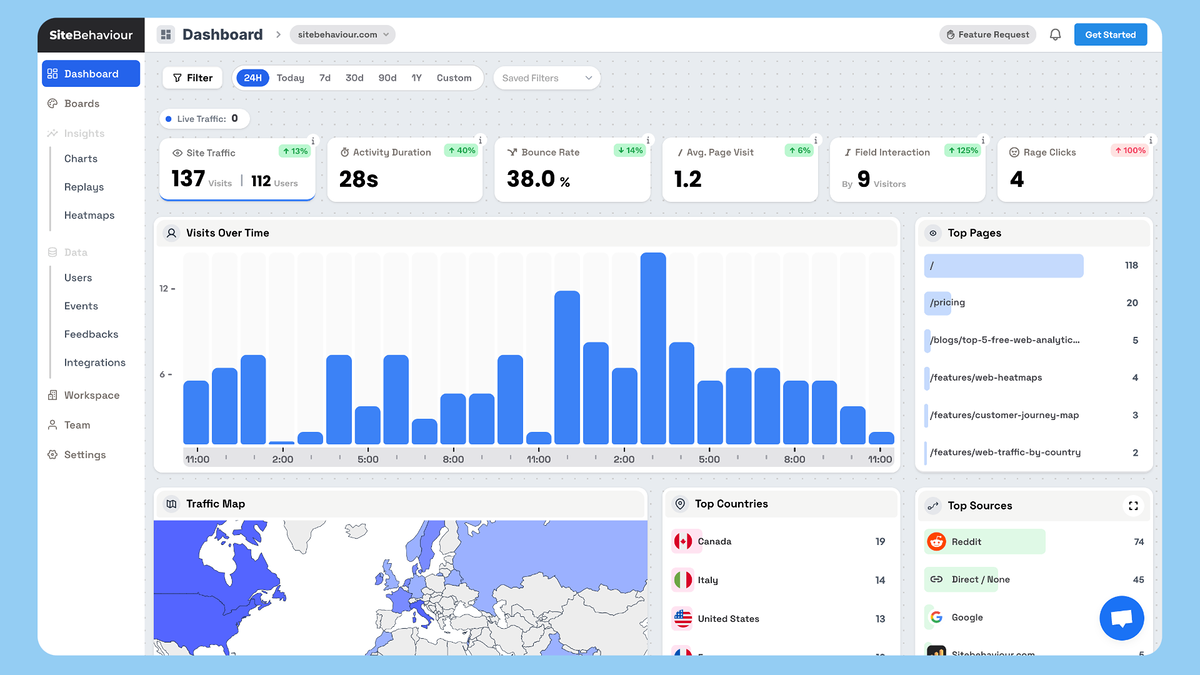
Sitebehaviour is a tool designed to help website owners improve their online presence. It tracks how visitors interact with a site. This information helps businesses understand user actions and preferences.
By analyzing visitor behavior, Sitebehaviour provides insights to boost user engagement. It supports better decision-making for website design and marketing strategies. If you want to understand how behavior tracking works in more depth, tools like this are often compared with a full website heatmap software solution.
What Sitebehaviour Offers
Sitebehaviour collects data on clicks, scrolls, and navigation paths. It shows which parts of a website attract the most attention. This helps identify strengths and weaknesses in site layout.
How Sitebehaviour Works
The tool uses tracking scripts installed on your website. These scripts record real-time user activity. Data is then presented in easy-to-understand reports and visual maps.
Who Can Use Sitebehaviour
Small businesses, marketers, and web developers benefit from Sitebehaviour. It works for any site type, including blogs, online stores, and portfolios. No advanced technical skills are required to use it.
Credit: appsumo.com
Key Features That Drive Growth
Sitebehaviour offers several key features that help businesses grow. These tools give clear insights into user actions and website performance. They help improve marketing strategies and boost sales effectively.
User Interaction Tracking
Sitebehaviour tracks how users interact with your website. It records clicks, scrolls, and mouse movements. This data shows what visitors like or ignore. Businesses can then improve their site based on real user behavior.
Real-time Analytics
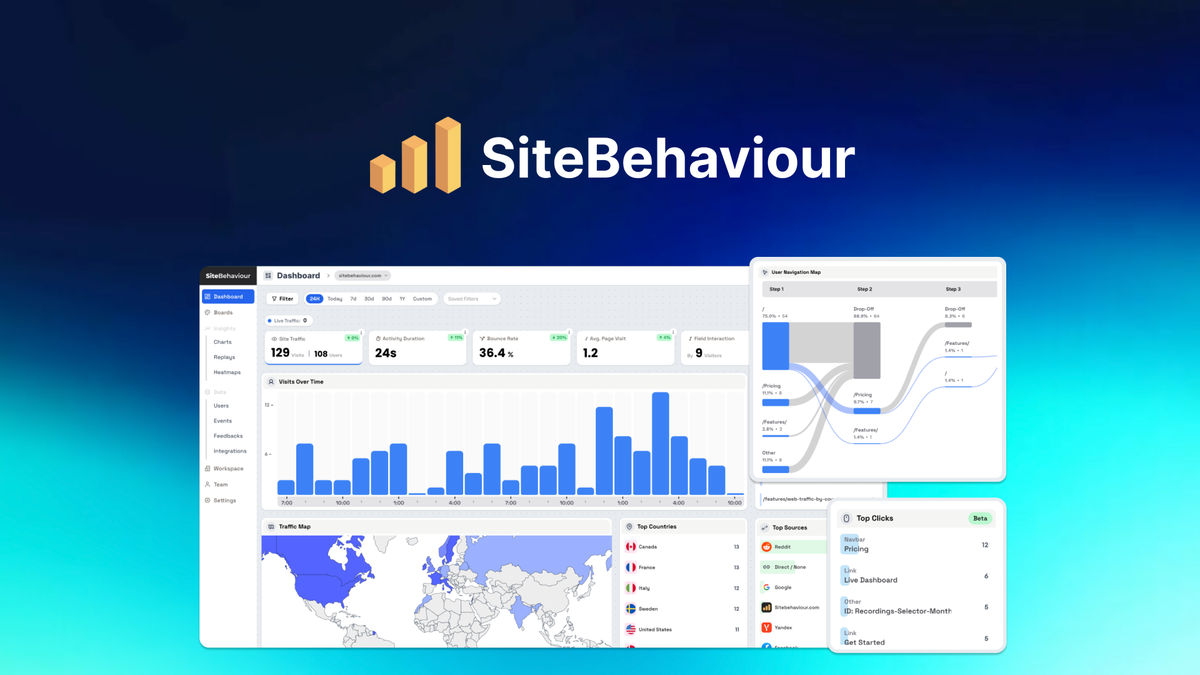
Sitebehaviour provides data instantly as users browse your site. You can see visitor numbers, traffic sources, and behavior live. This helps respond quickly to trends and adjust marketing plans fast.
Customizable Dashboards
The platform offers dashboards that you can customize easily. Choose the metrics that matter most to your business. This makes it simple to monitor key data in one place.
Conversion Funnel Analysis
Sitebehaviour tracks the steps visitors take before buying or signing up. It shows where users drop off in the process. Fixing these points improves conversion rates and grows your business.
How Sitebehaviour Enhances User Experience
Sitebehaviour helps improve how visitors use your website. It gives clear data on user actions. This information helps you make smart changes. The goal is to make your site easy and pleasant to use. Better user experience can lead to more visits and sales.
Sitebehaviour uses tools that show how people interact with your pages. These tools reveal which parts get attention and which parts do not. You can see what works well and what needs fixing. Let’s explore the key features that enhance user experience.
Heatmaps And Click Tracking
Heatmaps show where users move their mouse and click most. They use colors to highlight popular areas. Red means many clicks, blue means few. This helps you see what attracts users. You can place important buttons where users click often. It helps reduce confusion and improves navigation.
Session Replay Benefits
Session replay records visitors’ actions on your site. You can watch how they scroll, click, and type. It shows real user behavior in detail. This helps find where users get stuck or leave. Fixing these issues makes the site smoother. It also helps test changes before finalizing.
Feedback Collection Tools
Sitebehaviour offers tools to gather user feedback easily. Visitors can leave comments or answer quick surveys. This direct input reveals what users like or dislike. You get ideas to improve your site from real users. It builds trust and shows you care about visitors’ views.
Integrations And Compatibility
Sitebehaviour offers solid options for integration and compatibility. These features help users connect with popular platforms and tools. For users comparing analytics ecosystems, it’s often weighed against Sitebehaviour vs Google Analytics to understand differences in depth and usability. This makes managing websites and online stores easier.
Strong integration support means fewer technical problems. It also saves time by automating many tasks. Sitebehaviour works well with many systems used by businesses.
Popular Cms And E-commerce Platforms
Sitebehaviour supports major CMS like WordPress and Joomla. These platforms power millions of websites worldwide. The integration lets users add tracking and analytics quickly. It also supports e-commerce platforms like Shopify and WooCommerce. This helps store owners track customer behavior and sales. The setup is simple and requires no coding skills.
Third-party Tool Support
Sitebehaviour connects with many third-party tools. This includes email marketing, CRM, and ad platforms. Tools like Mailchimp, HubSpot, and Google Ads work smoothly. Users can sync data and automate marketing tasks. This reduces manual work and improves campaign results. The platform uses APIs for seamless data sharing.
Pricing Plans And Value
Sitebehaviour offers clear pricing plans suitable for different needs. The options balance cost and features well. This makes Sitebehaviour a practical choice for small businesses and growing websites. You can explore full breakdowns in the official Sitebehaviour pricing guide to understand which plan fits your needs best.
The pricing is easy to understand. Each plan provides good value for what you pay. You can start small and upgrade as your site grows.
Free Trial And Starter Options
Sitebehaviour offers a free trial to test basic tools. This trial lets you explore key functions without spending money. It helps users see if the platform fits their needs.
The starter plan is affordable and covers essential features. It suits beginners and small projects. You get enough tools to track website visitor behavior and improve user experience.
Advanced Features In Premium Plans
Premium plans include advanced features for deeper insights. You can access more detailed reports and customization options. These tools support larger websites with complex needs.
Higher-tier plans offer better support and faster data updates. They help businesses make smarter decisions based on real user data. The extra cost matches the added value from these features.
Credit: appsumo.com
Pros And Cons Of Sitebehaviour
Sitebehaviour has strengths and weaknesses worth knowing. This section breaks down what works well and what might not. It helps to decide if Sitebehaviour fits your needs.
Pros Of Sitebehaviour
Sitebehaviour offers easy setup and user-friendly tools. It has clear dashboards that show useful data fast. The platform supports various integrations for better workflows. It tracks customer actions in real time. Reports are detailed but simple to read. The service provides good customer support. It helps improve website engagement effectively.
Cons Of Sitebehaviour
Sitebehaviour can be pricey for small budgets. Some features may need more customization options. The learning curve can be steep for beginners. Mobile app options are limited at this time. Occasionally, data updates might run slower. Some users want more advanced reporting features. It may not fit all business types perfectly.
Real User Experiences
Real user experiences provide clear insights into how Sitebehaviour performs. These stories show how different businesses use the platform to meet their needs. Users share honest feedback on what works well and what could improve. This section highlights success stories from small businesses and examples from large enterprises.
Small Business Success Stories
Small businesses appreciate Sitebehaviour for its simple setup and ease of use. Many have improved customer engagement using its tools. One local shop increased online sales by 20% within three months. They found the analytics easy to understand. Another small cafe used Sitebehaviour to track visitor behavior and adjust their marketing. This led to more repeat customers. Sitebehaviour fits well for businesses with limited tech support.
Enterprise-level Use Cases
Large companies use Sitebehaviour to handle complex data and large traffic volumes. Enterprises value its customizable features and strong support. A multinational retailer integrated Sitebehaviour to monitor user activity across multiple sites. This helped optimize their marketing campaigns. Another enterprise used the platform to improve their website’s user experience. They reduced page load times and increased conversions. Sitebehaviour scales well to meet bigger business demands.

Why Sitebehaviour Is Getting Attention
The biggest reason Sitebehaviour is being discussed is not just features—it’s the AppSumo lifetime deal model.
Instead of paying monthly like traditional tools, AppSumo deals often allow you to:
- Pay once
- Use forever
- Get early access to growing SaaS products
This changes the economics completely for long-term users.
However, it’s important to be honest here:
Sitebehaviour is not always available on AppSumo, and like many SaaS deals, it may appear, pause, or relaunch depending on rollout strategy.
Features of Sitebehaviour (What You Can Expect)
While the tool is still emerging, its core value proposition is focused on essential behavior tracking:
1. Heatmaps
Understand where users click, scroll, and lose attention on your pages.
2. Session Recordings
Watch real user journeys to identify friction points in navigation or content flow.
3. Simple Dashboard
Designed to avoid complexity and show insights quickly without deep learning curves.
4. Lightweight Setup
Typically designed to be easy to install and start tracking without technical barriers.
Where Sitebehaviour Fits in the Market
Sitebehaviour is not trying to compete with enterprise analytics platforms. Instead, it sits in a practical middle ground:
- Easier than advanced CRO platforms
- Simpler than enterprise tools
- More focused than general analytics dashboards
Its strength lies in clarity over complexity.
Should You Wait for Sitebehaviour or Use Alternatives?
This is the most important decision.
If you need insights immediately:
You should not wait. Use:
- Microsoft Clarity (Best free option)
- Hotjar (Most balanced paid option)
These tools are stable, proven, and ready to use today. To understand better you can also compare it with Sitebehaviour alternatives.
If you are focused on long-term value:
Waiting for Sitebehaviour on AppSumo can make sense.
Why?
Because AppSumo deals often allow you to:
- Avoid monthly subscriptions
- Lock in early pricing
- Benefit from future feature updates at no extra cost
But timing matters. If your website is already getting traffic, delaying analytics can also delay growth improvements.
Real-World Insight (Important Perspective)
In practice, most website growth improvements don’t come from having the “best” tool—they come from consistently acting on behavior data.
Even a free tool like Microsoft Clarity can outperform premium tools if used properly.
Sitebehaviour becomes valuable only when:
- It is actively used
- Insights are turned into design improvements
- It fits your workflow without friction

Tips To Maximize Sitebehaviour’s Potential
Sitebehaviour offers many features to understand your website visitors. Using it well can improve your marketing results. Follow these tips to get the most from Sitebehaviour. Focus on clear goals, regular checks, and smart tool combinations.
Setting Up Effective Goals
Start by defining what success means for your website. Choose specific goals like increasing sign-ups or sales. Set measurable targets to track progress easily. Clear goals help you see what works and what does not.
Use Sitebehaviour’s goal-setting tools to create these targets. Make sure each goal matches your business needs. Avoid vague aims that are hard to measure or understand.
Regular Data Review Practices
Check your Sitebehaviour reports often. Frequent reviews help catch trends early. Look for changes in visitor behavior and engagement. Quick action can improve results fast.
Analyze data weekly or biweekly to stay updated. Use clear charts and summaries to save time. Note any unusual patterns and adjust your plans accordingly.
Combining With Other Marketing Tools
Use Sitebehaviour alongside your other marketing software. This creates a fuller picture of your audience. Sync data from email, social media, or ad platforms for better insights.
Integrations improve your ability to target the right visitors. They also help automate tasks and save time. Choose tools that easily connect with Sitebehaviour for smooth use.
Frequently Asked Questions
What Is Sitebehaviour Used For In Website Analysis?
Sitebehaviour tracks how visitors interact with a website. It helps identify user actions and areas needing improvement. This makes websites more user-friendly and effective.
How Does Sitebehaviour Improve Website User Experience?
Sitebehaviour shows where users click and how they move on pages. This data helps fix problems and make navigation easier. Better experience keeps visitors longer and boosts engagement.
Is Sitebehaviour Easy To Install And Use For Beginners?
Sitebehaviour offers simple setup with clear instructions. Its interface is user-friendly, even for those new to analytics. No advanced skills are needed to start gathering data.
Conclusion
Sitebehaviour offers useful tools for website analysis and user engagement. It helps track visitor actions clearly and simply. The platform suits small to medium businesses wanting basic insights. Its interface is easy to use without much training. Some features may lack depth for advanced users. If you’re exploring behavior analytics tools, it’s worth comparing it with heatmap-based solutions like website heatmap software to find the best fit for your strategy.
Overall, Sitebehaviour can improve understanding of website performance. Try it to see if it meets your needs. Simple, clear, and helpful for many website owners.