
Are you struggling to understand how visitors interact with your website? Imagine if you could see exactly where they click, scroll, or hesitate.
Website heatmap software gives you this powerful insight. By revealing what grabs your visitors’ attention and what gets ignored, it helps you make smart changes that boost engagement and sales. Keep reading to discover how this simple tool can transform your website and give you a clear edge over the competition.

Credit: www.smartlook.com
What Is Heatmap Software
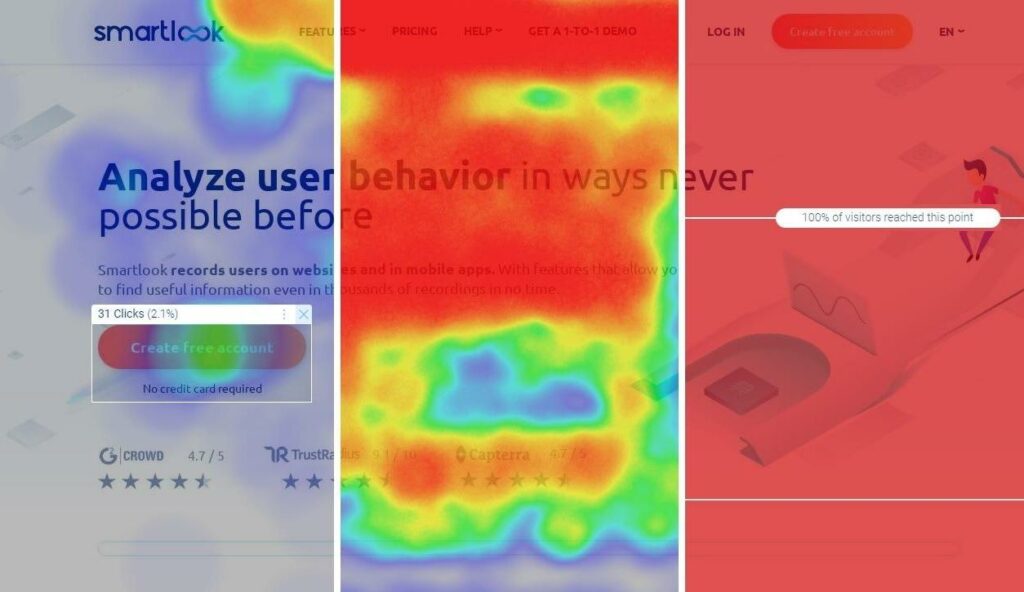
Heatmap software shows how visitors interact with a website. It uses colors to represent user activity. These colors reveal which parts of a page get the most attention.
The software tracks clicks, mouse movements, and scrolling behavior. It helps website owners understand user behavior visually. This insight allows them to improve site design and content placement. If you’re exploring tools in this space, reading a detailed SiteBehaviour review can help you understand how one of the popular platforms works in real scenarios.
How Heatmap Software Works
The software collects data from real users on a website. It records where visitors click and how far they scroll. This data is then turned into a color-coded map.
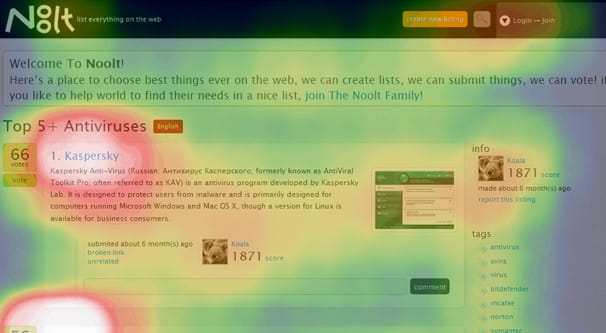
Hot areas appear in bright colors like red or orange. Cooler areas show in blue or green. These colors highlight popular and ignored parts of the page.
Click heatmaps show where visitors click the most. Scroll heatmaps reveal how far users scroll down a page. Move heatmaps track mouse movements across the screen.
Each type gives unique insights into visitor behavior. Using all three helps create a complete picture of user interaction.
Benefits Of Using Heatmap Software
Heatmaps make it easier to see visitor preferences. They show which links or buttons attract clicks. They reveal if important content is missed by users.
This information helps improve website layout and usability. It can increase visitor engagement and conversion rates. If you’re comparing tools, checking SiteBehaviour vs Google Analytics can give you a clearer idea of how heatmaps differ from traditional analytics.
Types Of Heatmaps
Heatmaps show how visitors interact with a website. They use colors to highlight popular spots. Different heatmap types reveal unique user behaviors. Understanding these types helps improve site design and user experience.
Click Heatmaps
Click heatmaps show where users click most. Bright colors mark high-click areas. They reveal buttons or links that attract attention. This helps identify which parts users find useful or confusing.
Scroll Heatmaps
Scroll heatmaps track how far visitors scroll down pages. They show where users stop reading or lose interest. This data helps place important content where visitors see it. It improves page layout and content visibility.
Move Heatmaps
Move heatmaps record mouse movements on a page. They suggest where users focus their attention. This type shows how people explore a site visually. It helps understand user intent and improve navigation paths.
5 Popular Website Heatmap Software (With Honest Buying Advice)
1. Hotjar (Most Trusted All-in-One Starter Tool)
Hotjar is still one of the most widely used heatmap tools in the market, especially for teams who want something reliable without complexity.
What it does well:
- Click, scroll, and movement heatmaps
- Session recordings to see real user behavior
- Feedback polls and on-site surveys
Why it’s popular:
It gives a complete picture of user behavior without needing technical setup or training.
Where it falls short:
- Pricing increases quickly as traffic grows
- Advanced analysis features are limited compared to newer tools
Best for:
Beginners, small businesses, and teams that want a proven standard tool.
What makes it reliable:
It has been used across thousands of websites for years, which has helped refine its tracking accuracy and usability. Because of that long-standing adoption, it’s often treated as a baseline tool for behavior analytics.
2. Microsoft Clarity (Best Free Heatmap Tool)
Clarity has become a serious competitor because it removes the biggest barrier in analytics: cost.
What it offers:
- Free heatmaps and session recordings
- Rage clicks, dead clicks, and scroll depth insights
- AI-based behavioral signals
Why people use it:
It provides surprisingly deep behavioral insights without charging anything.
Limitations:
- Not as strong in funnel tracking or advanced segmentation
- Interface is functional but not premium
Best for:
Startups, bloggers, and anyone who wants solid insights without paying monthly fees.
What makes it trustworthy:
Being backed by Microsoft gives it strong infrastructure stability and long-term reliability. It also processes large-scale behavioral data efficiently, which helps maintain performance even on high-traffic sites.
3. Crazy Egg (Best for Optimization Experiments)
Crazy Egg is not just about watching behavior—it focuses on improving pages through testing.
Key features:
- Heatmaps and scrollmaps
- A/B testing tools
- Confetti reports for segmented click analysis
Why it stands out:
It connects behavior data with optimization actions, which is useful for marketers focused on conversions.
Limitations:
- Interface feels less modern
- No free plan
Best for:
Marketers and website owners who actively test and optimize landing pages.
What makes it credible:
It has been used in conversion optimization workflows for many years, especially in eCommerce and landing page testing environments where small changes can significantly affect revenue.
4. Lucky Orange (Best All-in-One Conversion Suite)
Lucky Orange combines multiple conversion tools into a single dashboard. It’s powerful, but not always simple. If you’re not careful, you end up paying for features you rarely use.
What it includes:
- Heatmaps and recordings
- Live chat and visitor monitoring
- Conversion funnels and form analytics
Why it’s powerful:
It removes the need to connect multiple tools by combining tracking, communication, and analysis.
Limitations:
- Can feel overwhelming for beginners
- Subscription cost increases with traffic
Best for:
Businesses that want a full conversion optimization system in one place.
What makes it practical:
Its real-time tracking and live chat features allow businesses to respond to user friction instantly, which is something most heatmap tools don’t offer.
5. Sitebehavior (AppSumo Lifetime Deal – Worth Waiting For or Buying)
Sitebehavior is not widely available yet, but it is being discussed as an AppSumo lifetime deal product, which is where things get interesting.
What makes it attractive:
- Heatmaps and session recordings focused on simplicity
- Clean and easy-to-understand interface
- Built for fast insights without complexity overload
- Lifetime deal potential (one-time payment instead of monthly fees)
Why people are watching it:
AppSumo lifetime deals often give early-stage tools a chance to grow while giving buyers long-term value at a very low cost.
Important reality check:
It is currently not fully available or consistently active. That is normal for AppSumo launches and relaunch cycles.
So what should you do?
You have two smart options:
Option 1: Wait for Sitebehavior on AppSumo
If you are not in a hurry, waiting is often the best decision. AppSumo deals usually offer the highest long-term value when the tool is still growing.
Option 2: Buy existing subscriptions now
If you need insights immediately, tools like Hotjar or Microsoft Clarity are safer short-term choices.
What makes it worth watching:
AppSumo deals often feature early-stage SaaS tools that improve quickly based on user feedback. Buyers who enter early usually benefit from both lower pricing and continuous feature development over time.
Final Expert Verdict
Each tool fits a different stage of business maturity:
- Hotjar: Most balanced and reliable
- Microsoft Clarity: Best free starting point
- Crazy Egg: Best for testing-driven optimization
- Lucky Orange: Best all-in-one conversion system
- Sitebehavior: Best value opportunity if you catch the AppSumo deal
If your focus is long-term cost efficiency, watching AppSumo deals like Sitebehavior is a smart move. But if your website needs immediate optimization, starting with a proven tool like Hotjar or Clarity is more practical.
The real advantage doesn’t come from the tool itself—it comes from consistently using heatmaps to actually improve your pages.
Benefits For Conversion Optimization
Website heatmap software helps improve how visitors interact with your site. It shows where users click, move, and scroll. This data helps increase conversions by making the site easier to use and more appealing.
Identify User Behavior Patterns
Heatmaps reveal how visitors use your website. You can see which parts they focus on most. This helps understand what attracts attention and what is ignored. Knowing this guides you to place important content where users look.
Spot Conversion Barriers
Heatmaps show where users get stuck or confused. You can find buttons or links that are missed often. This helps spot issues that block sales or sign-ups. Fixing these barriers makes the path to conversion smoother.
Improve User Experience
Heatmap data helps design a better website layout. You can arrange elements to fit user habits. A smooth, clear experience keeps visitors longer. Happy users are more likely to complete actions you want.
Credit: www.smartlook.com
Key Features To Look For
Choosing the right website heatmap software means knowing which features matter most. These tools help you see where visitors click, scroll, and spend time. This data guides you to improve your website’s design and user experience. Focus on features that offer clear and actionable insights.
Real-time Data Tracking
Real-time data tracking shows visitor actions as they happen. You can watch clicks and scrolls instantly. This helps catch issues fast and understand user behavior live. Quick feedback lets you test changes and see results immediately.
Segmentation Options
Segmentation divides visitors into groups based on behavior or traits. You can analyze new versus returning users or traffic sources. This reveals how different visitors interact with your site. Tailored insights help improve specific parts of your website.
Integration With Analytics Tools
Integration with analytics tools combines heatmap data with other metrics. It gives a complete view of visitor behavior and site performance. Syncing with tools like Google Analytics improves reporting and decision-making. This makes your data more useful and easier to understand.
How To Implement Heatmap Software
Implementing heatmap software on your website helps you see how visitors interact with your pages. It shows where users click, scroll, and spend time. This data lets you improve your site’s design and user experience. Follow these steps to add heatmap software effectively.
Choosing The Right Tool
Select a heatmap tool that fits your website needs. Look for ease of use and clear visual reports. Check if the tool supports your website platform. Consider tools with features like click tracking, scroll tracking, and session recordings. Free trials help test the software before buying.
If budget is a concern, reviewing SiteBehaviour pricing can help you decide whether it’s the right fit for you.
Setting Up On Your Website
Sign up and create an account with your chosen tool. You will get a small code snippet. Paste this code into your website’s header or use a plugin if available. Make sure the code loads on all pages you want to track. Double-check the installation by visiting your site and viewing live data.
Analyzing The Data
Review heatmaps regularly to understand visitor behavior. Look for popular areas and places users ignore. Use scroll maps to see how far visitors scroll down. Identify any confusion or dead zones on your pages. Use these insights to make changes that improve user engagement and conversions.
Credit: growtraffic.com
Common Mistakes To Avoid
Using website heatmap software can reveal how visitors interact with your site. Many make mistakes that reduce its usefulness. Avoid these common errors to get clearer insights.
If you’re unsure which option to go with, exploring SiteBehaviour alternatives can help you compare different tools and choose the best one for your needs.
Ignoring Mobile Users
Many forget that mobile users act differently than desktop users. Mobile screens are smaller. People tap, scroll, and swipe in unique ways. Heatmaps must include mobile data to show real user behavior. Without this, you miss a big part of your audience.
Overlooking Context
Heatmaps show where visitors click or look. But they do not explain why. Context matters. Consider page goals, visitor intent, and design elements. Use heatmap data alongside other feedback to understand the full picture.
Relying Solely On Heatmaps
Heatmaps are helpful but not enough alone. They do not show visitor emotions or reasons behind actions. Combine heatmaps with tools like surveys and analytics. This mix gives clearer, smarter decisions for your website.
Case Studies Showing Success
Website heatmap software shows where visitors click, scroll, and spend time. Many businesses use this tool to improve their websites. Real case studies prove how heatmaps help increase sales and user engagement. These examples show practical results and easy steps anyone can follow.
Improving E-commerce Conversion Rates
A popular online store used heatmaps to track customer clicks. They found many visitors ignored the “Add to Cart” button. The store moved the button to a more visible spot. This simple change increased sales by 20% within a month. Heatmaps highlighted what customers really wanted to see.
Boosting Blog Readership And Engagement
A content website used heatmaps to see how far readers scrolled. Most stopped reading halfway through articles. The site shortened long posts and added images to keep attention. Readers stayed longer and shared more articles. Heatmaps helped understand which parts attracted readers most.
Enhancing Landing Page Effectiveness
A company tested two versions of its landing page using heatmaps. One version had a clearer call to action and less clutter. Heatmap data showed visitors focused more on the call to action in that version. The company saw a 15% increase in sign-ups. Heatmaps guided simple design improvements.

Future Trends In Heatmap Technology
Website heatmap technology is changing fast. New trends are shaping how we understand user behavior online. These trends help businesses improve their websites better than before.
Heatmaps will become more detailed and smarter. They will not only show where users click but also predict what they want next. This makes it easier to create user-friendly sites.
Advanced Ai Integration
Artificial intelligence will play a bigger role in heatmap tools. AI can analyze user data quickly and spot patterns humans might miss. This helps businesses make better decisions faster.
Real-time Heatmap Updates
Future heatmaps will update instantly as users interact with websites. This allows website owners to see live user behavior. Immediate changes can improve user experience on the spot.
Cross-device Tracking
Users visit websites on many devices. New heatmap software will track behavior across phones, tablets, and desktops. This gives a full picture of user journeys and preferences.
Enhanced User Segmentation
Heatmaps will offer better ways to segment users. Businesses can see how different groups behave on their site. This helps tailor content and design to specific audiences.
Integration With Other Analytics
Heatmaps will work closely with other tools like session recordings and surveys. Combined data provides deeper insights into user needs. This leads to smarter website improvements.
Frequently Asked Questions
What Is Website Heatmap Software Used For?
Website heatmap software shows where users click, scroll, and move on a page. It helps identify popular and ignored areas. This data improves website design and user experience.
How Does Heatmap Software Improve Website Performance?
Heatmap software reveals which parts of a page attract attention. It helps fix problems like unclear buttons or confusing layouts. This leads to higher user engagement and more conversions.
Can Heatmap Tools Track Visitor Behavior In Real Time?
Yes, many heatmap tools offer real-time tracking of user actions. This lets website owners see live user interaction patterns. Real-time data supports quick decisions to enhance the site.
Conclusion
Website heatmap software helps you see how visitors use your site. It shows where people click, scroll, and spend time. This information helps improve your website’s design and content. Better design means visitors find what they want faster. You can fix problems and make your site easier to use.
Heatmaps give clear data without guessing. Try using heatmap tools to learn what works best for your website. Small changes can lead to big improvements in user experience and engagement.