Are you looking for a CRM solution that fits your business needs without breaking the bank? Zoho CRM has become a popular choice for many companies worldwide, offering a powerful set of features designed to help you manage your customer relationships more effectively.
But is it the right fit for you? You’ll get an honest look at Zoho CRM through real user reviews, highlighting its strengths and weaknesses. Whether you’re a small business owner or part of a growing team, understanding what Zoho CRM can—and can’t—do will help you make a smarter decision.
Keep reading to discover if Zoho CRM is the game-changer your business has been waiting for.
Credit: insightfulaccountant.com
Zoho Crm Features
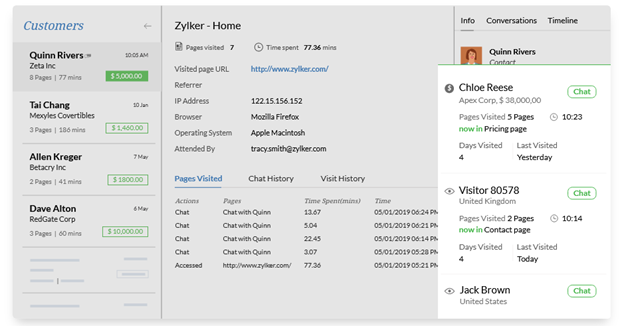
Zoho CRM offers a wide range of features designed to help businesses manage customer relationships efficiently. These features improve sales, marketing, and customer support processes. The platform suits small to large companies with flexible tools that adapt to different needs.
Customization Options
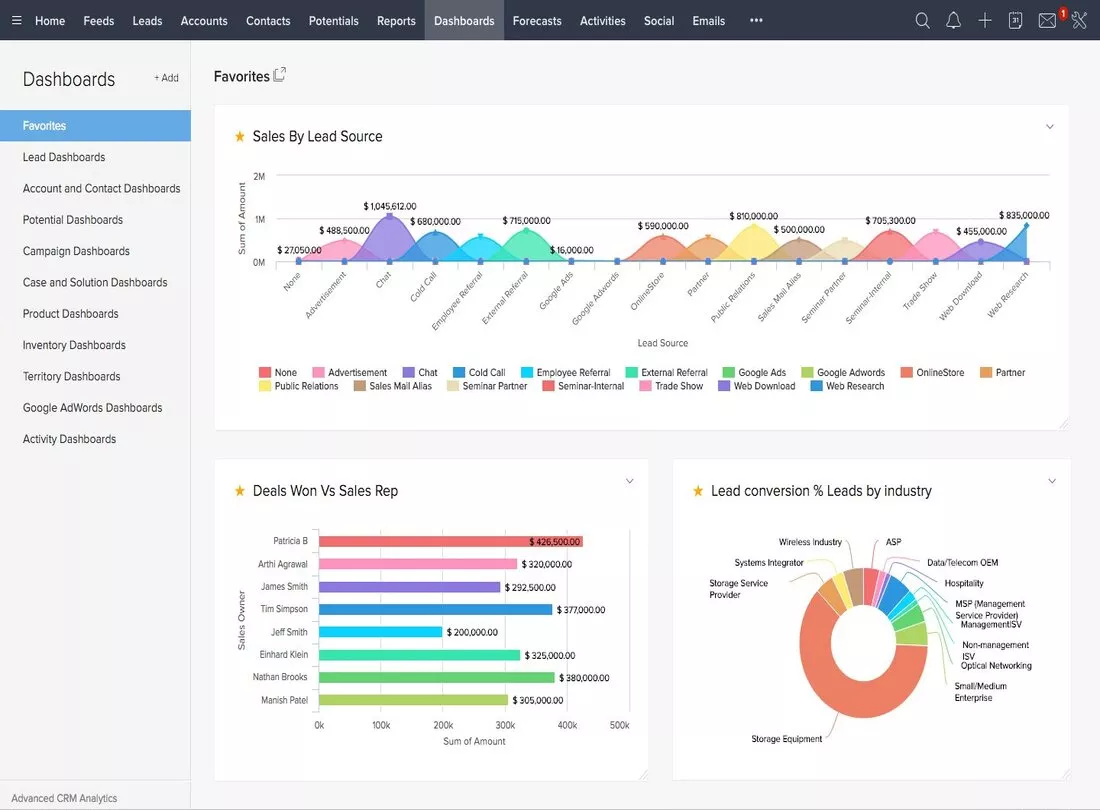
Zoho CRM allows users to tailor the system to their business. You can customize modules, fields, and layouts without coding. This flexibility helps match the CRM to specific workflows. Custom dashboards and reports provide insights unique to your business needs.
Automation And Workflows
Automation in Zoho CRM saves time by handling repetitive tasks. Workflows trigger actions like sending emails or updating records automatically. This reduces manual work and speeds up processes. You can create rules easily to fit your sales cycle.
Email Marketing Integration
Zoho CRM connects smoothly with email marketing tools. You can send campaigns directly from the CRM platform. Track email opens, clicks, and responses to measure engagement. This integration helps align marketing and sales efforts effectively.
Mobile Access And Apps
The Zoho CRM mobile app keeps your team connected on the go. Access contacts, deals, and tasks from smartphones or tablets. The app supports offline use, syncing data when back online. This mobility improves productivity outside the office.
User Experience
User experience shapes how users interact with Zoho CRM daily. It affects productivity and satisfaction. This section explores the key aspects of Zoho CRM’s user experience. Focus on design, ease, and learning hurdles.
Interface Design
Zoho CRM offers a clean and organized interface. Menus and options are clearly labeled. Colors are soft, reducing eye strain during long use. Icons help users quickly find tools and features. The dashboard presents key information at a glance. Some users find the layout customizable, which suits different work styles.
Ease Of Use
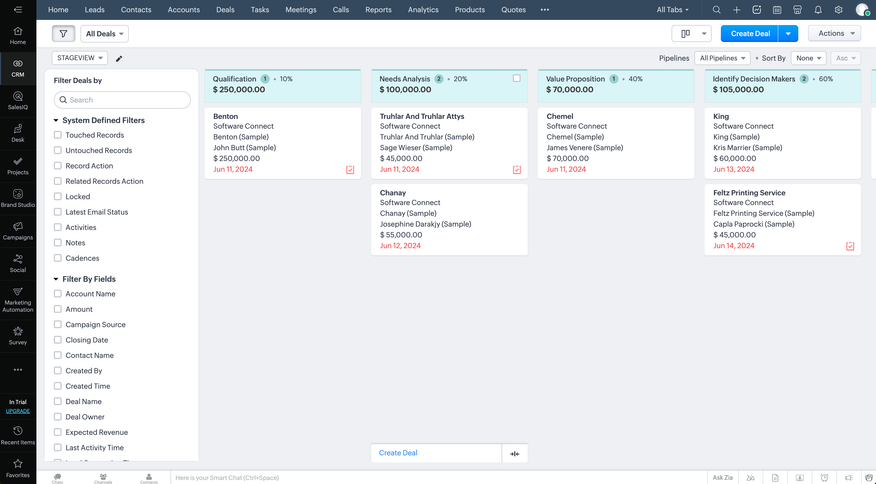
Users often praise Zoho CRM for its straightforward setup. Basic tasks like adding contacts or tracking deals require few steps. The system guides users with prompts and tips. Navigation flows logically from one section to another. This simplicity helps teams focus on work rather than software issues. However, certain advanced features can feel complex at first.
Learning Curve Challenges
New users may face a learning curve with Zoho CRM. Some features need time to understand fully. The range of options can overwhelm beginners. Training materials and tutorials are available but not always easy to follow. Patience is necessary to master workflow automation and reporting tools. Users report gradual improvement with regular use and practice.
Pricing And Plans
Understanding Zoho CRM’s pricing and plans is essential for businesses of all sizes. The platform offers a range of options that suit different needs and budgets. From a free tier to advanced paid plans, Zoho CRM tries to provide flexibility and value. This section breaks down the key aspects of each pricing level. You can read this article to learn more about Zoho CRM pricing here.
Free Tier Overview
Zoho CRM offers a free tier with basic features. It allows up to three users, making it ideal for small teams or startups. Users get access to lead, contact, and account management tools. The free plan also includes mobile apps and basic analytics. Although limited, it provides a solid introduction to CRM software.
Paid Plan Benefits
Paid plans add many useful features not found in the free tier. These include workflow automation, advanced analytics, and customizable dashboards. Users can integrate with other Zoho apps and third-party tools. Paid plans support more users and offer better storage limits. Customer support improves with higher-tier subscriptions, ensuring quicker help.
Value For Small Businesses
Small businesses find Zoho CRM’s pricing very competitive. The free tier covers essential needs without extra costs. Paid plans scale affordably, allowing growth without large investments. Features like automation save time and increase productivity. The flexibility in plans helps small companies choose what fits best. Overall, Zoho CRM offers strong value for budget-conscious businesses.
Pros Of Zoho Crm
Zoho CRM offers many advantages that suit different business needs. Its features help companies manage customer relationships efficiently. Users often praise its balance of power and simplicity. Below are some key benefits of using Zoho CRM.
Affordability
Zoho CRM provides competitive pricing plans. Small businesses can access essential tools without high costs. The free version includes basic features for startups. Paid plans offer more advanced options at reasonable rates. This makes Zoho CRM a budget-friendly choice for many companies.
Customization Flexibility
Zoho CRM allows users to tailor the system to their needs. You can modify fields, layouts, and modules easily. Automation rules and workflows help save time. Integration with other Zoho apps and third-party tools is smooth. This flexibility helps businesses create a personalized experience.
Scalability For Growing Businesses
The platform grows with your business needs. Zoho CRM supports adding more users and data without issues. It offers features suited for both small teams and large enterprises. As your company expands, Zoho CRM adapts to handle more complex workflows. This scalability ensures long-term usability and value.
Cons Of Zoho Crm
Zoho CRM offers many useful features but also has some drawbacks. These cons can affect user experience and productivity. Understanding these issues helps users decide if Zoho CRM fits their needs. Below are some common complaints from users based on reviews and feedback.
Task Management Limitations
Zoho CRM’s task management lacks advanced options. Users find it hard to organize and prioritize tasks effectively. The interface can feel basic and less flexible. This limits productivity, especially for teams handling many tasks daily. Task dependencies and reminders could be improved for better workflow.
Dashboard Functionality Issues
The dashboard design in Zoho CRM is not very user-friendly. Customization options are limited, making it hard to tailor views. Some users report slow loading times and glitches. This affects quick access to important data. A more intuitive and responsive dashboard would enhance user experience greatly.
Feature Utilization Tracking
Zoho CRM does not provide clear tracking of feature usage. Businesses struggle to see which tools their team uses most. This makes it difficult to measure ROI on certain features. Better analytics on feature utilization would help companies optimize their CRM investment.
Support And Bug Reporting
Customer support can be slow and less helpful at times. Bug reports often take longer to resolve than expected. Users report repeated issues despite submitting tickets. Faster response times and improved bug fixes would increase user satisfaction. Reliable support is key for smooth CRM operation.
Credit: insiderapps.com
Comparisons With Other Crms
Comparing Zoho CRM with other CRM platforms helps you find the best fit for your business. Each CRM offers unique features and strengths. Understanding these differences aids in making an informed choice. This section highlights how Zoho stacks up against some popular CRM options.
Hubspot Crm Advantages
HubSpot CRM offers a free plan with extensive features. It provides strong tools for sales, marketing, and customer service. The user interface is simple and intuitive. HubSpot excels in unifying sales and marketing efforts. It supports easy integration with many third-party apps. Zoho CRM, while powerful, has a steeper learning curve. HubSpot’s free tier is more generous in features than Zoho’s. Small businesses often prefer HubSpot for its ease of use.
Alternatives For Marketing Integration
Zoho CRM integrates well with Zoho Campaigns and other Zoho products. For marketing automation, some users prefer platforms like Salesforce or HubSpot. These alternatives offer deeper marketing automation features. Mailchimp and ActiveCampaign also pair well with various CRMs. Choosing a CRM with strong marketing tools depends on your business needs. Consider how well the CRM connects with your existing marketing stack. Zoho’s all-in-one suite can benefit businesses using multiple Zoho applications.
Choosing The Right Crm For Your Needs
Identify your key requirements before selecting a CRM. Consider factors like budget, ease of use, and feature set. Think about integration with other tools you already use. Support and training options also affect your choice. Zoho CRM offers flexibility with customization and pricing plans. HubSpot suits teams wanting a simple, integrated marketing and sales solution. Test free trials to experience each CRM’s interface and features. The right CRM will help streamline your processes and improve customer relations.
Customer Feedback Highlights
Customer feedback offers valuable insights into Zoho CRM’s real-world performance. Users share their experiences, pointing out strengths and areas for improvement. These reviews help potential buyers understand what to expect from the software. Below are key highlights from user comments and community discussions.
Positive User Reviews
Many users praise Zoho CRM for its easy interface. Customizing workflows and automations is simple and quick. The software integrates well with other Zoho products and third-party apps. Users appreciate the wide range of features available at affordable prices. Customer support often receives positive remarks for being responsive and helpful. Overall, many find this platform reliable for managing sales and customer data.
Common Criticisms
Some users mention a steep learning curve for beginners. The dashboard can feel cluttered and hard to navigate at times. Task search and reporting features need improvement, say several reviewers. Occasionally, bugs disrupt smooth operation, affecting productivity. Users also note that it can be hard to tell if all features are fully utilized. These issues suggest room for improvement in user experience and functionality.
Community Insights
The Zoho CRM user community actively shares tips and solutions. Forums and social media groups provide help with custom setups. Experienced users often guide newcomers through complex features. Many suggest combining Zoho CRM with other tools for better results. Community feedback highlights the importance of training and regular updates. This support network adds value beyond the software itself.
Tips To Maximize Zoho Crm
Getting the most out of Zoho CRM helps improve your business’s customer management. Simple strategies can boost productivity and make daily tasks easier. Focus on key areas like customization, automation, and training to enhance your CRM experience.
Customization Best Practices
Tailor Zoho CRM to fit your business needs. Use custom fields to capture important data. Adjust layouts so teams see relevant information first. Create custom modules if standard ones don’t cover your processes. Keep it simple to avoid confusion. Regularly update settings as your business changes.
Automation Setup
Set up workflows to reduce repetitive tasks. Automate email alerts for new leads or follow-ups. Use task assignment rules to keep your team organized. Automate data entry with web forms. Test automations to ensure they work smoothly. Automation saves time and keeps your CRM data accurate.
Training Resources
Invest time in learning Zoho CRM features. Use Zoho’s official tutorials and videos. Join user forums to get tips from other users. Schedule regular training sessions for your team. Encourage hands-on practice to build confidence. Good training leads to better use and fewer mistakes.
Credit: softwareconnect.com
Frequently Asked Questions
Is Zoho A Good Crm System?
Zoho CRM offers affordable, customizable features suitable for businesses of all sizes. It provides an easy-to-use interface and strong automation tools. Many users praise its value and scalability, making it a solid choice for small to medium enterprises seeking efficient customer relationship management.
What Are The Cons Of Zoho?
Zoho’s cons include a steep learning curve, limited task search, occasional bugs, and less intuitive dashboards. Feature usage tracking is unclear.
Is Zoho A Chinese Company?
Zoho is not a Chinese company. It is an Indian multinational technology firm headquartered in Chennai, India. Zoho specializes in cloud-based business software and CRM solutions.
Conclusion
Zoho CRM offers a solid set of features for small to mid-sized businesses. Its interface is simple and easy to customize. Users appreciate the affordable pricing and automation options. Some find the learning curve steep at first. Task search and dashboard functions could improve.
Overall, Zoho CRM serves well for managing customer relationships and sales. Consider your business needs before choosing any CRM software. Zoho CRM remains a popular choice for many companies worldwide.