Are you looking for a simple way to turn your videos into powerful web pages that grab attention and boost engagement? Videotopage might be exactly what you need.
This tool promises to make video marketing easier and more effective, but does it really deliver? In this review, you’ll discover how Videotopage works, its key features, and whether it’s the right choice for your business or project. If you’re still comparing tools, checking Videotopage vs Descript can give you a clearer idea of how it stacks up.
Keep reading to find out if this tool can help you stand out and get the results you want.
Credit: appsumo.com
Key Takeaway
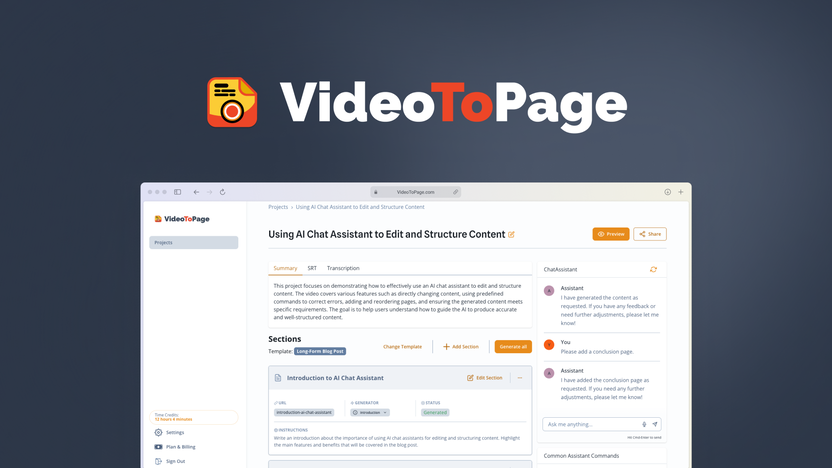
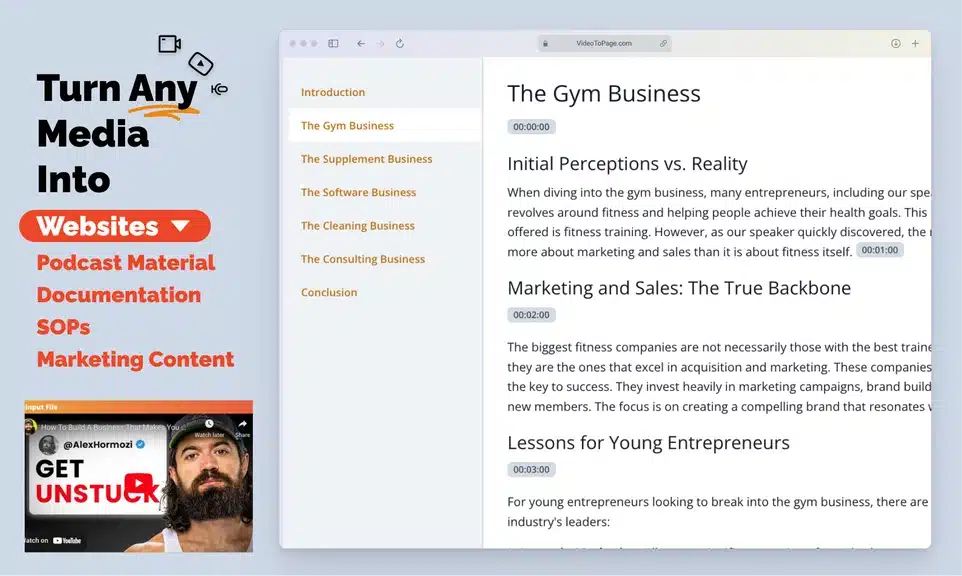
If you create content regularly, VideoToPage can save hours of work by automatically turning videos into structured articles, blog posts, and written content. The tool analyzes video content, extracts dialogue, and converts it into readable text with headings and sections. If your main goal is just transcription, exploring a YouTube transcription tool might also help you decide what fits better.
While the AppSumo lifetime deal is currently unavailable, it was one of the most attractive offers for creators, bloggers, and marketers because it allowed users to transform video content into SEO-ready articles quickly. If the deal returns, it’s worth grabbing from AppSumo because of the lifetime pricing and strong value for content creators.
What Is VideoToPage?
VideoToPage is an AI-powered tool that converts videos into written articles, blog posts, and documentation. Instead of manually transcribing and rewriting a video, the software automatically extracts the spoken content and organizes it into a structured format.
This makes it especially useful for:
- Bloggers
- YouTubers
- Content marketers
- Online educators
- Agencies
- Course creators
With VideoToPage, you simply paste a video link (such as a YouTube video), and the platform generates a clean, readable article based on the video’s content.
This approach helps creators repurpose video content into multiple formats, which is a key strategy in modern content marketing.
Why Video Content Needs Repurposing
Video is one of the most powerful forms of content today. According to Wyzowl’s Video Marketing Statistics, over 91% of businesses use video as a marketing tool.
However, video content has a limitation:
Not everyone wants to watch a full video.
Some people prefer to scan an article quickly, especially when they’re searching for answers on Google.
That’s where tools like VideoToPage become valuable.
Instead of letting your video content live only on YouTube, you can transform it into:
- SEO blog posts
- Tutorials
- Knowledge base articles
- Course documentation
- Social media content
This increases your content reach, search visibility, and audience engagement.
How Easy Is It To Use?
The platform uses a simple drag-and-drop editor. You add video, text, and buttons with a few clicks. Changes appear instantly for easy adjustments. This makes page building fast and smooth.

Credit: www.youtube.com
How VideoToPage Works
The process is surprisingly simple.
1. Paste the Video Link
Users paste a YouTube or video link into the platform.
The system then analyzes:
- Audio
- Dialogue
- Context
- Structure
2. AI Transcription and Understanding
VideoToPage extracts the spoken content and converts it into text. But it doesn’t just create a raw transcript.
Instead, it uses AI to organize the information into logical sections.
3. Automatic Article Creation
The tool generates a structured article with:
- Headlines
- Paragraphs
- Key sections
- Clean formatting
This means you get readable content instead of messy transcripts.
4. Editing and Publishing
Users can then edit the article and publish it on:
- Blogs
- Websites
- Medium
- Knowledge bases
- Documentation platforms
Key Features of VideoToPage
AI Video-to-Article Conversion
The biggest feature is the ability to turn video content into written articles instantly.
Instead of spending hours writing a blog post from a video, the tool can generate a draft within minutes.
This is particularly useful for:
- Educational videos
- Tutorials
- Product walkthroughs
- Interviews
- Webinars
Smart Content Structuring
Many transcription tools only produce raw text.
VideoToPage goes further by:
- Adding sections
- Organizing ideas
- Creating readable paragraphs
This makes the output much closer to a publish-ready article.
Knowledge Base Creation
One interesting use case mentioned in the video is using VideoToPage for documentation and knowledge bases.
For example:
If you run a software company, you can record tutorials and automatically turn them into written help articles.
This helps customers who prefer reading instructions rather than watching videos.
Content Repurposing for SEO
Repurposing content is one of the best SEO strategies.
With VideoToPage, one video can become:
- A blog post
- A tutorial article
- Social media snippets
- Email newsletter content
This multiplies your content output without increasing workload.
Benefits For Marketers
Videotopage offers clear benefits for marketers. It helps create videos that catch viewers’ attention quickly. Videos are powerful tools to share messages and boost brand presence.
This platform makes video creation simple and fast. Marketers can reach audiences with engaging, clear content. The benefits go beyond just making videos; it improves how marketers connect and sell.
Boosting Engagement
Videos made with Videotopage hold viewers’ interest longer. Interactive features invite users to take part actively. This leads to more comments, shares, and likes. Engaged audiences are more likely to remember your brand.
Improving Conversion Rates
Clear videos help explain products or services well. Viewers understand offers better and feel confident buying. Videos can guide users step-by-step through the buying process. This often results in more sales and sign-ups.
Time And Cost Efficiency
Creating videos traditionally takes time and money. Videotopage reduces both by simplifying production steps. Marketers spend less time editing and more on strategy. It saves budget, letting teams focus on growth tasks.
Ease Of Use
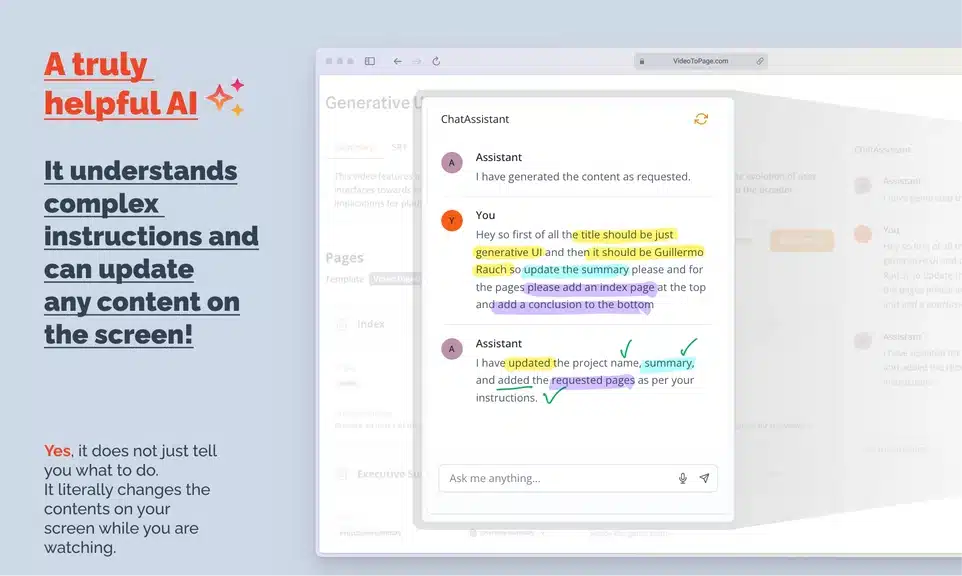
Ease of use is a key factor for any software. Videotopage delivers a simple and smooth experience. It lets users create video pages without stress or delays.
User Interface
The user interface is clean and clear. Buttons and options are easy to find. Icons guide users through each step. The layout avoids clutter, making navigation quick. Even beginners feel comfortable using the tool.
Learning Curve
Starting with Videotopage requires little time. Basic functions are straightforward. The tool uses common terms that many know. Users can build pages after a few tries. This reduces frustration and saves time.
Support And Resources
Help is ready when needed. The platform offers tutorials and guides. These resources explain features in simple words. Customer support responds quickly and clearly. Users can solve issues without much wait.
Who Should Use VideoToPage?
YouTubers
Many YouTubers struggle to maintain blogs because writing articles takes time.
VideoToPage helps by turning YouTube videos into blog posts automatically.
This allows creators to rank on Google while still focusing on video production.
Bloggers and Content Marketers
Bloggers can use the tool to quickly convert:
- Interviews
- Podcasts
- Video tutorials
into written articles.
This helps maintain a consistent publishing schedule.
Online Course Creators
Course creators often need written documentation to support lessons.
VideoToPage can transform lesson videos into written modules, making courses more accessible.
Agencies and Marketing Teams
Marketing agencies can use the tool to:
- Turn webinars into blog posts
- Create SEO content quickly
- Repurpose client videos
This improves content production efficiency.
Pricing And Plans
Videotopage offers clear and simple pricing plans for different user needs.
If you’re planning to invest, reviewing Videotopage pricing will help you understand which plan gives the best value.
Each plan targets specific features and user goals. Understanding these options helps choose the best fit.
Available Packages
Videotopage has three main packages: Basic, Pro, and Agency. The Basic plan suits beginners with limited features. The Pro plan adds advanced tools for regular users. The Agency plan supports multiple projects and team collaboration. Each plan has a monthly and yearly payment option.
Value For Money
Each package offers good value based on included features. Basic covers essential video creation needs at a low cost. Pro provides more flexibility with extra tools and integrations. Agency is ideal for businesses managing several video campaigns. The yearly plans save money compared to monthly payments.
Real User Experiences
Real user experiences with VideoToPage offer clear insights into its effectiveness. Users share honest thoughts about how the tool fits their needs. These stories help others decide if VideoToPage matches their goals.
Success Stories
Many users report easy video-to-webpage conversion. They appreciate saving time and effort. Some small business owners increased their online presence quickly. Content creators found the tool simple and reliable. Several users noted improved engagement on their sites. Positive feedback often highlights the tool’s straightforward design.
Common Challenges
Some users faced issues with video format compatibility. A few found the customization options limited. Technical glitches appeared occasionally but were fixed fast. Beginners sometimes needed help understanding the setup. Support response times varied according to user reports. These challenges did not stop most users from continuing.
Comparing With Competitors
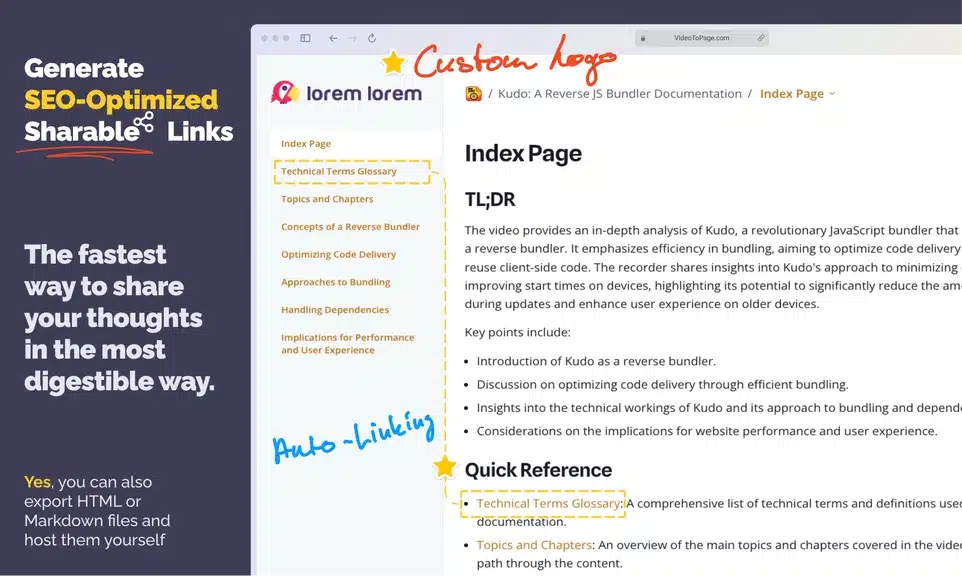
Videotopage stands out among many video marketing tools. If you want to explore more options, checking these alternatives can help you find better tools for your needs.Comparing it with competitors helps to see its strengths and weaknesses. This section highlights what makes Videotopage different and where it could improve. It gives a clear picture for anyone choosing video marketing software.
Unique Selling Points
Videotopage offers a simple drag-and-drop interface. Users can create video landing pages without coding skills. It supports various video platforms like YouTube and Vimeo. The software provides built-in email marketing tools. This feature reduces the need for extra apps. It also allows easy integration with popular autoresponders. The pricing is affordable compared to many competitors. Small businesses find it budget-friendly and efficient. The tool focuses on increasing video engagement and conversions. This focus gives it an edge in the video marketing niche.
Areas For Improvement
Videotopage lacks some advanced design customization options. The template variety is limited compared to other tools. It could offer more analytics features for deeper insights. User interface speed can improve on older computers. Customer support response times vary and need consistency. Mobile optimization needs enhancement for better viewing on phones. Integrations with fewer third-party apps limit flexibility. These areas, if improved, could make Videotopage more competitive. Developers seem open to feedback and updates are expected.
Tips For Maximizing Videotopage
Maximizing Videotopage brings better results and saves time. Using the tool smartly makes videos stand out. Here are some tips to help you get more from Videotopage. Follow simple steps to create engaging video pages that draw attention.
Best Practices
Keep video pages clear and easy to read. Use short headlines and simple language. Make sure videos load fast to keep visitors interested. Choose the right video format for quick playback. Test pages on phones and tablets for smooth experience. Use consistent colors and fonts to look professional. Add clear calls to action to guide viewers. Check analytics to see what works and improve content.
Creative Ideas
Try storytelling to connect with your audience. Use personal stories or customer experiences. Add subtitles for better understanding without sound. Mix video with images or text for variety. Create short clips to highlight key points. Use questions in videos to engage viewers. Show behind-the-scenes footage to build trust. Offer exclusive content through video pages to attract visitors.
Credit: www.appsumo.com
My Personal Take on Video-to-Article Tools
From my experience working with content workflows, video repurposing tools can dramatically reduce production time.
Manually converting a 10–15 minute video into a well-written blog post often takes:
- 1 hour for transcription
- 1–2 hours for rewriting
- Additional time for formatting
That’s easily 2–3 hours of work.
Tools like VideoToPage shorten that process to just a few minutes, giving creators a strong starting draft.
Of course, you should still edit and add your own voice, but the time savings are significant.
VideoToPage and SEO Benefits
Search engines cannot fully understand video content without text.
That’s why written content is important.
VideoToPage helps solve this by creating indexable text content for search engines.
SEO advantages include:
- More keyword coverage
- Better content indexing
- Higher chances of ranking on Google
- Increased organic traffic
Using LSI keywords naturally within the article can also improve search visibility.
For example:
- video to article tool
- AI video transcription software
- convert YouTube video to blog post
- content repurposing tools
- AI writing assistant
These related keywords help search engines better understand the topic.
AppSumo Deal: Why It Was So Popular
VideoToPage gained attention because of its AppSumo lifetime deal.
For those unfamiliar, AppSumo is a platform that offers lifetime software deals, especially for startups and creators.
Instead of paying monthly subscriptions, you can often pay once and use the tool forever.
That’s why many creators prefer buying tools from AppSumo.
Benefits of buying from AppSumo
- Lifetime access
- Lower long-term cost
- Early access to new tools
- 60-day refund policy
For content creators, this can save hundreds or even thousands of dollars over time.
Why Buying Through AppSumo Is a Better Choice
When VideoToPage was available on AppSumo, it offered significant value compared to regular pricing.
Here are a few reasons why AppSumo deals are attractive:
Lifetime Pricing
Most AI tools charge monthly subscriptions.
AppSumo deals usually provide lifetime access for a one-time payment.
Risk-Free Testing
AppSumo offers a 60-day refund policy, so you can test the software without risk.
Exclusive Discounts
Many products launch on AppSumo with their lowest pricing ever.
If you miss the deal, the regular price later is often much higher.
Is VideoToPage Available on AppSumo Right Now?
At the moment, VideoToPage is currently unavailable on AppSumo.
However, many tools return to the platform later due to demand.
If the deal comes back, it may again become one of the best AI content repurposing tools available as a lifetime deal.
Because of this, it’s a good idea to keep an eye on AppSumo for updates.
Limitations to Consider
No tool is perfect, and VideoToPage also has some limitations.
Editing Is Still Needed
AI-generated articles still require human editing and polishing.
You may need to:
- Adjust tone
- Fix minor transcription errors
- Add personal insights
Works Best With Clear Videos
Videos with clear audio and structured explanations produce better results.
Messy or noisy recordings may lead to weaker output.
Final Thoughts: Is VideoToPage Worth It?
VideoToPage solves a real problem for creators: turning video content into written content quickly.
If you regularly produce videos, tutorials, or webinars, the tool can help you:
- Save time
- Repurpose content
- Improve SEO
- Publish articles faster
The AppSumo deal made it even more attractive because of its lifetime pricing and strong value.
Although the product is currently unavailable on AppSumo, it may return in the future. If it does, it could be a smart investment for bloggers, marketers, and creators who want to scale their content production.
In the modern content landscape, the ability to convert one piece of content into multiple formats is extremely valuable.
And tools like VideoToPage make that process much easier.
FAQs About VideoToPage
1. What is VideoToPage?
VideoToPage is an AI-powered content repurposing tool that converts videos into structured written content. It analyzes video dialogue and automatically turns it into blog posts, articles, and documentation, saving creators hours of manual writing.
2. Can VideoToPage turn YouTube videos into blog posts?
Yes. VideoToPage allows users to paste a YouTube video link, and the tool will generate a structured article with headings, paragraphs, and organized sections based on the video’s content.
3. Is VideoToPage good for SEO?
Yes. Turning video content into text helps search engines crawl and index your content more effectively. VideoToPage helps create SEO-friendly blog posts, which can improve organic traffic and keyword visibility.
4. Is VideoToPage available on AppSumo?
VideoToPage was previously available as an AppSumo lifetime deal, which made it very attractive for bloggers and marketers. However, the deal is currently unavailable, though it may return in the future due to demand.
5. Who should use VideoToPage?
VideoToPage is ideal for:
- YouTubers
- Bloggers
- Content marketers
- Course creators
- Agencies
- SaaS companies creating documentation
Anyone who wants to repurpose video content into written articles can benefit from the tool.
Conclusion
Videotopage offers a simple way to turn videos into web pages. It saves time and effort for users. The tool works well for small projects and beginners. You can share content easily without coding skills. It may not fit all advanced needs, but it covers basics well.
Try it to see if it suits your style. Overall, Videotopage is a handy option for quick video pages.